
Getting Started with Zilliz Cloud
Read the entire series
- Getting Started with Zilliz Cloud
- A Beginner's Guide to Connecting Zilliz Cloud with Google Cloud Platform
- A Beginner’s Guide to Zilliz Cloud on the AWS Marketplace
- A Beginner's Guide to Connecting Zilliz Cloud with Azure Marketplace
- Mastering Text Similarity Search with Vectors in Zilliz Cloud
- Transforming PDFs into Insights: Vectorizing and Ingesting with Zilliz Cloud Pipelines
- Building RAG with Zilliz Cloud and AWS Bedrock: A Narrative Guide
1. What is Zilliz Cloud?
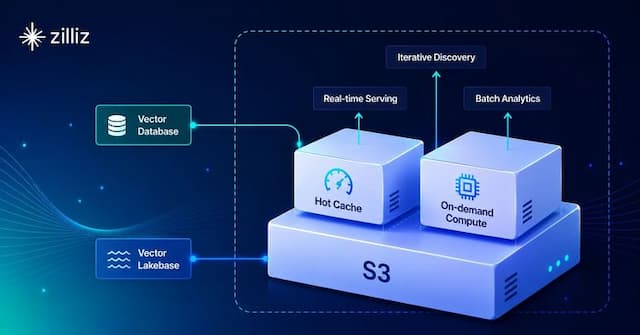
Zilliz Cloud is a fully managed Vector Lakebase platform for production AI, built by the creators of Milvus and powered by the open-source Milvus core. It combines vector database performance with the openness and scalability of multimodal data lakes, helping teams search, analyze, and govern unstructured data across the AI data lifecycle.
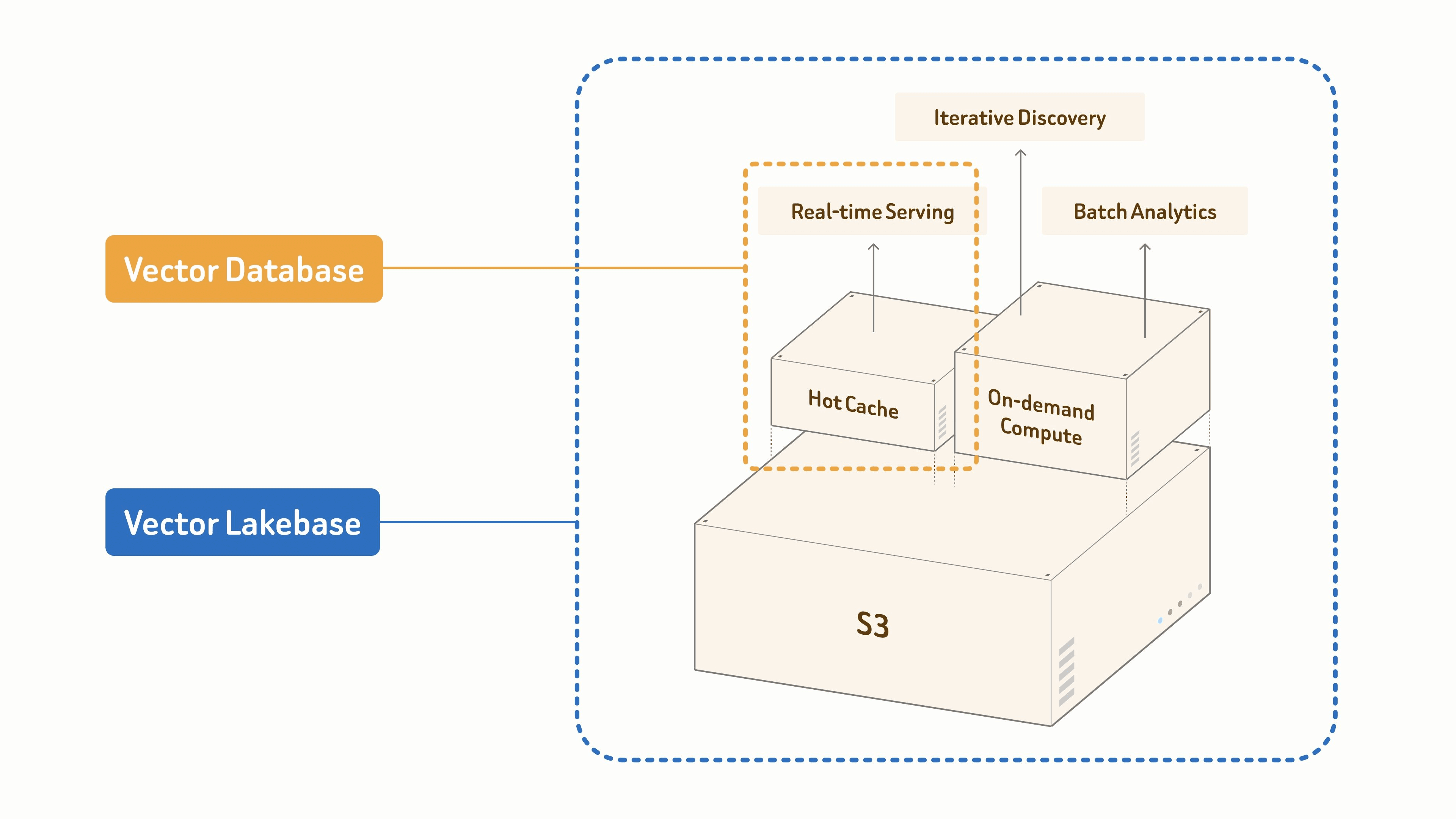
Unlike traditional vector databases focused mainly on online vector queries, Zilliz Cloud connects vector search with a data lake architecture, object storage, open formats such as Iceberg, Lance, Vortex, and Parquet, and an independent compute layer. Teams can keep data in existing lakes or object storage and use it for real-time serving, iterative discovery, and batch analytics without extra copies or heavy ETL.
As a managed cloud service, Zilliz Cloud supports production workloads such as RAG, AI agent memory, enterprise search, recommendations, multimodal retrieval, and data preparation for training or fine-tuning. It offers Serverless, Dedicated, On-Demand, and BYOC deployment options across 30+ regions, along with enterprise-grade reliability, security, access control, network isolation, encryption, audit logging, and compliance support.
2. Register for a Zilliz Cloud Account
Go to the Zilliz Cloud sign-up page and register with email, Google, or GitHub.
Choose your preferred registration method. If you sign up with email, enter your email address and password, agree to the Terms of Service and Privacy Policy, and click Continue.
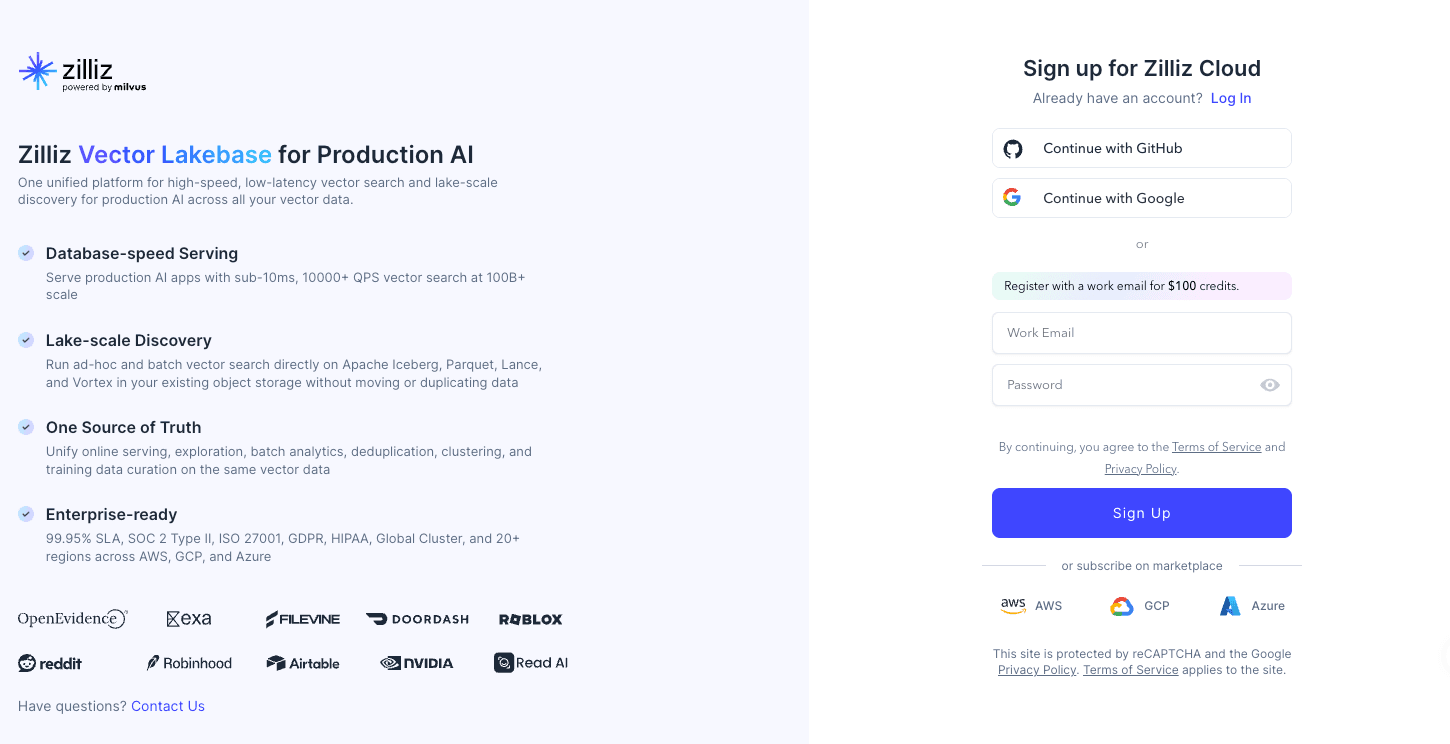
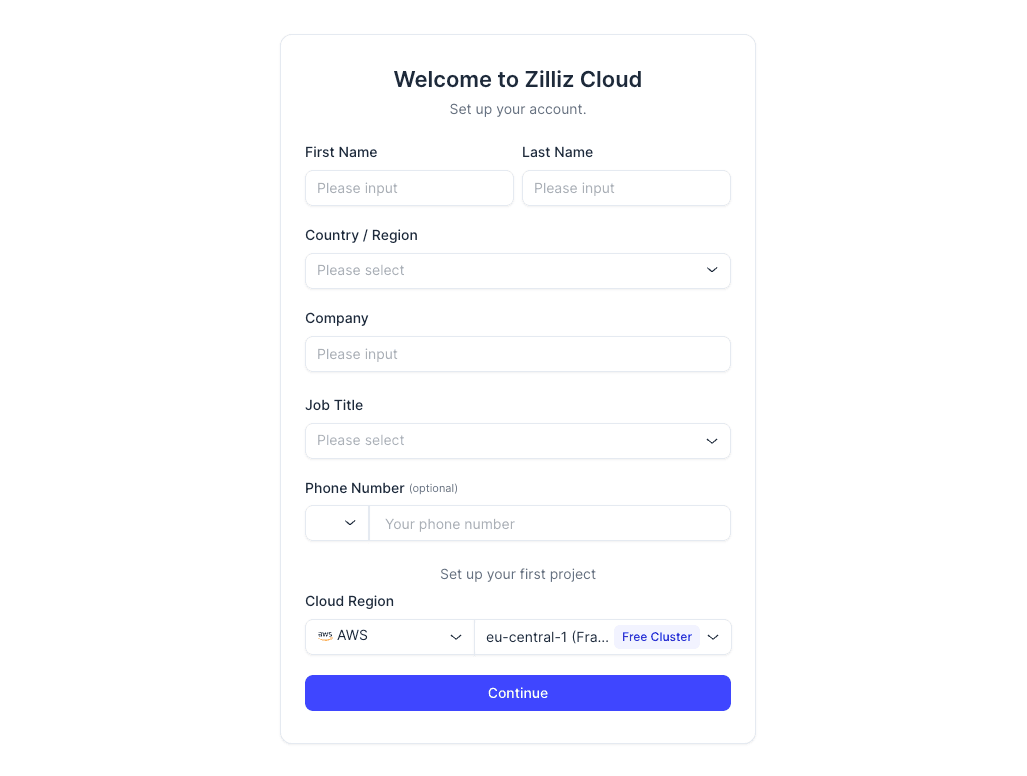
Then check your inbox, verify your email with the confirmation code, and complete the basic information requested by the console after your first login.
3. AI-friendly ways to get started with Zilliz Cloud
If you prefer working outside the web console, Zilliz Cloud offers CLI and agent-friendly options that fit into your existing development workflow.
| Option | Use when | Setup |
|---|---|---|
| Zilliz CLI | You want direct terminal, script, or CI access to Zilliz Cloud. | Install the CLI, verify it, then authenticate locally. |
| Claude Code Plugin | You use Claude Code and want guided Zilliz Cloud operations from prompts. | Install the plugin from the Zilliz marketplace, then run setup. |
| Zilliz Skill | You use a skill-compatible AI coding agent such as Codex, Cursor, Gemini CLI, or Claude Code. | Install the skill package and let the agent use it in your workspace. |
Zilliz CLI
The CLI is the best fit if you like terminal workflows or need repeatable automation in scripts and CI/CD. After you sign in, you can create and inspect clusters, manage collections and indexes, run imports and backups, configure roles, and check project context without opening the web console.
# macOS / Linux
curl -fsSL https://zilliz.com/cli/install.sh | bash

# Windows PowerShell
irm https://zilliz.com/cli/install.ps1 | iex

zilliz --version
zilliz auth login
Claude Code Plugin
The Claude Code Plugin is useful when Claude Code is already where you write and debug code. It brings Zilliz Cloud operations into that prompt-driven workflow, so you can ask Claude to set up the CLI, check your cloud context, inspect clusters, create or update collections, and run common operations from your current project.
claude
/plugin marketplace add zilliztech/zilliz-plugin
/plugin install zilliz@zilliztech/zilliz-plugin
/zilliz:setup
Zilliz Skill
The Zilliz Skill is for AI coding agents such as Codex, Cursor, Gemini CLI, or Claude Code. It gives the agent Zilliz-specific workflows and command patterns, so it can help choose a cluster path, design a collection schema, connect to Zilliz Cloud, run vector search examples, and handle imports, backups, RBAC, or monitoring tasks with less guesswork.
npx skills add zilliztech/zilliz-skill
4. Understand the Three Ways to Use Zilliz Cloud
Zilliz Cloud gives you three ways to run vector search.
Choose Serving Cluster when you need a continuously available service for real-time search, especially for production applications with steady traffic.
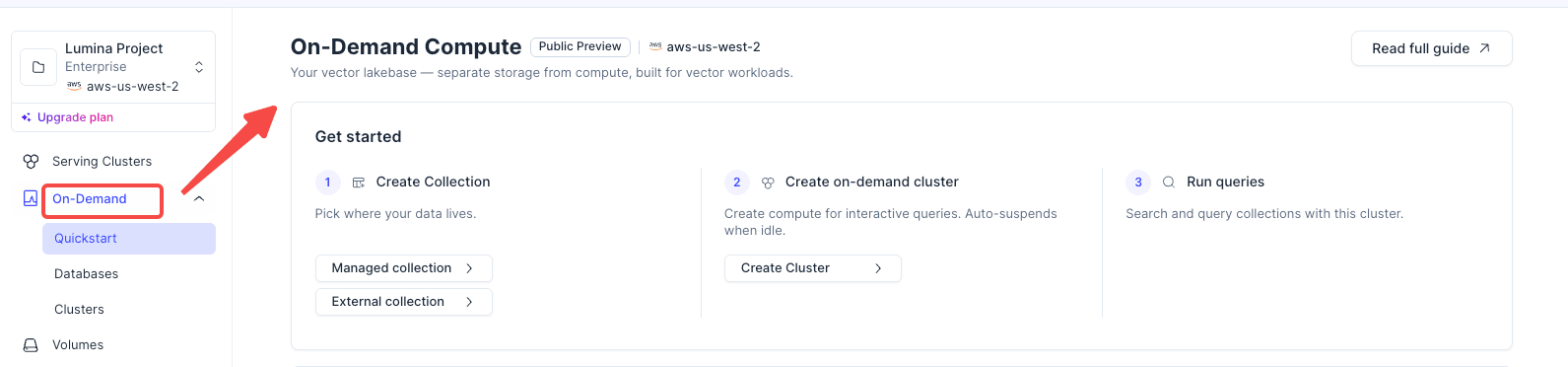
Choose On-Demand Search when you want to separate storage from compute and start query resources only when needed.
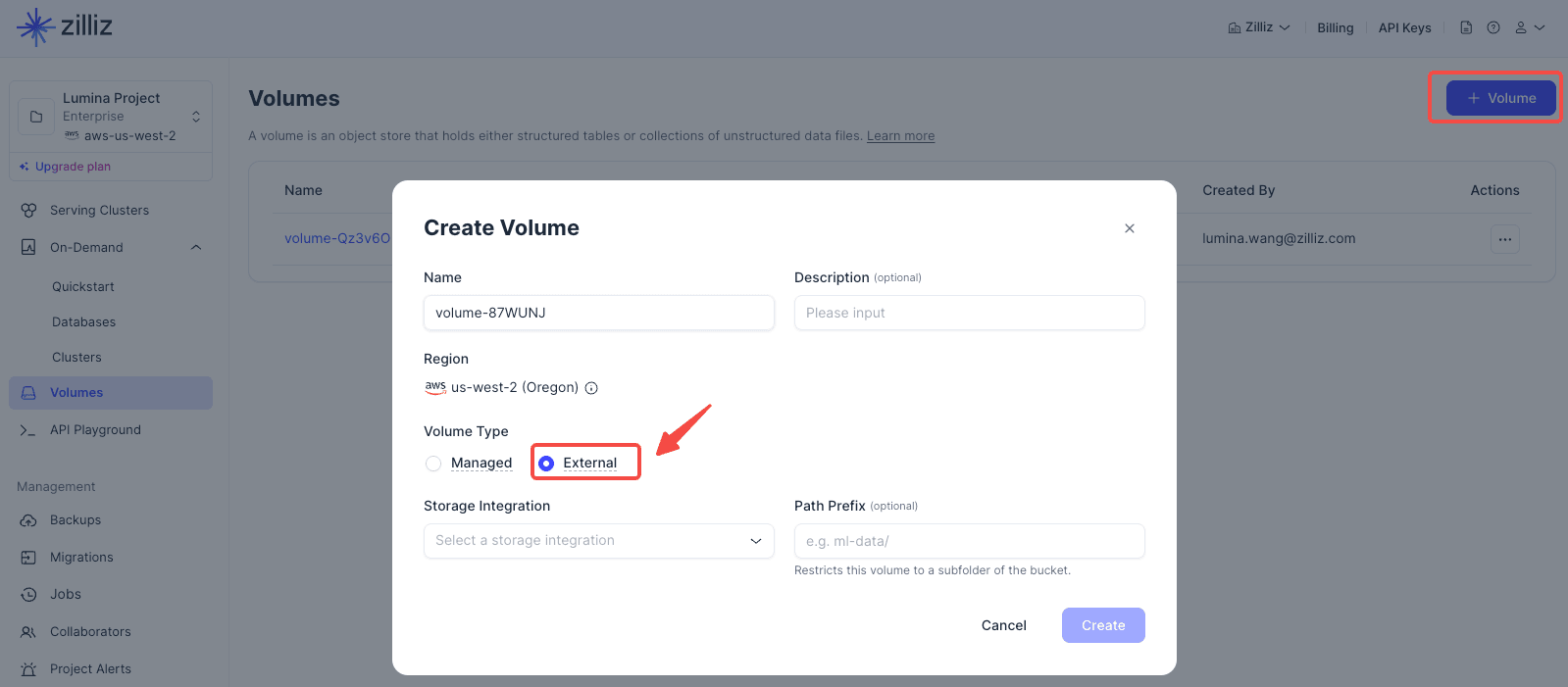
Choose External Data Lake Search when your data already lives in an external lake, and you want to query it without moving it into a traditional serving cluster first.
4.1 Three ways to use Zilliz Cloud
Serving Cluster
Use a Serving Cluster when your application needs a continuously available vector search service. This is the most straightforward path for real-time applications: create a Free, Serverless, or Dedicated cluster, create collections, insert data, and serve search requests from that cluster.
On-Demand Search
Use On-Demand Search when you want storage and compute to be separated. In the Vector Lakebase workflow, you create a collection, spin up an on-demand cluster for interactive queries, and let it auto-suspend when idle.
External Data Lake Search
Use External Data Lake Search when your vector data already lives in external object storage, such as Amazon S3, Google Cloud Storage, or Azure Blob Storage. This path lets you create an external volume and external collection, refresh metadata and indexes, then attach an on-demand cluster only when you need to query the data.
4.2 If You Choose Serving Cluster
Serving Cluster comes in three types: Free, Serverless, and Dedicated.
| Type | Best For | Recommendation |
|---|---|---|
| Free | Learning, testing, and demos. | Start here if this is your first time using Zilliz Cloud. The Free cluster requires no payment information and includes 5 GB storage, 2.5M vCUs per month, and up to 5 collections. Work email sign-ups also receive $100 credits for trying Serverless or Dedicated clusters. |
| Serverless | Lightweight applications, elastic workloads, and fast launches. | Good for early-stage projects and teams that do not want to manage resource sizing. |
| Dedicated | Production workloads, stable performance, and resource isolation. | Use it when you have clear requirements for performance, capacity, or backup policies. |
Create the Cluster
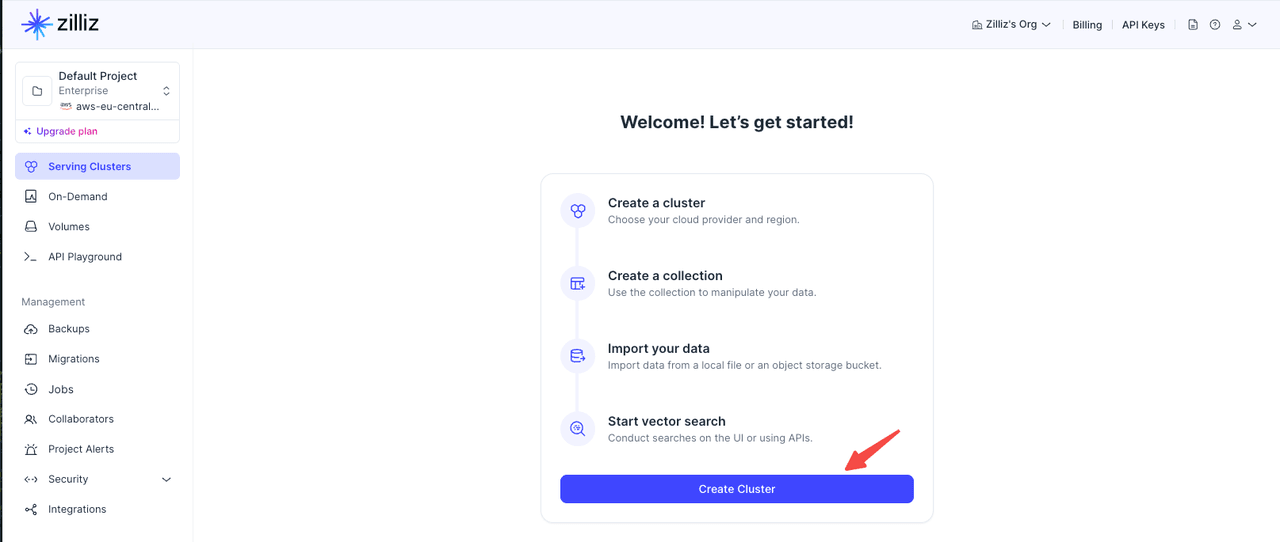
(1) Log in to the Zilliz Cloud console
(2) Go to the Clusters page.
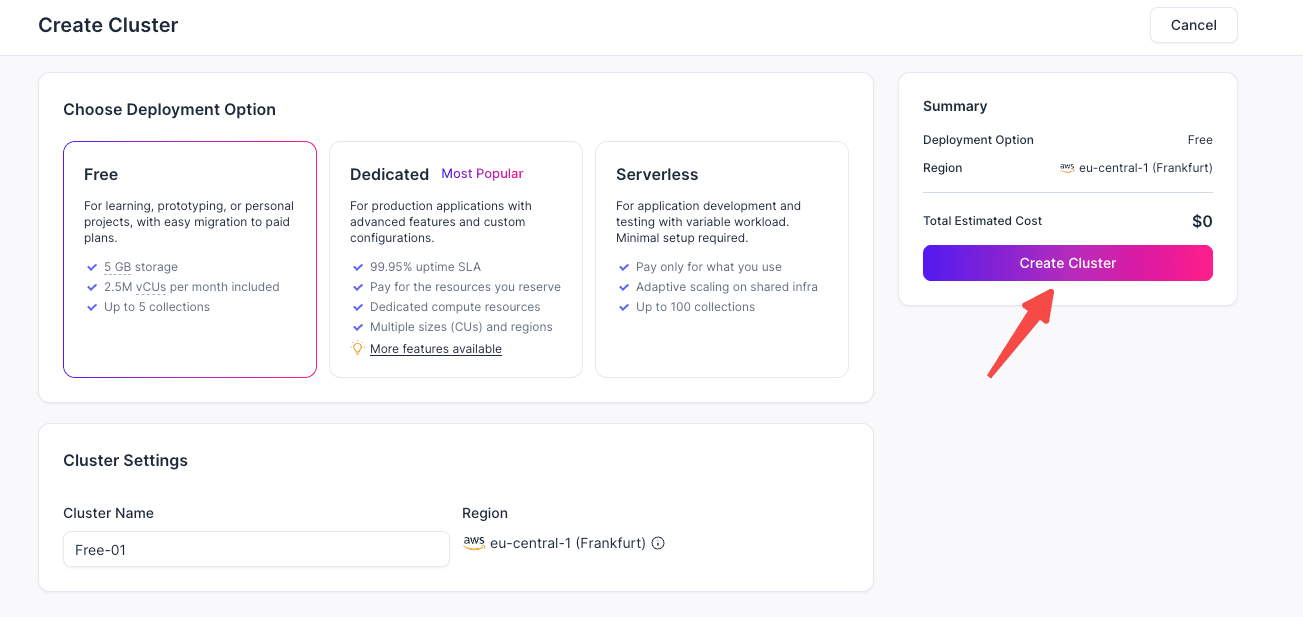
(3) Click Create Cluster.
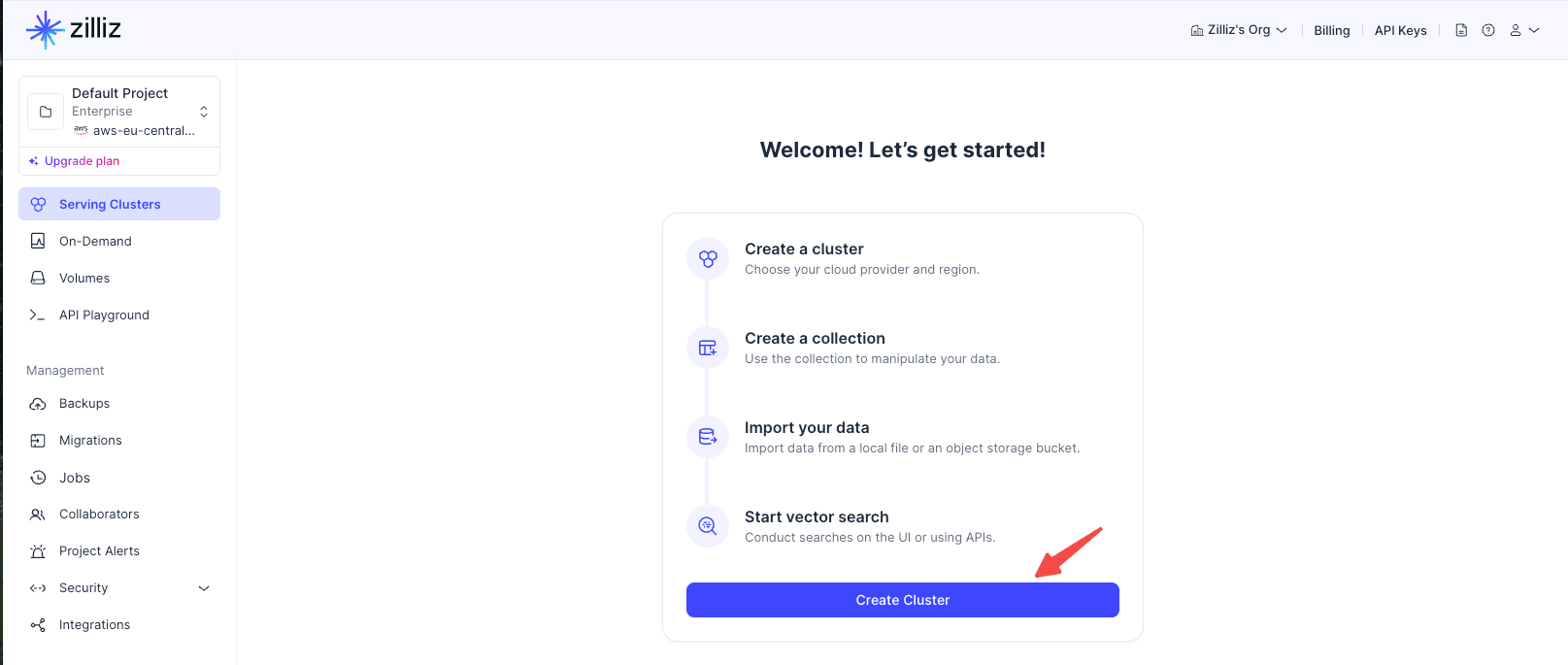
(4) Choose Free, Serverless, or Dedicated.
For a first trial, choose Free: it requires no payment information and includes 5 GB storage, 2.5M vCUs per month, and up to 5 collections. Use Serverless if you want pay-as-you-go scaling with minimal setup, or choose Dedicated when you need stable production performance and reserved resources.
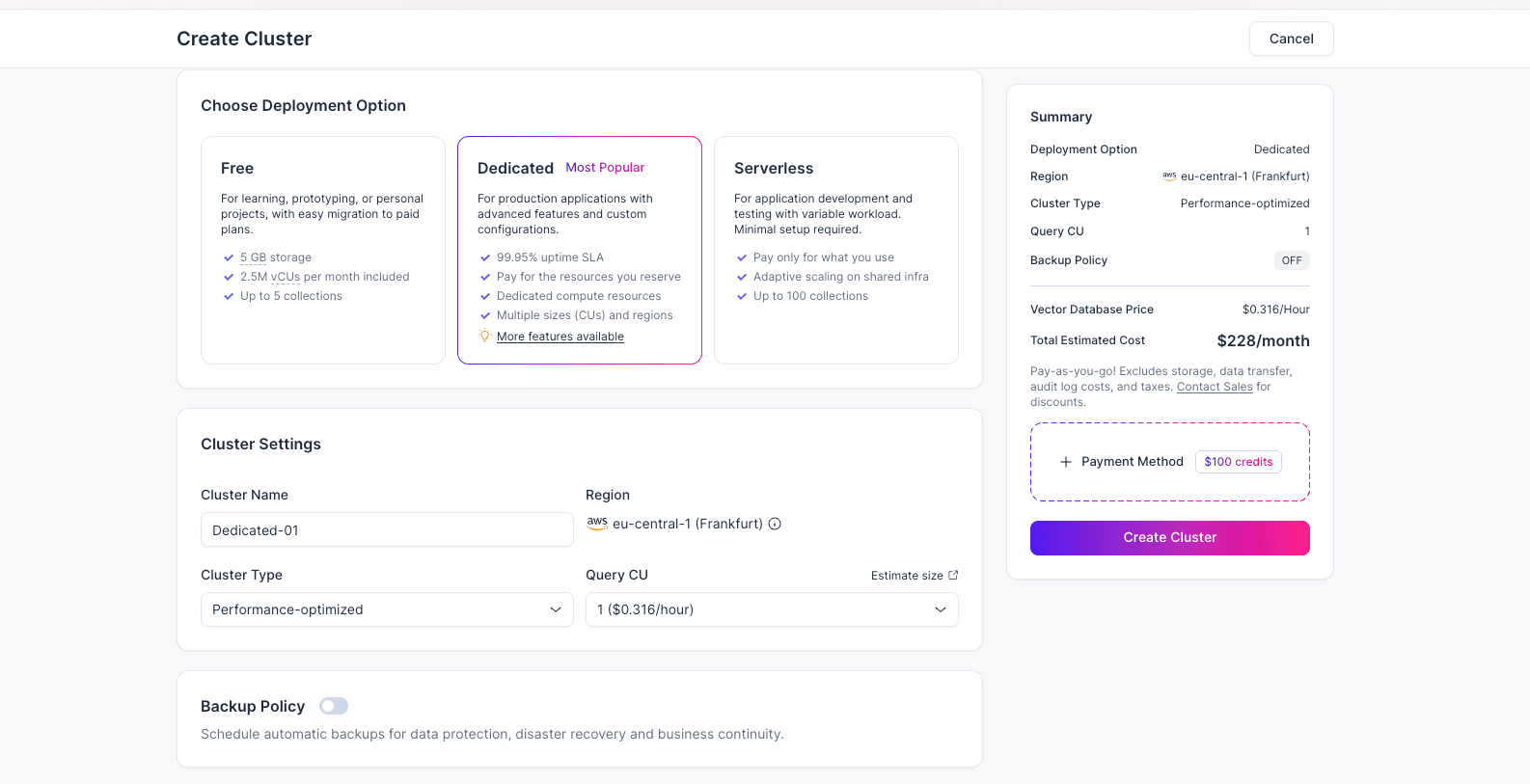
(5) Enter the cluster name, region, cluster type, Query CU, and other required settings. For a first-time trial, you can choose Free. Review the configuration, click Create Cluster, and wait until the cluster status becomes Running.
5. Get the Endpoint
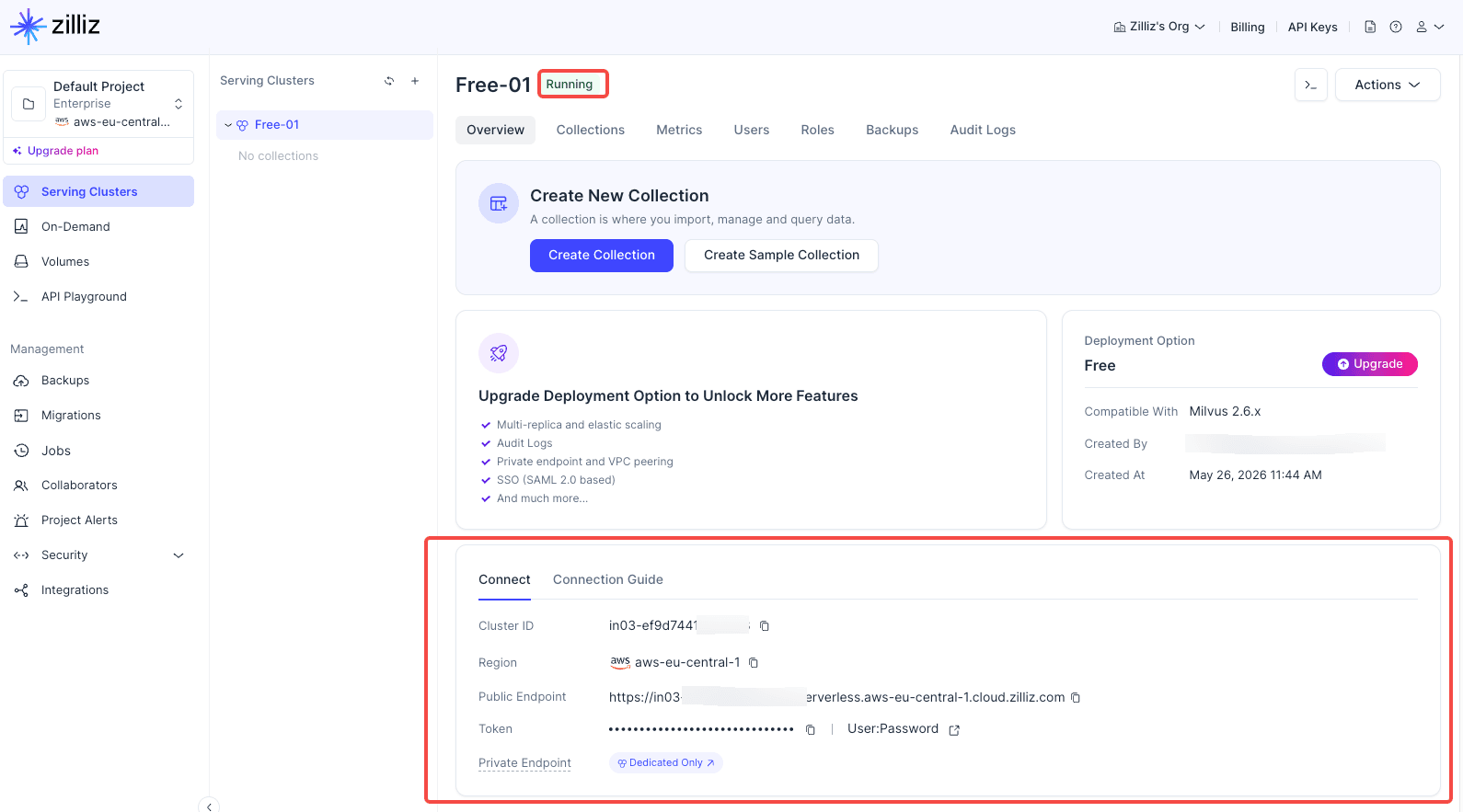
The endpoint is the address your application uses to connect to the cluster. After the cluster status becomes Running, you can copy the endpoint from the cluster details page.
6. Get an API Key
An API key authenticates requests. To connect an application to Zilliz Cloud, you usually need both the endpoint and an API key.
Personal API Key and Customized API Key
| Type | Best For |
|---|---|
| Personal API Key | Personal testing and local development. |
| Customized API Key | Team projects, backend services, and production environments. |
For production, use a Customized API Key. It is not tied to a single personal account, supports a dedicated access scope, and is easier to rotate and manage.
Create a Customized API Key
Go to the API Keys page and click + API Key.
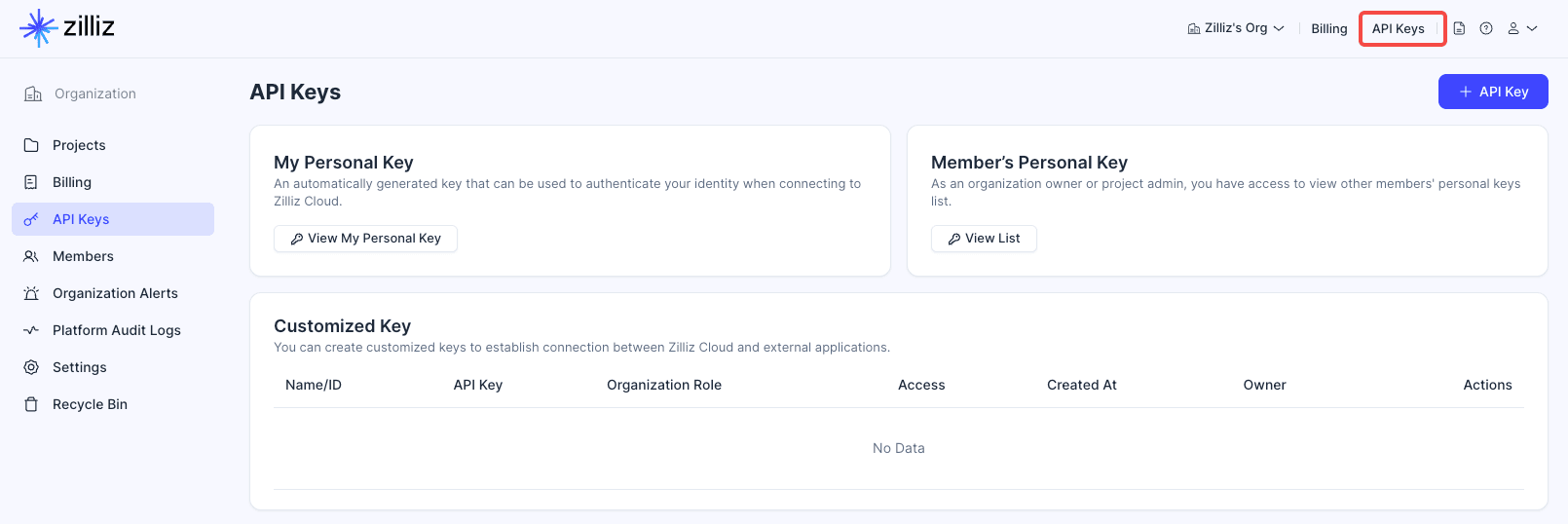
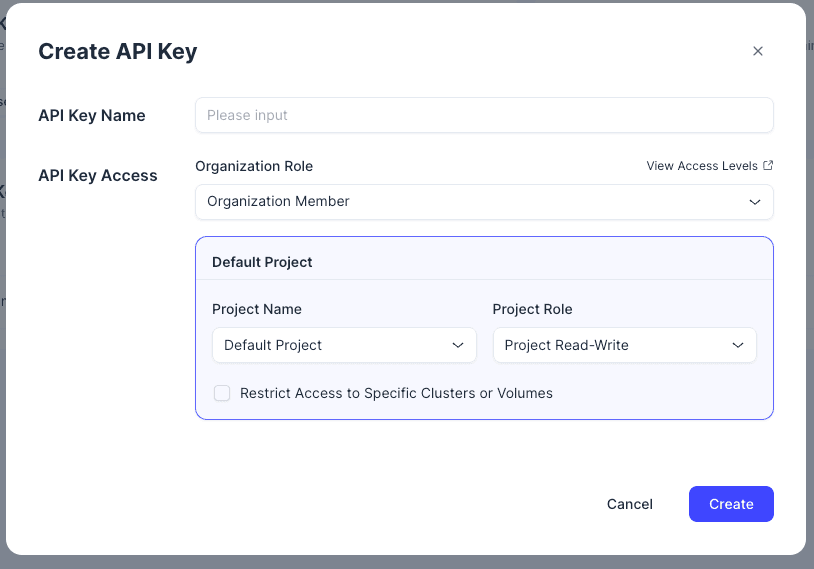
Enter an API key name, configure API Key Access, and restrict access to specific projects, clusters, or volumes if needed. After creating the key, copy it and store it in a secure place.
Tips: Do not put API keys in frontend code, public repositories, screenshots, or logs. If you suspect a key has been leaked, reset or delete it immediately.
7. Configure Connection Information in Your Application
Store the endpoint and API key in environment variables or a secrets manager.
ZILLIZ_CLOUD_URI="https://your-cluster-endpoint"
ZILLIZ_CLOUD_TOKEN="your-api-key"
Different SDKs and frameworks may use different parameter names, but the connection usually requires these two values:
- uri / endpoint: the cluster address.
- token / api-key: the access credential.
8. Create Your First Collection
After you have the endpoint and API key, you can create a collection. A collection is the table in Zilliz Cloud that stores vectors and metadata. One collection usually maps to one type of business data, such as document chunks, products, images, user behavior, or FAQs.
Before creating a collection, confirm three things:
- Vector dimension: it must match the output dimension of your embedding model.
- Primary key field: it uniquely identifies each record.
- Metadata fields: they store text, category, timestamp, source, or other filterable information.
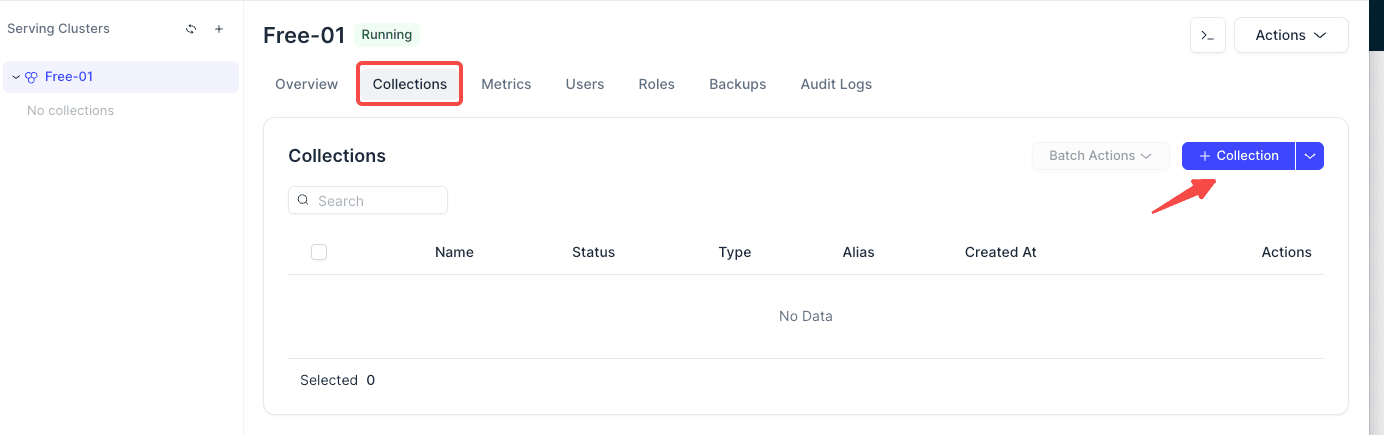
Create a Collection in the Console
You can start by creating a sample collection.
9. Common Console Pages
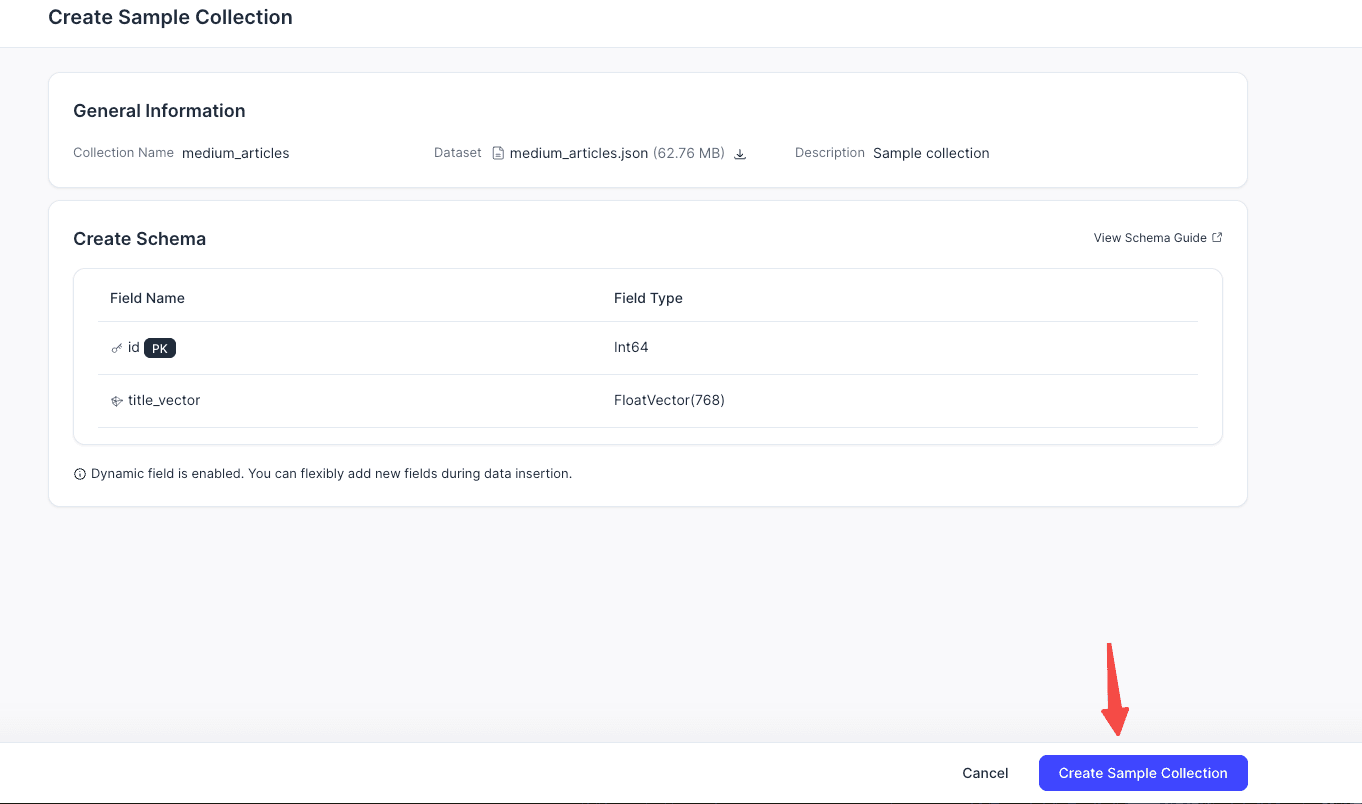
Clusters
Use this page to check cluster status, deployment region, cluster type, endpoint, and runtime metrics. Cluster creation, pause, resume, scaling, and related operations usually start here.
Collections
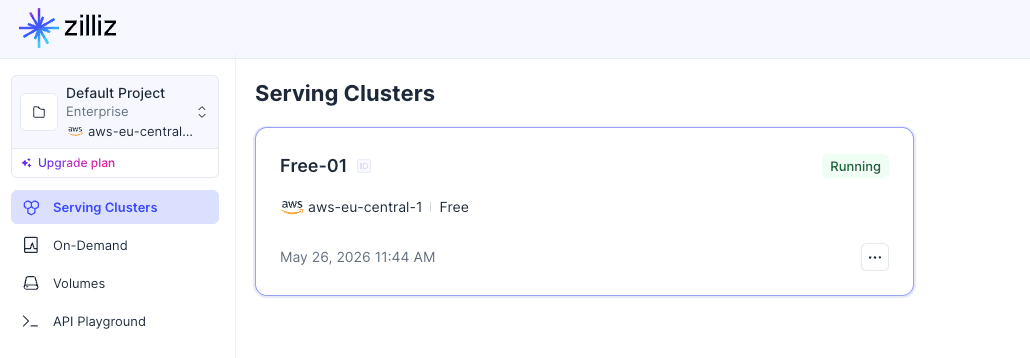
Use this page to manage collections, schemas, indexes, and data. A collection is similar to a vector data table and usually contains a primary key, vector fields, and metadata fields.
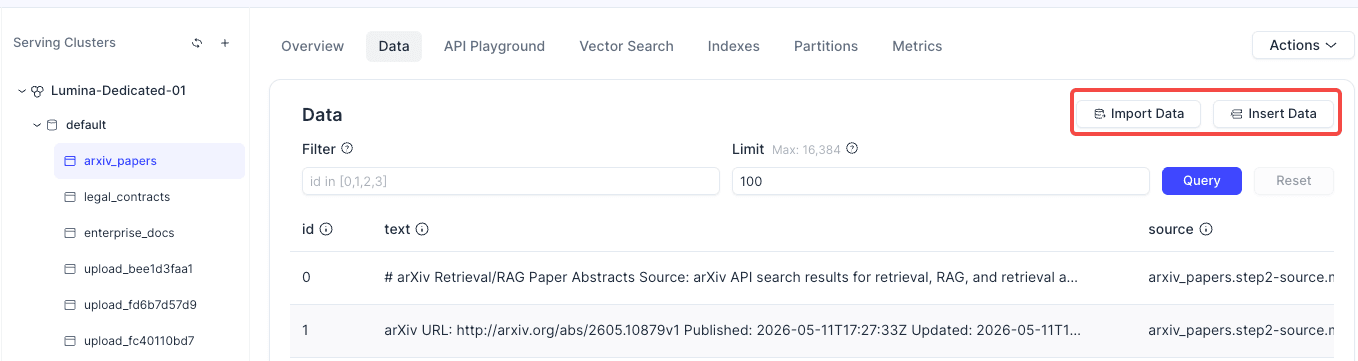
Data Import
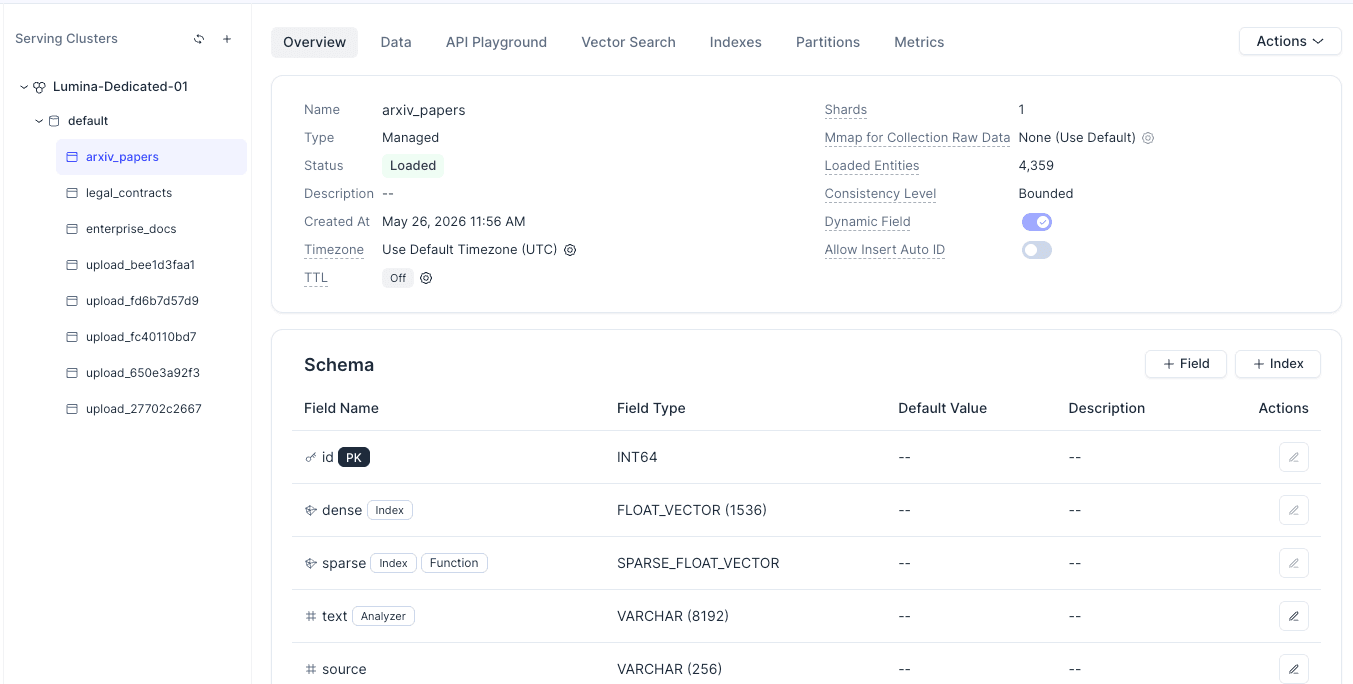
Use this page to import data from files. Before importing, make sure the field names, vector dimension, and collection schema match.
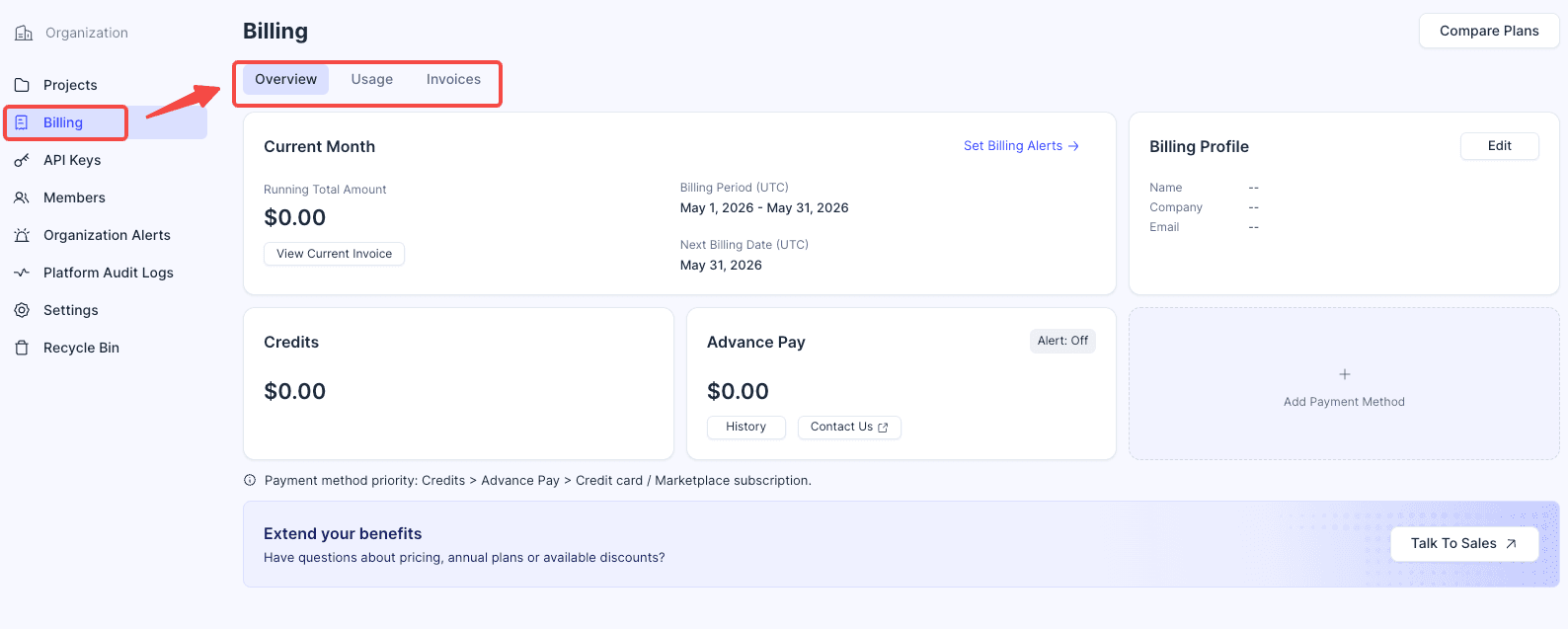
Usage / Billing
Use this page to review resource usage, billing, and quotas. Before moving to production, regularly check storage, request volume, and cluster operating costs.
FAQ
Which Zilliz Cloud path should I choose first?
If you are new to Zilliz Cloud, start with a Free Serving Cluster because it requires no payment information and gives you a simple path to create collections, insert data, and run searches. Choose On-Demand Search when you want to separate storage from compute, and choose External Data Lake Search when your vectors already live in object storage. For production applications with steady real-time traffic, use Serverless or Dedicated Serving Clusters depending on your performance and isolation requirements.
What is Vector Lakebase?
Vector Lakebase is Zilliz Cloud’s lake-native architecture for AI data. It separates storage from compute and keeps multimodal data, vectors, metadata, and indexes in object storage, while different compute modes can run serving, discovery, or analytics workloads on top.
Do I need Vector Lakebase if I only want a vector database?
Yes. A serving cluster is still part of the Vector Lakebase architecture, so you can use Zilliz Cloud like a regular vector database for low-latency search without extra complexity. The benefit is that you also have a path to expand into on-demand search, external data lake search, and analytics later.
How is Vector Lakebase different from a traditional vector database?
A traditional vector database usually couples compute, storage, and indexes inside a serving cluster. Vector Lakebase decouples them, so the same lake-native data foundation can support always-on serving, on-demand interactive search, and offline analytics without duplicating data pipelines.
What index types does Zilliz Cloud support?
For most Zilliz Cloud workloads, start with AUTOINDEX. On vector fields, AUTOINDEX is the recommended index type: Zilliz Cloud chooses and tunes the underlying index configuration, while you choose the metric type, such as COSINE, L2, IP,JACCARD, or HAMMING. On scalar fields, AUTOINDEX maps different field types and cardinalities to suitable scalar indexes, including BITMAP, INVERTED, STL_SORT, and RTEE. Zilliz Cloud also documents specialized indexes such as NGRAM for text matching and MINHASH_LSH for MinHash-based deduplication or similarity workflows. In practice, use AUTOINDEXunless you have a specific filtering, text-search, geometry, or deduplication requirement that calls for a specialized index.
How should I plan backup, migration, or disaster recovery for production vector data?
Plan it around your recovery point objective and recovery time objective. For Dedicated clusters, use Zilliz Cloud backups for point-in-time recovery: create backups before risky schema, ingestion, or application changes, enable automatic backups for regular protection, and restore either an entire cluster or specific collections when needed. For disaster recovery, consider cross-region backup where available and periodically test restores instead of assuming the backup is usable. For migration, keep raw documents, metadata, embedding model versions, collection schemas, index settings, and ingestion code under your control so you can rebuild or replay data into a new cluster if needed. Backup export to object storage can also help when you need an external copy, but check plan and feature availability before relying on it in a production runbook.
References

- 1. What is Zilliz Cloud?
- 2. Register for a Zilliz Cloud Account
- 3. AI-friendly ways to get started with Zilliz Cloud
- 4. Understand the Three Ways to Use Zilliz Cloud
- 5. Get the Endpoint
- 6. Get an API Key
- 7. Configure Connection Information in Your Application
- 8. Create Your First Collection
- 9. Common Console Pages
- FAQ
- References
Content
Start Free, Scale Easily
Try the fully-managed vector database built for your GenAI applications.
Try Zilliz Cloud for FreeKeep Reading
A Beginner's Guide to Connecting Zilliz Cloud with Google Cloud Platform
A Beginner's Guide to Connecting Zilliz Cloud with Google Cloud Platform
Transforming PDFs into Insights: Vectorizing and Ingesting with Zilliz Cloud Pipelines
You will learn how Zilliz Cloud Pipeline transforms PDF data into a format ready for LLMs to use in semantic search tasks. Finally, we will conduct data retrieval using vector search.
Building RAG with Zilliz Cloud and AWS Bedrock: A Narrative Guide
A comprehensive guide on how to use Zilliz Cloud and AWS Bedrock to build RAG applications