




A Developer's Guide to Exploring Milvus 2.6 Features on Zilliz Cloud
Milvus started as a high-performance open-source vector database built for scale, with state-of-the-art vector ANN search capabilities. As the developer community grew, feature requests expanded to include full-text search, boosting, and support for semi-structured data types (JSON, struct, etc.). These requests reflect a broader trend toward the convergence of database capabilities, driven by the need for more advanced features (other than similarity search) that help accelerate AI application development.
The convergence doesn't just show up in feature requests — it now shows up in the database itself. With Milvus 2.6, many capabilities that developers previously had to assemble outside of the database, such as decay-based ranking, field-level boosting, and hybrid filtering across structured and unstructured data, are now first-class primitives.
In other words, Milvus 2.6 marks a shift from "vector search + glue code" to a more advanced retrieval engine, and it is now Generally Available (GA) on Zilliz Cloud (a managed Milvus service).
In this article, I will walk through some of the cool features of Milvus v2.6, when to use them, and how to use them. Let's get started!
The Embedding Function (also known as Data In, Data Out)
Ever wondered if the database can handle the generation of embeddings on your behalf? With Embedding Functions (also known as "Data in, data out"), Milvus can transform raw text into vectors by calling external third-party embedding services such as OpenAI, VoyageAI, and Cohere.
Embedding Functions was first released in Milvus v2.6.0, and I've showcased it on the kafka-milvus-no-code-pipelines demo. Now, Embedding Functions are available on Zilliz Cloud, the fully managed service of the Milvus vector database.
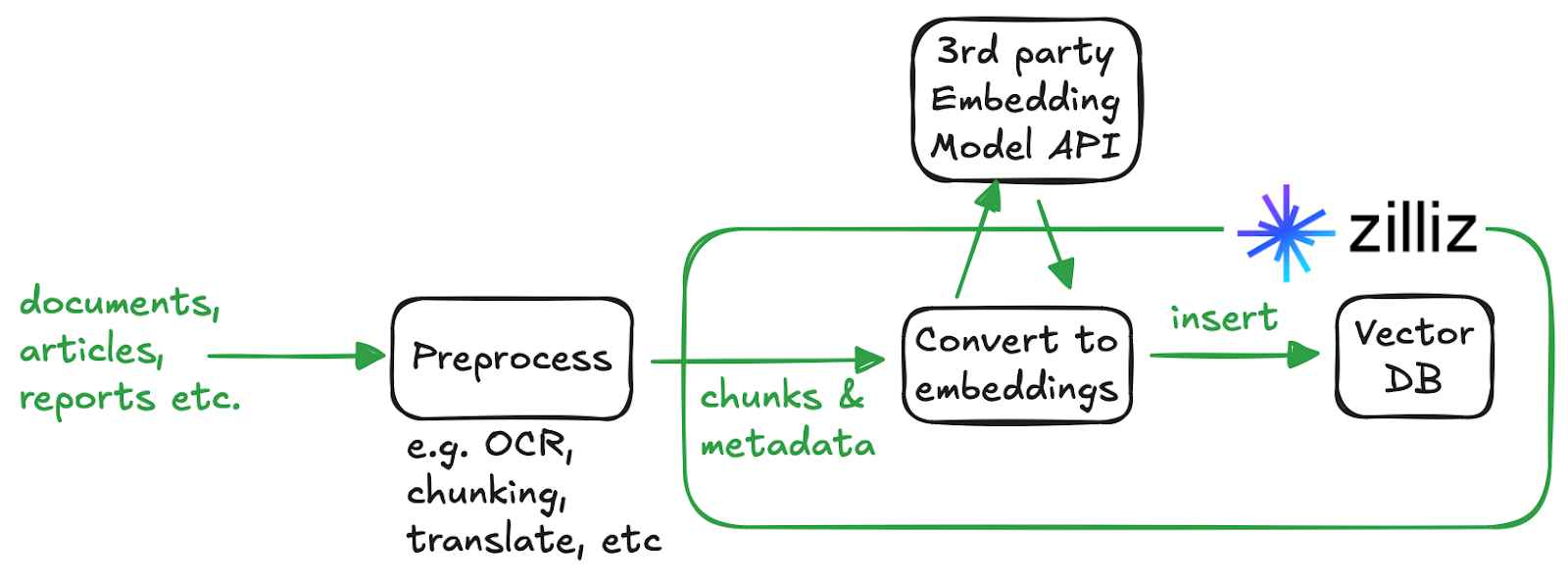
How does the embedding function work?
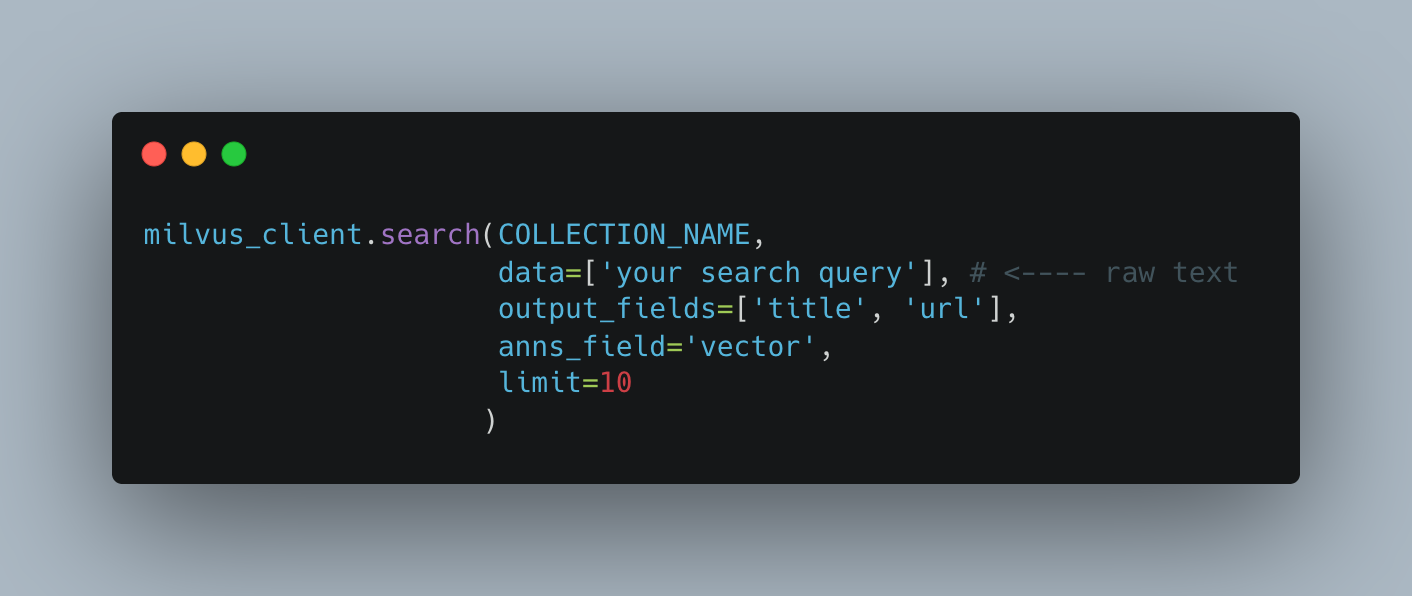
Let's say you insert "The quick brown fox jumps over the lazy dog" into Milvus with an embedding function configured. Milvus intercepts it at the proxy layer, routes it through a provider-specific embedding pipeline, and stores the vector produced by your model. The same transformation happens in reverse during search. Your query text is converted into a vector before it hits the index.
This feature is particularly useful for teams looking to offload the responsibility of managing embedding workflows to the database. By letting the database transparently generate embeddings at ingestion time (via a third-party model provider), Zilliz Cloud takes care of API integration, batching, retries, rate limits, and failure handling.
To get started with Embedding Functions on Zilliz Cloud, you need:
- Set up Model Provider Integration for the embedding service provider of your choice
- Create a collection with Embedding Function defined
- Insert your data.
You should be able to see the embedding function on Zilliz Cloud console on your collection schema page if you set it up properly.
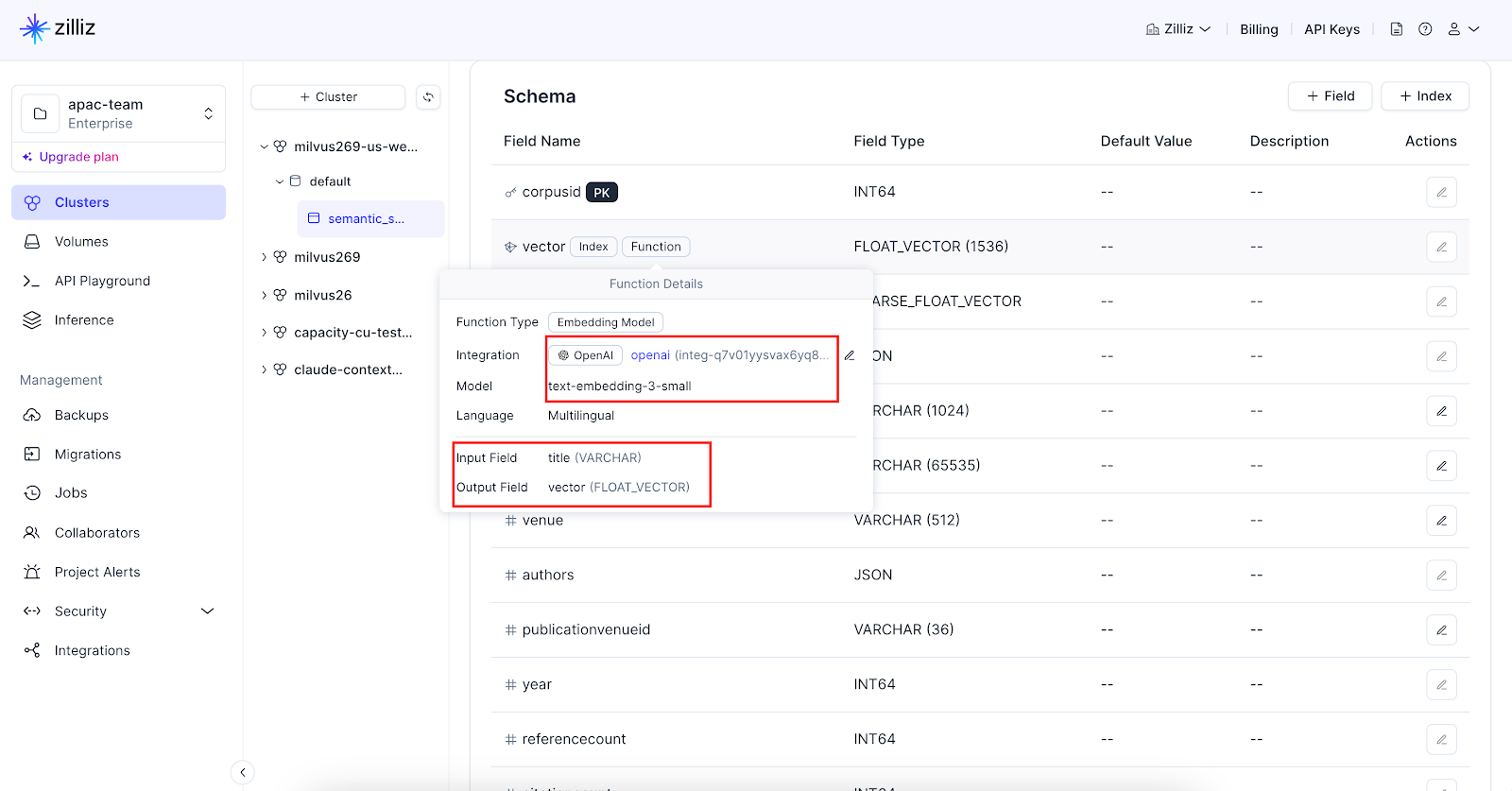
Now you just have to insert the raw text, and embeddings will be generated automatically and stored in your specified dense vector field. With embedding functions defined, you don't have to generate embeddings anymore, even for your search query.
A possible issue you might face will be the batch size limit Milvus impose when using embedding function.
2026-01-21 14:03:12,902 [ERROR][handler]: RPC error: [insert_rows], <MilvusException: (code=65535, message=numRows [1000] > function [openai]'s max batch [640])>, <Time:{'RPC start': '2026-01-21 14:03:12.722589', 'RPC error': '2026-01-21 14:03:12.902013'}>
Best practices and tips
- Keep within the batch size limit (shown in the error message). This is a safety mechanism to avoid hitting the model provider's token limit per API call. For example, OpenAI has a limitation of max 300,000 tokens per API call.
- For long texts or large document use cases, you must chunk before inserting. For instance, OpenAI has a 8192-token limit per input text for all embedding models.
- While providers like VoyageAI and Cohere automatically truncate long texts by default, relying on this can result in the silent loss of content at the end of your document.
Lexical Highlighting
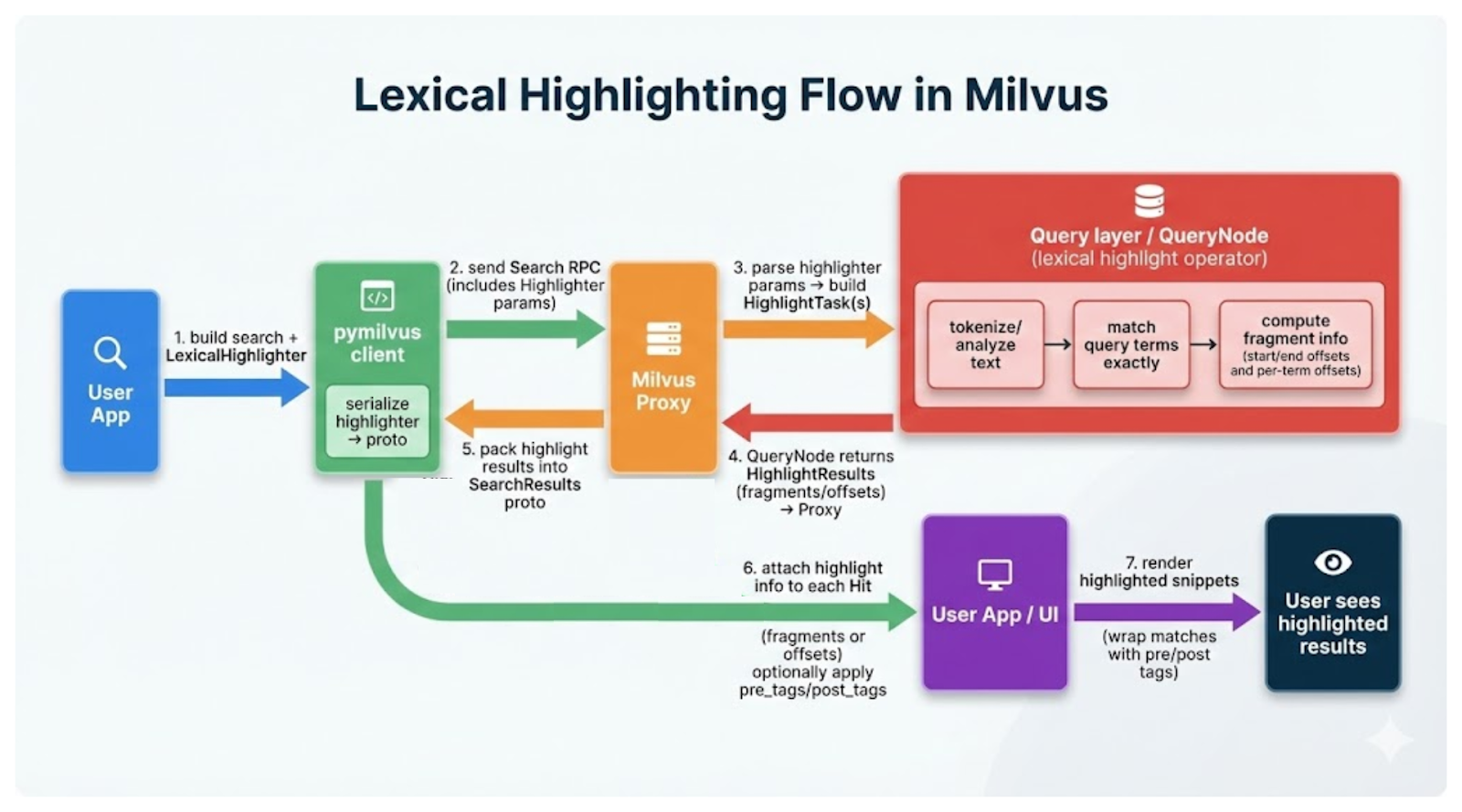
Lexical highlighting is useful for showing users why a result matched their query by visually marking the exact terms or phrases that triggered the match. This improves transparency, interpretability, and user trust in search results.
Here are some key scenarios:
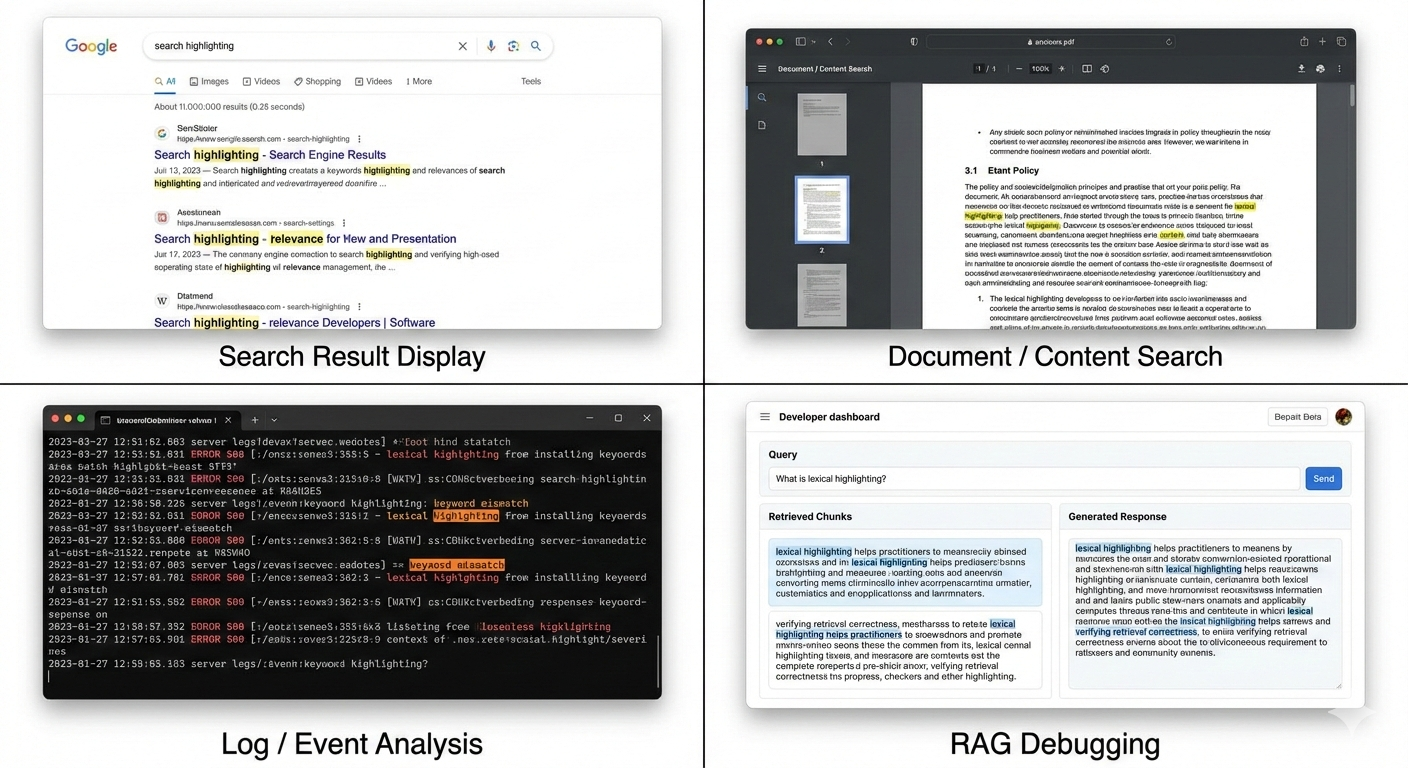
Search result display on UIs. When building search interfaces, highlighting helps users quickly understand a result's relevance without opening the full document. It reduces cognitive load and improves click-through by making the match explicit.
Document / Content search. In large documents (e.g., knowledge bases, PDFs, policies), lexical highlighting allows users to immediately locate matched keywords within the surrounding context, speeding up information discovery.
Log / Event analysis. Highlighting in operational logs or event data makes it easier to spot matching patterns, error codes, or keywords within dense, unstructured text, especially during troubleshooting or incident response.
RAG (Retrieval-Augmented Generation) debugging. In RAG pipelines, lexical highlighting helps practitioners inspect which parts of retrieved chunks matched the original query. This is useful for:
- Verifying retrieval correctness
- Diagnosing false positives or weak matches
- Understanding why a certain context was selected for generation
To implement server-side lexical highlighting with Zilliz Cloud, first, you instantiate a LexicalHighlighter (with the query text to highlight and surrounding tags for indicating how highlighted text looks) and provide it as a parameter to your full text search request.
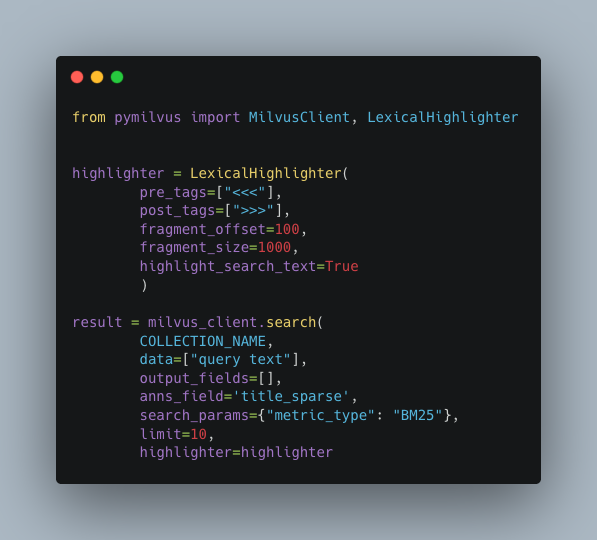
Then, Milvus will perform the search and run the lexical logic to find exact matches and return positional info on which substrings to highlight.
Best practices and tips
- LexicalHighlighter only works with BM25 full-text search. It will not work for dense vector search.
- You can define
pre_tagsandpost_tagsto wrap matched terms with HTML tags (e.g., custom CSS class, bold, italics, etc.) that render directly on a web page.
N-gram Index
N-gram indexes are powerful search engine indexing techniques that break down strings into smaller and overlapping sequences of characters (e.g., "coffee" into 3-grams -> "cof", "off", "ffe", "fee") to enable partial, flexible, and wildcard-style matching.
Here are some scenarios where you will find n-gram indexes useful:
- Improving performance of substring searches (e.g.,
LIKE %deep%) - Search-as-you-type / autocompletion
- Fuzzy searching
- Domain Name and Identifier Search (e.g.
example.com,facebook.com)
How does it work?
Documents that contain a specified n-gram can be located efficiently by using an index, often referred to as an inverted index, that maps each n-gram to a list of identifiers of the documents that contain that n-gram. The list is kept sorted to enable both efficient compression and efficient query execution. In the case of Milvus, ngram index is built on top of Tantivy which in turn uses compression techniques like delta encoding, bitpacking, and skip lists to compress and reduce the size of the inverted list, making the index lightweight.
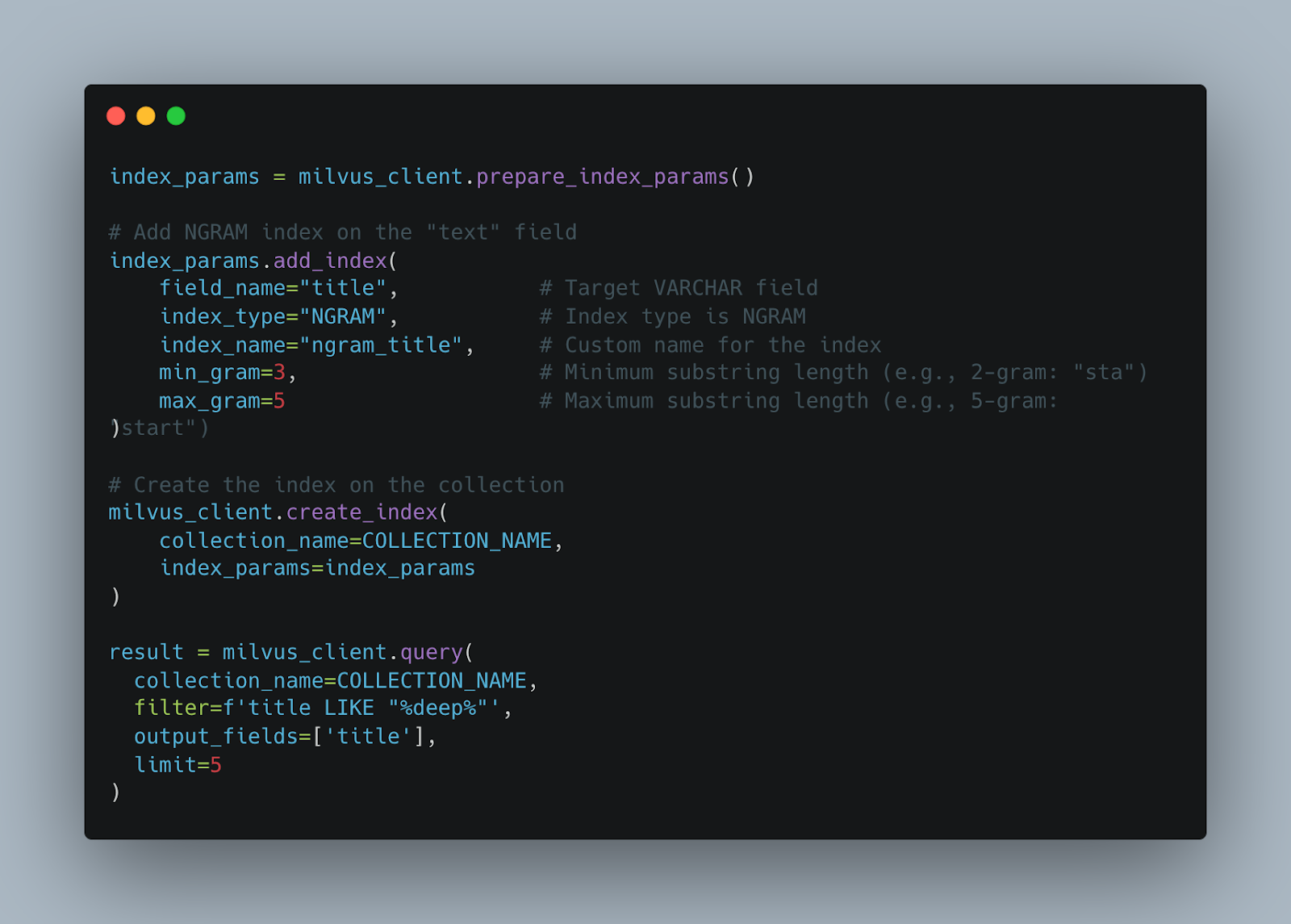
Instead of a full scan on your text field, Milvus first extracts the predicate e.g. deep, decomposes it into n-grams based on configured gram sizes, performs inverted index lookups and intersects results to identify candidates containing all grams, then verifies exact matches against the original LIKE pattern.
Milvus allows you to specify the min_gram and max_gram which respectively represent the minimum and maximum length for the n-grams that will be generated. For more details on how to create and use ngram index, refer to the NGRAM Index document.
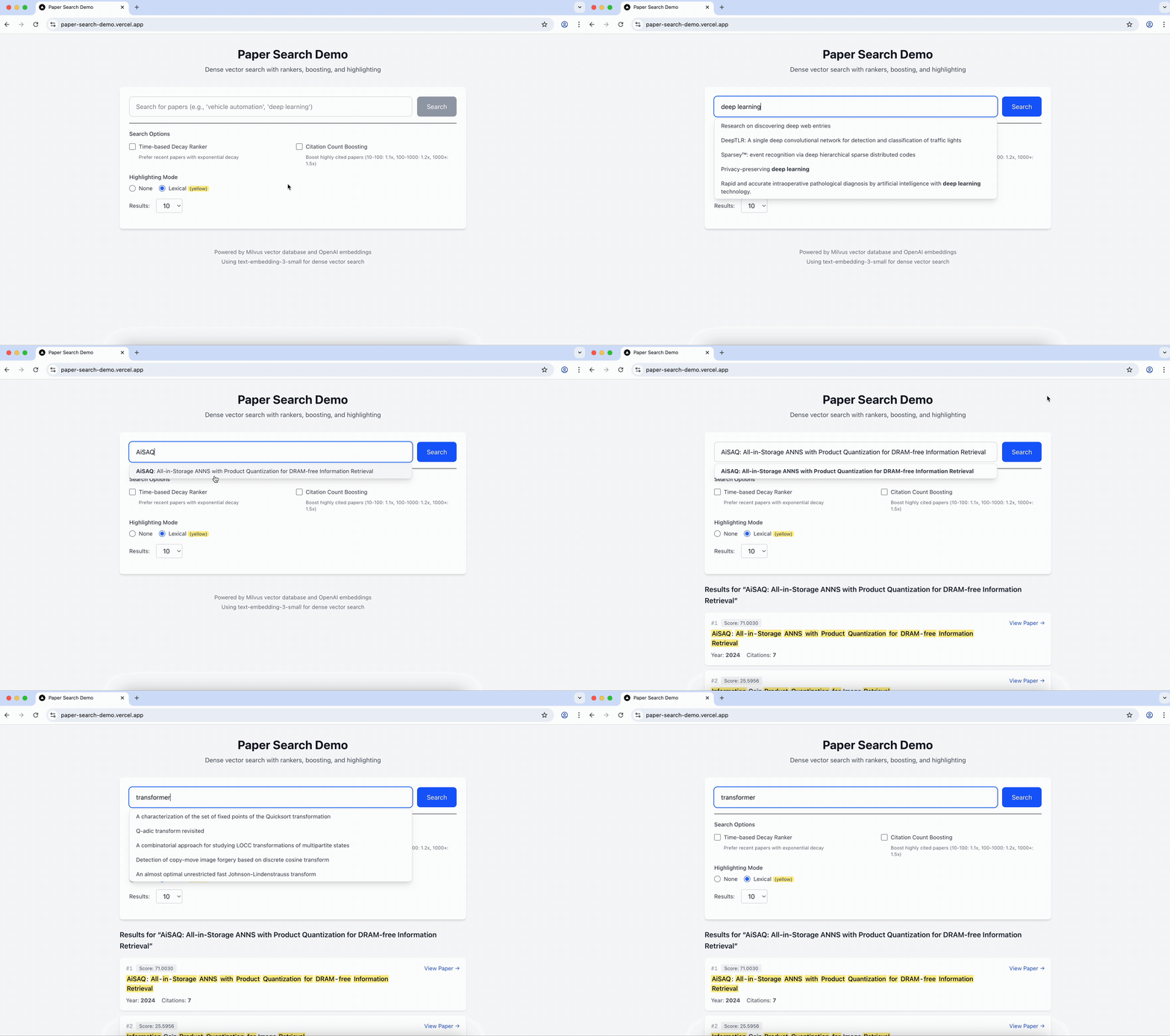
Here's a short demo of autocompletion implemented using Milvus's ngram index feature.
Best practices and tips
- Benchmark with representative queries: Test with realistic query patterns before deploying to production to validate that
min_gramandmax_gramsettings align with actual user behavior. - Combine with vector search strategically: Use NGRAM-accelerated filtering as a pre-filter to reduce the candidate set before vector similarity computation, improving overall query latency.
- Avoid over-indexing: Not every VARCHAR field benefits from an NGRAM index. Prioritize fields frequently used in
LIKEqueries with wildcard patterns. - Note that the n-gram index is case-sensitive. This means that tokens are indexed exactly as they appear in the original text, preserving uppercase and lowercase distinctions. Queries must match the exact casing used in indexed content.
Decay Ranker
Imagine you are building a semantic search engine for research papers, where you favour papers published in the past 10 years over those published more than 10 years ago.
Without Milvus's decay ranker, you probably have to rerank the search results outside of the vector database based on the publication year field. This will require application server / client side processing which will add both complexity and latency, which could negatively impact the user experience.
At the heart of Milvus's decay ranker is the Decay Function. Decay Functions adjust relevance scores based on numeric fields (like timestamps). The final score is calculated as:
final_score = normalized_similarity_score x decay_score
Currently, there are three different decay functions namely; Linear, Exponential, and Gaussian. Each decay function is useful for different scenarios. For example, Linear Function should be used when you need to exclude entities beyond a certain point (e.g. years, distance, etc). Exponential Function can be used when you want more recent items to dominate the results but still allowing older results to be discoverable. Gaussian Function is useful for location-based searches, i.e. items nearer to current location will be ranked higher.
Decay functions are highly customizable, and you can control their shape using several parameters when initializing them:
- origin: Reference point (e.g., current timestamp)
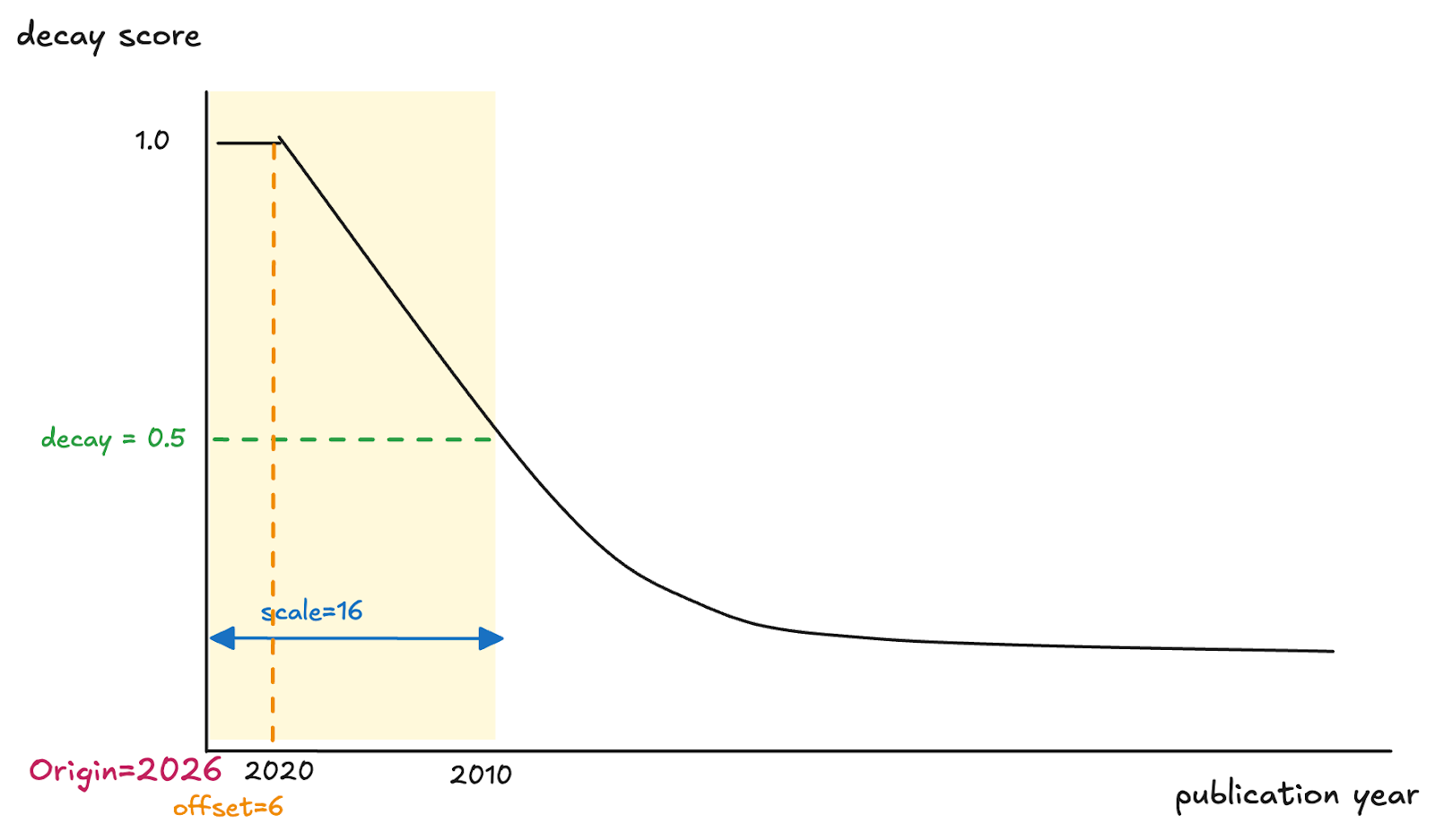
- offset: Creates a "no-decay zone" where items maintain full scores (decay = 1.0). Useful for ensuring very recent or very close items aren't penalized at all.
- scale: Larger values produce a gradual decline in relevance; smaller values produce a steeper decline.
- decay: Controls curve steepness. Lower values (e.g., 0.3) create a steeper decline; higher values (e.g., 0.7) create a more gradual decline. Default is 0.5.
Here's an example of figuring out how to set the decay function parameters:
- To use the current year as the origin:
origin=2026 - Research papers from 2021 to 2026 are equally relevant with no decay applied:
offset=6 - The score multiplier at the scale distance:
decay=0.5 - Papers from 2010 should have a decay score (previously specified) 0.5:
scale=16(since 2026 - 2010 = 16)
Best practices and tips
- A/B test decay configurations. Small changes in
scaleanddecayparameters can significantly impact user experience. - Ensure all time-based parameters (
origin,scale,offset) use the same unit as your collection data. - FunctionScore accepts only a single DecayFunction per query. Chaining or composing multiple DecayFunctions is currently not supported.
- Each decay ranker supports only one numeric field. You cannot combine multiple decay factors in a single ranker.
- Avoid decay on sparse or skewed fields. If your decay field has many null values, outliers, or highly skewed distributions, decay ranking may produce unintuitive results.
Boosting
Boosting is a practical mechanism for incorporating domain signals into vector search ranking. While semantic search captures what your query is about, it often ignores what matters more in a given domain. Boosting allows you re-rank results using arbitrary metadata field, effectively encoding business or domain intuition into the retrieval layer.
For example, in a research paper search workflow, two papers may both be relevant to "deep learning", but not equally important. A highly cited paper may deserve to appear above a less cited one, even if its similarity score is slightly lower. With boosting, a paper with a similarity score of 0.79 but 1,200 citations can be ranked higher above a paper scoring 0.81 with only 10 citations.
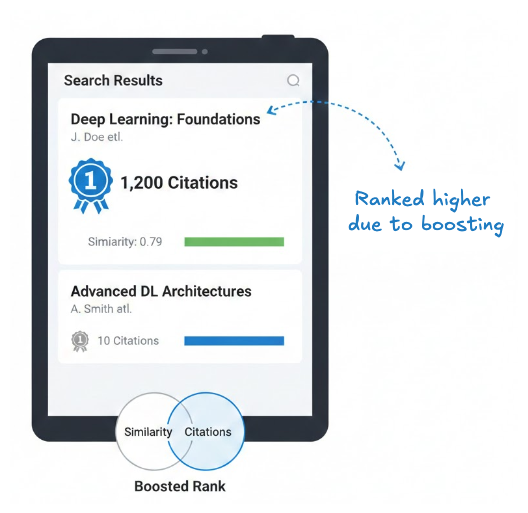
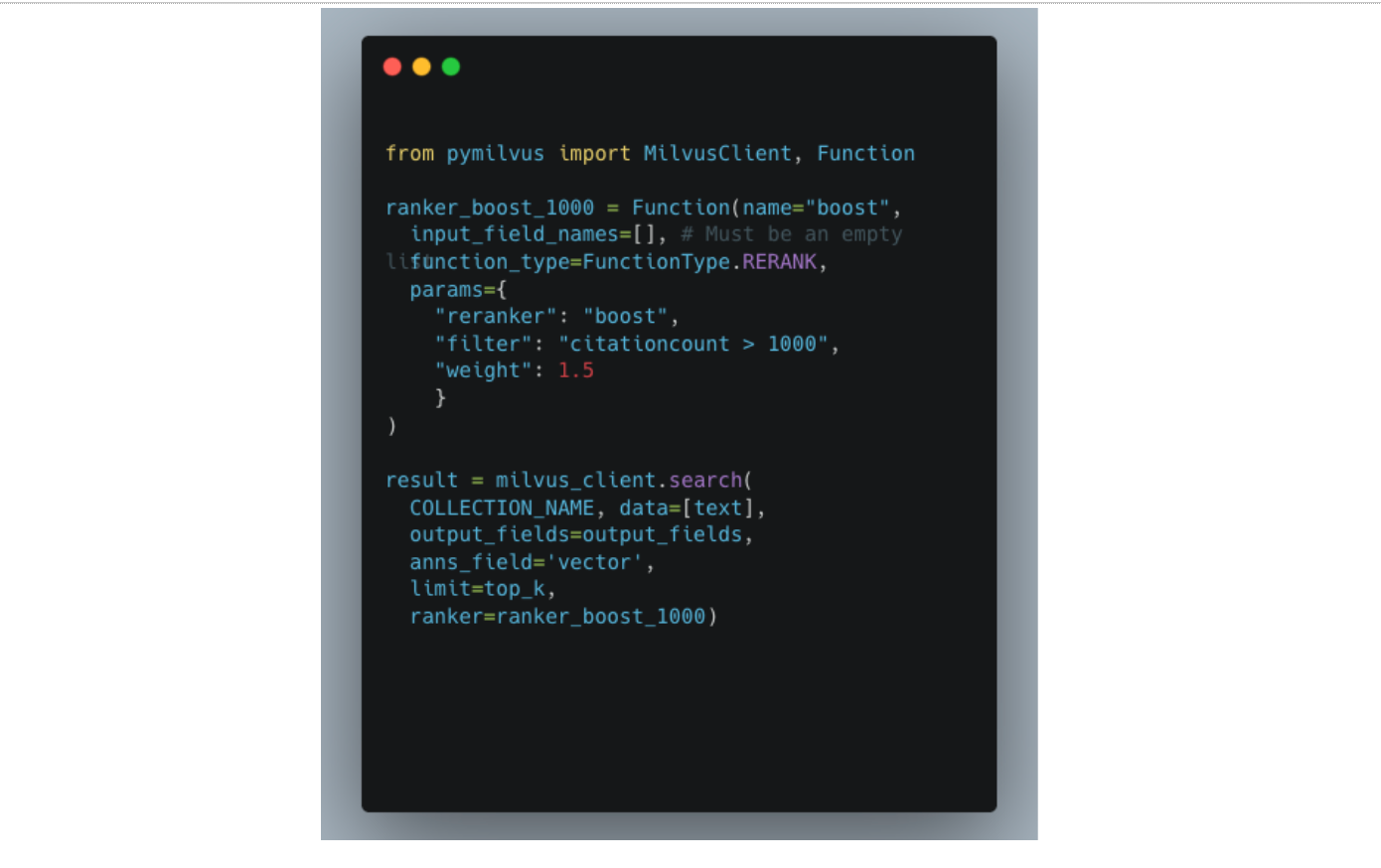
The above can be implemented by boosting papers based on the citation count. A simple implementation is as follows:
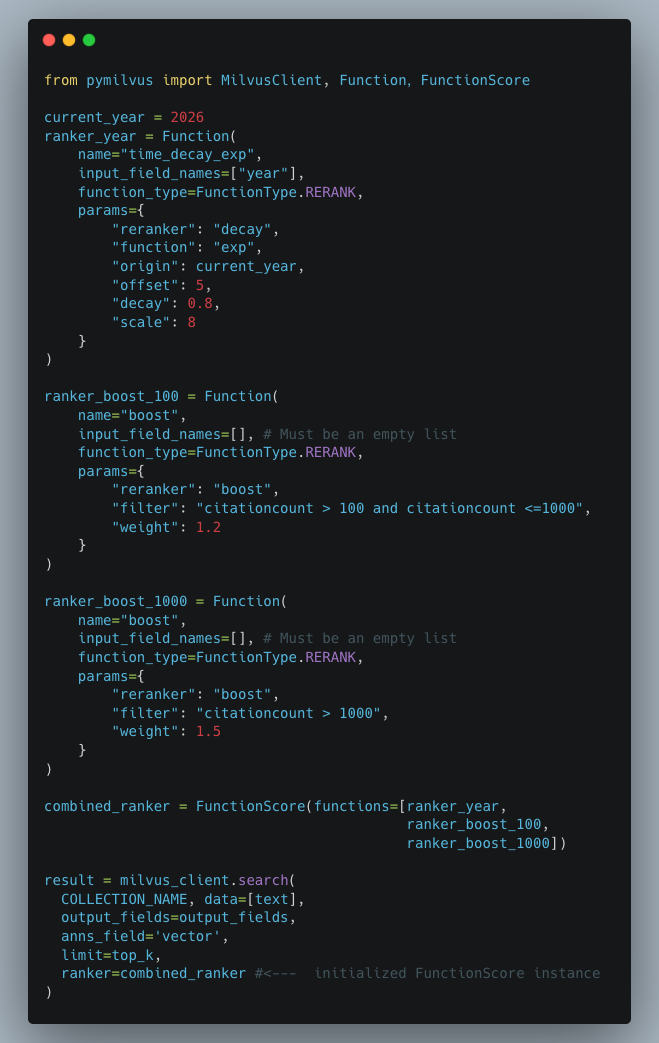
But what if we want to boost research papers with citation counts that are between 100 to 1000 and even include decay function to favour more recent papers. Turns out, we can chain a decay function with multiple boost rankers in a single search request by using FunctionScore class.
Best practices and tips
- FunctionScore is currently supported only for dense vector search. Hybrid search does not support FunctionScore; use a single ranker instead.
- For boosting based on continuous-valued fields, consider putting the values into discrete buckets and assigning distinct boost weights to each bucket.
Wrapping Up
Milvus 2.6 represents a meaningful step forward in what a vector database can do out of the box. The above features and capabilities I've discussed are not just nice-to-haves, they eliminate the glue code that developers previously had to build and maintain outside the database.
Instead of stitching together external embedding pipelines, custom reranking logic, and substring search workarounds, you can now express these directly in your Milvus queries. The result is cleaner application code, lower latency, and fewer moving parts to debug when things go wrong.
If you've been treating Milvus as "just" a vector store, it might be time to revisit what's possible. All these features are now GA on Zilliz Cloud, so you can start experimenting today.
Resources
- Doc: Integrate with Model Providers
- Doc: Model-based Embedding Functions
- Blog: Introducing the Embedding Function: How Milvus 2.6 Streamlines Vectorization and Semantic Search
- Doc: Lexical Highlighter in Zilliz Cloud
- Blog: How We Built a Semantic Highlighting Model for RAG Context Pruning and Token Saving
- Doc: NGRAM Index
- Doc: Decay Ranker Overview
- Doc: Boost Ranker

Keep Reading

3 Easiest Ways to Use Claude Code on Your Mobile Phone
Run Claude Code from your phone with Remote Control, Happy Coder, or SSH + Tailscale. Comparison table, setup steps, and tools for typing, memory, and parallel tasks.

Introducing Zilliz MCP Server: Natural Language Access to Your Vector Database
Developers can easily manage and query vector databases with natural language via Zilliz MCP Server in AI-native environments.

Milvus/Zilliz + Surveillance: How Vector Databases Transform Multi-Camera Tracking
See how Milvus vector database enhances multi-camera tracking with similarity-based matching for better surveillance in retail, warehouses and transport hubs.