




Introducing Zilliz CLI and Agent Skills for Zilliz Cloud
Starting today, you can manage your entire Zilliz Cloud deployment without leaving your terminal or AI coding agent. Provision clusters, run searches, configure backups, and manage access control — through CLI commands or natural language. No console. No context switching.
We're releasing a set of open-source tools that bring every Zilliz Cloud and Milvus operation into the workflows where developers already spend their time:
- Zilliz CLI — every Zilliz Cloud operation, from your terminal
- Zilliz Skill — teaches AI coding agents (Claude Code, Cursor, Codex, GitHub Copilot etc.) to manage Zilliz Cloud through natural language
- Milvus Skill — teaches AI coding agents to operate open-source Milvus through pymilvus — from Milvus Lite to standalone and distributed clusters
Together with the Zilliz Plugin for Claude Code we released earlier, these form a layered vector database developer tooling stack native to AI. The CLI is the foundation — it talks directly to Zilliz Cloud. The Skill builds on it, giving AI agents the knowledge to drive the CLI through natural language. The Plugin wraps everything into a guided experience with slash commands. And the Milvus Skill stands alongside, teaching agents to operate any self-hosted Milvus deployment through pymilvus.
Zilliz CLI: Your Vector Database from the Terminal
Zilliz CLI is a full-featured command-line interface for Zilliz Cloud. Everything you can do in the console — clusters, collections, vector search, hybrid search, indexes, backups, imports, RBAC, billing — works from your terminal.
# macOS / Linux
curl -fsSL https://zilliz.com/cli/install.sh | bash

# Windows (PowerShell)
irm https://zilliz.com/cli/install.ps1 | iex
A few examples of what this looks like in practice:
# Provision a cluster
zilliz cluster create --name staging --tier serverless --region us-east-1

# Search your collection
zilliz vector search --collection products --data "[0.1, 0.2, ...]" --limit 5

# Set up a nightly backup
zilliz backup create --cluster staging --name nightly-backup
Built for automation: five output formats (json, table, text, yaml, csv), JMESPath filtering with --query, and flexible authentication (CLI flag, environment variable, or credentials file) fit naturally into CI/CD pipelines and scripts. Full command reference: Zilliz CLI Reference.
The CLI gives you full control from the terminal. But what if your AI coding agent could run these commands for you?
Zilliz Skills: Manage Zilliz Cloud from Any AI Coding Agent
The Zilliz Skill builds on the CLI. Install it, and your AI coding agent — Claude Code, Cursor, Codex, or GitHub Copilot — gains the knowledge to manage Zilliz Cloud through natural language. You describe what you need; the agent figures out the CLI commands.
npx skills add zilliztech/zilliz-skill
| What You Say | What Happens |
|---|---|
| "Create a serverless cluster in us-east-1" | Agent provisions the cluster via zilliz-cli |
| "Search my collection for items similar to this query" | Agent constructs and runs the search |
| "Import these Parquet files from S3" | Agent handles the bulk import |
| "Set up a daily backup with 7-day retention" | Agent configures the backup policy |
| "Create a read-only role for the analytics team" | Agent sets up role-based access control |
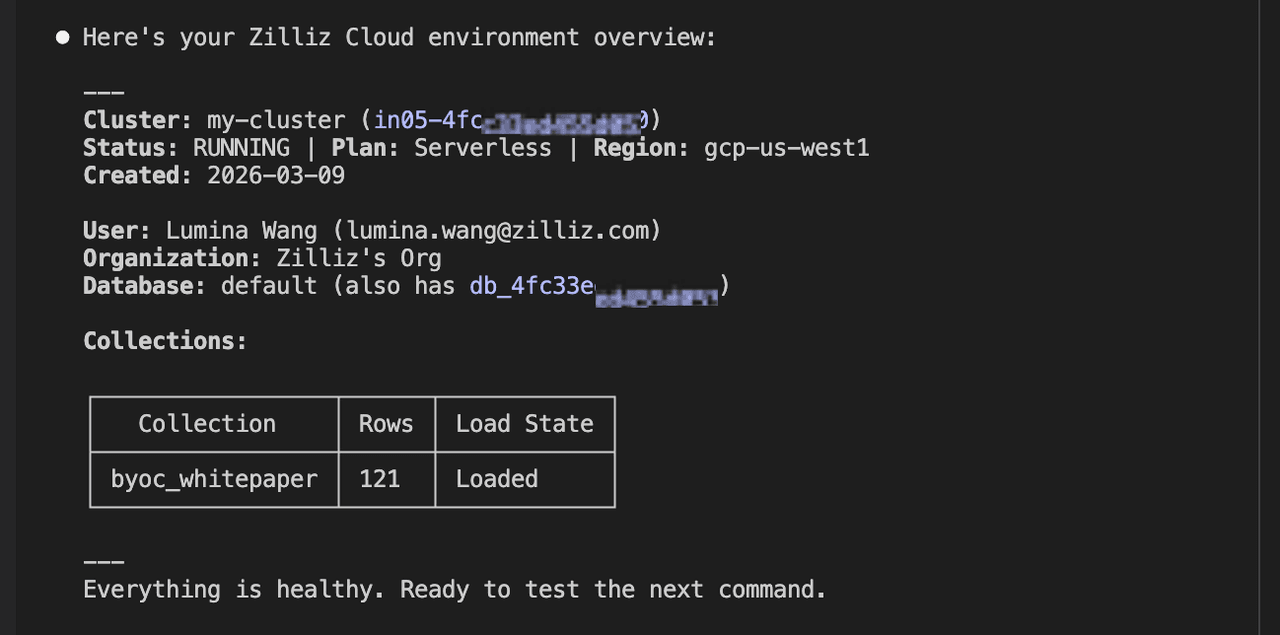
See It in Action
Show me the current Zilliz Cloud context and cluster status
Search "byoc_whitepaper" for documents about "What are the security benefits of BYOC architecture?", return top 3 results with text and page number
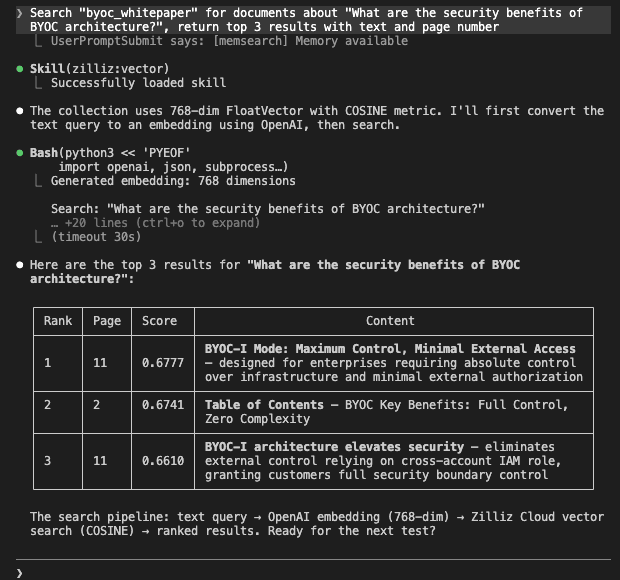
The agent builds the search with correct parameters and returns formatted results — no syntax lookup, no console tab.
Create a collection called "test_products" with id, name (varchar 256), price (float), and embedding (768-dim) fields
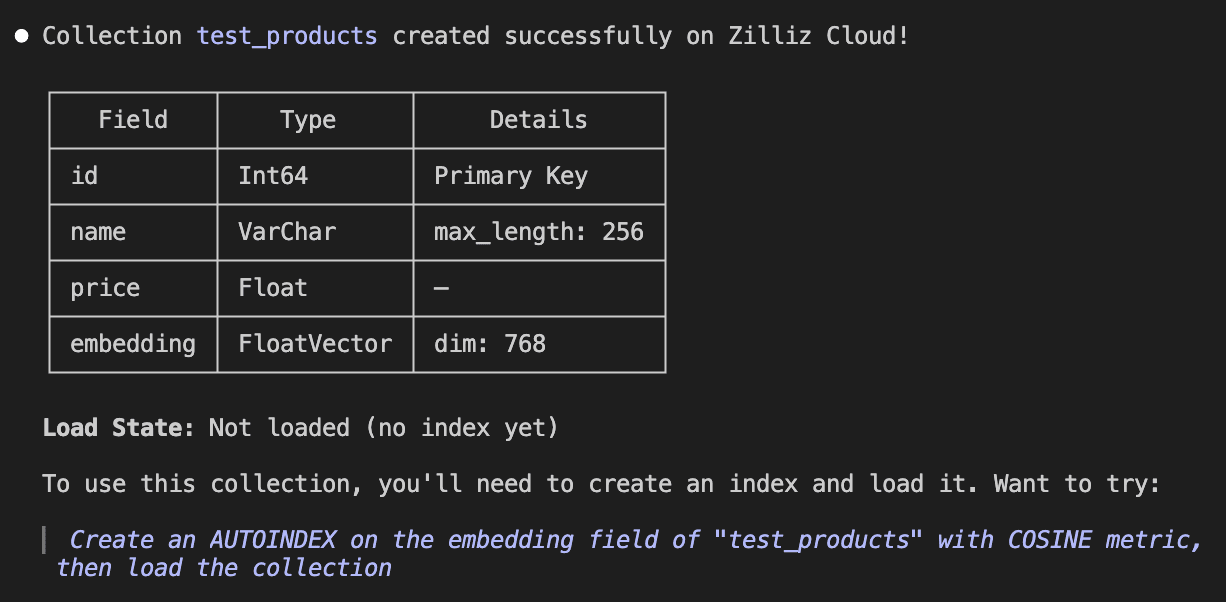
For the full list of supported operations, see the Zilliz Skill documentation.
Zilliz Plugin for Claude Code: Guided Setup with Slash Commands
If you use Claude Code, there's an even smoother option. Our Zilliz Plugin for Claude Code, released earlier, wraps the CLI and Zilliz Skill into a guided experience with slash commands:
/zilliz:quickstart— walks you through CLI installation, authentication, and cluster connection/zilliz:status— live overview of clusters, collections, and usage- 14 specialized skills covering every operational area
/plugin install zilliz@zilliztech/zilliz-plugin
If the Skill is the knowledge layer, the Plugin is the onboarding layer — the easiest way to get started with Zilliz Cloud from an AI coding agent.
Milvus Skills: Operate Milvus from Any AI Coding Agent
For developers running open-source Milvus — or anyone who prefers working through Python — the Milvus Skill provides the same agent-powered experience.
While the Zilliz Cloud tools manage the hosted service through CLI commands, the Milvus Skill covers the open-source side. It teaches AI coding agents to operate any Milvus deployment through pymilvus Python code — the full lifecycle from connections and schemas to search, indexing, RBAC, and RAG pipelines.
npx skills add zilliztech/milvus-skill
The skill contains official, verified pymilvus knowledge maintained by the Milvus engineering team:
| Area | What the Milvus Skill Covers |
|---|---|
| Connections | Milvus Lite, Standalone, Distributed |
| Collections & Schemas | All data types — scalars, vectors, JSON, arrays — with full collection management |
| Vector Operations | Insert, upsert, search, query, delete — plus sparse and dense search, full-text search with BM25 |
| Indexing | HNSW, IVF_FLAT, DiskANN, and more — with index management |
| Administration | Partitions, databases, users, roles, and RBAC privileges |
| Patterns | RAG, semantic search, hybrid search workflows |
See It in Action
Describe what you need, and the agent writes complete pymilvus code:
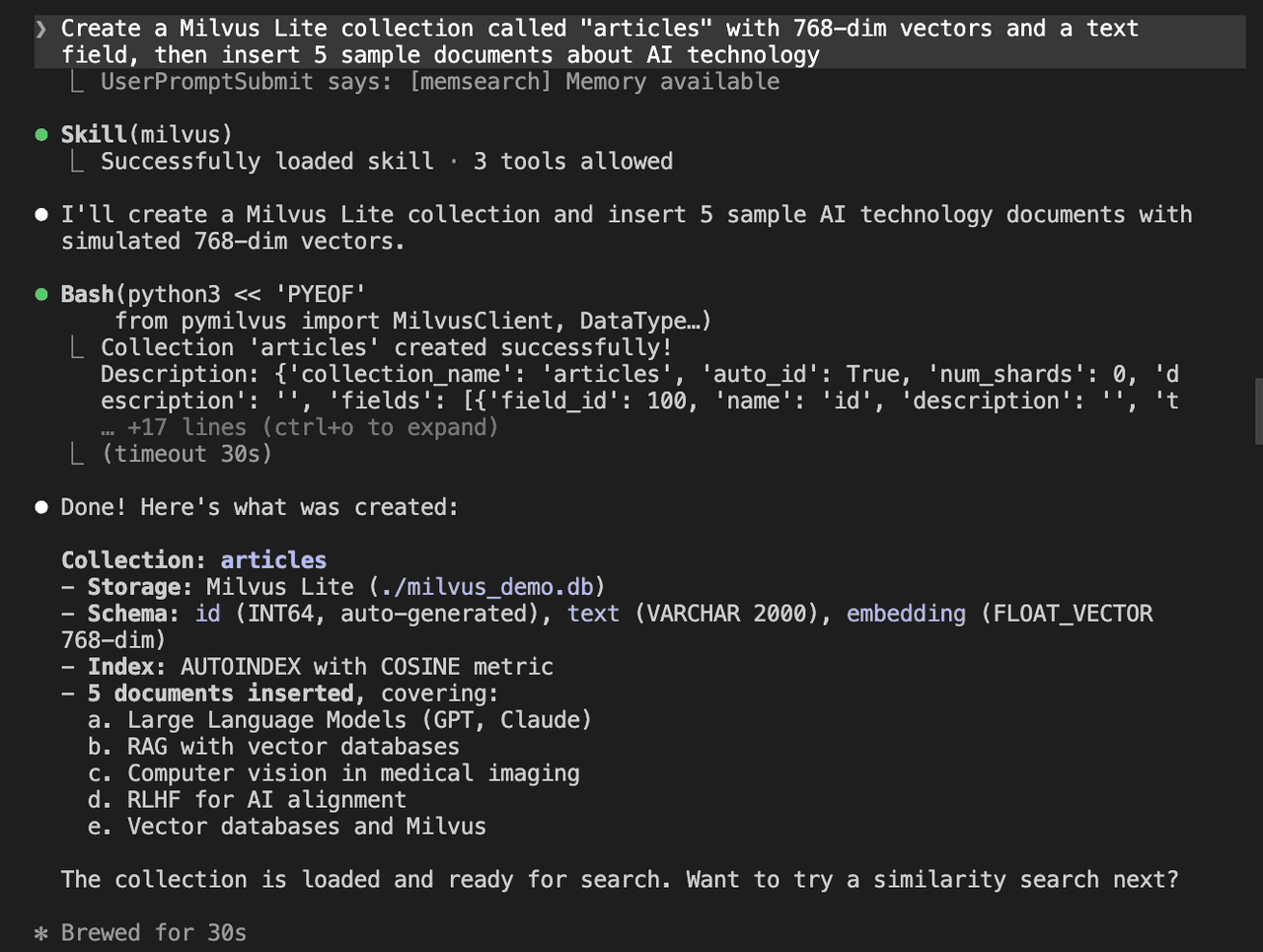
Create a Milvus Lite collection called "articles" with 768-dim vectors and a text field, then insert 5 sample documents about AI technology
The agent writes a complete script: connects to Milvus Lite, defines the schema, creates the collection, generates sample vector embeddings, inserts the data, and runs end-to-end without edits.
Create a collection with both dense vectors (768-dim) and sparse vectors, insert 5 sample documents, then perform a hybrid search with RRF reranking
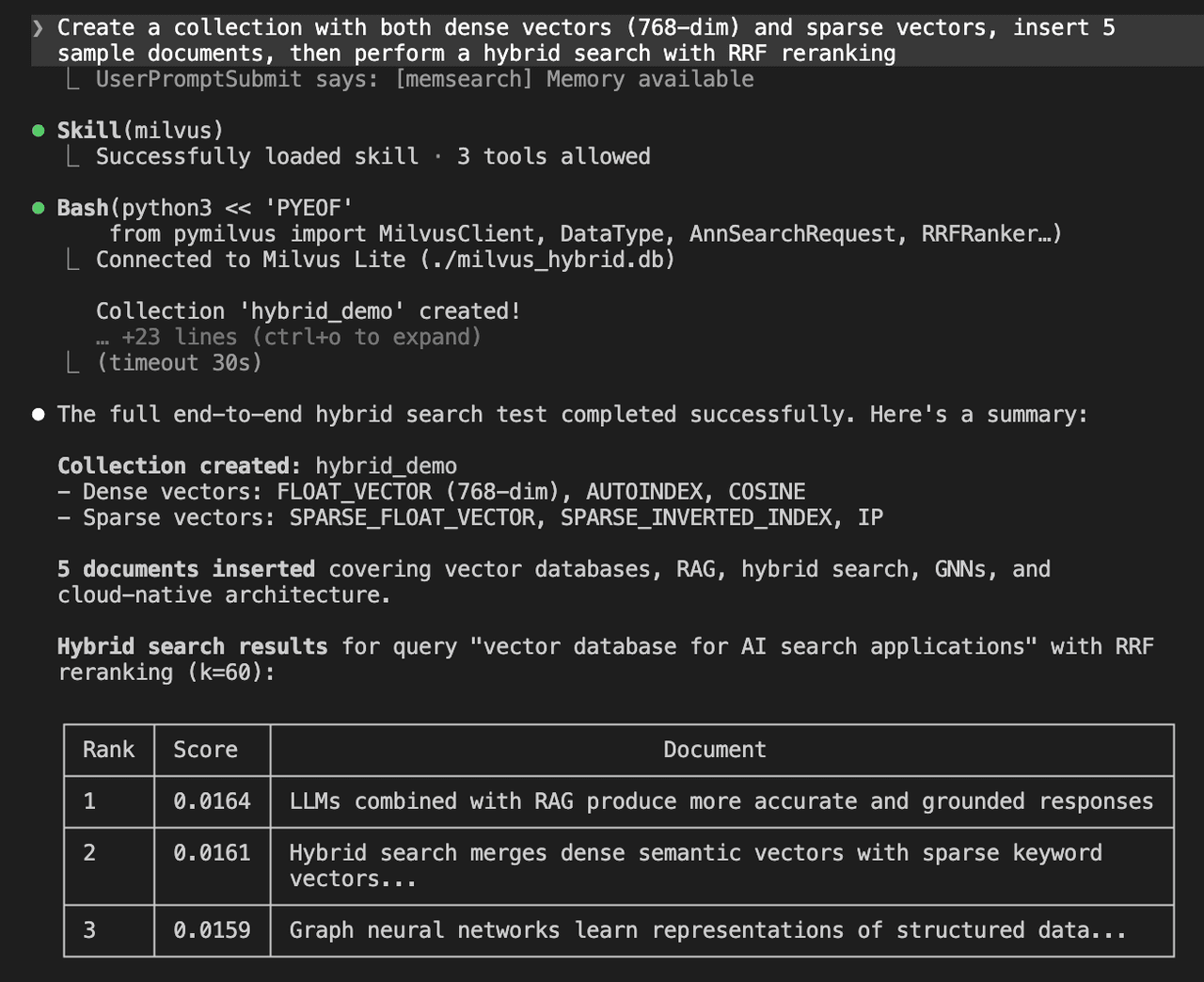
Two vector fields, dual indexes, sample data, hybrid search with RRF — all generated as working pymilvus code matching the current API.
For the full list of covered areas, see the Milvus for AI Agents documentation.
When to Use Each Tool: Zilliz CLI vs. Zilliz Skill vs. Zilliz Plugin vs. Milvus Skill
| Zilliz CLI | Zilliz Skill | Zilliz Plugin | Milvus Skill | |
|---|---|---|---|---|
| What it does | Terminal commands for Zilliz Cloud | Teaches agents to use the CLI | Guided Claude Code experience | Teaches agents pymilvus |
| Install | curl ... | bash | npx skills add | /plugin install | npx skills add |
| Works with | Terminal, scripts, CI/CD | Claude Code, Cursor, Codex, Copilot etc. | Claude Code | Claude Code, Cursor, Codex, Copilot etc. |
| Best for | Automation, pipelines, terminal ops | Natural-language cloud management | Easiest onboarding for Claude Code | Open-source Milvus via Python |
| Manages | Zilliz Cloud | Zilliz Cloud | Zilliz Cloud | Milvus (Lite, Standalone, Distributed) |
Most developers combine two or three: the CLI for terminal work and automation, the Zilliz Skill for natural-language cloud operations, and the Milvus Skill for operating Milvus through Python.
AI Prompts for Zilliz Cloud and Milvus
Beyond the CLI and Skills, we also provide curated AI prompt libraries for AI-powered IDEs — helping AI assistants implement Zilliz Cloud and Milvus features correctly and efficiently. Save a prompt to a file in your repo, then reference it when chatting with your AI tool — whether that's Claude Code, Cursor, GitHub Copilot, or Gemini CLI.
Get Started
Install what fits your workflow:
Getting started with Zilliz CLI from your terminal:
curl -fsSL https://raw.githubusercontent.com/zilliztech/zilliz-cli/master/install.sh | bash
zilliz login
Getting started with Zilliz/Milvus skills from any AI coding agent (Claude Code, Cursor, Codex, GitHub Copilot):
npx skills add zilliztech/zilliz-skill    # Zilliz Cloud operations
npx skills add zilliztech/milvus-skill    # Milvus operations via pymilvus
Getting started with Zilliz plugin for Claude Code users (includes the Skill plus slash commands):
/plugin install zilliz@zilliztech/zilliz-plugin
Sign up or sign in to Zilliz Cloud — new accounts registered with a work email get $100 in free credits.
Frequently Asked Questions
What AI coding agents do Zilliz Skill and Milvus Skill support?
Both Skills work with any agent that supports the Skills protocol — including Claude Code, Cursor, Codex, and GitHub Copilot. The Zilliz Plugin is Claude Code-specific and adds slash commands and guided onboarding on top of the Skill.
What's the difference between Zilliz Skill and Milvus Skill?
Zilliz Skill manages Zilliz Cloud (the fully managed service) through CLI commands. Milvus Skill provides open-source Milvus deployments (Lite, Standalone, Distributed) via the pymilvus Python library. Use Zilliz Skill for cloud, Milvus Skill for self-hosted.
Do I need Zilliz CLI installed to use Zilliz Skill?
Yes. Zilliz Skill teaches the agent to use the CLI — the Skill is the knowledge layer, and the CLI is the execution layer. Install the CLI first, authenticate with zilliz login, then install the Skill.
Can I use Milvus Skill with Milvus Lite for local development?
Yes. Milvus Skill covers the full range of Milvus deployments — including Milvus Lite, which runs in-process without a server. Tell your agent "connect to Milvus Lite" and it generates the correct pymilvus code for local development.

Keep Reading
Context Engineering Strategies for AI Agents: A Developer’s Guide
Learn practical context engineering strategies for AI agents. Explore frameworks, tools, and techniques to improve reliability, efficiency, and cost.

Introducing Zilliz MCP Server: Natural Language Access to Your Vector Database
Developers can easily manage and query vector databases with natural language via Zilliz MCP Server in AI-native environments.
Vector Databases vs. Graph Databases
Use a vector database for AI-powered similarity search; use a graph database for complex relationship-based queries and network analysis.