
Zilliz Cloud Pricing
Built to scale with your usage, meet your security and compliance needs, and remain cost-effective for any budget. Estimate Cost


Free
Starting point for learning and personal projects.
- 5 GB storage
- 2.5M per month includedvCUs
- Up to 5 collections
- Community support: Slack invite link
Standard
Managed essentials for non-critical workloads. Best for: prototypes and testing environments.
From $126/GB/month (Dedicated)
- Fully managed vector databases with core APIs
- Backup, restore, and basic monitoring
- Built-in encryption for data in transit and at rest
- Community support: Slack invite link
EnterpriseMOST POPULAR
Enterprise-grade reliability and controls. Best for: production applications.
- 99.95% uptime SLA
- Audit logs, SSO (SAML 2.0 based), granular RBAC
- Multi-replica and elastic scaling
- Private endpoint and VPC peering
- On-demand
- included
Business Critical
Regulated-ready with maximum resilience. Best for: healthcare, finance, and other highly regulated, mission-critical systems.
- Global cluster with high-level availability and disaster recovery
- Advanced security: CMEK and full-path in-transit encryption (edge TLS + internal)
- HIPAA-eligible with enhanced data privacy features
- and rapid incident response
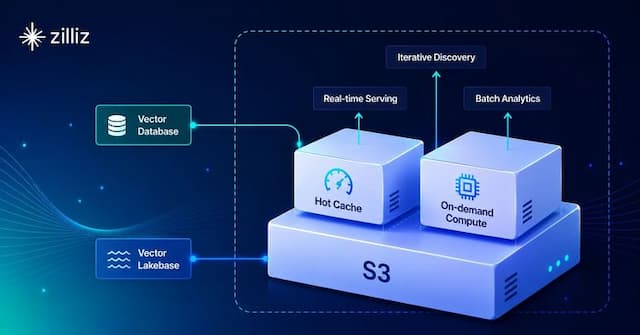
On-demand Compute
New!Run lake-scale search and indexing jobs on zero-copy external data.
- Zero-copy access to external data
- On-demand query jobs and system-managed index builds
- Pay only for active job runtime, with no always-on compute
BYOC (Bring Your Own Cloud)
Designed for organizations that prioritize custom infrastructure, enhanced data protection, and compliance.
- Deploy on your infrastructure of choice
- High-level control and security
- Same features and experience as SaaS Dedicated clusters
Flexible Deployment Options
Dedicated
Dedicated provides isolated, reserved environments for production workloads that demand consistent and predictable performance. This option is ideal for sustained high-throughput and latency-sensitive applications.
Predictable Performance
Leverage dedicated compute units (CU) to ensure stable performance without resource contention.
Fixed and Transparent Costs
Easily manage your budget with a clear, pay-as-you-go pricing model.
Full Control & Customization
Gain granular control over your resources and access advanced features to meet your specific application requirements.
Cluster Types
Dedicated clusters offer diverse types tailored to fit your use cases. A CU (compute unit) is a measure of computational resources for data processing. Each cluster type offers different combination of CPU, memory, and storage.
Performance-optimized
Ideal for real-time applications requiring instant search results and high concurrent traffic.
Per CU Capacity
2 million vectors
Search QPS
500-1500
Search Latency
10 ms
From $63
per million vectors / month
Capacity-optimized
Perfect for applications handling large vector datasets while maintaining reliable search speeds.
Per CU Capacity
8 million vectors
Search QPS
100-300
Search Latency
50-100 ms
From $16
per million vectors / month
Tiered-storage
Best for ultra-large-scale, cost-sensitive workloads.
Per CU Capacity
40 million vectors
Search QPS
10-50
Search Latency
100-1000ms
From $5
per million vectors / month
*This data is based on evaluations of 768-dimensional vectors.
View Plan Feature Details
Free
Start for FreeServerless
Try FreeDedicatedStandard
Try FreeMOST POPULARDedicatedEnterprise
Try FreeDedicatedBusiness Critical
Book a Demo
| Deployment | |||||
|---|---|---|---|---|---|
Environment | Shared | Shared | Dedicated | Dedicated | Dedicated |
Cluster Type | |||||
Performance-optimized Ideal for applications requiring low latency and high throughput. Each query CU can handle about 2 million 768-dim vectors. | |||||
Capacity-optimized Suited for managing large datasets with moderate search performance requirements. Each query CU can handle about 8 million 768-dim vectors. | |||||
Tiered-storage Best for ultra-large-scale, cost-sensitive workloads. Each query CU can handle about 40 million 768-dim vectors. | |||||
Public cloud provider | AWS, Google Cloud | AWS, Google Cloud | AWS, Google Cloud, Azure | AWS, Google Cloud, Azure | AWS, Google Cloud, Azure |
Compute Scaling | System-managed auto-scaling (No configuration required) | Manual scaling to 32 CUs | Configurable auto-scaling Manual scaling up to 2,048 CUs; CU × replica ≤ 204,800 (Contact us for larger needs.) | Configurable auto-scaling Manual scaling up to 2,048 CUs; CU × replica ≤ 204,800 (Contact us for larger needs.) | |
Uptime SLA | 99.95% | 99.99% if multi-replica is enabled | |||
Estimate Your Cost
Use this calculator to understand how Zilliz Cloud charges.
Number of Entities
Vector Dimensions
mmap
Enabling mmap (memory mapping) can optimize memory usage and the amount of data that can be stored in the same Query CU will be increased. Learn More
Estimated total cost per month
$
Evaluate your cost with $200 free credits
Prices are estimates and may differ from actual costs. We recommend running a Proof of Concept (PoC) using the free credits to validate costs and performance, or contacting us for a tailored cost-optimization plan and additional PoC resources.
- Query CU
$
GB
Storage
$
Frequently Asked Questions
What is a Compute Unit (CU)?
What is a vCU?
Which type of cluster should I pick?
How many query CUs do I need for a given collection?
How can I get Zilliz Cloud discounts?
How can I request a new cloud region?