



Milvus로 검색 확장하기: 대규모 데이터셋을 손쉽게 처리하기
사람들은 종종 제게 묻습니다: "그냥 NumPy나 FAISS를 쓰면 되는데, 왜 Milvus 같은 벡터 데이터베이스를 굳이 사용해야 하나요?" 이유는 많습니다: 확장성, 관리의 용이성, 데이터 지속성, 그리고 가장 중요한 이유 중 하나인 규모입니다. 수백만 또는 수십억 개의 벡터를 다룰 때는 그런 규모의 볼륨을 처리하도록 만들어진 솔루션이 필요합니다.
이 블로그 글에서는 Milvus를 사용해 4천만 개의 벡터라는 예시 사용 사례를 어떻게 다룰 수 있는지 살펴보겠습니다. 또한 메타데이터 필터링 같은 기능이 검색 결과를 어떻게 크게 향상시킬 수 있는지도 보여드리겠습니다. 이는 비-목적 특화형 벡터 데이터베이스에서 종종 빠져 있는 필수 기능이며, 큰 단점입니다.
Milvus: 규모 확장을 위해 만들어진 벡터 데이터베이스
Milvus는 고성능의 확장 가능한 벡터 유사도 검색으로 AI 애플리케이션을 구동하는 인기 있는 오픈 소스 벡터 데이터베이스입니다.
대규모 벡터 검색을 가능하게 하는 주요 기능은 다음과 같습니다:
- 분산 아키텍처: Milvus는 분산 아키텍처를 갖추고 있어 수평 확장을 원활하게 수행하고 여러 노드에 걸쳐 데이터와 워크로드를 분산할 수 있습니다. 이 기능은 높은 부하 상황에서도 높은 가용성과 복원력을 보장합니다.
- 최적화된 인덱싱: Milvus는 IVF_FLAT 및 HNSW 같은 다양한 인덱싱 기법을 지원할 뿐 아니라, 검색 속도를 높이기 위한 GPU Index 도 지원합니다. 또한 Vector DB 비용을 줄여야 한다면 DiskANN도 지원합니다. 검색은 조금 느려지겠지만 비용은 상당히 저렴해질 수 있습니다.
- 수십억 개 검색: Milvus의 두드러진 특징 중 하나는 수십억 개의 벡터를 효율적으로 처리하고 검색할 수 있다는 점입니다. 이 기능은 고속 및 대용량 벡터 유사도 검색이 필요한 애플리케이션에 매우 중요합니다.
- 다양한 컴퓨팅 옵션: Milvus는 GPU와 CPU의 성능을 활용할 수 있으며, 최적의 성능을 위해 가장 적합한 하드웨어에 작업을 지능적으로 할당합니다. 이 기능은 병렬 처리를 가능하게 하고, 특히 계산 집약적인 작업에서 상당한 속도 향상을 제공합니다.
데이터셋: 수백만 개의 Wikipedia 문서 임베딩
우리는 Cohere Embedding Model로 변환된 Wikipedia 데이터셋을 사용하며, 이는 Hugging Face에서 무료로 이용할 수 있습니다.
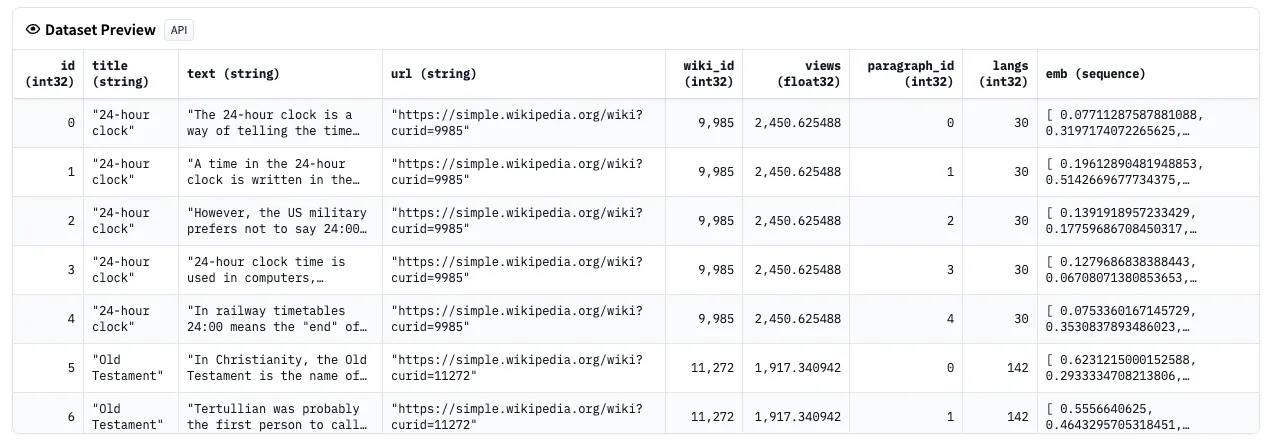 데이터셋 미리보기
그림 1: 데이터셋 미리보기
각 예시는 마크다운과 원치 않는 섹션(참고문헌 등)을 제거하도록 정제된 하나의 전체 Wikipedia 문서를 포함합니다.
이 데이터셋에는 300개가 넘는 언어가 포함되어 있지만, 우리의 사용 사례에서는 4,150만 개의 벡터가 포함된 영어에 집중하겠습니다. 흥미로운 점은 임베딩이 교차 언어적이라는 것입니다! 즉, 여러 언어에 걸쳐 검색할 수 있으며, 서로 다른 언어에서도 유사한 의미를 찾아내는 모델의 능력에 의존할 수 있다는 뜻입니다.
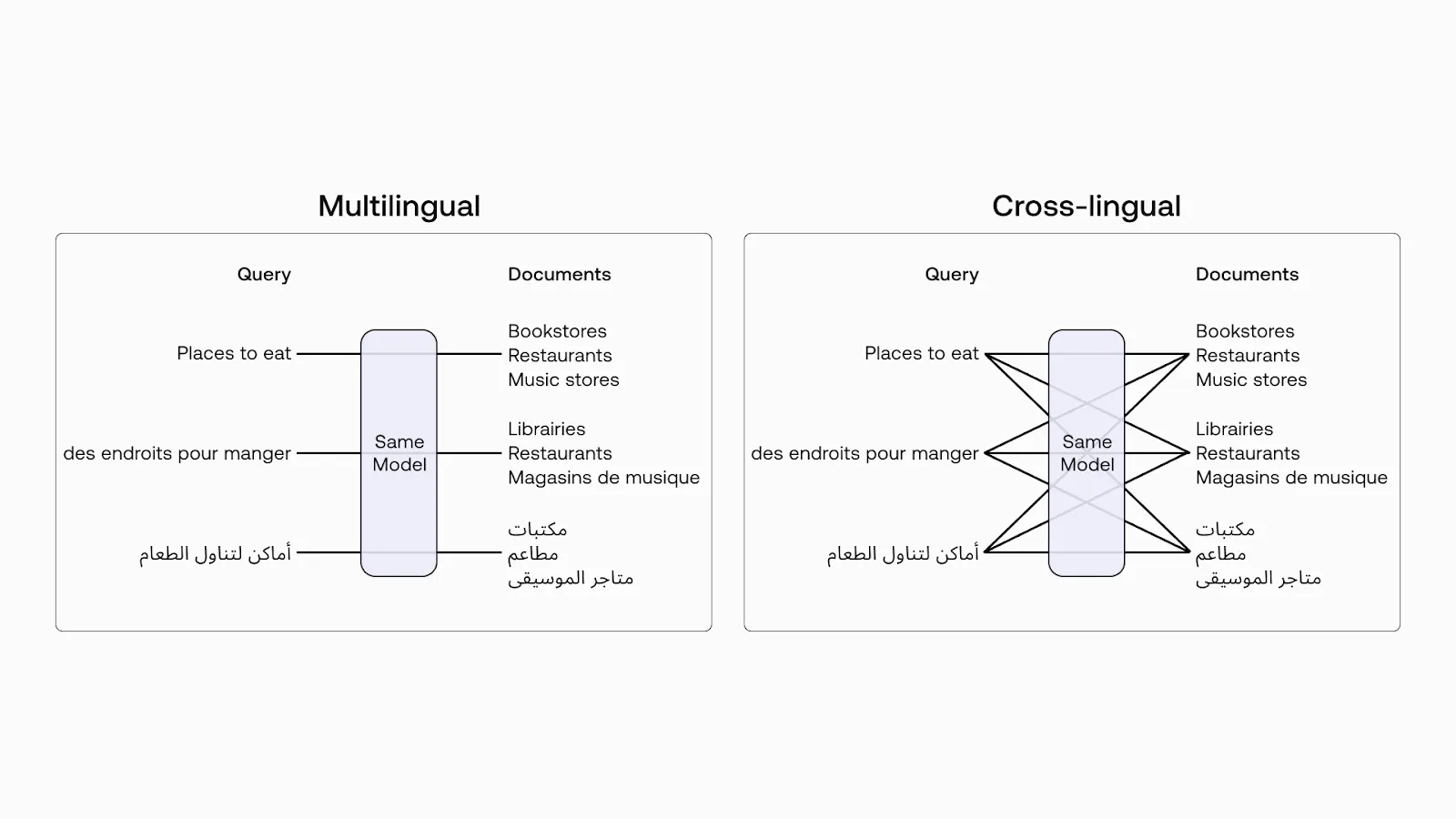 Multilingual vs Cross-lingual.png
그림 2: 다국어 vs 교차 언어 (이미지 출처)
Milvus 시작하기
이 섹션에서는 Milvus SDK 설치 또는 Zilliz Cloud 설정, Milvus 연결, 컬렉션 생성 등을 포함하여 Milvus를 시작하는 방법을 보여드립니다.
Milvus SDK 설치
pip install pymilvus를 실행하여 Milvus SDK를 설치하는 것부터 시작하세요. 단순화를 위해 Milvus를 Zilliz Cloud(Milvus의 완전 관리형 버전)에 배포하겠습니다. 사용하는 데이터의 규모에 따라 Kubernetes에 Milvus 배포를 하거나 Zilliz Cloud를 사용할 수 있습니다.
- 예를 들어 벡터가 백만 개를 넘는 더 큰 규모의 데이터가 있는 경우, Docker 또는 Kubernetes에서 더 성능이 좋은 Milvus 서버를 설정할 수 있습니다. 이 설정에서는 서버 uri(예:
http://localhost:19530)를 uri로 사용하세요. - Milvus용 완전 관리형 클라우드 서비스인 Zilliz Cloud를 사용하려면 Zilliz Cloud의 Public Endpoint 및 API key에 해당하는
uri와token을 조정하세요.
단계별 가이드
- Milvus에 연결: 먼저 Milvus 인스턴스에 대한 연결을 설정합니다.
from pymilvus import MilvusClient

client = MilvusClient(uri=<ZILLIZ_CLOUD_URI>, token=<ZILLIZ_TOKEN>)
- Schema 생성: Milvus Collection을 생성하는 데 사용할 Schema를 정의합니다.
# Define the schema for the collection
embedding_dim = 1024

schema = [
            {"name": "id", "dtype": "int64", "is_primary": True, "auto_id": True},
            {"name": "text_vector", "dtype": "float_vector", "dim": embedding_dim},
            {"name": "title", "dtype": "varchar", "max_length": 5000},
            {"name": "text", "dtype": "varchar", "max_length": 5000},
        ]
- Collection 생성: 이제 Embeddings를 저장하는 데 사용할 Collection을 생성합니다.
# Create the collection if it doesn't exist
collection_name = "cohere_embeddings"

if not client.has_collection(collection_name):
    client.create_collection(collection_name=collection_name, schema=schema)
- Index 생성: Vector Search를 효율적으로 만들기 위해 관심 있는 벡터 필드에 인덱스를 생성해야 합니다. vector index는 벡터를 저장하고 검색하도록 설계된 특수한 유형의 인덱스입니다.
# Define and create index
index_params = {
    "metric_type": "COSINE",
    "index_type": "HNSW",
    "params": {"M": 8, "efConstruction": 64},
}
client.create_index(collection_name=collection_name, field_name="text_vector", index_params=index_params)

# Load the collection
client.load_collection(collection_name=collection_name)
- 데이터 삽입: Hugging Face의 Dataset으로
cohere_embeddings컬렉션을 채웁니다. 사용 가능한 리소스에 따라 특정 언어만 선택하는 등 일부 하위 집합만 다운로드하거나, S3 또는 GCP 같은 Bucket에 업로드하거나, Hugging Face에서 스트리밍할 수도 있습니다.
데이터셋이 스트리밍 모드인 경우 전체 데이터셋을 다운로드하지 않고도 직접 반복 처리할 수 있습니다. 데이터셋을 반복 처리하는 동안 데이터가 점진적으로 다운로드되므로, 디스크에 데이터셋을 다운로드할 공간이 충분하지 않거나 사용하기 전에 데이터셋 다운로드가 완료될 때까지 기다리고 싶지 않을 때 유용합니다.
# Insert data into our collection
def insert_batch(client, collection_name, batch_data):
    client.insert(collection_name=collection_name, data=batch_data)
    batch_data.clear()

# Get the data from HuggingFace and create some batch
def insert_data(client, collection_name):
    batch_size = 1000  # Adjust the batch size as needed
    batch_data = []

    docs = load_dataset(
        "Cohere/wikipedia-2023-11-embed-multilingual-v3",
        "en", # 영어만
        split="train",
        streaming=True, # 데이터셋을 순회할 수 있게 해줍니다
    )

    for doc in tqdm(docs, desc="Milvus용 데이터 스트리밍 및 준비"):
        title = doc["title"][:4500] # 제목은 매우 길 수 있습니다
        text = doc["text"][:4500] # 텍스트는 매우 길 수 있습니다
        emb = doc["emb"]  # 임베딩 벡터

        batch_data.append({"title": title, "text_vector": emb, "text": text})
        if len(batch_data) >= batch_size:
            insert_batch(client, collection_name, batch_data)
    if batch_data:
        insert_batch(client, collection_name, batch_data)
스칼라 필터링: 대규모 환경에서 강력한 도구
수백만 또는 수십억 개의 벡터를 다룰 때, 필터링은 있으면 좋은 기능을 넘어 필수 요소가 됩니다. 그리고 바로 여기서 Milvus가 진가를 발휘합니다.
Milvus의 필터링 접근 방식이 게임 체인저인 이유는 다음과 같습니다.
- 비트셋 마법: Milvus는 필터 기준과 일치하는 벡터를 나타내기 위해 압축된 비트셋을 사용합니다. 이러한 비트셋은 저수준 CPU 연산 덕분에 "벡터 유사도 검색"이라고 말하는 것보다 더 빠르게 조작될 수 있습니다. 수십억 개의 데이터 포인트를 즉시 정렬할 수 있는 슈퍼컴퓨터를 가진 것과 같습니다.
- 검색 공간 축소: 사후 필터링만 제공하는 일부 다른 솔루션(예: pgvector)과 달리, Milvus는 벡터 유사도 검색을 실행하기 전에 메타데이터 필터를 적용합니다. 이를 통해 처리해야 할 벡터 수를 극적으로 줄입니다. 또한 수십억 개의 벡터에서 정말 중요한 수천 개로 검색 범위를 밀리초 단위로 좁힐 수 있습니다.
- 스칼라 인덱싱(필요할 때): 자주 필터링하는 필드의 경우, Milvus를 사용하면 스칼라 인덱스를 만들 수 있습니다. Milvus에 데이터용 치트 시트를 제공한다고 생각하면 됩니다. 기본적으로 항상 존재하는 것은 아니지만, 제대로 설정하면 이러한 인덱스가 필터링 성능을 터보차저처럼 끌어올릴 수 있습니다.
Milvus의 장점은 이러한 기능을 제공하는 데 그치지 않고, 이를 대규모 환경에서도 작동하게 만든다는 점입니다. 4천만 개의 벡터를 다루든 400억 개의 벡터를 다루든 말입니다.
정확한 필터링으로 검색
특정 제목을 가진 문서를 찾습니다.
FILTER_TITLE = "British Arab Commercial Bank"

res = milvus_client.query(
    collection_name=collection_name,
    filter=f'title like "{FILTER_TITLE}"',
    output_fields=["title", "text"]
)
for elt in res:
    pprint(elt)
이는 British Arab Commercial Bank에 관한 문서를 반환합니다.
{'id': 450933285225527270,
 'text': 'The British Arab Commercial Bank PLC (BACB) is an international '
         'wholesale bank incorporated in the United Kingdom that is authorised '
         'by the Prudential Regulation Authority (PRA) and regulated by the '
         'PRA and the Financial Conduct Authority (FCA). It was founded in '
         '1972 as UBAF Limited, adopted its current name in 1996, and '
         'registered as a public limited company in 2009. The bank has clients '
         'trading in and out of developing markets in the Middle East and '
         'Africa.',
 'title': 'British Arab Commercial Bank'}
{'id': 450933285225527271,
 'text': 'BACB has a head office in London, and three representative offices '
         'in Algiers in Algeria, Tripoli in Libya and Abidjan in the Cote '
         "D'Ivoire. The bank has 17 sister banks across Europe, Asia and "
         'Africa. It is owned by three main shareholders - the Libyan Foreign '
         'Bank (87.80%), Banque Centrale Populaire (6.10%) and Banque '
         "Extérieure d'Algérie (6.10%).",
 'title': 'British Arab Commercial Bank'}
접두/중위/접미 필터링으로 검색
특정 단어가 포함된 문서를 검색합니다.
res = milvus_client.query(
    collection_name=collection_name,
    filter='text like "%Calectasia%"', # Infix
    # filter='text like "Calect%"', # Suffix
    # filter='text like "%lectasia"', # Prefix
    output_fields=["title", "text"],
    limit=5,
)
for elt in res:
    pprint(elt)
이는 "Calectasia"라는 단어가 포함된 문서를 반환합니다.
{'id': 450933285225527360,
 'text': 'Calectasia is a genus of about fifteen species of flowering plants '
         'in the family Dasypogonaceae and is endemic to south-western '
         'Australia. Plants is this genus are small, erect shrubs with '
         'branched stems covered by leaf sheaths. The flowers are star-shaped, '
         'lilac-blue to purple and arranged singly on the ends of short '
         'branchlets.',
 'title': 'Calectasia'}
{'id': 450933285225527361,
 'text': 'Plants in the genus Calectasia are small, often rhizome-forming '
         'shrubs with erect, branched stems with sessile leaves arranged '
         'alternately along the stems,  long and about  wide, the base held '
         'closely against the stem and the tip pointed. The flowers are '
         'arranged singly on the ends of branchlets and are bisexual, the '
         'three sepals and three petals are similar to each other, and joined '
         'at the base forming a short tube but spreading, forming a star-like '
         'pattern with a metallic sheen. Six bright yellow or orange stamens '
         'form a tube in the centre of the flower with a thin style extending '
         'beyond the centre of the tube.',
 'title': 'Calectasia'}
"Not In"으로 필터링하여 검색
검색에서 특정 제목을 제외합니다.
res = milvus_client.query(
    collection_name=collection_name,
    filter='title not in ["British Arab Commercial Bank", "Calectasia"]',
    output_fields=["title", "text"],
    limit=10,
)
for elt in res:
    pprint(elt)
이는 제목이 "British Arab Commercial Bank" 또는 "Calectasia"가 아닌 문서를 반환합니다.
{'id': 450933285225527281,
 'text': 'The Commonwealth Skyranger, first produced as the Rearwin Skyranger, '
         'was the last design of Rearwin Aircraft before the company was '
         'purchased by a new owner and renamed Commonwealth Aircraft.  It was '
         'a side-by-side, two-seat, high-wing taildragger.',
 'title': 'Commonwealth Skyranger'}
{'id': 450933285225527282,
 'text': 'The Rearwin company had specialized in aircraft powered by small '
         'radial engines, such as their Sportster and Cloudster, and had even '
         'purchased the assets of LeBlond Engines to make small radial engines '
         'in-house in 1937. By 1940, however, it was clear Rearwin would need '
         'a design powered by a small horizontally opposed engine to remain '
         'competitive. Intended for sport pilots and flying businessmen, the '
         '"Rearwin Model 165" first flew on April 9, 1940. Originally named '
         'the "Ranger," Ranger Engines (who also sold several engines named '
         '"Ranger") protested, and Rearwin renamed the design "Skyranger." The '
         'overall design and construction methods allowed Rearwin to take '
         'orders for Skyrangers then deliver the aircraft within 10 weeks.',
 'title': 'Commonwealth Skyranger'}
Cohere 🤝 Milvus: 벡터 유사도 검색을 더 쉽고 효율적으로 만드는 강력한 조합
Cohere 임베딩을 사용하여 유사도 검색을 수행해 보겠습니다. 쿼리 Who founded Wikipedia를 임베딩하고 이를 사용해 Milvus 컬렉션을 검색합니다. 이는 Wikipedia Embeddings를 인코딩하는 데 사용된 것과 동일한 임베딩 모델입니다.
PyMilvus Model을 통해 Milvus와 Cohere 간의 통합을 사용할 것이며, pip install "pymilvus[model]"로 설치합니다 .
from pymilvus.model.dense import CohereEmbeddingFunction

cohere_ef = CohereEmbeddingFunction(
    model_name="embed-multilingual-v3.0",
    input_type="search_query",
    embedding_types=["float"]
)

query = 'Who founded Wikipedia'
embedded_query = cohere_ef.encode_queries([query])

response = embedded_query[0]
print(response[:10])
이는 Wikipedia 창립자들에 관한 가장 관련성 높은 Wikipedia 문서들을 반환합니다.
res = milvus_client.search(data=response, collection_name=collection_name, output_fields=["text"], limit=3)

for elt in res:
    pprint(elt)
그 결과는 다음과 같습니다:
[{'distance': 0.7344469428062439,
  'entity': {'text': 'Larry Sanger and Jimmy Wales are the ones who started '
                     'Wikipedia. Wales is credited with defining the goals of '
                     'the project. Sanger created the strategy of using a wiki '
                     "to reach Wales' goal. On January 10, 2001, Larry Sanger "
                     'proposed on the Nupedia mailing list to create a wiki as '
                     'a "feeder" project for Nupedia. Wikipedia was launched '
                     'on January 15, 2001. It was launched as an '
                     'English-language edition at www.wikipedia.com, and '
                     'announced by Sanger on the Nupedia mailing list. '
                     'Wikipedia\'s policy of "neutral point-of-view" was '
                     'enforced in its initial months and was similar to '
                     'Nupedia\'s earlier "nonbiased" policy. Otherwise, there '
                     "weren't very many rules initially, and Wikipedia "
                     'operated independently of Nupedia.'},
  'id': 450933285241797095},
 {'distance': 0.7239157557487488,
  'entity': {'text': 'Wikipedia was originally conceived as a complement to '
                     'Nupedia, a free on-line encyclopedia founded by Jimmy '
                     'Wales, with articles written by highly qualified '
                     'contributors and evaluated by an elaborate peer review '
                     'process. The writing of content for Nupedia proved to be '
                     'extremely slow, with only 12 articles completed during '
                     'the first year, despite a mailing-list of interested '
                     'editors and the presence of a full-time editor-in-chief '
                     'recruited by Wales, Larry Sanger. Learning of the wiki '
                     'concept, Wales and Sanger decided to try creating a '
                     'collaborative website to provide an additional source of '
                     'rapidly produced draft articles that could be polished '
                     'for use on Nupedia.'},
  'id': 450933285225827849},
 {'distance': 0.7191773653030396,
  'entity': {'text': "The foundation's creation was officially announced by "
                     'Wikipedia co-founder Jimmy Wales, who was running '
                     'Wikipedia within his company Bomis, on June 20, 2003.'},
  'id': 450933285242058780}]
검색 쿼리의 지연 시간에 초점을 맞춰 클러스터의 성능 지표를 확인해 보겠습니다. Zilliz Cloud API를 사용하여 평균 및 99번째 백분위수(P99) 지연 시간 값을 모두 가져오겠습니다.
먼저, 평균 지연 시간을 확인하겠습니다:
> curl --request POST \
     --url https://api.cloud.zilliz.com/v2/clusters/<cluster_id>/metrics/query \
     [...]
       "metricQueries": [
           {
               "name": "REQ_SEARCH_LATENCY",
               "stat": "AVG"
           }
    }'

[{"name":"REQ_SEARCH_LATENCY","stat":"AVG","unit":"millisecond","values":[{"timestamp":"2024-08-26T11:09:53Z","value":"2.0541596873255163"}]}]
이 쿼리는 2.05밀리초의 평균 지연 시간을 반환합니다.
다음으로, P99 지연 시간을 확인해 보겠습니다:
> curl --request POST \
     --url https://api.cloud.zilliz.com/v2/clusters/<cluster_id>/metrics/query \
     [...]
       "metricQueries": [
           {
               "name": "REQ_SEARCH_LATENCY",
               "stat": "P99"
           }
    }'
[{"name":"REQ_SEARCH_LATENCY","stat":"P99","unit":"millisecond","values":[{"timestamp":"2024-08-26T11:09:53Z","value":"4.949999999999999"}]}]
P99 지연 시간은 4.95밀리초로 보고됩니다.
이 결과는 상당히 인상적인 성능을 보여줍니다. 평균 쿼리 지연 시간은 2밀리초를 조금 넘는 수준이며, 쿼리의 99%가 5밀리초 미만에 완료됩니다. 이는 대규모 환경에서도 검색 작업을 처리하는 Milvus 클러스터의 효율성을 보여줍니다.
Milvus로 기본 RAG 시스템 만들기
검색 증강 생성(RAG)은 ChatGPT와 같은 대규모 언어 모델(LLMs)에서 환각을 완화하기 위한 고급 AI 기법입니다.
이 예제에서는 Milvus의 결과를 사용해 간단한 RAG 시스템을 만들 수 있습니다. 이를 통해 LLM이 Milvus에 저장된 정보에 접근하고 활용할 수 있습니다.
context = "\n".join(
    [line_with_distance[0] for line_with_distance in retrieved_lines_with_distances]
)

question = "Who created Wikipedia?"

SYSTEM_PROMPT = """
Human: You are an AI assistant. You are able to find answers to the questions from the contextual passage snippets provided.
"""

USER_PROMPT = f"""
    Use the following pieces of information enclosed in <context> tags to provide an answer to the question enclosed in <question> tags.
    <context>
    {context}
    </context>
    <question>
    {question}
    </question>
"""
from openai import OpenAI

client = OpenAI(
    base_url = 'http://localhost:11434/v1',
    api_key='ollama', # required, but unused
)

response = client.chat.completions.create(
    model="llama3.1",
    messages=[
        {"role": "system", "content": SYSTEM_PROMPT},
        {"role": "user", "content": USER_PROMPT},
    ],
)
print(response.choices[0].message.content)
According to the provided context, Larry Sanger and Jimmy Wales are the ones who started Wikipedia. Specifically, Jimmy Wales defined the goals of the project, while Larry Sanger created the strategy of using a wiki to achieve those goals.
기본을 넘어서: 향상된 확장성을 위한 Milvus의 고급 기능
Milvus는 대규모 데이터셋을 처리하기 위한 더욱 고급 기능도 제공합니다:
- 데이터 파티셔닝: 예를 들어 여러 사용자 또는 테넌트의 데이터를 포함하는 컬렉션의 경우, Milvus는 데이터를 논리적으로 분리하기 위한 파티션 키와 이름을 제공합니다. 이 기능은 사용자 ID나 조직 이름과 같은 효율적인 메타데이터 필터링을 가능하게 합니다.
- 범위 검색: 쿼리 벡터로부터 지정된 거리 범위 내의 벡터를 효율적으로 찾아, 고차원 공간에서 더 정밀하고 유연한 유사도 검색을 가능하게 합니다.
- 하이브리드 검색: 사용자가 단일 쿼리에서 여러 벡터 열을 검색할 수 있도록 합니다. 예를 들어, 다중 모달리티 데이터를 위해 텍스트 벡터와 이미지 벡터를 결합하거나, 의미 검색과 전문 검색을 사용하기 위해 밀집 벡터와 희소 벡터를 결합할 수 있습니다. 이 기능은 다재다능하고 유연한 검색 기능을 제공합니다.
자세한 내용은 Milvus 문서를 참조하세요.
결론
Milvus는 수십억 개의 벡터를 다루기 위한 강력하고 확장 가능한 솔루션을 제공합니다. 필터링과 분산 아키텍처 같은 강력한 기능 덕분에 까다로운 AI 애플리케이션에 완벽한 선택입니다.
성능 테스트를 통해 Milvus의 인상적인 역량을 확인했습니다:
- 평균 쿼리 지연 시간: 2.05밀리초
- 99번째 백분위수(P99) 지연 시간: 4.95밀리초
이 결과는 Milvus가 수백만 개의 벡터를 처리할 때도 5ms 미만의 검색 시간을 일관되게 제공할 수 있음을 보여줍니다. 따라서 대규모 데이터셋을 처리하고 번개처럼 빠른 검색 결과를 제공할 수 있는 애플리케이션을 구축하려는 경우, Milvus는 확실히 살펴볼 가치가 있습니다.
이 블로그 게시물이 마음에 드셨다면 GitHub에서 저희에게 스타를 눌러 주시기 바랍니다. 또한 Discord에 참여하여 Milvus 커뮤니티와 여러분의 경험을 공유해 주셔도 좋습니다.
추가 자료

계속 읽기

Introducing Business Critical Plan: Enterprise-Grade Security and Compliance for Mission-Critical AI Applications
Discover Zilliz Cloud’s Business Critical Plan—offering advanced security, compliance, and uptime for mission-critical AI and vector database workloads.
Migrating from S3 Vectors to Zilliz Cloud: Unlocking the Power of Tiered Storage
Learn how Zilliz Cloud bridges cost and performance with tiered storage and enterprise-grade features, and how to migrate data from AWS S3 Vectors to Zilliz Cloud.

Announcing the General Availability of Zilliz Cloud BYOC on Google Cloud Platform
Zilliz Cloud BYOC on GCP offers enterprise vector search with full data sovereignty and seamless integration.