




Stop Building AI Data Infra for the Wrong Stage
Most AI infrastructure decisions are made in week one and regretted when you look back in year two.
The problem is almost never the model, and rarely the application logic. It comes back to the same thing: the data infrastructure should be built for the stage the team is in.
At every stage, the failure mode cuts both ways. Over-engineer too early and you slow yourself down. Underestimate, and you rebuild under pressure. Both create the same result: iteration overhead that compounds.
Stage 1: The Prototype — Just Make It Work
At the beginning, speed matters much more than data infra — or actually, there's no need for a so-called "data infra" at all.
The goal is not scalability. The goal is not governance. The goal is not optimization.
The goal is simply to make the application work.
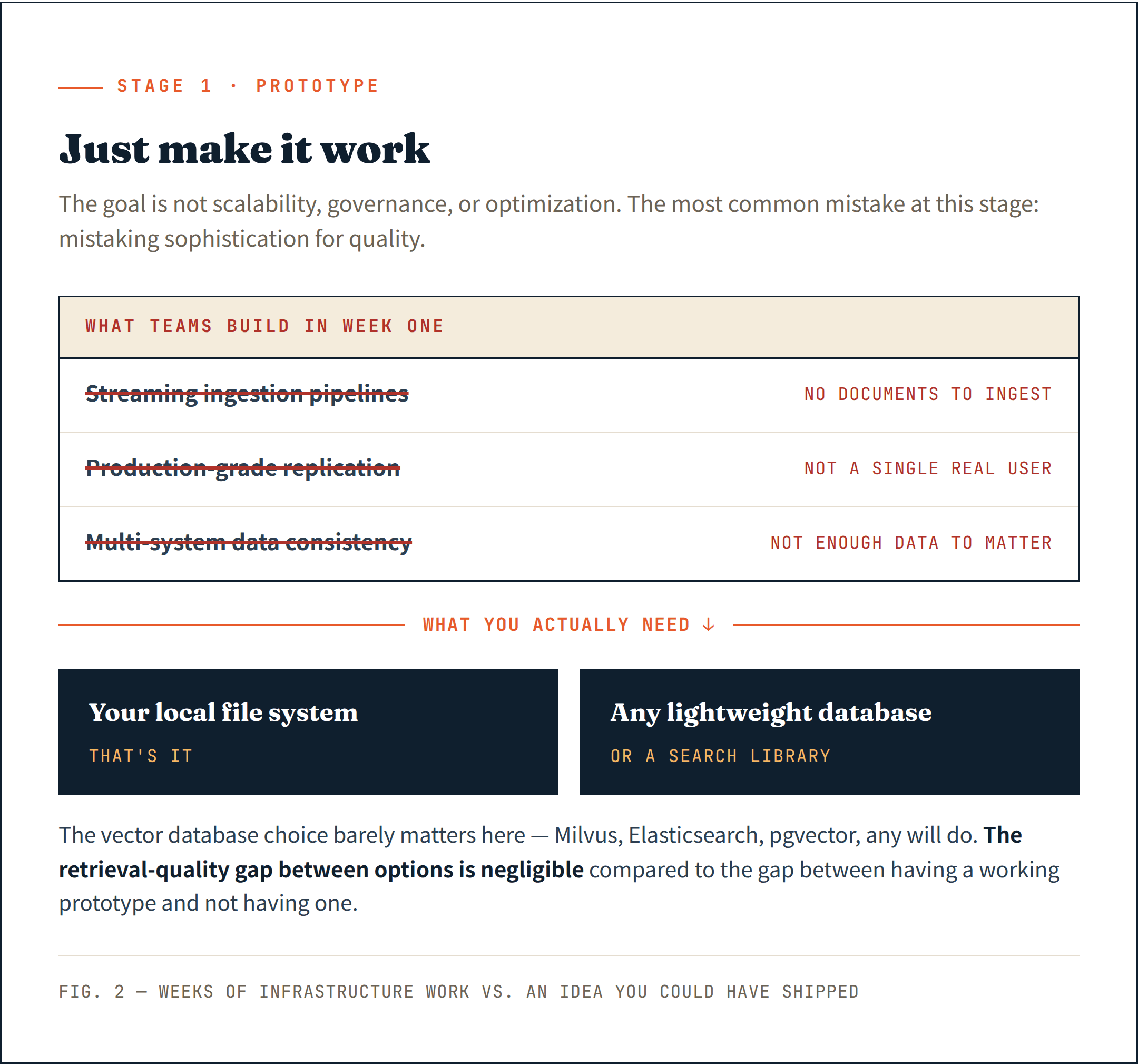
The most common mistake at this stage is mistaking sophistication for quality. Teams add streaming ingestion pipelines before they have documents to ingest. They set up production-grade replication before they have a single real user. They worry about data consistency across multiple systems before they have enough data to make consistency matter.
The result: weeks of infrastructure work that could have been shipped as a simple idea change.
As to the hot topic "vector database", it barely matters. Milvus, Elasticsearch, pgvector, or even a lightweight search library — any of them will do the job. The retrieval quality gap between options is negligible compared to the gap between having a working prototype and not having one.
What you actually need at this stage:
- Your local file system
- Any lightweight database or search library
Stage 2: Product-Market Fit — More Databases, Worse Problems
Once real users start interacting with the system, the focus shifts from building a demo to continuously improving the product, but a different trap appears.
The misconception sounds reasonable: more specialized database types lead to better retrieval quality.
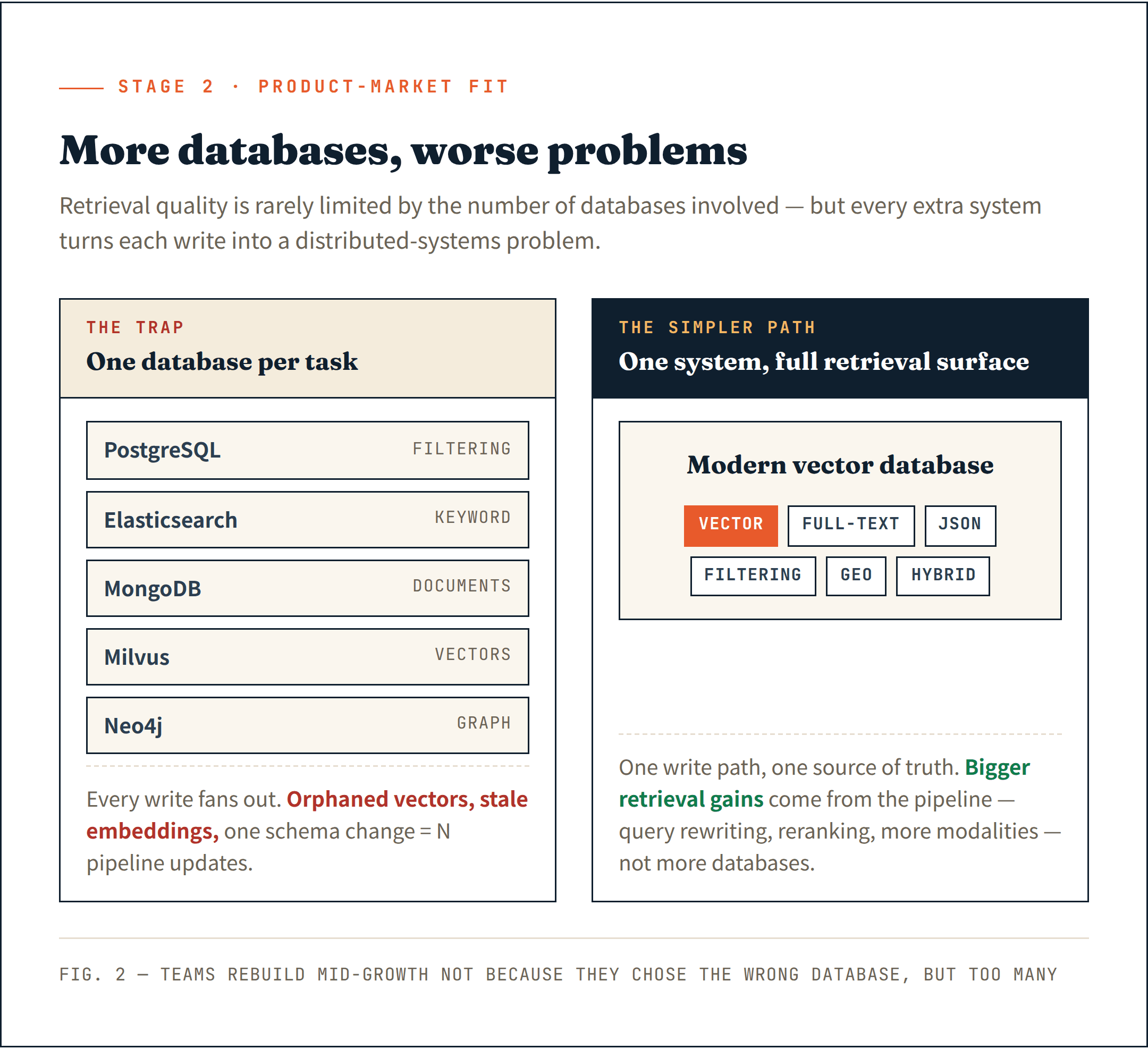
Some teams start assembling one system per retrieval task — PostgreSQL for filtering, Elasticsearch for keyword search, MongoDB for documents, Milvus for vectors, and Neo4j for graph relationships. The retrieval stack grows faster than the product itself.
Then the synchronization problem arrives.
Documents live in one system. Embeddings in another. Metadata in a third. Every write operation becomes a distributed systems problem. A failed deletion leaves orphaned vectors. A partial insert creates stale embeddings. A schema change requires updating multiple pipelines at once.
The hard lesson: retrieval quality is rarely limited by the number of databases involved.
The larger gains come from the retrieval pipeline itself — dynamic query rewriting, iterative search, progressive disclosure, better reranking. On the data side, adding another embedding field or another modality frequently improves retrieval quality more than adding another specialized database.
Modern vector databases have quietly expanded well beyond vectors. Full-text search, JSON filtering, geospatial search, and hybrid retrieval — most mature systems now support these natively. The specialized-database-per-task assumption is increasingly outdated.
A single system that handles the full retrieval surface is simpler to operate and provides a cleaner foundation for what comes next.
I've seen too many teams forced to rebuild their data infra mid-growth — not because they chose the wrong database, but because they chose too many.
What you actually need at this stage:
- A managed database service — let the vendor handle reliability while you focus on the product
- A single system with broad semantic support: vector, full-text, JSON, filtering, hybrid — not one database per task
- Enough headroom to grow into the next order of magnitude without rebuilding
Stage 3: Growth at Scale — Every Workload Should Not Share the Same Compute
This is the stage where cost pressure becomes undeniable. The reason is simple: the data always grows faster than your revenue.
The most common mistake: assuming the traditional database solution that got you here will take you further.
Unlike Stage 2, there is no easy room to rebuild at this point. A large-scale infrastructure migration under growth pressure is either extremely expensive, extremely risky, or both.
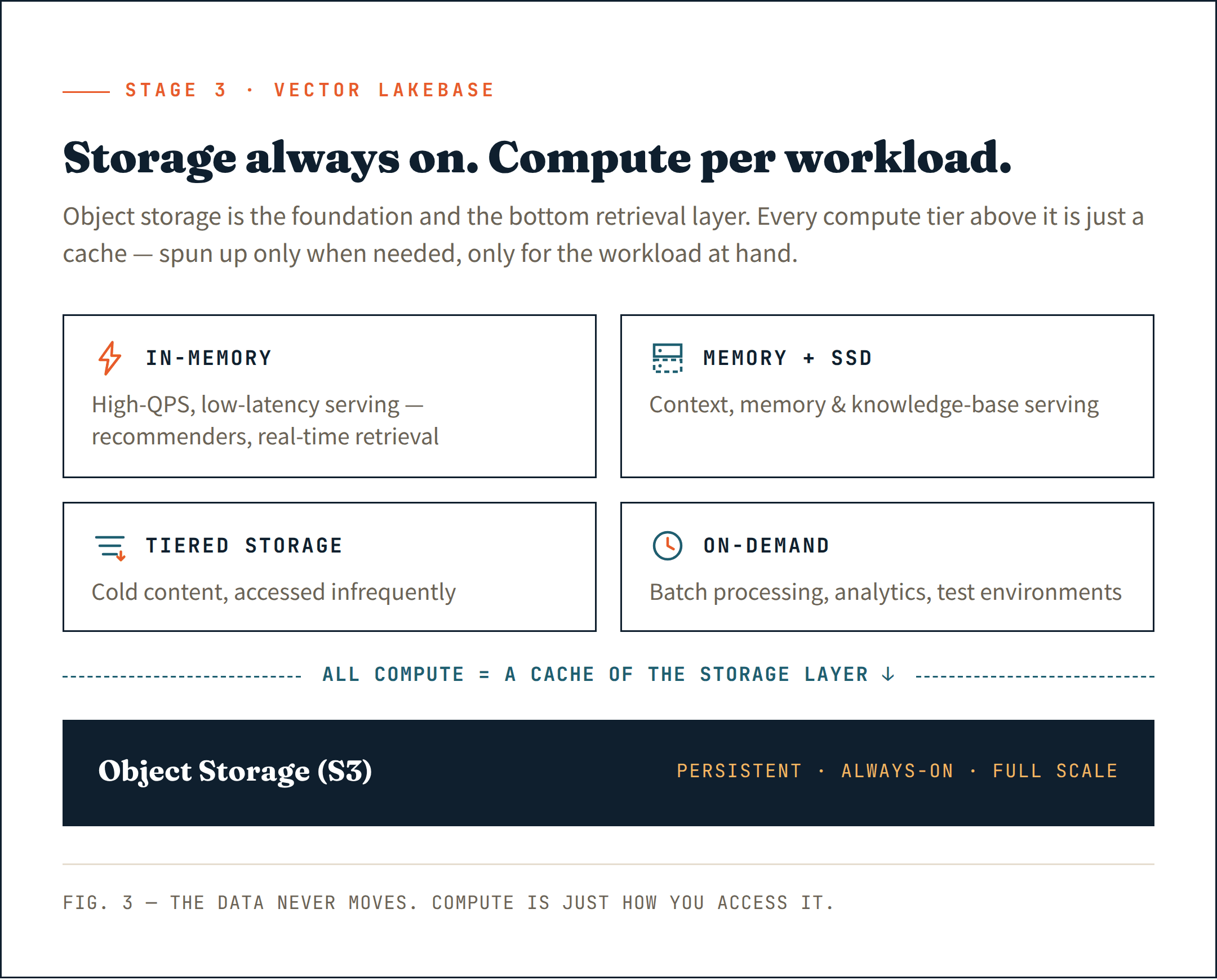
The right move is to put everything on object storage (like S3) — not just as a persistent store, but as the base layer of your retrieval architecture. It is the cheapest, most durable, and most scalable option that exists. Treat it as the foundation, not an afterthought.
Above that layer, bring in compute only where it is actually needed. Long-running clusters for latency-sensitive serving. Ephemeral compute resources for ingestion and indexing. On-demand compute for analytics and batch jobs. Each workload gets the compute it needs — and nothing more.
This is the essence of a Vector Lakebase: storage that is always on at full scale, compute that is neither — spun up only when needed, only for the workload at hand.
Most importantly, all compute — whether long-running or on-demand — acts as a cache of the object storage layer. The data always lives in storage. Compute is just how you access it.
Match each workload to the right compute tier:
- In-memory for high-QPS, low-latency workloads — AI recommender systems, real-time retrieval
- Memory + SSD for context, memory, and knowledge base serving
- Tiered storage for cold content that is accessed infrequently
- On-demand compute for batch processing, in-house analytics, and test environments
Done right, this approach cuts infrastructure costs by 50% or more compared to a unified design — while delivering much better service quality for each workload.
Serverless solutions often break down at this stage — not technically, but economically. Once your data crosses into terabytes, insert and storage costs begin to dominate. The reason is structural: serverless architectures bundle pooling overhead, indexing, and persistent data costs into write and storage markups. You are no longer paying for what you use. You are paying for the abstraction.
The first principle for data infra at this stage is straightforward: your foundation needs to scale with your data, not against it. One architecture forced to serve every workload equally well ends up serving none of them well — and the cost of that compromise compounds with every gigabyte you add.
What you actually need at this stage:
- Object storage (S3) as both foundation and bottom retrieval layer — persistent, always-on at full scale, the layer all compute reads from
- A Vector Lakebase: data that never moves, compute that spins up per workload and nothing more
- The right compute tier per workload type
Stage 4: Enterprise Scale — Trust Becomes Part of the Product
By this stage, most teams believe the hard part is behind them. It is not.
The common mistake: teams still think the problem is technical.
They have optimized infrastructure. They have controlled costs. They assume scaling to enterprise is a matter of adding capacity and checking a security box.
It is not.
The questions that block enterprise deals have nothing to do with performance:
How is our data isolated from other customers?
Who has access to what, and can you prove it?
Can you serve us in our region?
Can we deploy this inside our own cloud account?
But individual deal requirements are only part of the problem. In Stage 3, the inhomogeneity was technical — different workloads, different compute tiers. At this stage, it is structural: your customer base requires platform-level data infrastructure to handle it.
You have free users who need cost-efficient shared serving. You have paid individual customers who expect better availability. You have enterprise customers who require full data isolation, dedicated compute, and the ability to audit everything. Serving all three from the same architecture means you are either overspending on your free tier, underserving your enterprise customers, or both.
The right answer is a tiered infrastructure matched to each customer segment:
- Shared clusters for free and individual users — pooled, cost-optimized
- Isolated clusters per enterprise customer — dedicated compute, dedicated storage, dedicated access controls
- BYOC for customers who require deployment inside their own cloud account
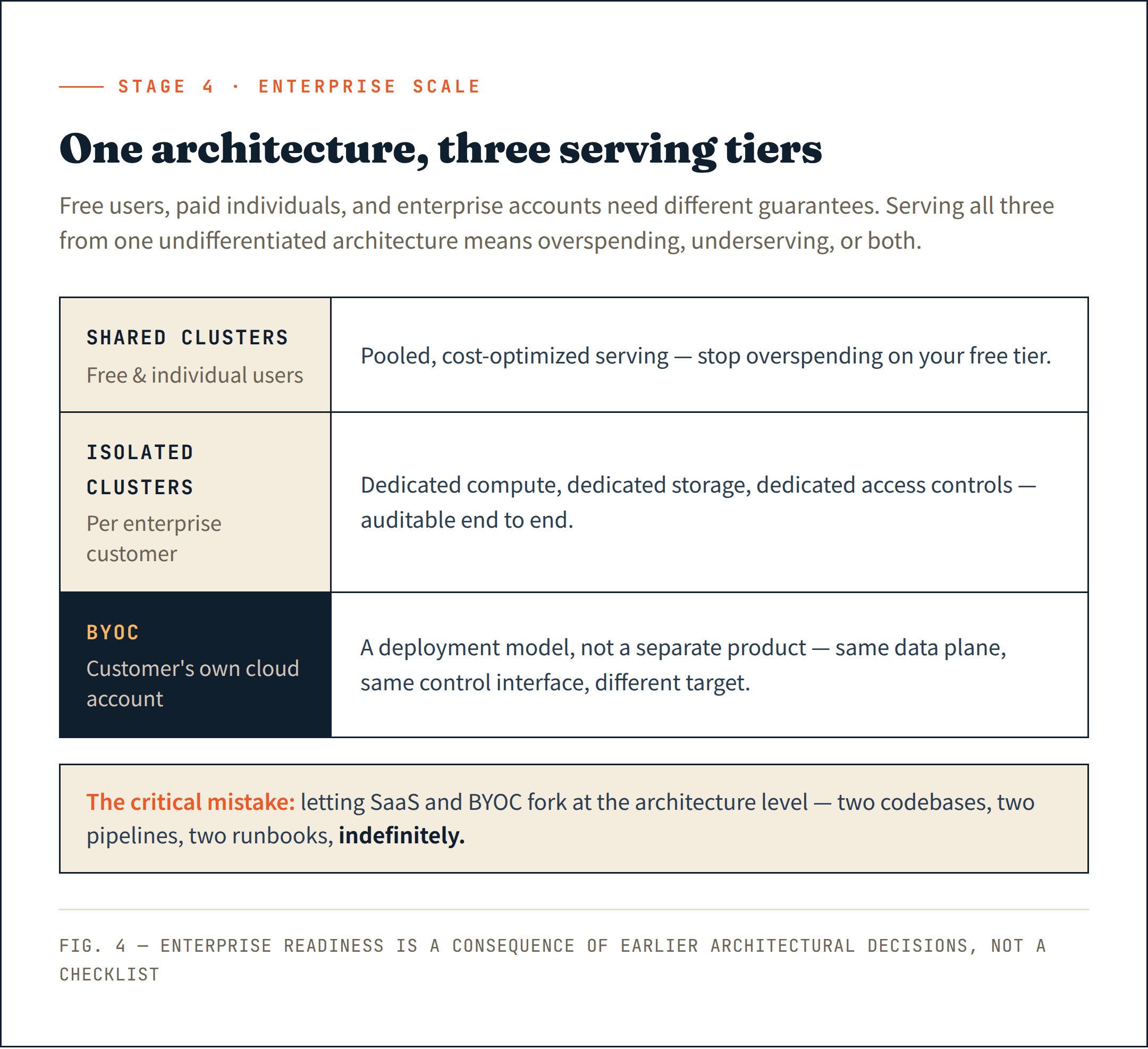
The BYOC point is where most teams make a critical mistake. SaaS and BYOC look like two products. If they fork at the architecture level, you are maintaining two codebases, two deployment pipelines, and two operational runbooks — indefinitely. The teams that got this right treated BYOC as a deployment model rather than a separate product. Same data plane, same control interface, different deployment target.
Global reliability is the other piece that gets deferred too long. At an enterprise scale, multi-regions are not a premium feature — they are a baseline expectation. Enterprise customers across different geographies will not tolerate a single-region deployment, nor will they accept your SLA commitments. Without a unified data infrastructure interface across clouds and regions, you end up operating different data layers in different environments — real-time data sync becomes its own distributed systems problem, and the operational complexity compounds with every new region you add.
The teams I spoke with who had reached serious enterprise deals described the same painful discovery: none of this had been designed in from the beginning. It had been bolted on later, under pressure from a live sales cycle. One team spent four months retrofitting data-level isolation into an architecture that was not built for it. They shipped it. But they knew exactly why it was fragile.
Enterprise readiness is not a checklist. It is a consequence of architectural decisions made much earlier.
What you actually need at this stage:
- A unified data infrastructure interface — consistent across clouds, consistent across regions
- Global clusters designed for high reliability and multi-region serving
- Tiered serving: shared clusters for free users, isolated clusters per enterprise customer
- SaaS and BYOC on the same architecture — one data plane, different deployment targets
- Open standards and open source at the foundation — no vendor lock-in at enterprise scale
What the Teams That Scaled Well Have in Common
The pattern is consistent.
Each stage introduces a completely different class of problem. Stage 1 is a speed problem. Stage 2 is a complexity problem. Stage 3 is a cost and architecture problem. Stage 4 is a trust and platform problem.
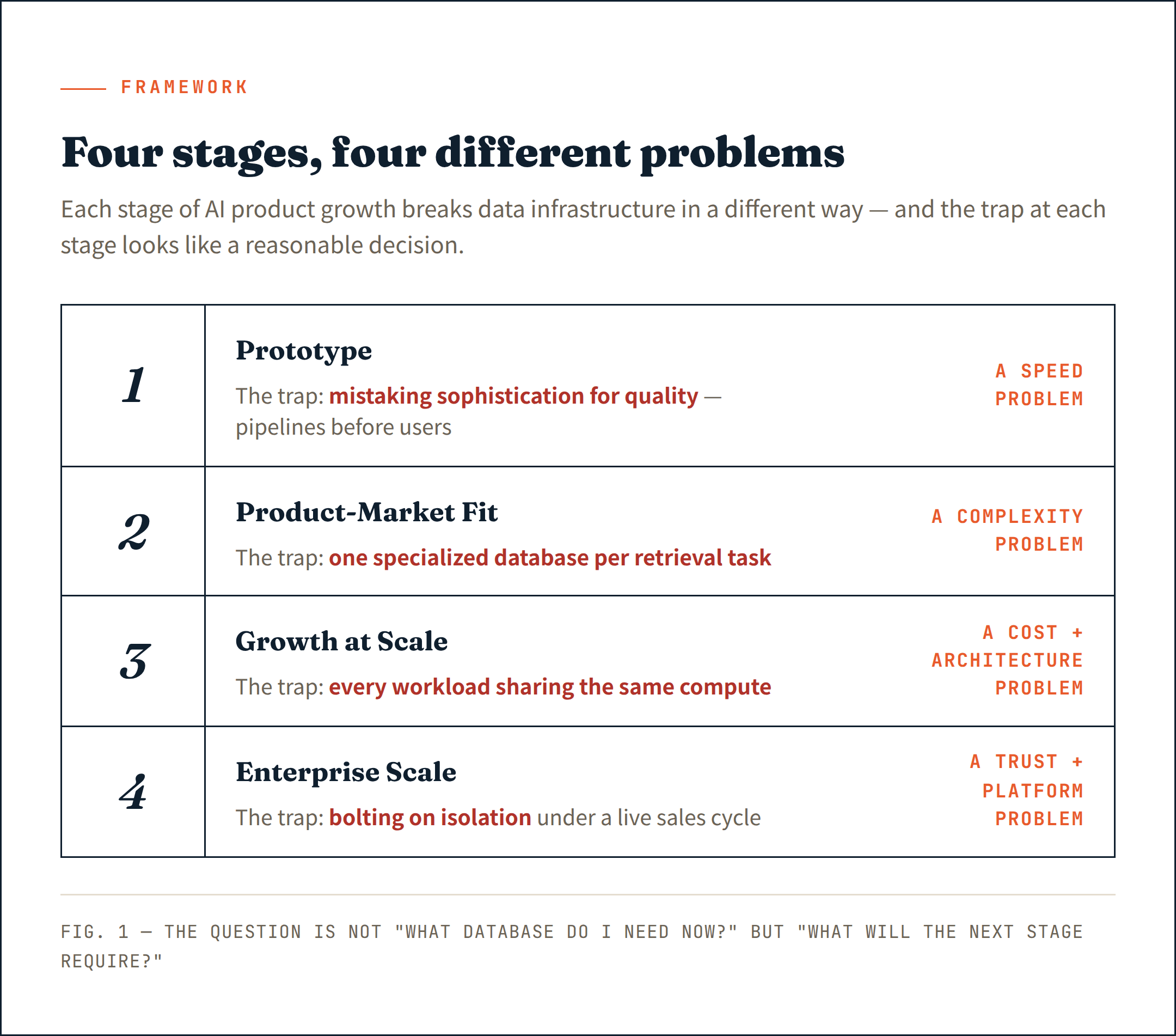
The teams that navigated every stage without a painful rebuild understood this early. They stopped asking "what database do I need right now?" and started asking "what will the next stage require — and does my current decision close that door?"
At Stage 1, a vector database is exactly the right tool. I say that without qualification.
At Stage 3 and beyond, what becomes necessary is something different in kind — a Vector Lakebase. Storage always on at full scale. Compute matched to each workload. A platform that can serve a free user, a paying customer, and an enterprise account from the same architecture, without forking.
The teams that got there faster were not smarter or better funded.
They just understood, earlier, that the infrastructure decision was not a temporary choice.
It was the foundation on which everything else would be built.
Zilliz Vector Lakebase is available in public preview
We've launched the public preview of Zilliz Vector Lakebase — a major evolution of Zilliz Cloud, from a managed vector database to a unified semantic data platform that pairs the production vector database with a shared, lake-native data foundation.
Zilliz Vector Lakebase core capabilities:
- Tiered serving optimized for different real-time performance-cost trade-offs
- On-demand search for large-scale or exploratory workloads without always-on compute
- External data lake search — index and search directly over your existing lake data
- Full-spectrum search across vectors, text, JSON, and geospatial data with hybrid retrieval and reranking
- Unified lake-native storage built on Vortex, an open format with faster and cheaper random reads than Lance or Parquet
If your current stack splits serving and discovery into separate systems, Vector Lakebase might be worth a look. Try it on Zilliz Cloud — new work email signups get $100 free credits — or talk to us about your use case.
Learn more about Vector Lakebases
- From Vector Database to Vector Lakebase
- We spent 8 years making vector databases faster. Then we stopped.
- Why We Built Vector Lakebase: Rethinking Unstructured Data Architecture for AI
- Vector Lakebase: End the AI Data Silo
- Zilliz Cloud On-Demand Compute: Pay Only for What You Use
- Notion's Vector Search Is Excellent. Their Next Problem Is Harder.

Keep Reading

Zilliz Cloud Delivers Better Performance and Lower Costs with Arm Neoverse-based AWS Graviton
Zilliz Cloud adopts Arm-based AWS Graviton3 CPUs to cut costs, speed up AI vector search, and power billion-scale RAG and semantic search workloads.
How to Use Anthropic MCP Server with Milvus
MCP + Milvus: Streamline AI agent development with standardized data access, eliminating integration hassles while enhancing context and flexibility.
OpenAI o1: What Developers Need to Know
In this article, we will talk about the o1 series from a developer's perspective, exploring how these models can be implemented for sophisticated use cases.