




How to Improve Retrieval Quality for Japanese Text with Sudachi, Milvus/Zilliz, and AWS Bedrock
This post was originally published on Qiita and is translated and published here with permission.
Introduction
When I started building Retrieval-Augmented Generation (RAG) systems for Japanese users, I ran into a problem that probably feels familiar to anyone who has worked with Japanese text: search accuracy just isn’t as straightforward as it is in English. The language has quirks—orthographic variations, long vowels, mixed scripts, surface-form differences—that routinely break both dense and sparse retrieval methods when used in isolation.
Dense vector search is great for understanding context and semantic similarity, but it quickly falls apart when you need exact matches—model numbers, legal article identifiers, internal codes, or very specific entities like “金商法第37条 (Article 37 of the Financial Instruments and Exchange Act).” Keyword-based methods like BM25 handle these cases well, but they can’t keep up when the input includes minor spelling variations (“サーバー” vs. “サーバ”) or when the same idea can be expressed in multiple forms.
To work around this, I built a hybrid search pipeline that combines the strengths of both approaches. The solution uses:
Sudachi: a Japanese tokenizer that provides normalization and stable tokenization across inconsistent text.
Zilliz Cloud (the fully managed Milvus service): a high–performance vector database that supports dense vectors, sparse vectors, and even automatic BM25 vector generation, which makes hybrid search much easier to implement.
AWS Bedrock: used for generating high-quality dense embeddings (Titan Embeddings v2), which form the semantic side of the retrieval pipeline.
In this post, I’ll walk through how I put these pieces together to build a high-accuracy Japanese hybrid search system. I’ll also include a hands-on example so you can try the same workflow yourself and adapt it to your own RAG projects.
Architecture Overview
The hybrid search system in this article is built on a simple but effective stack. Each component solves a specific problem that arises when dealing with Japanese text, and together they form a retrieval pipeline that balances semantic understanding with exact-match precision. Here’s the breakdown of what the stack looks like and why each part matters.
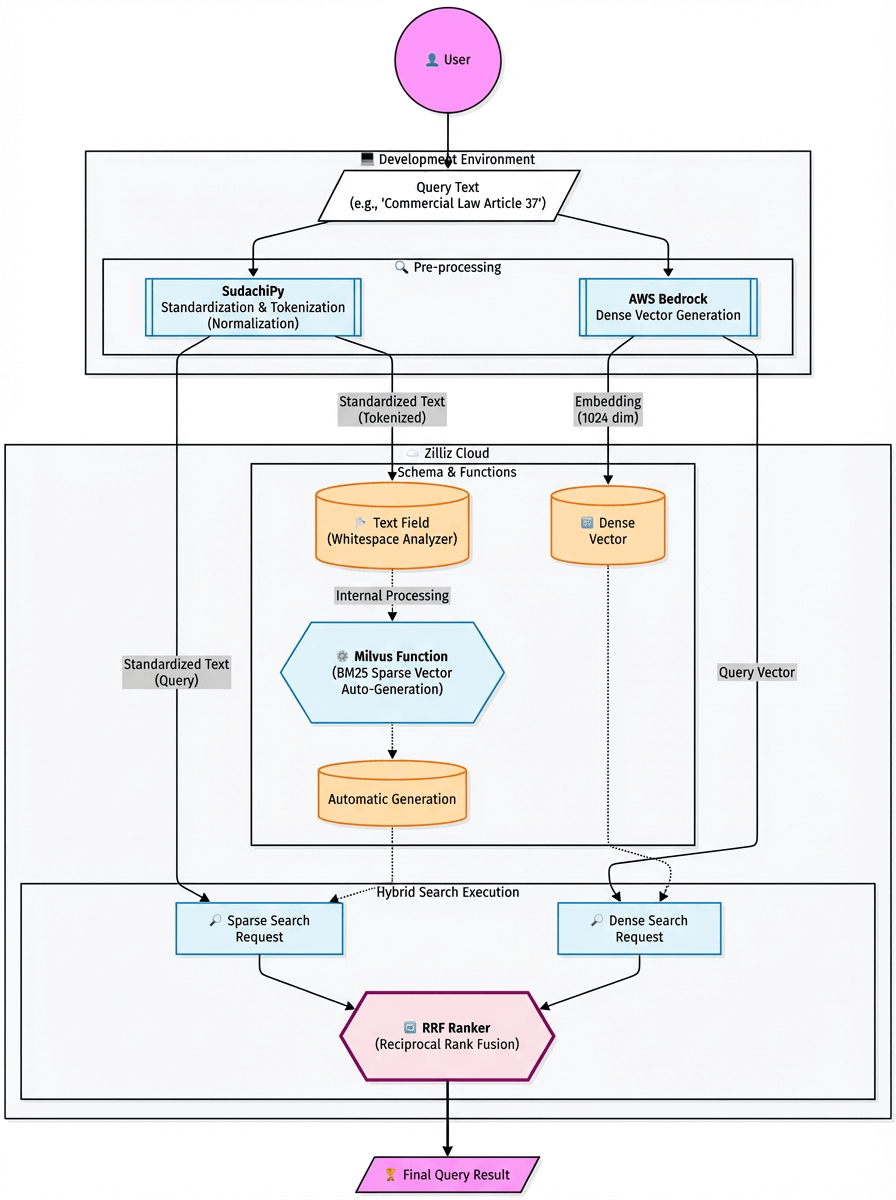
SudachiPy — Tokenizer / Morphological Analysis
Japanese text often contains inconsistent spellings, spacing irregularities, and variations in notation. Instead of relying on naïve tokenization, I use SudachiPy and its normalized_form() API to clean it all up. This ensures that “サーバー” and “サーバ” map to the same normalized token, and documents that would otherwise be missed still show up in the search results. This single step dramatically improves recall across the board.
Zilliz Cloud (Managed Milvus): A High-Performance Vector Database
Milvus is the most widely adopted open-source vector database, with 43K+ GitHub stars and a large contributor ecosystem. Zilliz Cloud uses the same Milvus core, but removes all of the operational work—cluster setup, autoscaling, performance tuning, backups, version upgrades—while still exposing the same Milvus API. In practice, that means I can build locally with open-source Milvus and deploy the exact same code to Zilliz Cloud when I need a production-grade environment.
This matters because many vector search projects hit the same wall: the prototype works, but scaling it becomes too expensive or too unpredictable. Fully managed PaaS search services like Azure AI Search or proprietary vector stores often become cost bottlenecks long before performance requirements are met. Zilliz Cloud offers a more efficient path: higher throughput, lower latency, and more control over data layout—without the cost creep that usually shows up at scale.
In this architecture, Zilliz Cloud handles all embedding storage and retrieval. It supports:
Dense vector search for semantic similarity
Sparse vector search for keyword-based retrieval
Starting with Milvus v2.4, the database also includes a Function feature that automatically generates BM25 sparse vectors from raw text. This is a big operational win. I don’t have to compute BM25 client-side, maintain extra indexing pipelines, or synchronize metadata across multiple systems. Everything—from dense embeddings to BM25 to hybrid ranking—lives in a single database, keeping the entire retrieval workflow simple, fast, and easy to maintain.
AWS Bedrock (Titan Embeddings v2): The Embedding Model
For dense vector embeddings, I use Titan Embeddings v2 from AWS Bedrock. It performs well across multiple languages and handles Japanese text reliably, which is important when you’re embedding mixed content like short queries, long policy documents, product descriptions, and FAQ-style text.
Reciprocal Rank Fusion (RRF): The Reranking Method
Hybrid search only works if you can meaningfully combine the results of dense and sparse search, and the two score spaces are fundamentally different. RRF (Reciprocal Rank Fusion) solves this cleanly by merging results based on rank rather than raw scores. It produces stable, easy-to-reason-about hybrid results without any hand-tuned weighting or normalization tricks.
Beginner-Friendly Hybrid Search Tutorial
With the architecture out of the way, let’s get into something you can actually run. I put together a GitHub repo with all the code and example data you need, so the setup is intentionally lightweight. Once you spin up a free Zilliz Cloud cluster and add your AWS Bedrock API key, you’ll be able to test three retrieval modes side by side:
Dense vector search
Sparse (BM25) full-text search
Hybrid search (RRF fusion)
The entire workflow runs on low cost—only the Bedrock embedding calls incur charges.
Step 1: Clone the Repository from GitHub
First, clone the repository:
git clone [https://github.com/Beginnersguide138/rag-with-sudachi.git](https://github.com/Beginnersguide138/rag-with-sudachi.git)
Move into the project directory and set up the Python environment:
cd rag-with-sudachi

uv sync               # Install Python dependencies using uv

cp .env.example .env  # Create an environment file based on the template
Step 2: Set Up Zilliz Cloud (Free Tier)
Zilliz Cloud runs on all major cloud providers—AWS, GCP, and Azure. You can sign up directly on the Zilliz website or subscribe through the respective cloud marketplaces. In this tutorial, I’ll use the AWS Marketplace path since it’s a quick way to spin up a fully managed Milvus cluster without touching any infrastructure.
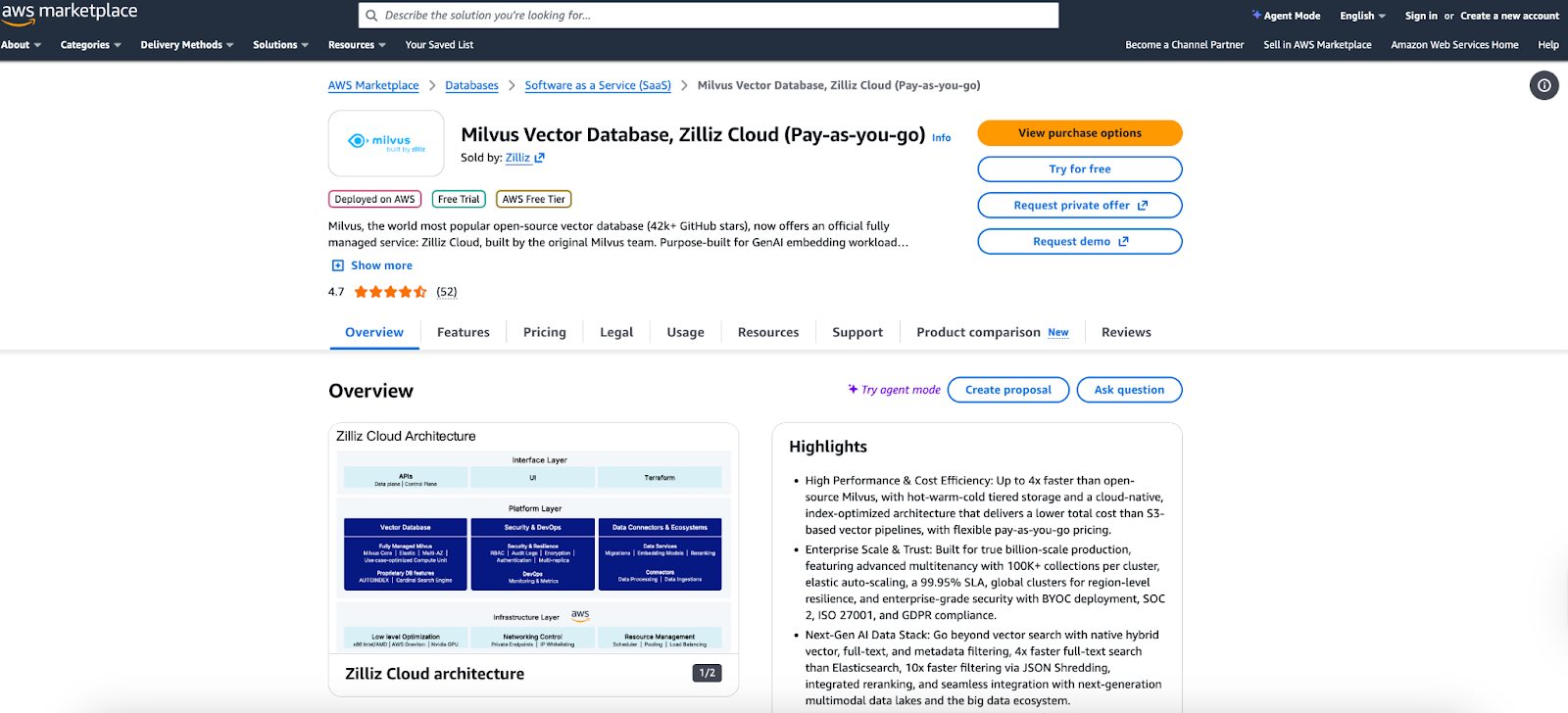
- Go to the Zilliz Cloud listing on AWS Marketplace and click “Try for free.” This creates a zero-cost serverless Milvus cluster:
It will never automatically convert to a paid plan
Has some limitations (e.g., restricted monitoring features)
The cluster is more than sufficient for this hybrid search tutorial
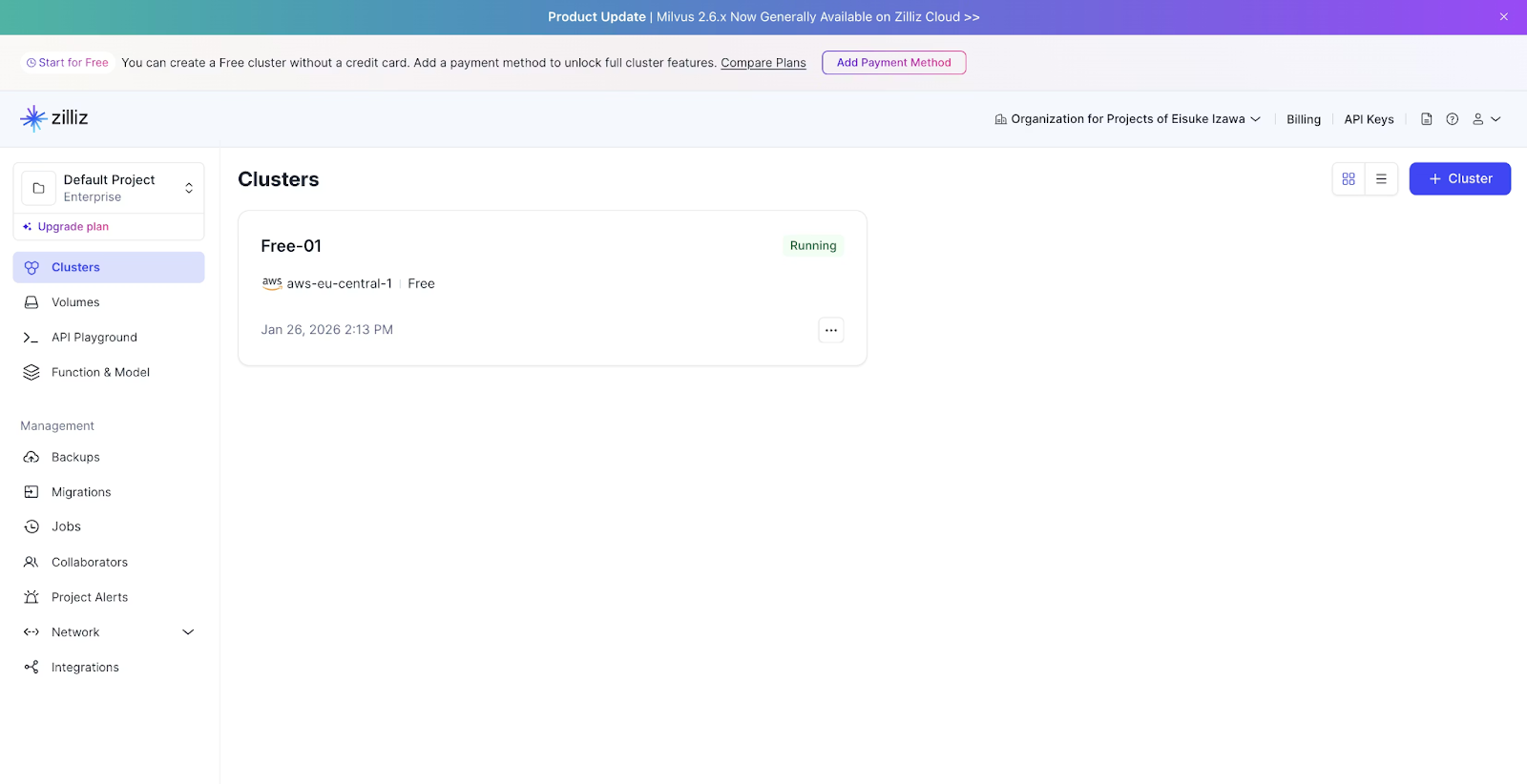
2. Open the Zilliz Cloud console after the subscription completes:
Create a new Organization (just a logical container for your projects).
You’ll see a free serverless cluster already provisioned.
Grab the Cluster Endpoint and API Key—you’ll need these when connecting from your code.
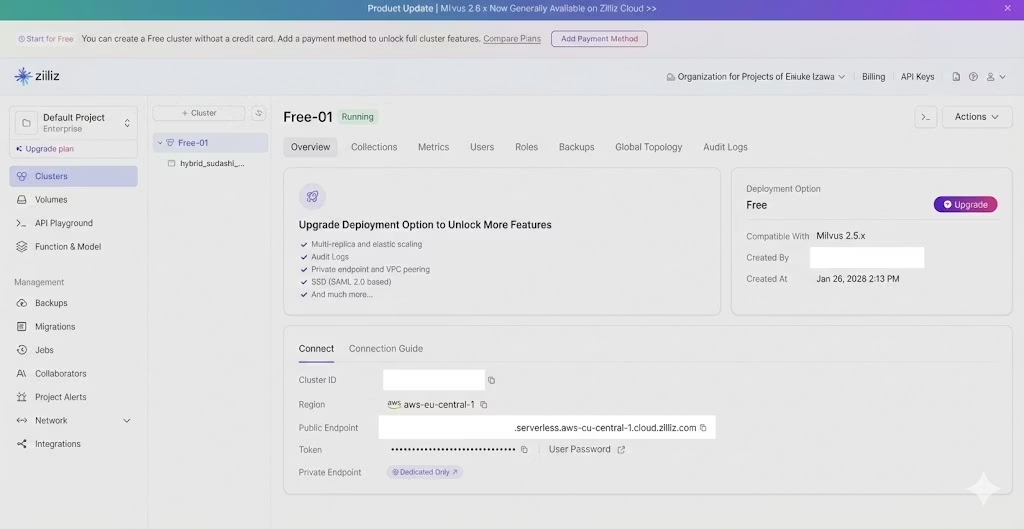
Step 3: Configure Environment Variables
Paste your Zilliz and Bedrock credentials into .env file:
# Zilliz Cloud connection

ZILLIZ_CLOUD_URI=https://your-cluster-id.serverless.region.cloud.zilliz.com

ZILLIZ_CLOUD_API_KEY=your-api-key-here


# AWS Bedrock short-term API key

AWS_BEARER_TOKEN_BEDROCK=bedrock-api-key-your-token-here
Code note: Bedrock short-term tokens expire every 12 hours. This is intentional—they reduce the blast radius of credential exposure and are ideal for local development.
Step 4: Launch the Notebook or Run the Script
Open the repository in VS Code. The main tutorial is located in:
notebooks/hybrid_search_with_bm25.ipynb
If you prefer a pure Python workflow instead of Jupyter Notebook, you can run:
python run_hybrid_search.py
Both versions:
Build the Milvus schema
Apply Sudachi normalization
Insert dense and sparse vectors
Compare the results of semantic, keyword, and hybrid search
Technical Details
1. The Key to Japanese Processing: Text Normalization with Sudachi
In retrieval systems for Japanese content, a large portion of accuracy depends on how text is preprocessed during indexing. Text extracted from PDFs often contains inconsistent spacing, orthographic variations, or noise, which frequently leads to missed matches and lower recall.
To address this issue, this implementation uses Sudachi’s normalization function. This process standardizes tokens before indexing so that the search system can treat different spellings and representations as equivalent.
Code: Sudachi Normalization Wrapper
class SudachiAnalyzer:

    def __init__(self):

        self.tokenizer = dictionary.Dictionary(dict="core").create()

        self.mode = tokenizer.Tokenizer.SplitMode.C


    def analyze(self, text: str) -> str:

        if not text:

            return ""

        tokens = self.tokenizer.tokenize(text, self.mode)

        # Return as a space-separated string

        return " ".join(\[t.normalized_form() for t in tokens if t.surface().strip()\])


analyzer = SudachiAnalyzer()
Why Normalization Matters
Using normalized_form() unifies variations such as:
Katakana: 「サーバー」 ⇔ 「サーバ」
Numeric notation: 「第1条」 ⇔ 「第一条」
PDF spacing noise: 「第 一 条」(不自然なスペース) ⇔ 「第一条」
Without normalization, these variations lead to:
Missed BM25 matches
Incorrect sparse vector tokenization
Lower recall for legally structured queries
By normalizing both documents and queries, the hybrid system dramatically increases match probability.
2. Schema Design in Zilliz Cloud (managed Milvus)
Milvus, the core of Zilliz Cloud, provides a Function feature (available in v2.4 and later) that automatically generates BM25-based sparse vectors in the database. This eliminates the need to precompute BM25 vectors on the client side.
Schema Definition
# Create schema (auto ID disabled for explicit ID assignment)

schema = MilvusClient.create_schema(auto_id=False, enable_dynamic_field=True)


# Field definitions

schema.add_field(field_name="id", datatype=DataType.INT64, is_primary=True)

schema.add_field(

    field_name="text",

    datatype=DataType.VARCHAR,

    max_length=65535,

    enable_analyzer=True,

    analyzer_params={

        "tokenizer": "whitespace"

    },  # Sudachi already provides whitespace-separated input

)

schema.add_field(

    field_name="dense_vector", datatype=DataType.FLOAT_VECTOR, dim=1024

)  # Titan Embeddings v2 outputs 1024 dimensions

schema.add_field(field_name="sparse_vector", datatype=DataType.SPARSE_FLOAT_VECTOR)


# Define the BM25 function

bm25_function = Function(

    name="text_bm25_emb",

    input_field_names=\["text"\],

    output_field_names=\["sparse_vector"\],

    function_type=FunctionType.BM25,

)

schema.add_function(bm25_function)
This design eliminates the need to explicitly pass sparse vectors during data insertion, significantly reducing operational complexity.
By shifting the BM25 vector generation into Milvus itself:
The ingestion pipeline becomes simpler
No explicit sparse-vector calculation is required
You avoid maintaining additional preprocessing code
Scaling becomes much easier
This reduces operational burden significantly.
Index Design and Optimization Strategy
# Index definitions

index_params = client.prepare_index_params()

index_params.add_index(

    field_name="dense_vector", index_type="HNSW", metric_type="COSINE"

)

index_params.add_index(

    field_name="sparse_vector",

    index_type="SPARSE_INVERTED_INDEX",

    metric_type="BM25",

    params={"inverted_index_algo": "DAAT_MAXSCORE"},

)
Dense Vector Index: HNSW
HNSW (Hierarchical Navigable Small World) is a graph-based ANN algorithm widely used in vector databases. It offers:
High-speed retrieval
High recall
Strong performance at scale
COSINE is used as the similarity metric because Titan Embeddings operate in normalized cosine space.
Sparse Vector Index: Inverted Index with MaxScore Optimization
Sparse vectors use a traditional inverted index structure. The additional DAAT_MAXSCORE optimization provides:
Document-at-a-time processing for efficient traversal
Early pruning of documents that cannot reach top-k scores
Reduced computation without compromising accuracy
This leads to significantly faster BM25 search.
3. Hybrid Search Implementation Using RRF
To fairly merge results from dense (semantic) and sparse (keyword) searches, the system uses Reciprocal Rank Fusion (RRF). RRF is robust, easy to apply, and does not require tuning or normalization across score types.
Hybrid Search Code
from pymilvus import AnnSearchRequest, RRFRanker


def search_hybrid(client, collection_name, query_text, query_vector, top_k=5):

    # Normalize and tokenize the query using Sudachi

    query_processed = analyzer.analyze(query_text)


    # Dense semantic search request

    req_dense = AnnSearchRequest(

        data=\[query_vector\],

        anns_field="dense_vector",

        param={"metric_type": "COSINE"},

        limit=top_k * 2,

    )


    # Sparse BM25 keyword search request

    req_sparse = AnnSearchRequest(

        data=\[query_processed\],

        anns_field="sparse_vector",

        param={"metric_type": "BM25"},

        limit=top_k * 2,

    )


    # Perform hybrid search using RRF

    res = client.hybrid_search(

        collection_name=collection_name,

        reqs=\[req_dense, req_sparse\],

        ranker=RRFRanker(),  # Fuse rankings using RRF

        limit=top_k,

        output_fields=\["text", "original_text"\],

    )

    return res\[0\]
Comparison of Actual Search Results
The tutorial evaluates results using publicly available documents from Japan’s Financial Services Agency. The notebook allows side-by-side comparison of:
Semantic search (dense vector)
Full-text search (sparse vector)
Hybrid search (dense + sparse via RRF)
Case Study: Keyword-Heavy Query
Query: “指定ADR機関が存在しない場合の苦情処理措置”
Note: the query means “A procedure for complaint handling when no designated ADR organization exists.”
Results:
Dense vector search: Often returns conceptually related passages but struggles to surface exact regulatory clauses.
Sparse BM25 search: Correctly identifies documents containing terms such as “designated ADR organization” and “complaint-handling measures,” ranking them highest.
Hybrid search: Combines the precise matching ability of BM25 with additional relevant context retrieved by dense search.
This shows that dense-only search risks missing critical results when users query with specialized terminology. Hybrid search is essential for business document retrieval.
Summary and Applications
In this article, we walked through a practical hybrid search setup that pairs Sudachi-based normalization with Zilliz Cloud (managed Milvus). The goal was simple: build a retrieval pipeline that performs well on Japanese text, where both semantic similarity and exact matching matter. By combining dense vectors, BM25 sparse vectors, and RRF-based fusion, the system stays accurate, easy to run, and adaptable to real production workloads.
Key Benefits
Robust to spelling variations: Sudachi’s normalization smooths out orthographic differences, spacing issues, and PDF extraction noise, preventing common recall failures in Japanese text search.
Low operational overhead: Milvus Functions handle BM25 sparse vector generation inside the database. No extra preprocessing jobs, no external search service, and no duplicated indexing logic.
High overall accuracy: RRF combines dense and sparse retrieval without complex weight tuning. You get stable hybrid results that handle both conceptual queries and exact identifiers gracefully.
Potential Use Cases
This hybrid approach shines in scenarios where users may switch between precise, structured queries and open-ended language:
Internal policy and manual search: Supports exact references (e.g., article numbers) while also handling vague or exploratory queries.
E-commerce product search: Enables precise part-number lookup while offering similarity-based recommendations.
Customer support knowledge bases: Match structured terms like error codes while still interpreting natural user input (“画面が真っ黒です”, “ログインできない”).
The complete source code and Jupyter Notebook used in this article are available in the following repository: GitHub: rag-with-sudachi
The cost to try everything out is minimal—only the AWS Bedrock embedding calls are billed. Zilliz Cloud’s free serverless tier is enough to run the entire workflow.
If you're exploring hybrid search for production systems or internal prototypes, this example is an excellent starting point.

Keep Reading
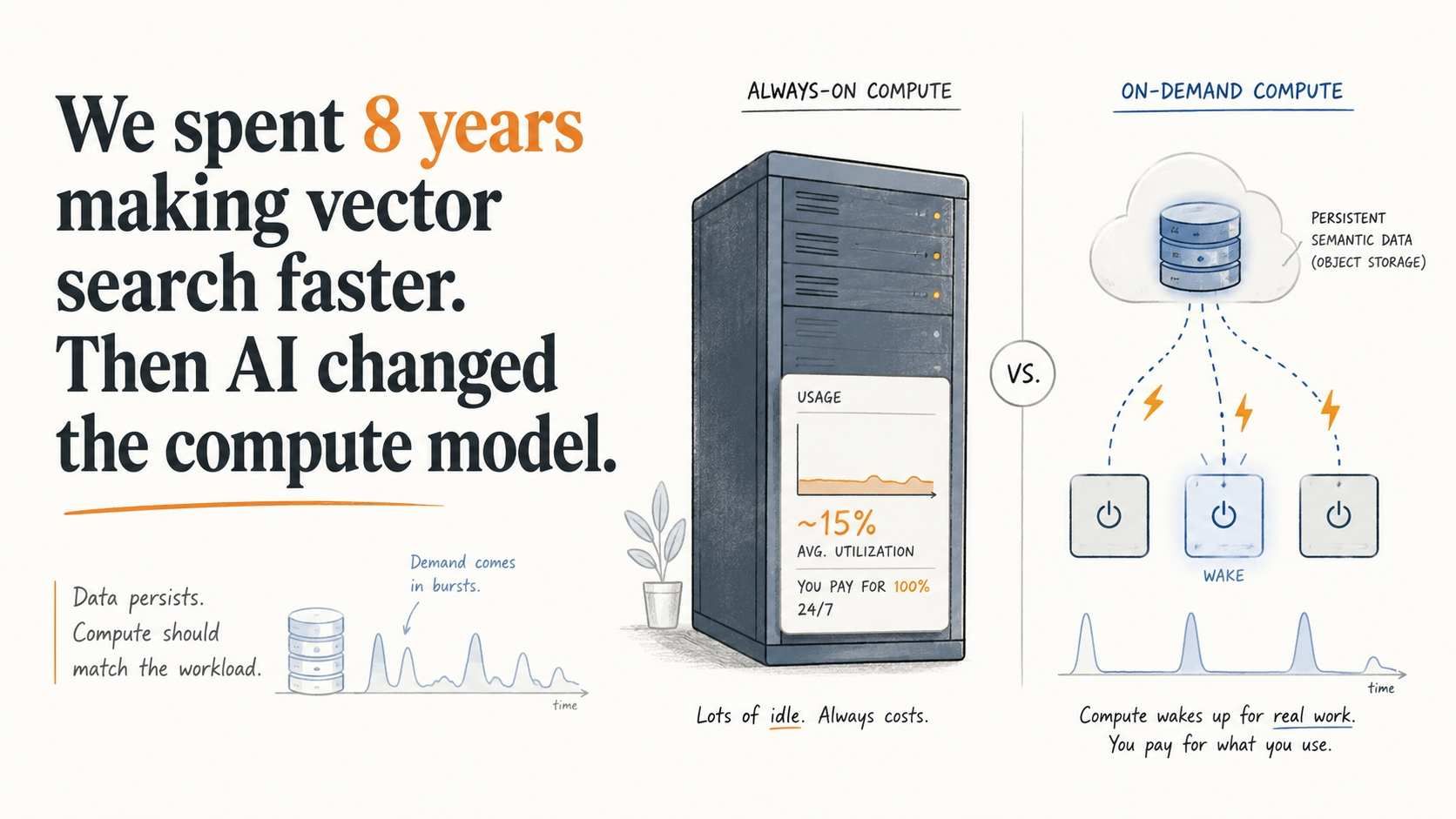
We spent 8 years making vector databases faster. Then we stopped.
Rarely queried embeddings still need to stay searchable. See how Vector Lakebase enables on-demand vector search without always-on compute costs.

How to Choose the Best Embedding Model for RAG in 2026: 10 Models Benchmarked
We benchmarked 10 embedding models on cross-modal, cross-lingual, long-document, and dimension compression tasks. See which one fits your RAG pipeline.

Optimizing Embedding Model Selection with TDA Clustering: A Strategic Guide for Vector Databases
Discover how Topological Data Analysis (TDA) reveals hidden embedding model weaknesses and helps optimize vector database performance.