




HKU NLP / instructor-xl
An instruction-finetuned model tailored for text embeddings with the best performance when compared to `instructor-base` and `instructor-large.`
Task: Embedding
Modality: Text
Similarity Metric: Cosine
License: Apache 2.0
Dimensions: 768
Max Input Tokens: 512
Price: Free
Introduction to the Instructor Model Family
The Instructor model by NKU NLP is a text embedding model fine-tuned with instructions. It creates task-specific embeddings (for classification, retrieval, clustering, text evaluation, etc.) across various domains (like science and finance) by just providing task instructions—no extra fine-tuning is needed. It has set state-of-the-art results on 70 embedding tasks!
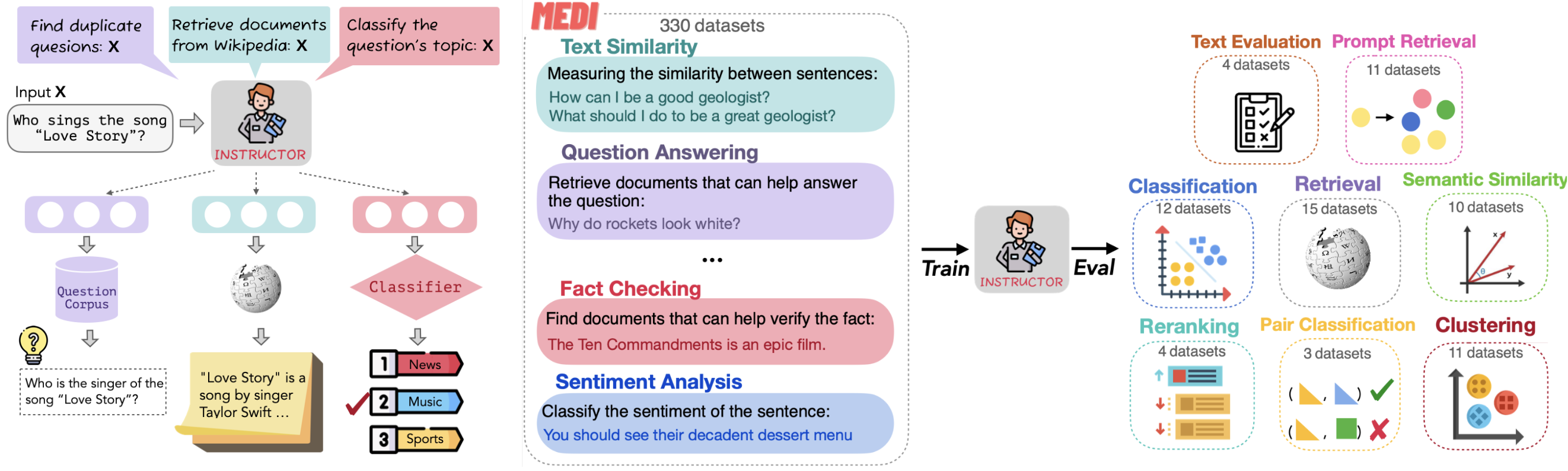 Figure How the Instructor Model works
Figure: How the Instructor Model works (image by NKU NLP)
The Instructor model comes in three variations: instructor-base, instructor-xl, and instructor-large. Each version offers different levels of performance and scalability to suit various embedding needs.
Introduction to instructor-xl
instructor-xl is the largest variation of the Instructor model family, which is optimized for performance and balancing accuracy and efficiency in large-scale natural language processing (NLP) applications.
It can generate task-specific and domain-tailored text embeddings by providing natural language instruction without further fine-tuning. It is ideal for any tasks (e.g., classification, retrieval, clustering, text evaluation, etc.) and domains (e.g., science, finance, etc.).
Comparing instructor-base, instructor-xl, and instructor-large:
| Feature | instructor-base | instructor-large | instructor-xl |
|---|---|---|---|
| Parameter Size | 86 million | 335 million | 1.5 billion |
| Embedding Dimension | 768 | 768 | 768 |
| Avg. MTEB Score | 55.9 | 58.4 | 58.8 |
How to create vector embeddings with the instructor-xl model
We recommend using the InstructorEmbedding Library to create vector embeddings.
Once the vector embeddings are generated, they can be stored in Zilliz Cloud (a fully managed vector database service powered by Milvus) and used for semantic similarity search. Here are four key steps:
- Sign up for a Zilliz Cloud account for free.
- Set up a serverless cluster and obtain the Public Endpoint and API Key.
- Create a vector collection and insert your vector embeddings.
- Run a semantic search on the stored embeddings.
Generate vector embeddings via InstructorEmbedding Library and insert them into Zilliz Cloud for semantic search
from InstructorEmbedding import INSTRUCTOR
from pymilvus import MilvusClient

model = INSTRUCTOR('hkunlp/instructor-XL')

docs = [["Represent the Wikipedia document for retrieval: ", "Artificial intelligence was founded as an academic discipline in 1956."],
        ["Represent the Wikipedia document for retrieval: ", "Alan Turing was the first person to conduct substantial research in AI."],
        ["Represent the Wikipedia document for retrieval: ", "Born in Maida Vale, London, Turing was raised in southern England."]]
# Generate embeddings for documents
docs_embeddings = model.encode(docs, normalize_embeddings=True)

queries = [["Represent the Wikipedia question for retrieving supporting documents: ", "When was artificial intelligence founded"],
           ["Represent the Wikipedia question for retrieving supporting documents: ", "Where was Alan Turing born?"]]
# Generate embeddings for queries
query_embeddings = model.encode(queries, normalize_embeddings=True)

# Connect to Zilliz Cloud with Public Endpoint and API Key
client = MilvusClient(
    uri=ZILLIZ_PUBLIC_ENDPOINT,
    token=ZILLIZ_API_KEY)

COLLECTION = "documents"
if client.has_collection(collection_name=COLLECTION):
    client.drop_collection(collection_name=COLLECTION)
client.create_collection(
    collection_name=COLLECTION,
    dimension=768,
    auto_id=True)

for doc, embedding in zip(docs, docs_embeddings):
    client.insert(COLLECTION, {"text": doc, "vector": embedding})

results = client.search(
    collection_name=COLLECTION,
    data=query_embeddings,
    consistency_level="Strong",
    output_fields=["text"])