Build RAG Chatbot with LangChain, Milvus, Mistral AI Mistral Large, and OpenAI text-embedding-3-small
Introduction to RAG
Retrieval-Augmented Generation (RAG) is a game-changer for GenAI applications, especially in conversational AI. It combines the power of pre-trained large language models (LLMs) like OpenAI’s GPT with external knowledge sources stored in vector databases such as Milvus and Zilliz Cloud, allowing for more accurate, contextually relevant, and up-to-date response generation. A RAG pipeline usually consists of four basic components: a vector database, an embedding model, an LLM, and a framework.
Key Components We'll Use for This RAG Chatbot
This tutorial shows you how to build a simple RAG chatbot in Python using the following components:
- LangChain: An open-source framework that helps you orchestrate the interaction between LLMs, vector stores, embedding models, etc, making it easier to integrate a RAG pipeline.
- Milvus: An open-source vector database optimized to store, index, and search large-scale vector embeddings efficiently, perfect for use cases like RAG, semantic search, and recommender systems. If you hate to manage your own infrastructure, we recommend using Zilliz Cloud, which is a fully managed vector database service built on Milvus and offers a free tier supporting up to 1 million vectors.
- Mistral AI Mistral Large: This model offers a high-performance solution for a range of natural language processing tasks. With a focus on large-scale text generation and comprehension, it excels in handling complex queries and generating nuanced responses. Ideal for applications in content creation, conversational agents, and research analysis, Mistral Large combines versatility with efficiency.
- OpenAI text-embedding-3-small: This model specializes in generating high-quality text embeddings for various NLP tasks, offering a balance between performance and computational efficiency. Its strengths lie in semantic understanding and similarity comparisons, making it ideal for applications in search, recommendation systems, and clustering tasks where quick processing is essential.
By the end of this tutorial, you’ll have a functional chatbot capable of answering questions based on a custom knowledge base.
Note: Since we may use proprietary models in our tutorials, make sure you have the required API key beforehand.
Step 1: Install and Set Up LangChain
%pip install --quiet --upgrade langchain-text-splitters langchain-community langgraph
Step 2: Install and Set Up Mistral AI Mistral Large
pip install -qU "langchain[mistralai]"
import getpass
import os

if not os.environ.get("MISTRAL_API_KEY"):
  os.environ["MISTRAL_API_KEY"] = getpass.getpass("Enter API key for Mistral AI: ")

from langchain.chat_models import init_chat_model

llm = init_chat_model("mistral-large-latest", model_provider="mistralai")
Step 3: Install and Set Up OpenAI text-embedding-3-small
pip install -qU langchain-openai
import getpass
import os

if not os.environ.get("OPENAI_API_KEY"):
  os.environ["OPENAI_API_KEY"] = getpass.getpass("Enter API key for OpenAI: ")

from langchain_openai import OpenAIEmbeddings

embeddings = OpenAIEmbeddings(model="text-embedding-3-small")
Step 4: Install and Set Up Milvus
pip install -qU langchain-milvus
from langchain_milvus import Milvus

vector_store = Milvus(embedding_function=embeddings)
Step 5: Build a RAG Chatbot
Now that you’ve set up all components, let’s start to build a simple chatbot. We’ll use the Milvus introduction doc as a private knowledge base. You can replace it with your own dataset to customize your RAG chatbot.
import bs4
from langchain import hub
from langchain_community.document_loaders import WebBaseLoader
from langchain_core.documents import Document
from langchain_text_splitters import RecursiveCharacterTextSplitter
from langgraph.graph import START, StateGraph
from typing_extensions import List, TypedDict

# Load and chunk contents of the blog
loader = WebBaseLoader(
    web_paths=("https://milvus.io/docs/overview.md",),
    bs_kwargs=dict(
        parse_only=bs4.SoupStrainer(
            class_=("doc-style doc-post-content")
        )
    ),
)

docs = loader.load()

text_splitter = RecursiveCharacterTextSplitter(chunk_size=1000, chunk_overlap=200)
all_splits = text_splitter.split_documents(docs)

# Index chunks
_ = vector_store.add_documents(documents=all_splits)

# Define prompt for question-answering
prompt = hub.pull("rlm/rag-prompt")


# Define state for application
class State(TypedDict):
    question: str
    context: List[Document]
    answer: str


# Define application steps
def retrieve(state: State):
    retrieved_docs = vector_store.similarity_search(state["question"])
    return {"context": retrieved_docs}


def generate(state: State):
    docs_content = "\n\n".join(doc.page_content for doc in state["context"])
    messages = prompt.invoke({"question": state["question"], "context": docs_content})
    response = llm.invoke(messages)
    return {"answer": response.content}


# Compile application and test
graph_builder = StateGraph(State).add_sequence([retrieve, generate])
graph_builder.add_edge(START, "retrieve")
graph = graph_builder.compile()
Test the Chatbot
Yeah! You've built your own chatbot. Let's ask the chatbot a question.
response = graph.invoke({"question": "What data types does Milvus support?"})
print(response["answer"])
Example Output
Milvus supports various data types including sparse vectors, binary vectors, JSON, and arrays. Additionally, it handles common numerical and character types, making it versatile for different data modeling needs. This allows users to manage unstructured or multi-modal data efficiently.
Optimization Tips
As you build your RAG system, optimization is key to ensuring peak performance and efficiency. While setting up the components is an essential first step, fine-tuning each one will help you create a solution that works even better and scales seamlessly. In this section, we’ll share some practical tips for optimizing all these components, giving you the edge to build smarter, faster, and more responsive RAG applications.
LangChain optimization tips
To optimize LangChain, focus on minimizing redundant operations in your workflow by structuring your chains and agents efficiently. Use caching to avoid repeated computations, speeding up your system, and experiment with modular design to ensure that components like models or databases can be easily swapped out. This will provide both flexibility and efficiency, allowing you to quickly scale your system without unnecessary delays or complications.
Milvus optimization tips
Milvus serves as a highly efficient vector database, critical for retrieval tasks in a RAG system. To optimize its performance, ensure that indexes are properly built to balance speed and accuracy; consider utilizing HNSW (Hierarchical Navigable Small World) for efficient nearest neighbor search where response time is crucial. Partitioning data based on usage patterns can enhance query performance and reduce load times, enabling better scalability. Regularly monitor and adjust cache settings based on query frequency to avoid latency during data retrieval. Employ batch processing for vector insertions, which can minimize database lock contention and enhance overall throughput. Additionally, fine-tune the model parameters by experimenting with the dimensionality of the vectors; higher dimensions can improve retrieval accuracy but may increase search time, necessitating a balance tailored to your specific use case and hardware infrastructure.
Mistral AI Mistral Large optimization tips
Mistral Large is a high-capacity model suitable for complex reasoning and in-depth retrieval tasks in RAG applications. To improve efficiency, use advanced reranking models to prioritize top-quality retrieval results, ensuring only the most relevant information is included in the context window. Optimize token efficiency by segmenting and structuring input prompts logically, avoiding excessive context that may slow down inference. Fine-tune temperature (0.1–0.2 for factual queries, up to 0.5 for creative reasoning) and sampling parameters to maintain response quality. Use dynamic retrieval strategies—retrieving broader context for ambiguous queries and narrowing the scope for well-defined questions. Deploy caching and asynchronous processing for handling high-throughput workloads efficiently. If running Mistral Large in a cloud environment, allocate resources dynamically to balance performance and cost.
OpenAI text-embedding-3-small optimization tips
OpenAI text-embedding-3-small offers a lightweight alternative with faster processing speeds, making it well-suited for real-time RAG applications. Improve retrieval performance by fine-tuning similarity thresholds to minimize false positives in ANN searches. Keep input text concise and remove redundant information before embedding to maximize embedding efficiency. Utilize caching for frequently queried text embeddings to reduce unnecessary recomputation. When scaling, distribute embedding generation across multiple workers to optimize throughput. Apply post-processing filters, such as cosine similarity cutoffs, to refine search results. Consider hybrid search (dense + keyword-based) for improved retrieval when dealing with varied query types.
By implementing these tips across your components, you'll be able to enhance the performance and functionality of your RAG system, ensuring it’s optimized for both speed and accuracy. Keep testing, iterating, and refining your setup to stay ahead in the ever-evolving world of AI development.
RAG Cost Calculator: A Free Tool to Calculate Your Cost in Seconds
Estimating the cost of a Retrieval-Augmented Generation (RAG) pipeline involves analyzing expenses across vector storage, compute resources, and API usage. Key cost drivers include vector database queries, embedding generation, and LLM inference.
RAG Cost Calculator is a free tool that quickly estimates the cost of building a RAG pipeline, including chunking, embedding, vector storage/search, and LLM generation. It also helps you identify cost-saving opportunities and achieve up to 10x cost reduction on vector databases with the serverless option.
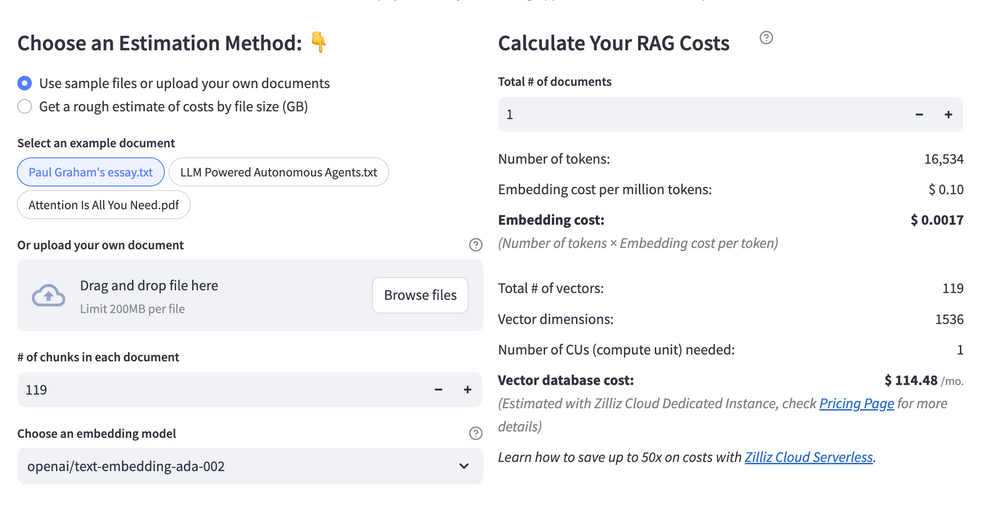 Calculate your RAG cost
What Have You Learned?
What an exciting journey we’ve been on together! Throughout this tutorial, we've rolled up our sleeves and built an innovative retrieval-augmented generation (RAG) system that showcases the power of four pivotal components: a robust framework, an efficient vector database, a sophisticated LLM, and a high-performance embedding model. The framework enabled us to seamlessly integrate these technologies, creating a cohesive ecosystem where each element plays a vital role.
We learned how utilizing Milvus as our vector database empowers rapid, efficient searches, ensuring that we can retrieve information at lightning speed. Coupled with the Mistral AI model, our system now possesses conversational intelligence that can engage users in meaningful dialogues. Meanwhile, the embedding model has equipped us with rich semantic representations, allowing our applications to understand context and nuances in user queries.
We also explored some handy optimization tips and even provided a free cost calculator to help you assess your project's budget. Now, as you feel the thrill of what's possible with these tools, I encourage you to think about building, optimizing, and innovating your own RAG applications. The sky’s the limit—dive in, experiment, and let your creativity flow to harness the power of knowledge in ways you've never imagined! Happy building!
Further Resources
🌟 In addition to this RAG tutorial, unleash your full potential with these incredible resources to level up your RAG skills.
- How to Build a Multimodal RAG | Documentation
- How to Enhance the Performance of Your RAG Pipeline
- Graph RAG with Milvus | Documentation
- How to Evaluate RAG Applications - Zilliz Learn
- Generative AI Resource Hub | Zilliz
We'd Love to Hear What You Think!
We’d love to hear your thoughts! 🌟 Leave your questions or comments below or join our vibrant Milvus Discord community to share your experiences, ask questions, or connect with thousands of AI enthusiasts. Your journey matters to us!
If you like this tutorial, show your support by giving our Milvus GitHub repo a star ⭐—it means the world to us and inspires us to keep creating! 💖
- Introduction to RAG
- Key Components We'll Use for This RAG Chatbot
- Step 1: Install and Set Up LangChain
- Step 2: Install and Set Up Mistral AI Mistral Large
- Step 3: Install and Set Up OpenAI text-embedding-3-small
- Step 4: Install and Set Up Milvus
- Step 5: Build a RAG Chatbot
- Optimization Tips
- RAG Cost Calculator: A Free Tool to Calculate Your Cost in Seconds
- What Have You Learned?
- Further Resources
- We'd Love to Hear What You Think!
Content
Vector Database at Scale
Zilliz Cloud is a fully-managed vector database built for scale, perfect for your RAG apps.
Try Zilliz Cloud for Free