


Build RAG Chatbot with Llamaindex, HNSWlib, Jamba Mini, and Cohere embed-multilingual-v3.0
Introduction to RAG
Retrieval-Augmented Generation (RAG) is a game-changer for GenAI applications, especially in conversational AI. It combines the power of pre-trained large language models (LLMs) like OpenAI’s GPT with external knowledge sources stored in vector databases such as Milvus and Zilliz Cloud, allowing for more accurate, contextually relevant, and up-to-date response generation. A RAG pipeline usually consists of four basic components: a vector database, an embedding model, an LLM, and a framework.
Key Components We'll Use for This RAG Chatbot
This tutorial shows you how to build a simple RAG chatbot in Python using the following components:
- Llamaindex: a data framework that connects large language models (LLMs) with various data sources, enabling efficient retrieval-augmented generation (RAG). It helps structure, index, and query private or external data, optimizing LLM applications for search, chatbots, and analytics.
- HNSWlib: a high-performance C++ and Python library for approximate nearest neighbor (ANN) search using the Hierarchical Navigable Small World (HNSW) algorithm. It provides fast, scalable, and efficient similarity search in high-dimensional spaces, making it ideal for vector databases and AI applications.
- Jamba Mini: Jamba Mini is a lightweight AI model designed for real-time text generation and natural language understanding in resource-constrained environments. With a balance of efficiency and accuracy, it is ideal for mobile apps, edge devices, and interactive assistants that require quick, low-latency responses.
- Cohere embed-multilingual-v3.0: A multilingual text embedding model designed to convert text in over 100 languages into high-dimensional vectors (1024 dimensions), excelling in semantic understanding and cross-lingual tasks. Its strengths include robust multilingual alignment and nuanced context capture, ideal for cross-language semantic search, multilingual document clustering, and enhancing NLP applications like recommendation systems in diverse linguistic environments.
By the end of this tutorial, you’ll have a functional chatbot capable of answering questions based on a custom knowledge base.
Note: Since we may use proprietary models in our tutorials, make sure you have the required API key beforehand.
Step 1: Install and Set Up Llamaindex
pip install llama-index
Step 2: Install and Set Up Jamba Mini
%pip install llama-index-llms-ai21
from llama_index.llms.ai21 import AI21

llm = AI21(
    model="jamba-mini", api_key=api_key, max_tokens=100, temperature=0.5
)
Step 3: Install and Set Up Cohere embed-multilingual-v3.0
%pip install llama-index-embeddings-cohere
from llama_index.embeddings.cohere import CohereEmbedding

embed_model = CohereEmbedding(
    api_key=cohere_api_key,
    model_name="embed-multilingual-v3.0",
)
Step 4: Install and Set Up HNSWlib
%pip install llama-index-vector-stores-hnswlib
from llama_index.vector_stores.hnswlib import HnswlibVectorStore
from llama_index.core import (
    VectorStoreIndex,
    StorageContext,
    SimpleDirectoryReader,
)
vector_store = HnswlibVectorStore.from_params(
    space="ip",
    dimension=embed_model._model.get_sentence_embedding_dimension(),
    max_elements=1000,
)
Step 5: Build a RAG Chatbot
Now that you’ve set up all components, let’s start to build a simple chatbot. We’ll use the Milvus introduction doc as a private knowledge base. You can replace it with your own dataset to customize your RAG chatbot.
import requests

from llama_index.core import SimpleDirectoryReader

# load documents
url = 'https://raw.githubusercontent.com/milvus-io/milvus-docs/refs/heads/v2.5.x/site/en/about/overview.md'
example_file = 'example_file.md'  # You can replace it with your own file paths.
response = requests.get(url)
with open(example_file, 'wb') as f:
    f.write(response.content)
documents = SimpleDirectoryReader(
    input_files=[example_file]
).load_data()

print("Document ID:", documents[0].doc_id)

storage_context = StorageContext.from_defaults(vector_store=vector_store)
index = VectorStoreIndex.from_documents(
    documents, storage_context=storage_context, embed_model=embed_model
)

query_engine = index.as_query_engine(llm=llm)
res = query_engine.query("What is Milvus?")  # You can replace it with your own question.
print(res)
Example output
Milvus is a high-performance, highly scalable vector database designed to operate efficiently across various environments, from personal laptops to large-scale distributed systems. It is available as both open-source software and a cloud service. Milvus excels in managing unstructured data by converting it into numerical vectors through embeddings, which facilitates fast and scalable searches and analytics. The database supports a wide range of data types and offers robust data modeling capabilities, allowing users to organize their data effectively. Additionally, Milvus provides multiple deployment options, including a lightweight version for quick prototyping and a distributed version for handling massive data scales.
Optimization Tips
As you build your RAG system, optimization is key to ensuring peak performance and efficiency. While setting up the components is an essential first step, fine-tuning each one will help you create a solution that works even better and scales seamlessly. In this section, we’ll share some practical tips for optimizing all these components, giving you the edge to build smarter, faster, and more responsive RAG applications.
LlamaIndex optimization tips
To optimize LlamaIndex for a Retrieval-Augmented Generation (RAG) setup, structure your data efficiently using hierarchical indices like tree-based or keyword-table indices for faster retrieval. Use embeddings that align with your use case to improve search relevance. Fine-tune chunk sizes to balance context length and retrieval precision. Enable caching for frequently accessed queries to enhance performance. Optimize metadata filtering to reduce unnecessary search space and improve speed. If using vector databases, ensure indexing strategies align with your query patterns. Implement async processing to handle large-scale document ingestion efficiently. Regularly monitor query performance and adjust indexing parameters as needed for optimal results.
HNSWlib optimization tips
To optimize HNSWlib for a Retrieval-Augmented Generation (RAG) setup, fine-tune the M parameter (number of connections per node) to balance accuracy and memory usage—higher values improve recall but increase indexing time. Adjust ef_construction (search depth during indexing) to enhance retrieval quality. During queries, set ef_search dynamically based on latency vs. accuracy trade-offs. Use multi-threading for faster indexing and querying. Ensure vectors are properly normalized for consistent similarity comparisons. If working with large datasets, periodically rebuild the index to maintain efficiency. Store the index on disk and load it efficiently for persistence in production environments. Monitor query performance and tweak parameters to achieve optimal speed-recall balance.
Jamba Mini optimization tips
To optimize Jamba Mini in a Retrieval-Augmented Generation (RAG) setup, focus on fine-tuning the model to handle domain-specific language and user intents. Preprocess inputs effectively by normalizing text and removing noise, ensuring relevant context is fed into the model. Utilize caching for frequent queries to reduce latency, and experiment with prompt engineering to guide the model’s responses toward greater accuracy. Monitor system performance and adjust batch sizes to maintain efficiency, while minimizing resource consumption. You can also optimize memory management by using lightweight data structures and ensuring fast retrieval from the knowledge base.
Cohere embed-multilingual-v3.0 optimization tips
To optimize Cohere embed-multilingual-v3.0 in RAG, preprocess text by normalizing casing, removing redundant whitespace, and filtering low-relevance content. Use appropriate chunk sizes (200–500 tokens) to balance context retention and embedding quality. Batch embedding requests to reduce latency. Leverage its multilingual strength by aligning input language with supported locales and applying language-specific stopword filtering. Fine-tune retrieval with hybrid search (semantic + keyword) and metadata filters. Regularly update embeddings to reflect new data and test retrieval accuracy using diverse multilingual queries to ensure robust cross-lingual performance.
By implementing these tips across your components, you'll be able to enhance the performance and functionality of your RAG system, ensuring it’s optimized for both speed and accuracy. Keep testing, iterating, and refining your setup to stay ahead in the ever-evolving world of AI development.
RAG Cost Calculator: A Free Tool to Calculate Your Cost in Seconds
Estimating the cost of a Retrieval-Augmented Generation (RAG) pipeline involves analyzing expenses across vector storage, compute resources, and API usage. Key cost drivers include vector database queries, embedding generation, and LLM inference.
RAG Cost Calculator is a free tool that quickly estimates the cost of building a RAG pipeline, including chunking, embedding, vector storage/search, and LLM generation. It also helps you identify cost-saving opportunities and achieve up to 10x cost reduction on vector databases with the serverless option.
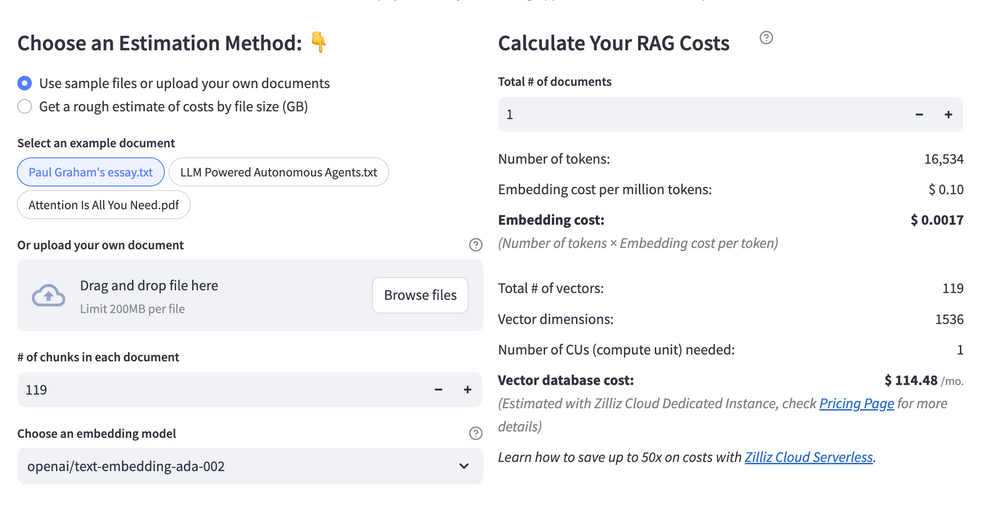 Calculate your RAG cost
What Have You Learned?
Congratulations on making it through this tutorial! You've just delved into the exciting world of Retrieval-Augmented Generation (RAG) systems, integrating some powerful tools to create an efficient pipeline. By leveraging LlamaIndex as the framework, you learned how to seamlessly manage your data and queries. With HNSWlib acting as your vector database, you now have an effective way to index and search high-dimensional vectors, ensuring rapid retrieval of relevant information. The Jamba Mini language model and the Cohere embed-multilingual-v3.0 embedding model equipped you with the capabilities to understand and generate human-like text, paving the way for creating conversational agents that not only retrieve information but also engage users in dynamic ways.
What’s even more thrilling is that you’ve picked up tips for optimization along the way, enabling you to tailor your RAG applications for maximum performance. With the handy free RAG cost calculator, you can plan and assess your resource usage to remain efficient and budget-friendly. The possibilities are endless! Now that you've built a solid foundation, it’s time to channel that knowledge into action. Don’t just stop here—start building, optimizing, and innovating your own RAG applications! Dive into experimentation, push the boundaries of what you can create, and let your imagination run wild. The future is bright, and you’re well on your way to being at the forefront of this exciting technology!
Further Resources
🌟 In addition to this RAG tutorial, unleash your full potential with these incredible resources to level up your RAG skills.
- How to Build a Multimodal RAG | Documentation
- How to Enhance the Performance of Your RAG Pipeline
- Graph RAG with Milvus | Documentation
- How to Evaluate RAG Applications - Zilliz Learn
- Generative AI Resource Hub | Zilliz
We'd Love to Hear What You Think!
We’d love to hear your thoughts! 🌟 Leave your questions or comments below or join our vibrant Milvus Discord community to share your experiences, ask questions, or connect with thousands of AI enthusiasts. Your journey matters to us!
If you like this tutorial, show your support by giving our Milvus GitHub repo a star ⭐—it means the world to us and inspires us to keep creating! 💖
- Introduction to RAG
- Key Components We'll Use for This RAG Chatbot
- Step 1: Install and Set Up Llamaindex
- Step 2: Install and Set Up Jamba Mini
- Step 3: Install and Set Up Cohere embed-multilingual-v3.0
- Step 4: Install and Set Up HNSWlib
- Step 5: Build a RAG Chatbot
- Optimization Tips
- RAG Cost Calculator: A Free Tool to Calculate Your Cost in Seconds
- What Have You Learned?
- Further Resources
- We'd Love to Hear What You Think!
anchor.title
Vector Database at Scale
Zilliz Cloud is a fully-managed vector database built for scale, perfect for your RAG apps.
Try Zilliz Cloud for Free