Build RAG Chatbot with Haystack, Haystack In-memory store, Cohere Command R, and Ollama all-minilm
Introduction to RAG
Retrieval-Augmented Generation (RAG) is a game-changer for GenAI applications, especially in conversational AI. It combines the power of pre-trained large language models (LLMs) like OpenAI’s GPT with external knowledge sources stored in vector databases such as Milvus and Zilliz Cloud, allowing for more accurate, contextually relevant, and up-to-date response generation. A RAG pipeline usually consists of four basic components: a vector database, an embedding model, an LLM, and a framework.
Key Components We'll Use for This RAG Chatbot
This tutorial shows you how to build a simple RAG chatbot in Python using the following components:
- Haystack: An open-source Python framework designed for building production-ready NLP applications, particularly question answering and semantic search systems. Haystack excels at retrieving information from large document collections through its modular architecture that combines retrieval and reader components. Ideal for developers creating search applications, chatbots, and knowledge management systems that require efficient document processing and accurate information extraction from unstructured text.
- Haystack in-memory store: a very simple, in-memory document store with no extra services or dependencies. It is great for experimenting with Haystack, and we do not recommend using it for production. If you want a much more scalable solution for your apps or even enterprise projects, we recommend using Zilliz Cloud, which is a fully managed vector database service built on the open-source Milvusand offers a free tier supporting up to 1 million vectors.)
- Cohere Command R: A scalable enterprise AI model optimized for Retrieval-Augmented Generation (RAG), designed to handle complex workflows with high accuracy. Strengths include multilingual support, low-latency performance, and secure integration with business data. Ideal for automating customer support, data analysis, and generating context-aware insights from large datasets.
- Ollama all-minilm: A compact language model optimized for efficient NLP tasks, offering fast inference and low resource consumption. Strengths include scalability, versatility in text processing, and seamless integration. Ideal for real-time applications, edge deployments, and scenarios requiring lightweight yet robust language understanding.
By the end of this tutorial, you’ll have a functional chatbot capable of answering questions based on a custom knowledge base.
Note: Since we may use proprietary models in our tutorials, make sure you have the required API key beforehand.
Step 1: Install and Set Up Haystack
import os
import requests

from haystack import Pipeline
from haystack.components.converters import MarkdownToDocument

from haystack.components.preprocessors import DocumentSplitter
from haystack.components.writers import DocumentWriter
Step 2: Install and Set Up Cohere Command R
To use Cohere models with Haystack for a RAG pipeline, you need to get a Cohere API Key first. You can write this key in:
- The
api_keyinit parameter using Secret API - The
COHERE_API_KEYenvironment variable (recommended)
Now, let's install and set up the Cohere model.
pip install cohere-haystack
from haystack_integrations.components.generators.cohere import CohereGenerator

generator = CohereGenerator(model="command-r")
Step 3: Install and Set Up Ollama all-minilm
pip install ollama-haystack
Make sure that you have a running Ollama model (either through a docker container, or locally hosted). No other configuration is necessary as Ollama has the embedding API built in.
from haystack import Document
from haystack_integrations.components.embedders.ollama import OllamaDocumentEmbedder
from haystack_integrations.components.embedders.ollama import OllamaTextEmbedder

text_embedder = OllamaTextEmbedder(model="all-minilm")
document_embedder = OllamaDocumentEmbedder(model="all-minilm")
Step 4: Install and Set Up Haystack In-memory store
from haystack.document_stores.in_memory import InMemoryDocumentStore
from haystack.components.retrievers import InMemoryEmbeddingRetriever

document_store = InMemoryDocumentStore()
retriever=InMemoryEmbeddingRetriever(document_store=document_store))
Step 5: Build a RAG Chatbot
Now that you’ve set up all components, let’s start to build a simple chatbot. We’ll use the Milvus introduction doc as a private knowledge base. You can replace it your own dataset to customize your RAG chatbot.
url = 'https://raw.githubusercontent.com/milvus-io/milvus-docs/refs/heads/v2.5.x/site/en/about/overview.md'
example_file = 'example_file.md'
response = requests.get(url)
with open(example_file, 'wb') as f:
    f.write(response.content)
file_paths = [example_file]  # You can replace it with your own file paths.

indexing_pipeline = Pipeline()
indexing_pipeline.add_component("converter", MarkdownToDocument())
indexing_pipeline.add_component("splitter", DocumentSplitter(split_by="sentence", split_length=2))
indexing_pipeline.add_component("embedder", document_embedder)
indexing_pipeline.add_component("writer", DocumentWriter(document_store))
indexing_pipeline.connect("converter", "splitter")
indexing_pipeline.connect("splitter", "embedder")
indexing_pipeline.connect("embedder", "writer")
indexing_pipeline.run({"converter": {"sources": file_paths}})

# print("Number of documents:", document_store.count_documents())

question = "What is Milvus?"  # You can replace it with your own question.

retrieval_pipeline = Pipeline()
retrieval_pipeline.add_component("embedder", text_embedder)
retrieval_pipeline.add_component("retriever", retriever)
retrieval_pipeline.connect("embedder", "retriever")

retrieval_results = retrieval_pipeline.run({"embedder": {"text": question}})

# for doc in retrieval_results["retriever"]["documents"]:
#     print(doc.content)
#     print("-" * 10)

from haystack.utils import Secret
from haystack.components.builders import PromptBuilder

retriever=InMemoryEmbeddingRetriever(document_store=document_store)
 text_embedder = OllamaTextEmbedder(model="all-minilm")

prompt_template = """Answer the following query based on the provided context. If the context does
                     not include an answer, reply with 'I don't know'.\n
                     Query: {{query}}
                     Documents:
                     {% for doc in documents %}
                        {{ doc.content }}
                     {% endfor %}
                     Answer:
                  """

rag_pipeline = Pipeline()
rag_pipeline.add_component("text_embedder", text_embedder)
rag_pipeline.add_component("retriever", retriever)
rag_pipeline.add_component("prompt_builder", PromptBuilder(template=prompt_template))
rag_pipeline.add_component("generator", generator)
rag_pipeline.connect("text_embedder.embedding", "retriever.query_embedding")
rag_pipeline.connect("retriever.documents", "prompt_builder.documents")
rag_pipeline.connect("prompt_builder", "generator")

results = rag_pipeline.run({"text_embedder": {"text": question}, "prompt_builder": {"query": question},})
print('RAG answer:\n', results["generator"]["replies"][0])
Optimization Tips
As you build your RAG system, optimization is key to ensuring peak performance and efficiency. While setting up the components is an essential first step, fine-tuning each one will help you create a solution that works even better and scales seamlessly. In this section, we’ll share some practical tips for optimizing all these components, giving you the edge to build smarter, faster, and more responsive RAG applications.
Haystack optimization tips
To optimize Haystack in a RAG setup, ensure you use an efficient retriever like FAISS or Milvus for scalable and fast similarity searches. Fine-tune your document store settings, such as indexing strategies and storage backends, to balance speed and accuracy. Use batch processing for embedding generation to reduce latency and optimize API calls. Leverage Haystack's pipeline caching to avoid redundant computations, especially for frequently queried documents. Tune your reader model by selecting a lightweight yet accurate transformer-based model like DistilBERT to speed up response times. Implement query rewriting or filtering techniques to enhance retrieval quality, ensuring the most relevant documents are retrieved for generation. Finally, monitor system performance with Haystack’s built-in evaluation tools to iteratively refine your setup based on real-world query performance.
Haystack in-memory store optimization tips
Haystack in-memory store is just a very simple, in-memory document store with no extra services or dependencies. We recommend that you just experiment it with RAG pipeline within your Haystack framework, and we do not recommend using it for production. If you want a much more scalable solution for your apps or even enterprise projects, we recommend using Zilliz Cloud, which is a fully managed vector database service built on the open-source Milvusand offers a free tier supporting up to 1 million vectors
Cohere Command R optimization tips
To optimize Cohere Command R in a RAG setup, fine-tune prompts for clarity and specificity, using explicit instructions to guide context-aware responses. Limit input context to relevant chunks (e.g., 256-512 tokens) to reduce noise and computational overhead. Adjust temperature and top-p values to balance creativity and factual accuracy—lower values enhance precision for retrieval tasks. Implement query augmentation (e.g., synonyms, rephrasing) to improve retrieval alignment. Use Cohere’s built-in reranking to prioritize high-confidence documents. Regularly validate outputs against source data to minimize hallucinations and ensure consistency. Profile latency and batch requests where possible for scalability.
Ollama all-minilm optimization tips
Optimize Ollama all-minilm in RAG by preprocessing input text into concise, semantically meaningful chunks (256-512 tokens) to align with its context window. Use metadata filtering during retrieval to prioritize relevant documents and reduce noise. Fine-tune the model on domain-specific data to enhance answer relevance. Adjust temperature (0.2-0.5) and top-p (0.85-0.95) for balanced creativity and accuracy. Cache frequent queries to reduce latency, and employ batch processing for parallel inference. Quantize the model to 8-bit for faster inference with minimal accuracy loss. Regularly evaluate retrieval hit rates and answer quality to iteratively refine the pipeline.
By implementing these tips across your components, you'll be able to enhance the performance and functionality of your RAG system, ensuring it’s optimized for both speed and accuracy. Keep testing, iterating, and refining your setup to stay ahead in the ever-evolving world of AI development.
RAG Cost Calculator: A Free Tool to Calculate Your Cost in Seconds
Estimating the cost of a Retrieval-Augmented Generation (RAG) pipeline involves analyzing expenses across vector storage, compute resources, and API usage. Key cost drivers include vector database queries, embedding generation, and LLM inference.
RAG Cost Calculator is a free tool that quickly estimates the cost of building a RAG pipeline, including chunking, embedding, vector storage/search, and LLM generation. It also helps you identify cost-saving opportunities and achieve up to 10x cost reduction on vector databases with the serverless option.
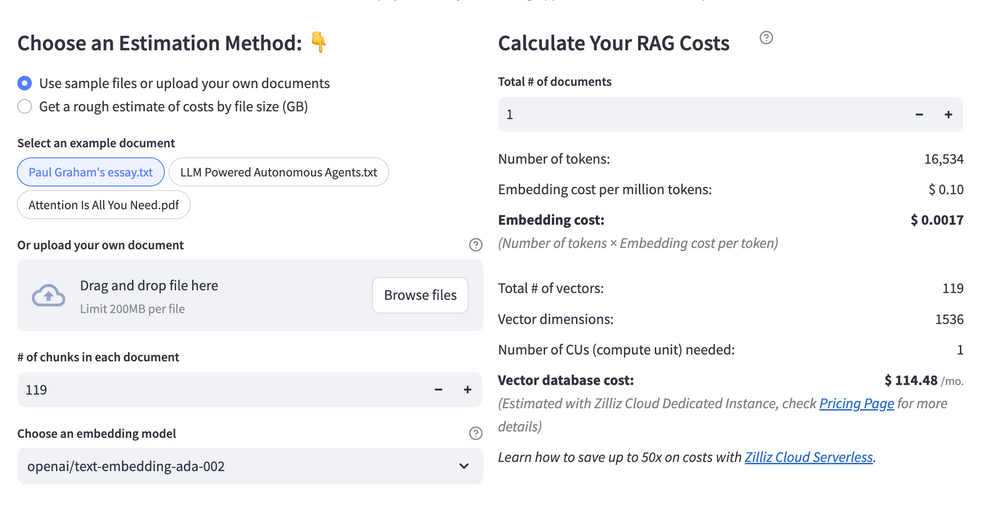 Calculate your RAG cost
What Have You Learned?
By now, you’ve unlocked the magic of building a RAG system from the ground up! You’ve seen how Haystack acts as the backbone, seamlessly orchestrating every step of the pipeline—ingesting data, retrieving context, and generating responses. Paired with the Haystack In-Memory Store, you learned to create a lightning-fast vector database that keeps your application nimble, even during intense query sessions. Then came Cohere Command R, the powerhouse LLM that turns retrieved context into coherent, nuanced answers, making your system feel almost human. And let’s not forget Ollama’s all-minilm embedding model, which quietly works its magic by transforming text into compact, meaningful vectors, ensuring your retrievals are both accurate and efficient. Together, these tools form a symphony of capabilities, proving that cutting-edge AI isn’t just for big tech—it’s accessible, customizable, and ready for your unique ideas!
But this tutorial didn’t just stop at the basics. You picked up pro tips for optimization, like tweaking chunk sizes for better retrieval or fine-tuning metadata filters to sharpen results. And that free RAG cost calculator? It’s your secret weapon for balancing performance and budget, so you can innovate without surprises. Imagine what’s next: chatbots that understand niche domains, research assistants that dig through mountains of data, or creative tools that spark new ideas. The skills you’ve gained aren’t just steps—they’re a launchpad. So what’s stopping you? Grab your code editor, tweak those parameters, and start building. The world of RAG is yours to explore, optimize, and transform. Your next big idea is waiting—let’s bring it to life, one line of code at a time! 🚀✨
Further Resources
🌟 In addition to this RAG tutorial, unleash your full potential with these incredible resources to level up your RAG skills.
- How to Build a Multimodal RAG | Documentation
- How to Enhance the Performance of Your RAG Pipeline
- Graph RAG with Milvus | Documentation
- How to Evaluate RAG Applications - Zilliz Learn
- Generative AI Resource Hub | Zilliz
We'd Love to Hear What You Think!
We’d love to hear your thoughts! 🌟 Leave your questions or comments below or join our vibrant Milvus Discord community to share your experiences, ask questions, or connect with thousands of AI enthusiasts. Your journey matters to us!
If you like this tutorial, show your support by giving our Milvus GitHub repo a star ⭐—it means the world to us and inspires us to keep creating! 💖
Content
- Introduction to RAG
- Key Components We'll Use for This RAG Chatbot
- Step 1: Install and Set Up Haystack
- Step 2: Install and Set Up Cohere Command R
- Step 3: Install and Set Up Ollama all-minilm
- Step 4: Install and Set Up Haystack In-memory store
- Step 5: Build a RAG Chatbot
- Optimization Tips
- RAG Cost Calculator: A Free Tool to Calculate Your Cost in Seconds
- What Have You Learned?
- Further Resources
- We'd Love to Hear What You Think!
Vector Database at Scale
Zilliz Cloud is a fully-managed vector database built for scale, perfect for your RAG apps.
Try Zilliz Cloud for Free