

Build RAG Chatbot with Haystack, Haystack In-memory store, Amazon Bedrock Claude 3 Haiku, and HuggingFace all-MiniLM-L12-v1
Introduction to RAG
Retrieval-Augmented Generation (RAG) is a game-changer for GenAI applications, especially in conversational AI. It combines the power of pre-trained large language models (LLMs) like OpenAI’s GPT with external knowledge sources stored in vector databases such as Milvus and Zilliz Cloud, allowing for more accurate, contextually relevant, and up-to-date response generation. A RAG pipeline usually consists of four basic components: a vector database, an embedding model, an LLM, and a framework.
Key Components We'll Use for This RAG Chatbot
This tutorial shows you how to build a simple RAG chatbot in Python using the following components:
- Haystack: An open-source Python framework designed for building production-ready NLP applications, particularly question answering and semantic search systems. Haystack excels at retrieving information from large document collections through its modular architecture that combines retrieval and reader components. Ideal for developers creating search applications, chatbots, and knowledge management systems that require efficient document processing and accurate information extraction from unstructured text.
- Haystack in-memory store: a very simple, in-memory document store with no extra services or dependencies. It is great for experimenting with Haystack, and we do not recommend using it for production. If you want a much more scalable solution for your apps or even enterprise projects, we recommend using Zilliz Cloud, which is a fully managed vector database service built on the open-source Milvusand offers a free tier supporting up to 1 million vectors.)
- AmazonBedrock Claude 3 Haiku: A lightweight, high-speed AI model optimized for rapid, cost-efficient processing of simple to moderately complex tasks. Excels in low-latency applications, offering strong accuracy and scalability for real-time use cases like chatbots, content moderation, data extraction, and high-volume query handling while minimizing operational costs.
- HuggingFace all-MiniLM-L12-v1: A compact sentence embedding model designed to convert text into dense vector representations for semantic understanding. It balances speed and efficiency with strong performance in tasks like semantic search, text clustering, and retrieval-augmented generation. Ideal for applications requiring low-latency inference or resource-constrained environments while maintaining robust semantic analysis capabilities.
By the end of this tutorial, you’ll have a functional chatbot capable of answering questions based on a custom knowledge base.
Note: Since we may use proprietary models in our tutorials, make sure you have the required API key beforehand.
Step 1: Install and Set Up Haystack
import os
import requests

from haystack import Pipeline
from haystack.components.converters import MarkdownToDocument

from haystack.components.preprocessors import DocumentSplitter
from haystack.components.writers import DocumentWriter
Step 2: Install and Set Up Amazon Bedrock Claude 3 Haiku
Amazon Bedrock is a fully managed service that makes high-performing foundation models from leading AI startups and Amazon available through a unified API. You can choose from various foundation models to find the one best suited for your use case.
To use LLMs on Amazon Bedrock for text generation together with Haystack, you need to initialize an AmazonBedrockGenerator with the model name, the AWS credentials (AWS_ACCESS_KEY_ID, AWS_SECRET_ACCESS_KEY, AWS_DEFAULT_REGION) should be set as environment variables, be configured as described above or passed as Secret arguments. Note, make sure the region you set supports Amazon Bedrock.
Now, let's start installing and setting up models with Amazon Bedrock.
pip install amazon-bedrock-haystack
from haystack_integrations.components.generators.amazon_bedrock import AmazonBedrockGenerator

aws_access_key_id="..."
aws_secret_access_key="..."
aws_region_name="eu-central-1"

generator = AmazonBedrockGenerator(model="anthropic.claude-3-haiku-20240307-v1:0")
Step 3: Install and Set Up HuggingFace all-MiniLM-L12-v1
Haystack'sHuggingFaceAPITextEmbedder can be used to embed strings with different Hugging Face APIs:
The component uses a HF_API_TOKEN environment variable by default. Otherwise, you can pass a Hugging Face API token at initialization with token – see code examples below. The token is needed:
- If you use the Serverless Inference API, or
- If you use Inference Endpoints.
Here, in this tutorial, we'll use the Free Serverless Inference API. Let's install and set up the model.
To use this API, you need a free Hugging Face token. The Embedder expects the model in api_params.
from haystack.components.embedders import HuggingFaceAPITextEmbedder
from haystack.utils import Secret
from haystack.components.embedders import HuggingFaceAPIDocumentEmbedder
from haystack.dataclasses import Document

text_embedder = HuggingFaceAPITextEmbedder(api_type="serverless_inference_api",
                                           api_params={"model": "sentence-transformers/all-MiniLM-L12-v1"},
                                           token=Secret.from_token("<your-api-key>"))
document_embedder = HuggingFaceAPIDocumentEmbedder(api_type="serverless_inference_api",
                                              api_params={"model": "sentence-transformers/all-MiniLM-L12-v1"},
                                              token=Secret.from_token("<your-api-key>"))
Step 4: Install and Set Up Haystack In-memory store
from haystack.document_stores.in_memory import InMemoryDocumentStore
from haystack.components.retrievers import InMemoryEmbeddingRetriever

document_store = InMemoryDocumentStore()
retriever=InMemoryEmbeddingRetriever(document_store=document_store))
Step 5: Build a RAG Chatbot
Now that you’ve set up all components, let’s start to build a simple chatbot. We’ll use the Milvus introduction doc as a private knowledge base. You can replace it your own dataset to customize your RAG chatbot.
url = 'https://raw.githubusercontent.com/milvus-io/milvus-docs/refs/heads/v2.5.x/site/en/about/overview.md'
example_file = 'example_file.md'
response = requests.get(url)
with open(example_file, 'wb') as f:
    f.write(response.content)
file_paths = [example_file]  # You can replace it with your own file paths.

indexing_pipeline = Pipeline()
indexing_pipeline.add_component("converter", MarkdownToDocument())
indexing_pipeline.add_component("splitter", DocumentSplitter(split_by="sentence", split_length=2))
indexing_pipeline.add_component("embedder", document_embedder)
indexing_pipeline.add_component("writer", DocumentWriter(document_store))
indexing_pipeline.connect("converter", "splitter")
indexing_pipeline.connect("splitter", "embedder")
indexing_pipeline.connect("embedder", "writer")
indexing_pipeline.run({"converter": {"sources": file_paths}})

# print("Number of documents:", document_store.count_documents())

question = "What is Milvus?"  # You can replace it with your own question.

retrieval_pipeline = Pipeline()
retrieval_pipeline.add_component("embedder", text_embedder)
retrieval_pipeline.add_component("retriever", retriever)
retrieval_pipeline.connect("embedder", "retriever")

retrieval_results = retrieval_pipeline.run({"embedder": {"text": question}})

# for doc in retrieval_results["retriever"]["documents"]:
#     print(doc.content)
#     print("-" * 10)

from haystack.utils import Secret
from haystack.components.builders import PromptBuilder

retriever=InMemoryEmbeddingRetriever(document_store=document_store)
 text_embedder = HuggingFaceAPITextEmbedder(api_type="serverless_inference_api",
                                           api_params={"model": "sentence-transformers/all-MiniLM-L12-v1"},
                                           token=Secret.from_token("<your-api-key>"))

prompt_template = """Answer the following query based on the provided context. If the context does
                     not include an answer, reply with 'I don't know'.\n
                     Query: {{query}}
                     Documents:
                     {% for doc in documents %}
                        {{ doc.content }}
                     {% endfor %}
                     Answer:
                  """

rag_pipeline = Pipeline()
rag_pipeline.add_component("text_embedder", text_embedder)
rag_pipeline.add_component("retriever", retriever)
rag_pipeline.add_component("prompt_builder", PromptBuilder(template=prompt_template))
rag_pipeline.add_component("generator", generator)
rag_pipeline.connect("text_embedder.embedding", "retriever.query_embedding")
rag_pipeline.connect("retriever.documents", "prompt_builder.documents")
rag_pipeline.connect("prompt_builder", "generator")

results = rag_pipeline.run({"text_embedder": {"text": question}, "prompt_builder": {"query": question},})
print('RAG answer:\n', results["generator"]["replies"][0])
Optimization Tips
As you build your RAG system, optimization is key to ensuring peak performance and efficiency. While setting up the components is an essential first step, fine-tuning each one will help you create a solution that works even better and scales seamlessly. In this section, we’ll share some practical tips for optimizing all these components, giving you the edge to build smarter, faster, and more responsive RAG applications.
Haystack optimization tips
To optimize Haystack in a RAG setup, ensure you use an efficient retriever like FAISS or Milvus for scalable and fast similarity searches. Fine-tune your document store settings, such as indexing strategies and storage backends, to balance speed and accuracy. Use batch processing for embedding generation to reduce latency and optimize API calls. Leverage Haystack's pipeline caching to avoid redundant computations, especially for frequently queried documents. Tune your reader model by selecting a lightweight yet accurate transformer-based model like DistilBERT to speed up response times. Implement query rewriting or filtering techniques to enhance retrieval quality, ensuring the most relevant documents are retrieved for generation. Finally, monitor system performance with Haystack’s built-in evaluation tools to iteratively refine your setup based on real-world query performance.
Haystack in-memory store optimization tips
Haystack in-memory store is just a very simple, in-memory document store with no extra services or dependencies. We recommend that you just experiment it with RAG pipeline within your Haystack framework, and we do not recommend using it for production. If you want a much more scalable solution for your apps or even enterprise projects, we recommend using Zilliz Cloud, which is a fully managed vector database service built on the open-source Milvusand offers a free tier supporting up to 1 million vectors
AmazonBedrock Claude 3 Haiku optimization tips
To optimize Claude 3 Haiku in RAG, structure prompts with clear context markers (e.g., <context> and </context>) to separate retrieved documents from instructions. Use concise, direct queries to leverage its fast response strength, and set max_tokens to balance output length with latency. Fine-tune temperature (0.2–0.5 for factual precision, higher for creativity) and employ chunking strategies to fit context windows efficiently. Pre-filter irrelevant retrieved data to reduce noise, and test system prompts to enforce output formatting rules. Implement retries with exponential backoff for reliability, and cache frequent queries to minimize repeat processing.
HuggingFace all-MiniLM-L12-v1 optimization tips
To optimize the all-MiniLM-L12-v1 model in a RAG setup: preprocess input data by cleaning and normalizing text (lowercasing, removing special characters) to improve embedding quality. Use batch inference for embedding generation to maximize GPU utilization. Fine-tune the model on domain-specific data via contrastive learning to enhance retrieval relevance. Reduce vector dimensionality via PCA if storage or latency is critical. Cache frequently accessed embeddings to minimize recomputation. Quantize the model with Hugging Face’s transformers library for faster inference with minimal accuracy loss. Regularly benchmark performance against your retrieval metrics (e.g., recall@k) to validate optimizations.
By implementing these tips across your components, you'll be able to enhance the performance and functionality of your RAG system, ensuring it’s optimized for both speed and accuracy. Keep testing, iterating, and refining your setup to stay ahead in the ever-evolving world of AI development.
RAG Cost Calculator: A Free Tool to Calculate Your Cost in Seconds
Estimating the cost of a Retrieval-Augmented Generation (RAG) pipeline involves analyzing expenses across vector storage, compute resources, and API usage. Key cost drivers include vector database queries, embedding generation, and LLM inference.
RAG Cost Calculator is a free tool that quickly estimates the cost of building a RAG pipeline, including chunking, embedding, vector storage/search, and LLM generation. It also helps you identify cost-saving opportunities and achieve up to 10x cost reduction on vector databases with the serverless option.
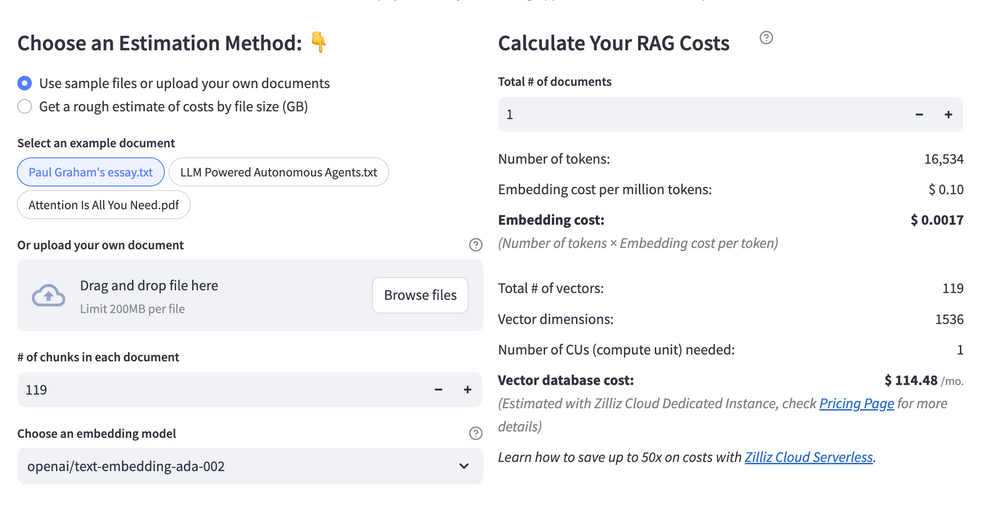 Calculate your RAG cost
What Have You Learned?
By now, you’ve unlocked the magic of building a RAG system from the ground up! You’ve seen firsthand how Haystack acts as the backbone of your pipeline, seamlessly connecting every component like a well-oiled machine. The Haystack In-Memory Store became your go-to for lightning-fast vector storage and retrieval, proving that you don’t need complex infrastructure to handle dynamic data. Then came Amazon Bedrock’s Claude 3 Haiku, which blew you away with its speed and precision, turning raw text into insightful, context-aware responses. And let’s not forget the HuggingFace all-MiniLM-L12-v1 embedding model—your secret weapon for transforming words into rich numerical representations, ensuring your system understands user queries with pinpoint accuracy. Together, these tools showed you how to fetch, process, and generate answers in a way that feels almost effortless. Plus, you picked up pro tips like optimizing chunk sizes and filtering metadata to boost performance, and that free RAG cost calculator? Total game-changer for keeping your projects budget-friendly without sacrificing power.
But this isn’t just about following steps—it’s about opening doors. You’ve got the blueprint to create AI applications that think, learn, and adapt. Whether you’re building a chatbot, a research assistant, or something entirely new, the skills you’ve gained let you tweak, refine, and innovate. Imagine fine-tuning embeddings for niche domains, experimenting with different LLMs, or scaling your storage for massive datasets. The sky’s the limit! So what’s next? Dive in, play with the tools, break things (then fix them!), and let your creativity run wild. The world needs your ideas, and now you’ve got everything to bring them to life. Ready, set, build—your next big breakthrough is just a RAG pipeline away. The future is yours to shape, and it’s looking incredibly smart! 🚀
Further Resources
🌟 In addition to this RAG tutorial, unleash your full potential with these incredible resources to level up your RAG skills.
- How to Build a Multimodal RAG | Documentation
- How to Enhance the Performance of Your RAG Pipeline
- Graph RAG with Milvus | Documentation
- How to Evaluate RAG Applications - Zilliz Learn
- Generative AI Resource Hub | Zilliz
We'd Love to Hear What You Think!
We’d love to hear your thoughts! 🌟 Leave your questions or comments below or join our vibrant Milvus Discord community to share your experiences, ask questions, or connect with thousands of AI enthusiasts. Your journey matters to us!
If you like this tutorial, show your support by giving our Milvus GitHub repo a star ⭐—it means the world to us and inspires us to keep creating! 💖
- Introduction to RAG
- Key Components We'll Use for This RAG Chatbot
- Step 1: Install and Set Up Haystack
- Step 2: Install and Set Up Amazon Bedrock Claude 3 Haiku
- Step 3: Install and Set Up HuggingFace all-MiniLM-L12-v1
- Step 4: Install and Set Up Haystack In-memory store
- Step 5: Build a RAG Chatbot
- Optimization Tips
- RAG Cost Calculator: A Free Tool to Calculate Your Cost in Seconds
- What Have You Learned?
- Further Resources
- We'd Love to Hear What You Think!
Content
Vector Database at Scale
Zilliz Cloud is a fully-managed vector database built for scale, perfect for your RAG apps.
Try Zilliz Cloud for Free