


Build RAG Chatbot with LangChain, OpenSearch, Databricks Llama 3.1, and Azure text-embedding-3-large
Introduction to RAG
Retrieval-Augmented Generation (RAG) is a game-changer for GenAI applications, especially in conversational AI. It combines the power of pre-trained large language models (LLMs) like OpenAI’s GPT with external knowledge sources stored in vector databases such as Milvus and Zilliz Cloud, allowing for more accurate, contextually relevant, and up-to-date response generation. A RAG pipeline usually consists of four basic components: a vector database, an embedding model, an LLM, and a framework.
Key Components We'll Use for This RAG Chatbot
This tutorial shows you how to build a simple RAG chatbot in Python using the following components:
- LangChain: An open-source framework that helps you orchestrate the interaction between LLMs, vector stores, embedding models, etc, making it easier to integrate a RAG pipeline.
- OpenSearch: An open-source search and analytics suite derived from Elasticsearch. It offers robust full-text search and real-time analytics, with vector search available as an add-on for similarity-based queries, extending its capabilities to handle high-dimensional data. Since it is just a vector search add-on rather than a purpose-built vector database, it lacks scalability and availability and many other advanced features required by enterprise-level applications. Therefore, if you prefer a much more scalable solution or hate to manage your own infrastructure, we recommend using Zilliz Cloud, which is a fully managed vector database service built on the open-source Milvus and offers a free tier supporting up to 1 million vectors.)
- Databricks Llama 3.1: This advanced generative model from Databricks focuses on data-centric AI and collaborative analytics. It excels in scalable machine learning tasks, providing robust insights and predictions from large datasets. Ideal for organizations looking to leverage data for automated reporting, interactive data exploration, and enhanced decision-making processes.
- Azure text-embedding-3-large: This powerful AI model specializes in generating high-quality text embeddings for natural language processing tasks. With its advanced understanding of context, it excels in applications like semantic search, recommendation systems, and clustering. Ideal for developers seeking to enhance text analysis and retrieval in complex datasets while ensuring robust accuracy and performance.
By the end of this tutorial, you’ll have a functional chatbot capable of answering questions based on a custom knowledge base.
Note: Since we may use proprietary models in our tutorials, make sure you have the required API key beforehand.
Step 1: Install and Set Up LangChain
%pip install --quiet --upgrade langchain-text-splitters langchain-community langgraph
Step 2: Install and Set Up Databricks Llama 3.1
pip install -qU "databricks-langchain"
import getpass
import os

if not os.environ.get("DATABRICKS_TOKEN"):
  os.environ["DATABRICKS_TOKEN"] = getpass.getpass("Enter API key for Databricks: ")

from databricks_langchain import ChatDatabricks

os.environ["DATABRICKS_HOST"] = "https://example.staging.cloud.databricks.com/serving-endpoints"

llm = ChatDatabricks(endpoint="databricks-meta-llama-3-1-70b-instruct")
Step 3: Install and Set Up Azure text-embedding-3-large
pip install -qU langchain-openai
import getpass
import os

if not os.environ.get("AZURE_OPENAI_API_KEY"):
  os.environ["AZURE_OPENAI_API_KEY"] = getpass.getpass("Enter API key for Azure: ")

from langchain_openai import AzureOpenAIEmbeddings

embeddings = AzureOpenAIEmbeddings(
    azure_endpoint=os.environ["AZURE_OPENAI_ENDPOINT"],
    azure_deployment=os.environ["AZURE_OPENAI_DEPLOYMENT_NAME"],
    openai_api_version=os.environ["AZURE_OPENAI_API_VERSION"],
)
Step 4: Install and Set Up OpenSearch
pip install --upgrade --quiet opensearch-py langchain-community
from langchain_community.vectorstores import OpenSearchVectorSearch
opensearch_vector_search = OpenSearchVectorSearch(
    "http://localhost:9200",
    "embeddings",
    embedding_function
)
Step 5: Build a RAG Chatbot
Now that you’ve set up all components, let’s start to build a simple chatbot. We’ll use the Milvus introduction doc as a private knowledge base. You can replace it with your own dataset to customize your RAG chatbot.
import bs4
from langchain import hub
from langchain_community.document_loaders import WebBaseLoader
from langchain_core.documents import Document
from langchain_text_splitters import RecursiveCharacterTextSplitter
from langgraph.graph import START, StateGraph
from typing_extensions import List, TypedDict

# Load and chunk contents of the blog
loader = WebBaseLoader(
    web_paths=("https://milvus.io/docs/overview.md",),
    bs_kwargs=dict(
        parse_only=bs4.SoupStrainer(
            class_=("doc-style doc-post-content")
        )
    ),
)

docs = loader.load()

text_splitter = RecursiveCharacterTextSplitter(chunk_size=1000, chunk_overlap=200)
all_splits = text_splitter.split_documents(docs)

# Index chunks
_ = vector_store.add_documents(documents=all_splits)

# Define prompt for question-answering
prompt = hub.pull("rlm/rag-prompt")


# Define state for application
class State(TypedDict):
    question: str
    context: List[Document]
    answer: str


# Define application steps
def retrieve(state: State):
    retrieved_docs = vector_store.similarity_search(state["question"])
    return {"context": retrieved_docs}


def generate(state: State):
    docs_content = "\n\n".join(doc.page_content for doc in state["context"])
    messages = prompt.invoke({"question": state["question"], "context": docs_content})
    response = llm.invoke(messages)
    return {"answer": response.content}


# Compile application and test
graph_builder = StateGraph(State).add_sequence([retrieve, generate])
graph_builder.add_edge(START, "retrieve")
graph = graph_builder.compile()
Test the Chatbot
Yeah! You've built your own chatbot. Let's ask the chatbot a question.
response = graph.invoke({"question": "What data types does Milvus support?"})
print(response["answer"])
Example Output
Milvus supports various data types including sparse vectors, binary vectors, JSON, and arrays. Additionally, it handles common numerical and character types, making it versatile for different data modeling needs. This allows users to manage unstructured or multi-modal data efficiently.
Optimization Tips
As you build your RAG system, optimization is key to ensuring peak performance and efficiency. While setting up the components is an essential first step, fine-tuning each one will help you create a solution that works even better and scales seamlessly. In this section, we’ll share some practical tips for optimizing all these components, giving you the edge to build smarter, faster, and more responsive RAG applications.
LangChain optimization tips
To optimize LangChain, focus on minimizing redundant operations in your workflow by structuring your chains and agents efficiently. Use caching to avoid repeated computations, speeding up your system, and experiment with modular design to ensure that components like models or databases can be easily swapped out. This will provide both flexibility and efficiency, allowing you to quickly scale your system without unnecessary delays or complications.
OpenSearch optimization tips
To optimize OpenSearch in a Retrieval-Augmented Generation (RAG) setup, fine-tune indexing by enabling efficient mappings and reducing unnecessary stored fields. Use HNSW for vector search to speed up similarity queries while balancing recall and latency with appropriate ef_search and ef_construction values. Leverage shard and replica settings to distribute load effectively, and enable caching for frequent queries. Optimize text-based retrieval with BM25 tuning and custom analyzers for better relevance. Regularly monitor cluster health, index size, and query performance using OpenSearch Dashboards and adjust configurations accordingly.
Databricks Llama 3.1 optimization tips
Databricks Llama 3.1 is designed for scalable and high-performance RAG applications, making it crucial to optimize retrieval and processing efficiency. Leverage Databricks' distributed computing capabilities to parallelize retrieval and embedding computations, reducing latency for large datasets. Implement hybrid search (combining vector and keyword search) to enhance retrieval relevance. Use optimized prompt templates to minimize token usage while maximizing response quality. Fine-tune temperature (0.1–0.3) for factual consistency and adjust top-k/top-p for response control. Cache frequently queried results to reduce redundant computations, improving both cost and performance. If dealing with large-scale queries, utilize Databricks’ auto-scaling to dynamically allocate resources and avoid bottlenecks. Implement incremental indexing for real-time updates to your vector store, ensuring retrieval accuracy remains high over time.
Azure text-embedding-3-large optimization tips
Azure text-embedding-3-large is a powerful model for generating high-quality text embeddings. Optimize efficiency by preprocessing input text to remove redundant content and ensure the embeddings focus on the most important concepts. Leverage approximate nearest neighbor (ANN) search algorithms like FAISS or HNSW for fast retrieval across large datasets. When dealing with high-throughput applications, implement caching strategies to store frequently accessed embeddings, reducing API call overhead. Use multi-threading or parallel processing to handle batch requests and reduce latency in large-scale systems. Consider dimensionality reduction techniques, such as PCA or quantization, to reduce storage requirements and improve retrieval speed. Regularly update embeddings to reflect new data and ensure your system’s search results are accurate.
By implementing these tips across your components, you'll be able to enhance the performance and functionality of your RAG system, ensuring it’s optimized for both speed and accuracy. Keep testing, iterating, and refining your setup to stay ahead in the ever-evolving world of AI development.
RAG Cost Calculator: A Free Tool to Calculate Your Cost in Seconds
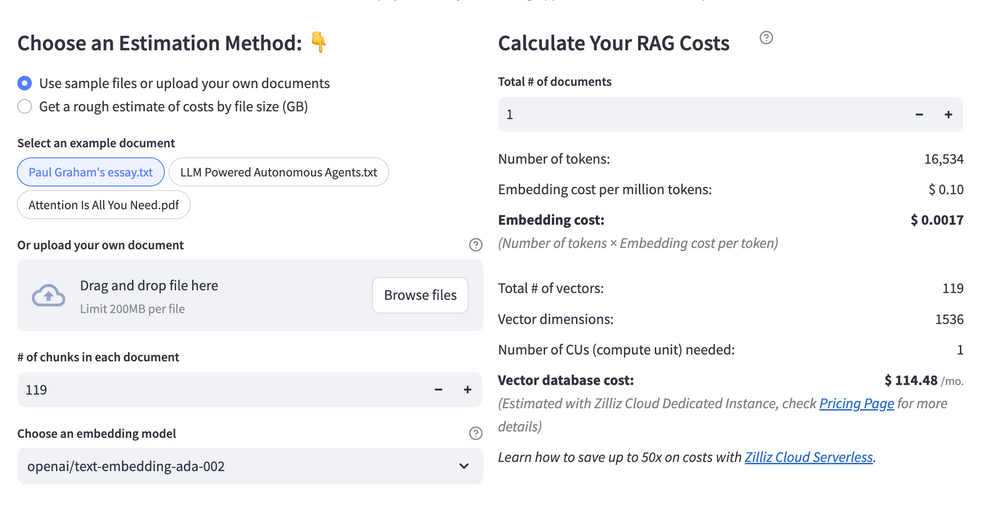
Estimating the cost of a Retrieval-Augmented Generation (RAG) pipeline involves analyzing expenses across vector storage, compute resources, and API usage. Key cost drivers include vector database queries, embedding generation, and LLM inference.
RAG Cost Calculator is a free tool that quickly estimates the cost of building a RAG pipeline, including chunking, embedding, vector storage/search, and LLM generation. It also helps you identify cost-saving opportunities and achieve up to 10x cost reduction on vector databases with the serverless option.
 Calculate your RAG cost
What Have You Learned?
By diving into this tutorial, you’ve unlocked the magic of combining cutting-edge tools to build a powerful RAG system! You’ve seen how LangChain acts as the glue, orchestrating workflows and simplifying interactions between components. OpenSearch steps in as your robust vector database, handling lightning-fast similarity searches to retrieve the most relevant context for your queries. Azure’s text-embedding-3-large model transforms text into rich, semantic embeddings, giving your system a deep understanding of language nuances. Then, Databricks’ Llama 3.1—a state-of-the-art LLM—takes that retrieved context and crafts natural, coherent responses, making your application feel almost human. Together, these tools create a seamless pipeline where retrieval and generation work hand-in-hand to deliver accurate, context-aware answers. Plus, you’ve picked up pro tips for optimizing performance, like tuning chunk sizes and balancing latency with accuracy, and even discovered how to estimate costs with the free RAG cost calculator to keep your projects budget-friendly!
But this isn’t just about following steps—it’s about empowerment. You’ve gained the skills to build intelligent systems that bridge knowledge gaps and solve real-world problems. Imagine the possibilities: chatbots that understand niche domains, research assistants that surface insights from massive datasets, or tools that democratize access to specialized information. The framework is yours to tweak, scale, and innovate with. So, what’s next? Take this foundation and run with it! Experiment with different models, refine your retrieval strategies, and push the boundaries of what RAG can do. The future of AI-driven applications is in your hands—go build something awesome, share your wins, and keep iterating. The world’s waiting for what you’ll create next! 🚀
Further Resources
🌟 In addition to this RAG tutorial, unleash your full potential with these incredible resources to level up your RAG skills.
- How to Build a Multimodal RAG | Documentation
- How to Enhance the Performance of Your RAG Pipeline
- Graph RAG with Milvus | Documentation
- How to Evaluate RAG Applications - Zilliz Learn
- Generative AI Resource Hub | Zilliz
We'd Love to Hear What You Think!
We’d love to hear your thoughts! 🌟 Leave your questions or comments below or join our vibrant Milvus Discord community to share your experiences, ask questions, or connect with thousands of AI enthusiasts. Your journey matters to us!
If you like this tutorial, show your support by giving our Milvus GitHub repo a star ⭐—it means the world to us and inspires us to keep creating! 💖
- Introduction to RAG
- Key Components We'll Use for This RAG Chatbot
- Step 1: Install and Set Up LangChain
- Step 2: Install and Set Up Databricks Llama 3.1
- Step 3: Install and Set Up Azure text-embedding-3-large
- Step 4: Install and Set Up OpenSearch
- Step 5: Build a RAG Chatbot
- Optimization Tips
- RAG Cost Calculator: A Free Tool to Calculate Your Cost in Seconds
- What Have You Learned?
- Further Resources
- We'd Love to Hear What You Think!
Content
Vector Database at Scale
Zilliz Cloud is a fully-managed vector database built for scale, perfect for your RAG apps.
Try Zilliz Cloud for Free