

Build RAG Chatbot with Llamaindex, Zilliz Cloud, Anthropic Claude 3.5 Haiku, and Ollama all-minilm
Introduction to RAG
Retrieval-Augmented Generation (RAG) is a game-changer for GenAI applications, especially in conversational AI. It combines the power of pre-trained large language models (LLMs) like OpenAI’s GPT with external knowledge sources stored in vector databases such as Milvus and Zilliz Cloud, allowing for more accurate, contextually relevant, and up-to-date response generation. A RAG pipeline usually consists of four basic components: a vector database, an embedding model, an LLM, and a framework.
Key Components We'll Use for This RAG Chatbot
This tutorial shows you how to build a simple RAG chatbot in Python using the following components:
- Llamaindex: a data framework that connects large language models (LLMs) with various data sources, enabling efficient retrieval-augmented generation (RAG). It helps structure, index, and query private or external data, optimizing LLM applications for search, chatbots, and analytics.
- Zilliz Cloud: a fully managed vector database-as-a-service platform built on top of the open-source Milvus, designed to handle high-performance vector data processing at scale. It enables organizations to efficiently store, search, and analyze large volumes of unstructured data, such as text, images, or audio, by leveraging advanced vector search technology. It offers a free tier supporting up to 1 million vectors.
- Anthropic Claude 3.5 Haiku: A lightweight, high-speed AI model optimized for rapid, cost-efficient processing of complex queries. It excels in real-time applications, offering strong performance in text analysis, summarization, and multilingual tasks. Ideal for scalable enterprise solutions, dynamic customer interactions, and scenarios requiring low-latency responses without compromising accuracy.
- Ollama all-minilm: A compact language model optimized for efficient NLP tasks, offering fast inference and low resource consumption. Strengths include scalability, versatility in text processing, and seamless integration. Ideal for real-time applications, edge deployments, and scenarios requiring lightweight yet robust language understanding.
By the end of this tutorial, you’ll have a functional chatbot capable of answering questions based on a custom knowledge base.
Note: Since we may use proprietary models in our tutorials, make sure you have the required API key beforehand.
Step 1: Install and Set Up Llamaindex
pip install llama-index
Step 2: Install and Set Up Anthropic Claude 3.5 Haiku
%pip install llama-index-llms-anthropic
from llama_index.llms.anthropic import Anthropic

# To customize your API key, do this
# otherwise it will lookup ANTHROPIC_API_KEY from your env variable
# llm = Anthropic(api_key="")
llm = Anthropic(model="claude-3-5-haiku-latest")
Step 3: Install and Set Up Ollama all-minilm
%pip install llama-index-embeddings-ollama
from llama_index.embeddings.ollama import OllamaEmbedding

embed_model = OllamaEmbedding(
    model_name="all-minilm",
)
Step 4: Install and Set Up Zilliz Cloud
pip install llama-index-vector-stores-milvus
from llama_index.core import VectorStoreIndex, StorageContext
from llama_index.vector_stores.milvus import MilvusVectorStore

vector_store = MilvusVectorStore(
    uri=ZILLIZ_CLOUD_URI,
    token=ZILLIZ_CLOUD_TOKEN,
    dim=1536,  # You can replace it with your embedding model's dimension.
    overwrite=True,
)
Step 5: Build a RAG Chatbot
Now that you’ve set up all components, let’s start to build a simple chatbot. We’ll use the Milvus introduction doc as a private knowledge base. You can replace it with your own dataset to customize your RAG chatbot.
import requests

from llama_index.core import SimpleDirectoryReader

# load documents
url = 'https://raw.githubusercontent.com/milvus-io/milvus-docs/refs/heads/v2.5.x/site/en/about/overview.md'
example_file = 'example_file.md'  # You can replace it with your own file paths.
response = requests.get(url)
with open(example_file, 'wb') as f:
    f.write(response.content)
documents = SimpleDirectoryReader(
    input_files=[example_file]
).load_data()

print("Document ID:", documents[0].doc_id)

storage_context = StorageContext.from_defaults(vector_store=vector_store)
index = VectorStoreIndex.from_documents(
    documents, storage_context=storage_context, embed_model=embed_model
)

query_engine = index.as_query_engine(llm=llm)
res = query_engine.query("What is Milvus?")  # You can replace it with your own question.
print(res)
Example output
Milvus is a high-performance, highly scalable vector database designed to operate efficiently across various environments, from personal laptops to large-scale distributed systems. It is available as both open-source software and a cloud service. Milvus excels in managing unstructured data by converting it into numerical vectors through embeddings, which facilitates fast and scalable searches and analytics. The database supports a wide range of data types and offers robust data modeling capabilities, allowing users to organize their data effectively. Additionally, Milvus provides multiple deployment options, including a lightweight version for quick prototyping and a distributed version for handling massive data scales.
Optimization Tips
As you build your RAG system, optimization is key to ensuring peak performance and efficiency. While setting up the components is an essential first step, fine-tuning each one will help you create a solution that works even better and scales seamlessly. In this section, we’ll share some practical tips for optimizing all these components, giving you the edge to build smarter, faster, and more responsive RAG applications.
LlamaIndex optimization tips
To optimize LlamaIndex for a Retrieval-Augmented Generation (RAG) setup, structure your data efficiently using hierarchical indices like tree-based or keyword-table indices for faster retrieval. Use embeddings that align with your use case to improve search relevance. Fine-tune chunk sizes to balance context length and retrieval precision. Enable caching for frequently accessed queries to enhance performance. Optimize metadata filtering to reduce unnecessary search space and improve speed. If using vector databases, ensure indexing strategies align with your query patterns. Implement async processing to handle large-scale document ingestion efficiently. Regularly monitor query performance and adjust indexing parameters as needed for optimal results.
Zilliz Cloud optimization tips
Optimizing Zilliz Cloud for a RAG system involves efficient index selection, query tuning, and resource management. Use Hierarchical Navigable Small World (HNSW) indexing for high-speed, approximate nearest neighbor search while balancing recall and efficiency. Fine-tune ef_construction and M parameters based on your dataset size and query workload to optimize search accuracy and latency. Enable dynamic scaling to handle fluctuating workloads efficiently, ensuring smooth performance under varying query loads. Implement data partitioning to improve retrieval speed by grouping related data, reducing unnecessary comparisons. Regularly update and optimize embeddings to keep results relevant, particularly when dealing with evolving datasets. Use hybrid search techniques, such as combining vector and keyword search, to improve response quality. Monitor system metrics in Zilliz Cloud’s dashboard and adjust configurations accordingly to maintain low-latency, high-throughput performance.
Anthropic Claude 3.5 Haiku optimization tips
Optimize context relevance by implementing semantic chunking with 512-1024 token segments and metadata filtering to reduce noise. Use structured data formatting (JSON/XML tables) for retrieved content to enhance Claude's parsing efficiency. Implement query expansion with synonyms and domain-specific terms to improve retrieval alignment. Fine-tune temperature settings (0.2-0.4 range) for factual consistency. Cache frequent query embeddings and employ prompt compression techniques like entity summarization. Monitor token usage through Claude's API metrics to balance context depth with cost efficiency, prioritizing critical information in the prompt's beginning for better attention focus.
Ollama all-minilm optimization tips
Optimize Ollama all-minilm in RAG by preprocessing input text into concise, semantically meaningful chunks (256-512 tokens) to align with its context window. Use metadata filtering during retrieval to prioritize relevant documents and reduce noise. Fine-tune the model on domain-specific data to enhance answer relevance. Adjust temperature (0.2-0.5) and top-p (0.85-0.95) for balanced creativity and accuracy. Cache frequent queries to reduce latency, and employ batch processing for parallel inference. Quantize the model to 8-bit for faster inference with minimal accuracy loss. Regularly evaluate retrieval hit rates and answer quality to iteratively refine the pipeline.
By implementing these tips across your components, you'll be able to enhance the performance and functionality of your RAG system, ensuring it’s optimized for both speed and accuracy. Keep testing, iterating, and refining your setup to stay ahead in the ever-evolving world of AI development.
RAG Cost Calculator: A Free Tool to Calculate Your Cost in Seconds
Estimating the cost of a Retrieval-Augmented Generation (RAG) pipeline involves analyzing expenses across vector storage, compute resources, and API usage. Key cost drivers include vector database queries, embedding generation, and LLM inference.
RAG Cost Calculator is a free tool that quickly estimates the cost of building a RAG pipeline, including chunking, embedding, vector storage/search, and LLM generation. It also helps you identify cost-saving opportunities and achieve up to 10x cost reduction on vector databases with the serverless option.
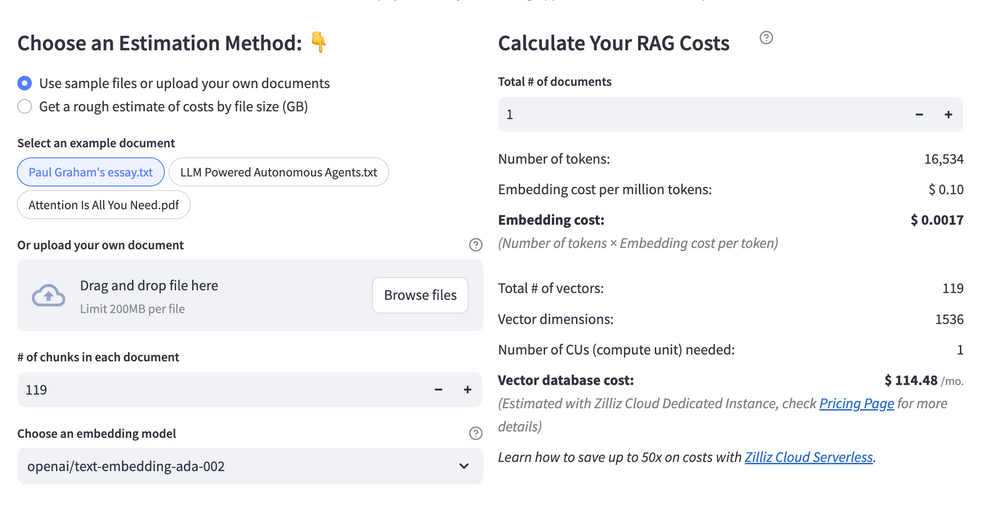 Calculate your RAG cost
What Have You Learned?
Wow, what a journey we’ve had together in this tutorial! You've successfully learned how to integrate a powerful framework, a robust vector database, a dynamic large language model (LLM), and an advanced embedding model to construct a Retrieval-Augmented Generation (RAG) system. We’ve explored LlamaIndex for structuring your data seamlessly and utilized Zilliz Cloud for efficient vector storage and retrieval. Not to forget, Anthropic Claude 3.5 Haiku helped us synthesize information effectively, while Ollama all-minilm served up precise embeddings, enhancing your system's performance. Each component plays a critical role in creating a pipeline that handles queries intelligently, ensuring that the information you retrieve is not only relevant but also contextually enriching.
What’s even more exciting is the optimization tips we shared, which empower you to fine-tune your system for maximum efficiency. Plus, the handy free RAG cost calculator is a fantastic resource to keep your projects budget-friendly. Now you have the tools and knowledge to build, optimize, and innovate your own RAG applications! So, go ahead and dive into your creative process, explore new ideas, and push the boundaries of what you can achieve. The future of AI-enhanced retrieval systems is bright, and with your newfound skills, you’re well-equipped to contribute to it. Let’s get building!
Further Resources
🌟 In addition to this RAG tutorial, unleash your full potential with these incredible resources to level up your RAG skills.
- How to Build a Multimodal RAG | Documentation
- How to Enhance the Performance of Your RAG Pipeline
- Graph RAG with Milvus | Documentation
- How to Evaluate RAG Applications - Zilliz Learn
- Generative AI Resource Hub | Zilliz
We'd Love to Hear What You Think!
We’d love to hear your thoughts! 🌟 Leave your questions or comments below or join our vibrant Milvus Discord community to share your experiences, ask questions, or connect with thousands of AI enthusiasts. Your journey matters to us!
If you like this tutorial, show your support by giving our Milvus GitHub repo a star ⭐—it means the world to us and inspires us to keep creating! 💖
- Introduction to RAG
- Key Components We'll Use for This RAG Chatbot
- Step 1: Install and Set Up Llamaindex
- Step 2: Install and Set Up Anthropic Claude 3.5 Haiku
- Step 3: Install and Set Up Ollama all-minilm
- Step 4: Install and Set Up Zilliz Cloud
- Step 5: Build a RAG Chatbot
- Optimization Tips
- RAG Cost Calculator: A Free Tool to Calculate Your Cost in Seconds
- What Have You Learned?
- Further Resources
- We'd Love to Hear What You Think!
Content
Vector Database at Scale
Zilliz Cloud is a fully-managed vector database built for scale, perfect for your RAG apps.
Try Zilliz Cloud for Free