
Build RAG Chatbot with Haystack, Milvus, Google Vertex AI Gemini 1.5 Pro, and Ollama paraphrase-multilingual
Introduction to RAG
Retrieval-Augmented Generation (RAG) is a game-changer for GenAI applications, especially in conversational AI. It combines the power of pre-trained large language models (LLMs) like OpenAI’s GPT with external knowledge sources stored in vector databases such as Milvus and Zilliz Cloud, allowing for more accurate, contextually relevant, and up-to-date response generation. A RAG pipeline usually consists of four basic components: a vector database, an embedding model, an LLM, and a framework.
Key Components We'll Use for This RAG Chatbot
This tutorial shows you how to build a simple RAG chatbot in Python using the following components:
- Haystack: An open-source Python framework designed for building production-ready NLP applications, particularly question answering and semantic search systems. Haystack excels at retrieving information from large document collections through its modular architecture that combines retrieval and reader components. Ideal for developers creating search applications, chatbots, and knowledge management systems that require efficient document processing and accurate information extraction from unstructured text.
- Milvus: An open-source vector database optimized to store, index, and search large-scale vector embeddings efficiently, perfect for use cases like RAG, semantic search, and recommender systems. If you hate to manage your own infrastructure, we recommend using Zilliz Cloud, which is a fully managed vector database service built on Milvus and offers a free tier supporting up to 1 million vectors.
- Google Vertex AI Gemini 1.5 Pro: A multimodal AI model optimized for processing text, images, and code with a 1-million-token context window, enabling deep analysis of complex inputs. Strengths include scalability, high accuracy, and seamless Google Cloud integration. Ideal for enterprise applications like advanced content generation, data-driven insights, and large-scale automation workflows.
- Ollama Paraphrase-Multilingual: A versatile AI model designed to rephrase and restructure text across multiple languages while preserving meaning. Strengths include multilingual adaptability, context retention, and semantic accuracy. Ideal for translation enhancement, cross-lingual content generation, global customer support, and academic or technical writing requiring nuanced paraphrasing in diverse linguistic contexts.
By the end of this tutorial, you’ll have a functional chatbot capable of answering questions based on a custom knowledge base.
Note: Since we may use proprietary models in our tutorials, make sure you have the required API key beforehand.
Step 1: Install and Set Up Haystack
import os
import requests

from haystack import Pipeline
from haystack.components.converters import MarkdownToDocument

from haystack.components.preprocessors import DocumentSplitter
from haystack.components.writers import DocumentWriter
Step 2: Install and Set Up Google Vertex AI Gemini 1.5 Pro
Using theVertexAIGeminiGenerator with Haystack requires authentication using Google Cloud Application Default Credentials (ADCs). This means your application must be set up with credentials that allow it to access Google Cloud services. If you're not sure how to configure ADCs, check the official Google documentation for setup instructions.
It's important to use a Google Cloud account that has the right permissions to access a project with Google Vertex AI endpoints. Without proper access, the generator won’t work as expected.
To find your project ID, you can either look it up in the Google Cloud Console under the resource manager or run the following command in your terminal.
Now let's install and set up this model.
pip install google-vertex-haystack
from haystack_integrations.components.generators.google_vertex import VertexAIGeminiGenerator

generator = VertexAIGeminiGenerator(model="gemini-1.5-pro")
Step 3: Install and Set Up Ollama paraphrase-multilingual
pip install ollama-haystack
Make sure that you have a running Ollama model (either through a docker container, or locally hosted). No other configuration is necessary as Ollama has the embedding API built in.
from haystack import Document
from haystack_integrations.components.embedders.ollama import OllamaDocumentEmbedder
from haystack_integrations.components.embedders.ollama import OllamaTextEmbedder

text_embedder = OllamaTextEmbedder(model="paraphrase-multilingual")
document_embedder = OllamaDocumentEmbedder(model="paraphrase-multilingual")
Step 4: Install and Set Up Milvus
pip install --upgrade pymilvus milvus-haystack
from milvus_haystack import MilvusDocumentStore
from milvus_haystack.milvus_embedding_retriever import MilvusEmbeddingRetriever

document_store = MilvusDocumentStore(connection_args={"uri": "./milvus.db"}, drop_old=True,)
retriever = MilvusEmbeddingRetriever(document_store=document_store, top_k=3)
Step 5: Build a RAG Chatbot
Now that you’ve set up all components, let’s start to build a simple chatbot. We’ll use the Milvus introduction doc as a private knowledge base. You can replace it your own dataset to customize your RAG chatbot.
url = 'https://raw.githubusercontent.com/milvus-io/milvus-docs/refs/heads/v2.5.x/site/en/about/overview.md'
example_file = 'example_file.md'
response = requests.get(url)
with open(example_file, 'wb') as f:
    f.write(response.content)
file_paths = [example_file]  # You can replace it with your own file paths.

indexing_pipeline = Pipeline()
indexing_pipeline.add_component("converter", MarkdownToDocument())
indexing_pipeline.add_component("splitter", DocumentSplitter(split_by="sentence", split_length=2))
indexing_pipeline.add_component("embedder", document_embedder)
indexing_pipeline.add_component("writer", DocumentWriter(document_store))
indexing_pipeline.connect("converter", "splitter")
indexing_pipeline.connect("splitter", "embedder")
indexing_pipeline.connect("embedder", "writer")
indexing_pipeline.run({"converter": {"sources": file_paths}})

# print("Number of documents:", document_store.count_documents())

question = "What is Milvus?"  # You can replace it with your own question.

retrieval_pipeline = Pipeline()
retrieval_pipeline.add_component("embedder", text_embedder)
retrieval_pipeline.add_component("retriever", retriever)
retrieval_pipeline.connect("embedder", "retriever")

retrieval_results = retrieval_pipeline.run({"embedder": {"text": question}})

# for doc in retrieval_results["retriever"]["documents"]:
#     print(doc.content)
#     print("-" * 10)

from haystack.utils import Secret
from haystack.components.builders import PromptBuilder

retriever = MilvusEmbeddingRetriever(document_store=document_store, top_k=3)
 text_embedder = OllamaTextEmbedder(model="paraphrase-multilingual")

prompt_template = """Answer the following query based on the provided context. If the context does
                     not include an answer, reply with 'I don't know'.\n
                     Query: {{query}}
                     Documents:
                     {% for doc in documents %}
                        {{ doc.content }}
                     {% endfor %}
                     Answer:
                  """

rag_pipeline = Pipeline()
rag_pipeline.add_component("text_embedder", text_embedder)
rag_pipeline.add_component("retriever", retriever)
rag_pipeline.add_component("prompt_builder", PromptBuilder(template=prompt_template))
rag_pipeline.add_component("generator", generator)
rag_pipeline.connect("text_embedder.embedding", "retriever.query_embedding")
rag_pipeline.connect("retriever.documents", "prompt_builder.documents")
rag_pipeline.connect("prompt_builder", "generator")

results = rag_pipeline.run({"text_embedder": {"text": question}, "prompt_builder": {"query": question},})
print('RAG answer:\n', results["generator"]["replies"][0])
Optimization Tips
As you build your RAG system, optimization is key to ensuring peak performance and efficiency. While setting up the components is an essential first step, fine-tuning each one will help you create a solution that works even better and scales seamlessly. In this section, we’ll share some practical tips for optimizing all these components, giving you the edge to build smarter, faster, and more responsive RAG applications.
Haystack optimization tips
To optimize Haystack in a RAG setup, ensure you use an efficient retriever like FAISS or Milvus for scalable and fast similarity searches. Fine-tune your document store settings, such as indexing strategies and storage backends, to balance speed and accuracy. Use batch processing for embedding generation to reduce latency and optimize API calls. Leverage Haystack's pipeline caching to avoid redundant computations, especially for frequently queried documents. Tune your reader model by selecting a lightweight yet accurate transformer-based model like DistilBERT to speed up response times. Implement query rewriting or filtering techniques to enhance retrieval quality, ensuring the most relevant documents are retrieved for generation. Finally, monitor system performance with Haystack’s built-in evaluation tools to iteratively refine your setup based on real-world query performance.
Milvus optimization tips
Milvus serves as a highly efficient vector database, critical for retrieval tasks in a RAG system. To optimize its performance, ensure that indexes are properly built to balance speed and accuracy; consider utilizing HNSW (Hierarchical Navigable Small World) for efficient nearest neighbor search where response time is crucial. Partitioning data based on usage patterns can enhance query performance and reduce load times, enabling better scalability. Regularly monitor and adjust cache settings based on query frequency to avoid latency during data retrieval. Employ batch processing for vector insertions, which can minimize database lock contention and enhance overall throughput. Additionally, fine-tune the model parameters by experimenting with the dimensionality of the vectors; higher dimensions can improve retrieval accuracy but may increase search time, necessitating a balance tailored to your specific use case and hardware infrastructure.
Google Vertex AI Gemini 1.5 Pro optimization tips
To optimize Gemini 1.5 Pro in RAG, prioritize reducing input token usage by truncating or summarizing retrieved documents to fit its 1M-token context window efficiently. Use batch processing for parallel inference requests to minimize latency. Fine-tune temperature and top-k/p settings to balance creativity and factual accuracy. Leverage system prompts to enforce strict adherence to retrieved content, reducing hallucinations. Enable streaming for real-time responses and implement caching for frequent queries. Profile model performance with Vertex AI’s monitoring tools to adjust resource allocation and optimize costs. Test retrieval chunk sizes and embedding dimensions to align with Gemini’s input expectations.
Ollama paraphrase-multilingual optimization tips
To optimize Ollama paraphrase-multilingual in a RAG setup, preprocess input text to remove noise and standardize formats (e.g., lowercasing, punctuation normalization). Use smaller temperature values (e.g., 0.3) for deterministic outputs and adjust max_length to balance context retention and brevity. Batch processing parallelizes paraphrasing for efficiency. Cache frequent or repetitive queries to reduce redundant computations. Validate outputs with metrics like BLEU or semantic similarity scores. For multilingual use, explicitly specify language codes in prompts to avoid ambiguity. Fine-tune on domain-specific data if available, and leverage GPU acceleration for faster inference.
By implementing these tips across your components, you'll be able to enhance the performance and functionality of your RAG system, ensuring it’s optimized for both speed and accuracy. Keep testing, iterating, and refining your setup to stay ahead in the ever-evolving world of AI development.
RAG Cost Calculator: A Free Tool to Calculate Your Cost in Seconds
Estimating the cost of a Retrieval-Augmented Generation (RAG) pipeline involves analyzing expenses across vector storage, compute resources, and API usage. Key cost drivers include vector database queries, embedding generation, and LLM inference.
RAG Cost Calculator is a free tool that quickly estimates the cost of building a RAG pipeline, including chunking, embedding, vector storage/search, and LLM generation. It also helps you identify cost-saving opportunities and achieve up to 10x cost reduction on vector databases with the serverless option.
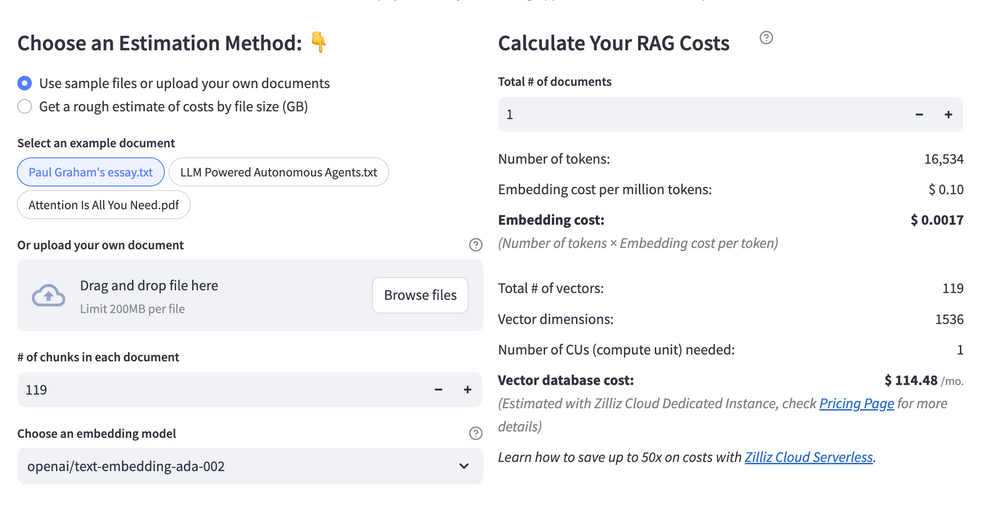 Calculate your RAG cost
What Have You Learned?
By diving into this tutorial, you’ve unlocked the power of combining cutting-edge tools to build a functional and scalable RAG system! You learned how Haystack serves as the backbone of your pipeline, orchestrating the flow of data between components with its modular design. With Milvus as your vector database, you saw firsthand how to store and retrieve embeddings efficiently, ensuring lightning-fast similarity searches even with massive datasets. Then came the magic of Google Vertex AI Gemini 1.5 Pro, a powerhouse LLM that generates human-like responses by leveraging the context retrieved from Milvus. But the real game-changer? Integrating Ollama’s paraphrase-multilingual model to create rich, multilingual embeddings, which means your RAG system isn’t just smart—it’s globally adaptable! Along the way, you picked up optimization tricks like fine-tuning chunk sizes and balancing speed-accuracy tradeoffs, plus a sneak peek into tools like the free RAG cost calculator to budget your AI experiments wisely.
Now that you’ve seen how these pieces fit together, the possibilities are endless! Whether you’re building a multilingual chatbot, a research assistant, or an enterprise knowledge hub, you’ve got the tools to make it happen. Remember, every tweak you make—whether optimizing retrieval or experimenting with new embedding models—brings you closer to creating something truly transformative. So go ahead, fire up your code editor, play with different configurations, and let your creativity run wild. The future of intelligent applications is in your hands, and you’re more than ready to build it. Let’s make those RAG dreams a reality—one line of code at a time! 🚀
Further Resources
🌟 In addition to this RAG tutorial, unleash your full potential with these incredible resources to level up your RAG skills.
- How to Build a Multimodal RAG | Documentation
- How to Enhance the Performance of Your RAG Pipeline
- Graph RAG with Milvus | Documentation
- How to Evaluate RAG Applications - Zilliz Learn
- Generative AI Resource Hub | Zilliz
We'd Love to Hear What You Think!
We’d love to hear your thoughts! 🌟 Leave your questions or comments below or join our vibrant Milvus Discord community to share your experiences, ask questions, or connect with thousands of AI enthusiasts. Your journey matters to us!
If you like this tutorial, show your support by giving our Milvus GitHub repo a star ⭐—it means the world to us and inspires us to keep creating! 💖
Content
- Introduction to RAG
- Key Components We'll Use for This RAG Chatbot
- Step 1: Install and Set Up Haystack
- Step 2: Install and Set Up Google Vertex AI Gemini 1.5 Pro
- Step 3: Install and Set Up Ollama paraphrase-multilingual
- Step 4: Install and Set Up Milvus
- Step 5: Build a RAG Chatbot
- Optimization Tips
- RAG Cost Calculator: A Free Tool to Calculate Your Cost in Seconds
- What Have You Learned?
- Further Resources
- We'd Love to Hear What You Think!
Vector Database at Scale
Zilliz Cloud is a fully-managed vector database built for scale, perfect for your RAG apps.
Try Zilliz Cloud for Free