


How to Migrate from Chroma to Zilliz Cloud
Chroma Cloud stops accepting writes on November 22, 2026, and stops serving reads on December 22, 2026, according to Chroma's wind-down timeline. If your application writes to Chroma Cloud, it needs a new home before the first date, and your data has to be out before the second.
Open-source Chroma isn't affected. But if you run it yourself and you're taking it to production, with more data than one machine holds comfortably, an uptime target, and nobody keen to be on call for it, the move is the same, minus the deadline.
This guide moves either one to Zilliz Cloud, the fully managed vector database built on open-source Milvus. Your embeddings carry over as-is, so nothing gets re-embedded, and your IDs, documents, URIs, and metadata come with them. If you'd rather run open-source Milvus yourself, the same steps apply; see Moving Chroma to open-source Milvus in Step 1.
The migration includes four steps: move your data, check it, update your application, and cut over.
Before you start
You need:
- A Zilliz Cloud cluster, with its public endpoint and an API key. Sign up if you don't have one. The free plan holds up to 5 collections; for more, use a Serverless or Dedicated cluster.
- Your Chroma connection details. On Chroma Cloud, the Connect panel in the dashboard shows your API key, tenant ID, and database name. For self-hosted Chroma, you need the server address, plus a token or a username and password if you enabled authentication.
- Python 3.10 or later with both clients, to check the copy and update your application:
pip install chromadb==1.5.9 pymilvus==3.0.2
- Docker, if you use the open-source Vector Transport Service (Option B in Step 1).
How your data maps
Each Chroma collection becomes a Zilliz Cloud collection with four fields. Metadata goes into the collection's dynamic field, so every metadata key stays filterable, just as it was in Chroma. The Zilliz Cloud docs page Migrate from Chroma to Zilliz Cloud has the full mapping, including how metadata types convert to typed fields.
| Chroma | Zilliz Cloud |
|---|---|
| Collection | Collection with the same name, with - converted to _: support-docs becomes support_docs. Zilliz Cloud names take only letters, digits, and underscores and can't start with a digit, so a name like kb.v2 or 2024-notes needs a new name when you set up the copy. So does one of any two names that convert to the same name, such as support-docs and support_docs |
id | id, the VARCHAR primary key. IDs don't change |
embedding | embedding, a FLOAT_VECTOR field with the same dimension |
document | document, a nullable VARCHAR field of up to 65,535 bytes |
uri | uri, a nullable VARCHAR field. The URI string is copied; the file it points to isn't |
| Metadata | Keys in the dynamic field. You can also turn chosen keys into typed fields when you set up the copy |
Distance space: cosine, l2, or ip | Index metric: COSINE, L2, or IP. The metric isn't copied over; you set it when the index is built |
| Embedding function | Not stored in the database. Your application embeds queries (Step 3) |
One collection per user? Each Chroma collection becomes its own Zilliz Cloud collection, and a cluster holds a limited number of them: 5 on Free, 100 on Serverless, and on Dedicated clusters 1,024 per compute unit, up to 16,384. If you have more per-user collections than that, or expect to, talk to us before you migrate: the better design is one collection with a partition key, which supports millions of tenants.
Step 1: Move your data
You can copy the data in two ways. Which one fits depends on where your Chroma runs:
| Your Chroma | Use |
|---|---|
| Chroma Cloud | Option A: Built-in Migration Service |
| Your own Chroma server, reachable from the internet | Option A: Built-in Migration Service |
| Your own Chroma on a private network or your laptop, or embedded in your application | Option B: Vector Transport Service (open-source) |
The difference is who connects to whom. The Migration Service runs in Zilliz Cloud and reads from your Chroma, so it needs an address it can reach. Vector Transport Service runs on a machine you choose and writes out to Zilliz Cloud, so it works from anywhere that can reach both.
First, note each collection's record count and distance space. You need the distance space to set the index metric, whichever option you use, and the count to check the copy:
import chromadb

client = chromadb.HttpClient(host="localhost", port=8000)
# Chroma Cloud: chromadb.CloudClient(api_key=..., tenant=..., database=...)

for collection in client.list_collections():
    config = collection.configuration_json
    space = (config.get("hnsw") or config.get("spann") or {}).get("space") or "l2"
    print(f"{collection.name}: {collection.count()} records, space {space}")
Chroma uses l2 for collections created without a distance space. Leave empty collections out of the copy: Chroma doesn't record a dimension until the first embedding arrives, so there's nothing to create the target from.
Option A: Zilliz Cloud Migration Service
The Migration Service is built into the Zilliz Cloud console and is free to use. You need the Organization Owner or Project Admin role. A self-hosted Chroma server must serve Chroma's REST API v2 and be reachable from Zilliz Cloud. If it sits behind a firewall, add Zilliz Cloud's IP addresses to its allowlist.
- Connect. In the console, open Migrations and choose Chroma as the source. Enter the Chroma endpoint, tenant, database, and credentials. For Chroma Cloud, copy them from the Connect panel: the endpoint is
https://api.trychroma.com, or your region's endpoint if your database is outside AWS us-east-1, and the credential is your API key. Self-hosted Chroma can use no authentication, a token, or a username and password, and its default tenant and database aredefault_tenantanddefault_database. Then choose the target cluster and database.
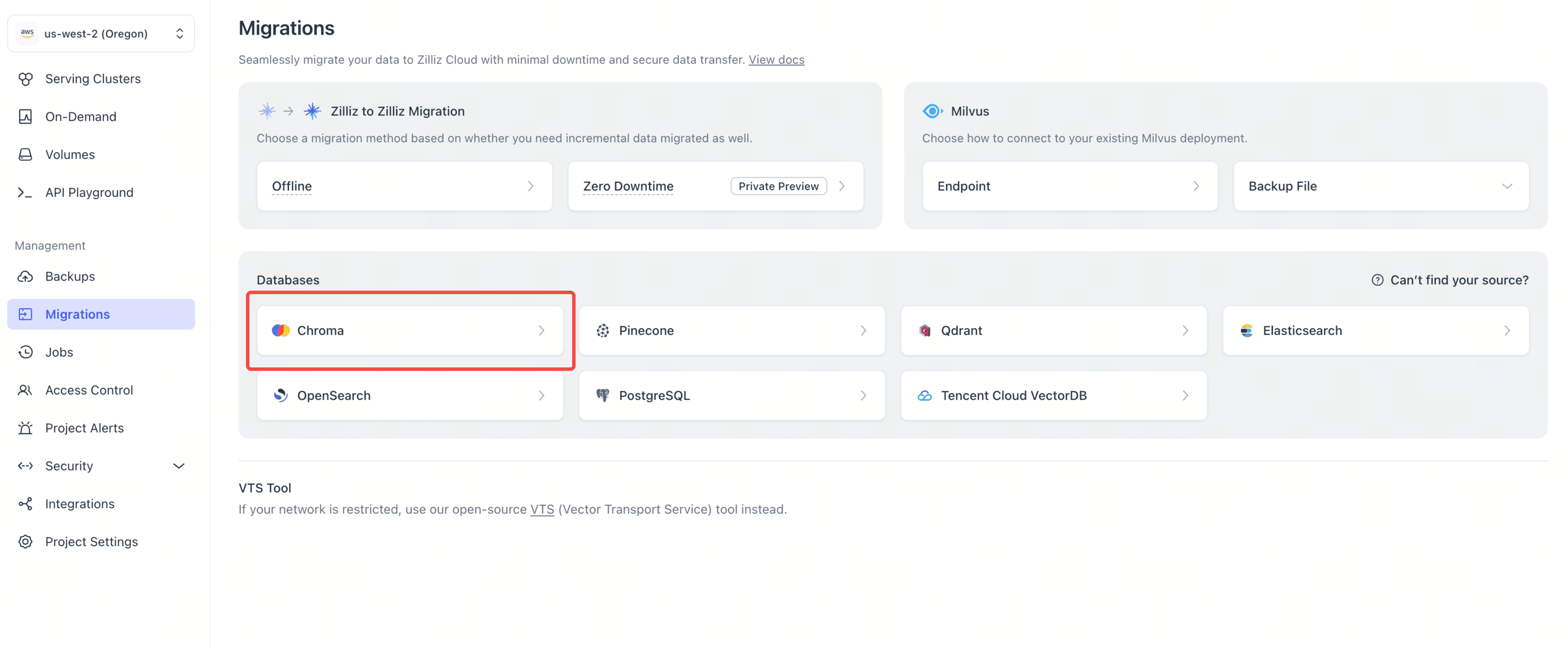
- Pick and review. Select the collections to move. Check each target name, and rename any that Zilliz Cloud can't use or that are already taken. Review the field mapping: metadata goes to the dynamic field by default, and you can turn chosen keys into typed fields here.
- Set the index. Leave Create indexes after migration on, so the collections are searchable as soon as the job finishes. Set each collection's metric to match its Chroma distance space:
cosinetoCOSINE,l2toL2, andiptoIP. The metric isn't copied over from Chroma. See index settings. - Run. Start the job and follow it on the Jobs page. When it finishes, the job reports the row count it verified.
Every field and option is described in Migrate from Chroma to Zilliz Cloud in the Zilliz Cloud docs. Then go to Step 2.
Option B: Vector Transport Service
Vector Transport Service (VTS) is Zilliz's open-source migration tool, and the engine the Migration Service runs on. You run it yourself in Docker, from a config file. It reads Chroma through its v2 REST API, which any Chroma server on version 0.6 or later serves.
If your Chroma is embedded in your application, with its data in a local directory through chromadb.PersistentClient, there's no server for VTS to read from yet. Start one on that directory:
chroma run --path ./chroma_data --port 8000
Then write the job config. Save this as migration.conf and replace each $ placeholder with a real value; they aren't environment variables and aren't expanded for you.
hocon
env {
  parallelism = 1
  job.mode = "BATCH"
}

source {
  ChromaDB {
    url = "$CHROMA_URL"                  # e.g. http://host.docker.internal:8000
    tenant = "default_tenant"
    database = "default_database"
    collections = ["$CHROMA_COLLECTION"] # e.g. ["support-docs"]

    # If your Chroma requires auth, see the table below
    # auth_type = "X_CHROMA_TOKEN"
    # token = "$CHROMA_TOKEN"

    id_split_size = 300
    batch_size = 300
  }
}

sink {
  Milvus {
    url = "$ZILLIZ_CLOUD_ENDPOINT"
    token = "$ZILLIZ_CLOUD_API_KEY"
    database = "default"                 # must already exist
    batch_size = 50
    enable_dynamic_field = true          # required, this is where metadata goes
    schema_save_mode = "CREATE_SCHEMA_WHEN_NOT_EXIST"
    data_save_mode = "APPEND_DATA"
  }
}
The config holds credentials, so restrict it with chmod 600 migration.conf.
| Parameter | What to put there |
|---|---|
url (source) | The Chroma server root, without /api/v2, which VTS appends. VTS runs in a container, where localhost means the container itself. If Chroma runs on the same machine, use http://host.docker.internal:8000 on macOS and Windows; on Linux, add --network host to docker run and keep localhost. For Chroma Cloud, use https://api.trychroma.com, or your region's endpoint |
tenant and database | default_tenant and default_database unless you created others. On Chroma Cloud, your tenant ID and database name |
auth_type and token | Leave both out if your server runs without auth. Otherwise use X_CHROMA_TOKEN or BEARER with a token, or BASIC with username and password. Chroma Cloud uses X_CHROMA_TOKEN with your API key |
id_split_size and batch_size | 300 for both works everywhere, and on Chroma Cloud both must stay at or below 300. For a large self-hosted collection, 10000000 and 1000 scan IDs in bulk and then fetch records by ID, which avoids slow deep paging |
collection_rename (sink) | Optional, { "source" = "target" }. Required for any source name that isn't a valid Zilliz Cloud name once - becomes _ |
To turn chosen metadata keys into typed fields, add a field_schema block to the sink. The Milvus sink guide covers field_schema and collection_rename, and the ChromaDB source guide covers batch sizes, authentication, and the other source options.
Run the job:
docker run --rm \
  --mount "type=bind,source=$(pwd)/migration.conf,target=/config/migration.conf,readonly" \
  --workdir /opt/seatunnel \
  --entrypoint /bin/bash \
  zilliz/vector-transport-service:v1.3.0 \
  -lc 'mkdir -p logs && ./bin/seatunnel.sh --config /config/migration.conf -m local'
The job succeeded when the log ends with end with state FINISHED, Total Read Count equals Total Write Count, and Total Failed Count is 0.
The job appends, so don't rerun it into the same collection. A second run writes every record again. If a job fails partway, or you need a fresh copy, drop the target collection first, or send the job to a new one with collection_rename.
Build the index. Use the distance space you noted for that collection:
from pymilvus import MilvusClient

client = MilvusClient(
    uri="YOUR_ZILLIZ_CLOUD_ENDPOINT",
    token="YOUR_ZILLIZ_CLOUD_API_KEY",
)

index_params = client.prepare_index_params()
index_params.add_index(
    field_name="embedding",
    index_type="AUTOINDEX",
    metric_type="COSINE",  # cosine -> COSINE, l2 -> L2, ip -> IP
)
client.create_index(collection_name="support_docs", index_params=index_params)
client.load_collection("support_docs")
Moving Chroma to open-source Milvus
Everything in this guide works with open-source Milvus 2.5 or later. Use Option B, which writes to any Milvus it can reach: set the sink's url to your Milvus address, such as http://host.docker.internal:19530 when Milvus runs on the same machine, and token to username:password, or delete the token line if authentication is off. Steps 2 to 4 are the same, and in your application only uri and token change. Because Milvus and Zilliz Cloud share one API, you can move between them later without touching your code.
Step 2: Check your data
First, compare record counts. The Migration Service reports the row count it verified; for VTS, it's Total Write Count in the log. Either should match the count in Chroma.
Counts tell you every record arrived. They don't tell you the index answers queries the way Chroma did: an index built with the wrong metric passes a count check and still returns the wrong neighbors. So run a few searches on both sides and compare:
import chromadb
from pymilvus import MilvusClient

chroma = chromadb.CloudClient(api_key="YOUR_CHROMA_API_KEY", tenant="YOUR_TENANT_ID", database="YOUR_DATABASE_NAME")
# Self-hosted Chroma: chromadb.HttpClient(host="localhost", port=8000)
milvus = MilvusClient(uri="YOUR_ZILLIZ_CLOUD_ENDPOINT", token="YOUR_ZILLIZ_CLOUD_API_KEY")

source = chroma.get_collection("support-docs")
overlaps = []
for vector in source.get(limit=20, include=["embeddings"])["embeddings"]:
    expected = source.query(query_embeddings=[vector], n_results=10, include=[])["ids"][0]
    hits = milvus.search("support_docs", data=[vector.tolist()], limit=10)[0]
    overlaps.append(len(set(expected) & {hit["id"] for hit in hits}) / len(expected))
print(f"top-10 overlap: {sum(overlaps) / len(overlaps):.0%}")
This uses 20 records as queries and counts how many of the top 10 results match. Both systems use approximate indexes, so a figure a little under 100% is normal. A much lower one almost always means the index metric doesn't match the collection's distance space.
Neither check looks inside the records. Before the final copy goes live, compare those too: check that every ID made it across, then compare vectors, documents, URIs, and metadata. On a small collection, compare every record; on a large one, a random sample.
If your application kept writing to Chroma during the copy, the counts can differ. That's fine for a first pass; for the final copy when you cut over, they must match.
Step 3: Update your application
Most calls translate one-for-one. Two things need attention: your application now creates query embeddings itself, and scores for cosine and ip collections run the other way.
Connect to Zilliz Cloud:
from pymilvus import MilvusClient

client = MilvusClient(
    uri="YOUR_ZILLIZ_CLOUD_ENDPOINT",
    token="YOUR_ZILLIZ_CLOUD_API_KEY",
)
For open-source Milvus, set uri to your Milvus address and token to username:password, or leave token out if authentication is off. Everything below is the same.
Embed queries with the same model as before. When you passed query_texts to Chroma, Chroma ran the collection's embedding function for you. The migrated collections don't carry that function, so call the same model in your code. If you let Chroma embed your text and never set an embedding function, it used its default model, all-MiniLM-L6-v2. The chromadb package can still run it locally:
from chromadb.utils.embedding_functions import DefaultEmbeddingFunction

embed = DefaultEmbeddingFunction()
query_vector = embed(["How do I get a refund?"])[0].tolist()
If you used OpenAI or another provider, call the same model with the same settings.
Search with filters. Before, in Chroma:
results = collection.query(
    query_embeddings=[query_vector],
    n_results=5,
    where={"category": "billing"},
    where_document={"$contains": "refund"},
)
After, in Zilliz Cloud:
results = client.search(
    collection_name="support_docs",
    data=[query_vector],
    limit=5,
    filter='category == "billing" and document like "%refund%"',
    output_fields=["document", "category"],
)
Each hit is a dict with id, distance, and the fields you asked for under entity. Chroma's where and where_document filters become one filter expression:
| Chroma | Zilliz Cloud |
|---|---|
{"category": "billing"} | category == "billing" |
{"category": {"$ne": "billing"}} | category != "billing" |
{"year": {"$gte": 2023}} (also $gt, $lt, $lte) | year >= 2023 (also >, <, <=) |
{"category": {"$in": ["billing", "account"]}} | category in ["billing", "account"] |
{"category": {"$nin": ["billing", "account"]}} | category not in ["billing", "account"] |
{"$and": [...]} and {"$or": [...]} | ... and ... and ... or ... |
{"is_public": True} | is_public == true |
{"tags": {"$contains": "faq"}} (array metadata) | array_contains(tags, "faq") |
where_document={"$contains": "refund"} | document like "%refund%" |
where_document={"$not_contains": "refund"} | not (document like "%refund%") |
Read scores the other way round. Chroma returns distances, where lower means more similar. For COSINE and IP, Zilliz Cloud returns similarity scores, where higher means more similar. Rankings don't change, but any threshold in your code does. In our test, the top hit for the search above had a Chroma distance of 0.0545 and a Zilliz Cloud score of 0.9455.
| Chroma space | Chroma returns | Zilliz Cloud returns | A threshold like distance < 0.3 becomes |
|---|---|---|---|
cosine | 1 − cosine similarity | Cosine similarity | score > 0.7 |
ip | 1 − inner product | Inner product | score > 0.7 |
l2 | Squared L2 distance | Squared L2 distance | No change |
Write and delete records. Metadata keys sit next to the other fields in each row, so there's no separate metadatas argument. add and upsert both map to upsert (or insert for new IDs), and delete works by ID or by filter:
client.upsert(
    collection_name="support_docs",
    data=[{"id": "doc-1001", "embedding": vector, "document": "How to change your billing address", "category": "billing"}],
)
client.delete(collection_name="support_docs", ids=["doc-1001"])
client.delete(collection_name="support_docs", filter='category == "archived"')
Here vector is an embedding from the same model as the rest of the collection. You can leave out uri; it's nullable.
Using LangChain? Swap the vector store class and point it at the migrated field names. Before:
from langchain_chroma import Chroma

vector_store = Chroma(
    collection_name="support-docs",
    embedding_function=embeddings,
    chroma_cloud_api_key="YOUR_CHROMA_API_KEY",
    tenant="YOUR_TENANT_ID",
    database="YOUR_DATABASE_NAME",
)
docs = vector_store.similarity_search("How do I get a refund?", k=5, filter={"category": "billing"})
After, with pip install langchain-milvus:
from langchain_milvus import Milvus

vector_store = Milvus(
    embedding_function=embeddings,
    collection_name="support_docs",
    connection_args={"uri": "YOUR_ZILLIZ_CLOUD_ENDPOINT", "token": "YOUR_ZILLIZ_CLOUD_API_KEY"},
    primary_field="id",
    text_field="document",
    vector_field="embedding",
    enable_dynamic_field=True,
)
docs = vector_store.similarity_search("How do I get a refund?", k=5, expr='category == "billing"')
embeddings is the same LangChain embeddings object you used with Chroma, and filters move from filter={...} to expr="...". LlamaIndex users can switch to the Milvus vector store the same way.
Step 4: Cut over
- Copy your data, check it, and point a staging build of your application at Zilliz Cloud.
- Pause writes to Chroma. After November 22, Chroma Cloud blocks them anyway.
- Copy again, so you get every write up to the pause, and check that the counts now match exactly. Delete the first copy before you start, or send this one to another database.
- Deploy your application against Zilliz Cloud.
- On Chroma Cloud, remove or rotate your credentials before December 22, as Chroma's wind-down notice asks.
Reading this after November 22? Your Chroma Cloud data is already read-only, so skip step 2 and copy once. You can still copy it until December 22.
On self-hosted Chroma, there's no deadline, but keep the order: copy, pause writes, copy again, switch. Keep your Chroma server for a while afterward. Until your application writes something new to Zilliz Cloud, rolling back is a configuration change.
Next steps
- Moving a large or production workload? Talk to our support team about planning the cutover.
- Comparing options first? Chroma vs. Zilliz Cloud covers features, scale, and what maps from Chroma Cloud.
- Used hybrid search in Chroma Cloud? Zilliz Cloud's hybrid search combines dense vectors with BM25 or other sparse vectors in one request.
- Moving other databases too? The same Migration Service handles Pinecone, Qdrant, Elasticsearch, OpenSearch, and PostgreSQL.
 Fendy Feng
Fendy Feng is the Product Marketing Manager at Zilliz. She has extensive experience developing and enhancing the impact of open-source projects in various global markets by producing high-quality, tailored content. Before joining Zilliz, Fendy worked as a Content Strategist at PingCAP, a fast-growing E-Series startup renowned for its open-source distributed SQL database.
 Sebastian Huang
Staff Software Engineer at Zilliz
 Shawn He
Shawn He is a Senior Software Engineer at Zilliz, specializing in vector database migration, data pipelines, and cloud SaaS development. He builds reliable tools and services that help users move data across vector databases and streamline cloud data workflows.
Keep Reading

My Wife Wanted Dior. I Spent $600 on Claude Code to Vibe-Code a 2M-Line Database Instead.
Write tests, not code reviews. How a test-first workflow with 6 parallel Claude Code sessions turns a 2M-line C++ codebase into a daily shipping pipeline.
DeepSeek vs. OpenAI: A Battle of Innovation in Modern AI
Compare OpenAI's o1 and o3-mini with DeepSeek R1's open-source alternative. Discover which AI model offers the best balance of reasoning capabilities and cost efficiency.

Multimodal Pipelines for AI Applications
Learn how to build scalable multimodal AI pipelines using DataVolo and Milvus. Discover best practices for handling unstructured data and implementing RAG systems.