




VDBBench Adds Cost-Aware Benchmarking for Vector Databases
Last year, we released VectorDBBench 1.0 to make vector database benchmarking closer to production workloads. Instead of testing only peak QPS on fixed benchmark data, VectorDBBench (also known as VDBBench) lets teams evaluate vector databases using workload patterns that more closely reflect their own production systems: ingestion, filtering, recall, latency, concurrency, and custom datasets.
The latest release of VDBBench adds a new dimension: cost.
Production teams rarely choose a vector database by performance alone. They need to know what it costs to hit a target QPS, how P99 behaves under that cost model, when inserted data becomes searchable, when it is fully indexed, how payload size affects search, how the system behaves across many tenants, and what happens on the first query after being idle. Those questions are now part of VDBBench.
To show how these new cost-aware benchmarks work in practice, we tested three commonly evaluated managed vector database products: Zilliz Cloud, Turbopuffer, and Pinecone. The results are published in the new VDBBench Cost Leaderboard, with charts and tables that compare insert readiness, payload search, multitenant search, cold latency, and cost-performance trade-offs.
The leaderboard is only one way to read the results — it is a snapshot of three products at one point in time. Because VDBBench is open source, teams can also reproduce these cases, benchmark products that are not on the leaderboard, or adapt the workloads to their own production-like data.
The goal is not to crown a universal winner, but to help teams choose the vector database that best fits their workload, performance targets, and budget.
- References: VectorDBBench GitHub | VDBBench Leaderboards
What's New in VDBBench
This release adds four cloud-oriented benchmark cases that measure production behavior that peak-QPS leaderboards often miss.
| Case | What it measures | Why it matters |
|---|---|---|
| CloudInsertCase | Insert completion, searchable state, fully indexed state, and write cost | Freshness and backfill cost matter for RAG, catalogs, and agent memory |
| CloudPayloadSearchCase | QPS, P99 latency, recall, and response payload shape | Returning vectors or metadata can change the search cost surface |
| MultitenantSearchCase | Throughput across many tenants or namespaces | SaaS workloads stress routing and partition behavior differently from single-tenant search |
| CloudColdLatencyCase | First query after idle vs. warmed query path | Cold-start behavior matters for low-frequency tenants and agent memory |
On top of these cases, the Cost Leaderboard adds a cost-Pareto view that models operating costs at target QPS levels under each product's measured serving limits — because buying decisions usually hinge on where performance and cost intersect.
The VDBBench Cost Leaderboard uses these cases to publicly compare managed products. Because the cases ship in open-source VDBBench, teams can reuse them for their own evaluation, including products and workloads not shown on the leaderboard.
Who We Tested: Zilliz Cloud vs. Turbopuffer vs. Pinecone
For this first cost-aware run, we tested three commonly evaluated managed vector database products. All products were benchmarked on May 10, 2026, in AWS US West (us-west-2). Their operating models differ, so the results should be interpreted in terms of workload fit rather than as a single ranking.
| Product | Role in this benchmark |
|---|---|
| Zilliz Cloud | Managed cloud vector database and vector lakebase from the creators of Milvus, tested across its Tiered and Capacity configurations |
| Turbopuffer | Serverless vector database tested across unpinned and pinned modes |
| Pinecone Serverless | Mature low-ops serverless vector database used as a common production reference point |
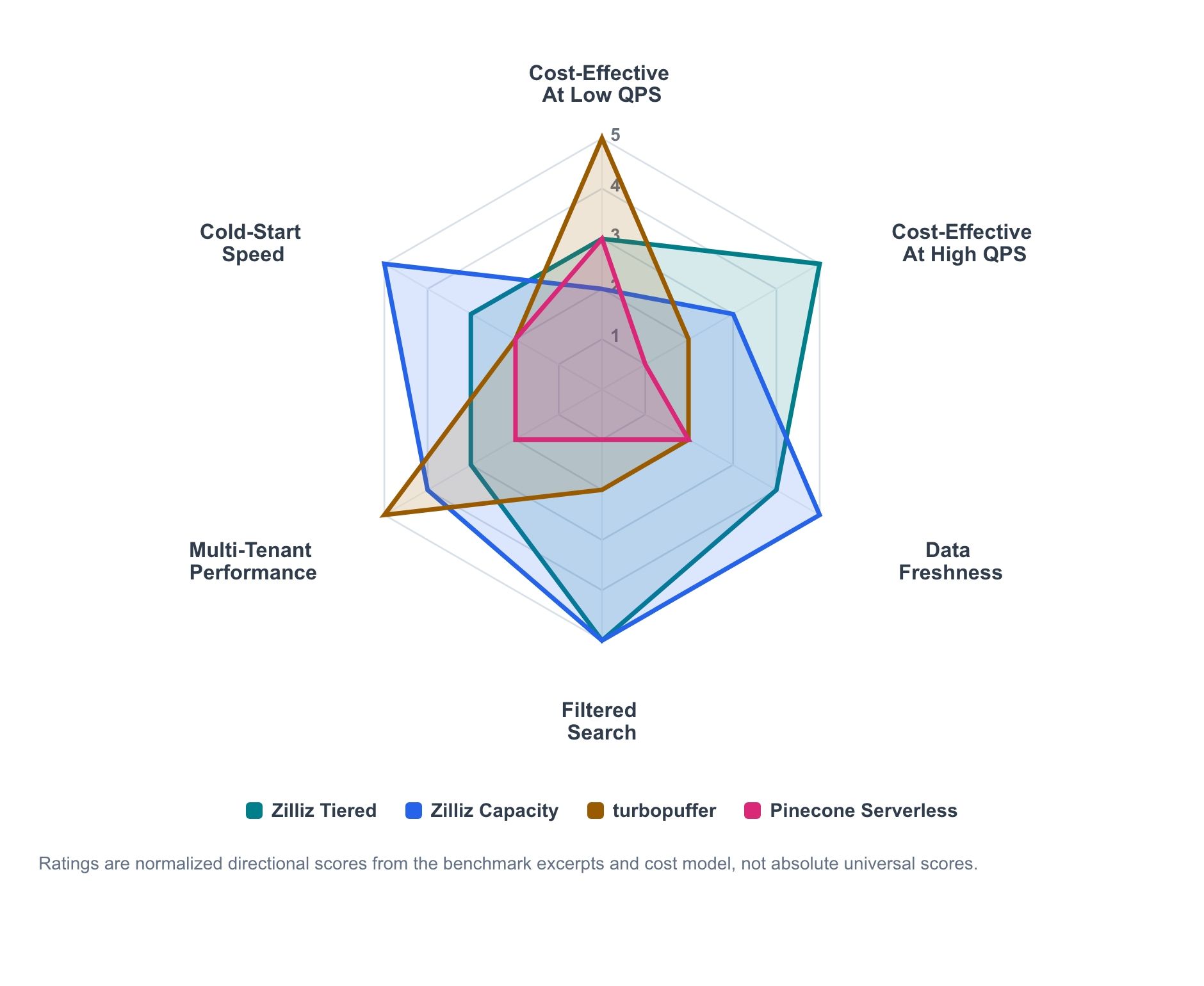
Figure 1. Directional workload-fit summary based on benchmark excerpts and cost modeling. Scores are normalized for comparison across workload dimensions and should not be read as universal absolute rankings.
The radar chart summarizes the directional signal from the benchmark excerpts and cost model. It is not an absolute scorecard; it is a map of where each product tends to be strongest.
- Zilliz Cloud Tiered is the economical active-serving line that scales up as utilization rises.
- Zilliz Cloud Capacity is the higher-control profile for predictable serving, freshness, and cold behavior.
- Turbopuffer is strongest where usage-metered serverless economics and namespace-oriented throughput match the workload.
- Pinecone remains a useful low-ops serverless baseline, even when it is not the cost-performance frontier in a specific test.
The main pattern is clear. Serverless economics can be attractive at low sustained QPS. Provisioned capacity becomes more competitive as utilization rises. Freshness, filtered search, payload size, tenant count, and cold behavior can all move the decision.
Datasets and Workloads
The cost-aware cases use two workload shapes.
- Single-tenant LAION 100M: 100 million 768-dimensional dense vectors. This represents a large production collection where payload size, filters, recall, and sustained QPS matter.
- Multitenant Cohere 10M: 10 million 768-dimensional dense vectors, randomly split across 1,000 tenants — roughly 10K vectors per tenant. This represents SaaS-style workloads in which each tenant has a smaller dataset, but the system must efficiently route and serve many namespaces or tenant partitions.
The excerpts below show the shape of the findings. The Cost Leaderboard and the VectorDBBench repository remain the source for the complete matrices, client definitions, and reproduction details.
CloudInsertCase: Inserted Is Not Always Ready
Insert performance is not one number. A managed vector database can accept data from the client before that data is safe to search through the intended index path. For production workloads, teams need to know when the insert operation is completed, when the data becomes searchable, and when background indexing is fully caught up.
CloudInsertCase measures the write-to-serve lifecycle. This matters for RAG corpus refreshes, product catalog updates, agent memory writes, and data backfills. In these systems, "insert accepted" is not enough. The operational question is when newly written data can be searched reliably with production performance.
| Product / mode | Batch size | Insert time | Searchable wait | Fully indexed wait | Write cost |
|---|---|---|---|---|---|
| Zilliz Cloud Capacity 12CU | 10,000 | 3.2 hr | 0 ms | 1.9 min | $9.50 |
| Zilliz Cloud Tiered 4CU | 10,000 | 4.1 hr | 0 ms | 10.9 min | $6.34 |
| Turbopuffer (backpressure off) | 10,000 | 1.8 hr | 6.4 hr | 2.0 min | $302 |
| Pinecone Serverless | 10,000 | 72.4 hr | 0 ms | 127 ms | $1,180 |
Table 1. LAION 100M batch-10k insert excerpt. Costs and timings are from the current leaderboard run. For the provisioned Zilliz configurations, write cost is the CU-hour cost consumed during the load-and-index window; for Turbopuffer and Pinecone, it is the metered write charge. Read the timings with the client definitions for inserted, searchable, and fully indexed states (defined per client in the VDBBench source).
Batch size changes numbers for different products.
- Turbopuffer shows strong raw intake in large batches, especially with backpressure disabled — its most aggressive intake mode. In the batch-10k path, it completes insertion quickly, but the searchable wait dominates the full readiness window.
- Zilliz Cloud is steadier across batch sizes. In the tested Capacity and Tiered configurations, data becomes searchable immediately after insert completion, and the remaining fully indexed wait is measured in minutes.
- Pinecone Serverless is the slower bulk-intake baseline in this test. Once data is accepted, the additional searchable and fully indexed wait is effectively zero in these runs, but the insert stage itself takes much longer.
The product read is workload-shaped.
- Zilliz fits workflows where fresh data needs to be quickly searchable and indexed at a predictable cost.
- Turbopuffer fits large accepted backfills when the workload can tolerate a longer ready window.
- Pinecone fits lower-volume serverless ingestion patterns where operational simplicity matters more than bulk-load speed or cost.
Bulk loading is also a cost event. In this LAION 100M insert case, the Zilliz configurations keep write-side cost in the single-digit dollar range for the tested batch-10k path. Turbopuffer is modeled around $302. Pinecone Serverless is modeled around $1,180. That does not make one pricing model universally better. It means the insert economics depends on how often the workload runs that path.
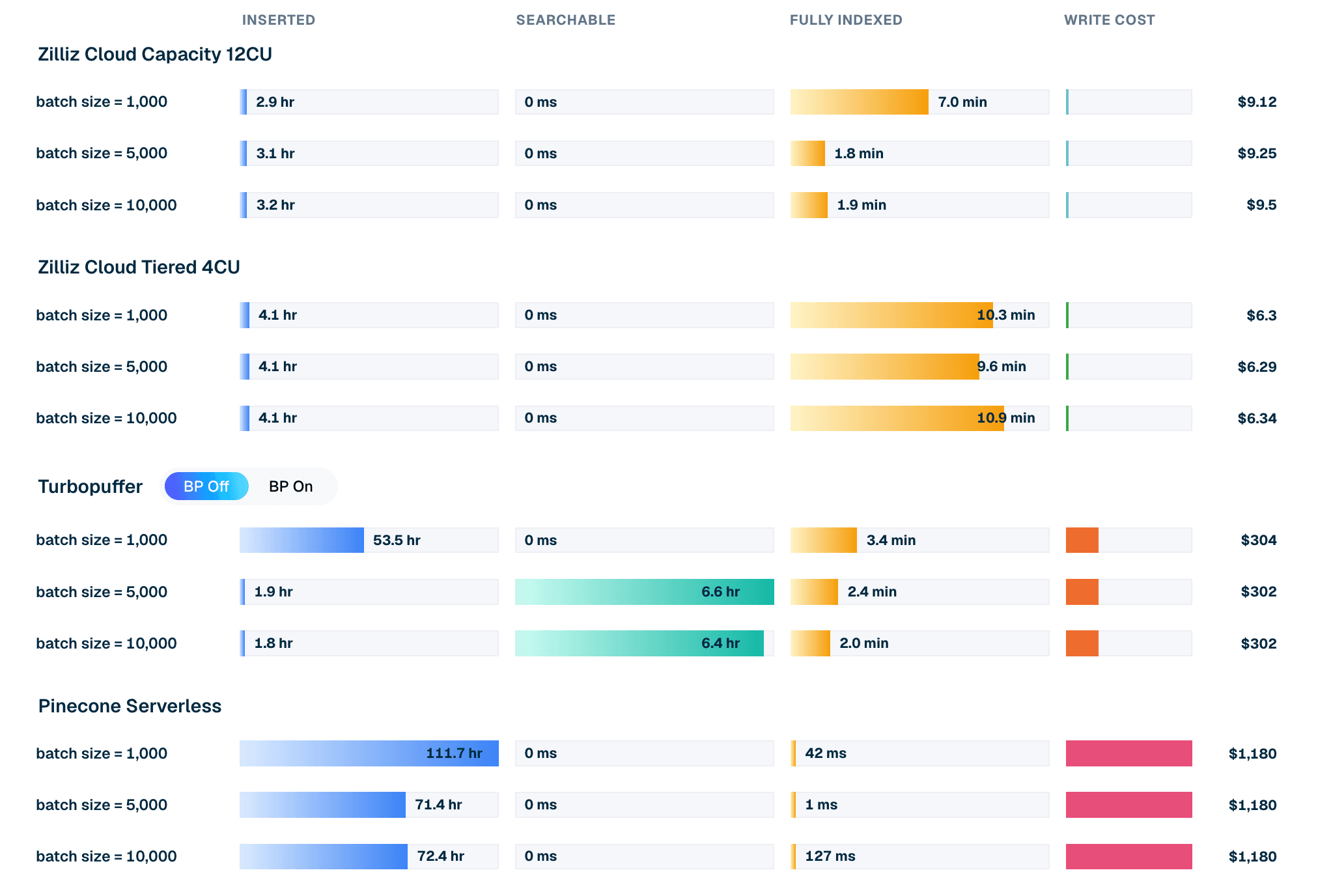
Figure 2. Insert lifecycle for LAION 100M at batch 10k: insert time, searchable wait, fully indexed wait, and modeled write cost per product.
CloudPayloadSearchCase: Payload Changes the Search Surface
Once data is searchable, the next question is not only how many queries per second the database can handle. The response shape matters. Returning only IDs is very different from returning metadata or raw vectors. A 768-dimensional vector can add thousands of bytes to each result. At topK=100, payload size can become a major factor in query cost and latency.
CloudPayloadSearchCase tests single-tenant LAION 100M under different response payloads and filter shapes. The readout combines max concurrent QPS, P99 latency at that concurrency, payload type, and recall, where available.
One note on reading the tables: P99 here is measured at max concurrency — the saturation point that produces each product's peak QPS — not at a comfortable service-level operating point. It shows how a configuration behaves at its measured limit.
| Product | P99 latency @ max concurrency | Max QPS | recall@10 |
|---|---|---|---|
| Zilliz Cloud Capacity 32CU | 158 ms | 786.1 | 0.9728 |
| turbopuffer | 2.34 s | 395.7 | 0.9321 |
| Zilliz Cloud Capacity 12CU | 299 ms | 376.0 | 0.9723 |
| Turbopuffer pinned | 3.30 s | 68.2 | 0.9321 |
| Zilliz Cloud Tiered 4CU | 5.57 s | 49.2 | 0.9510 |
| Pinecone Serverless | 4.85 s | 4.6 | 0.9609 |
Table 2. Single-tenant LAION 100M, unfiltered IDs-only, topK 100. Note on Pinecone: its throughput in this single-tenant case is bounded by server-side read-unit throttling, so the run tops out at concurrency 4–5, versus 80 for the other products. Read its rows as a paced serverless baseline rather than a saturation result.
Configuration matters. At 12CU, Zilliz Capacity and Turbopuffer are close on raw QPS in this broad IDs-only case, while Zilliz is ahead on recall and P99 latency. At 32CU, Zilliz Capacity exceeds the tested Turbopuffer result for this single-tenant workload.
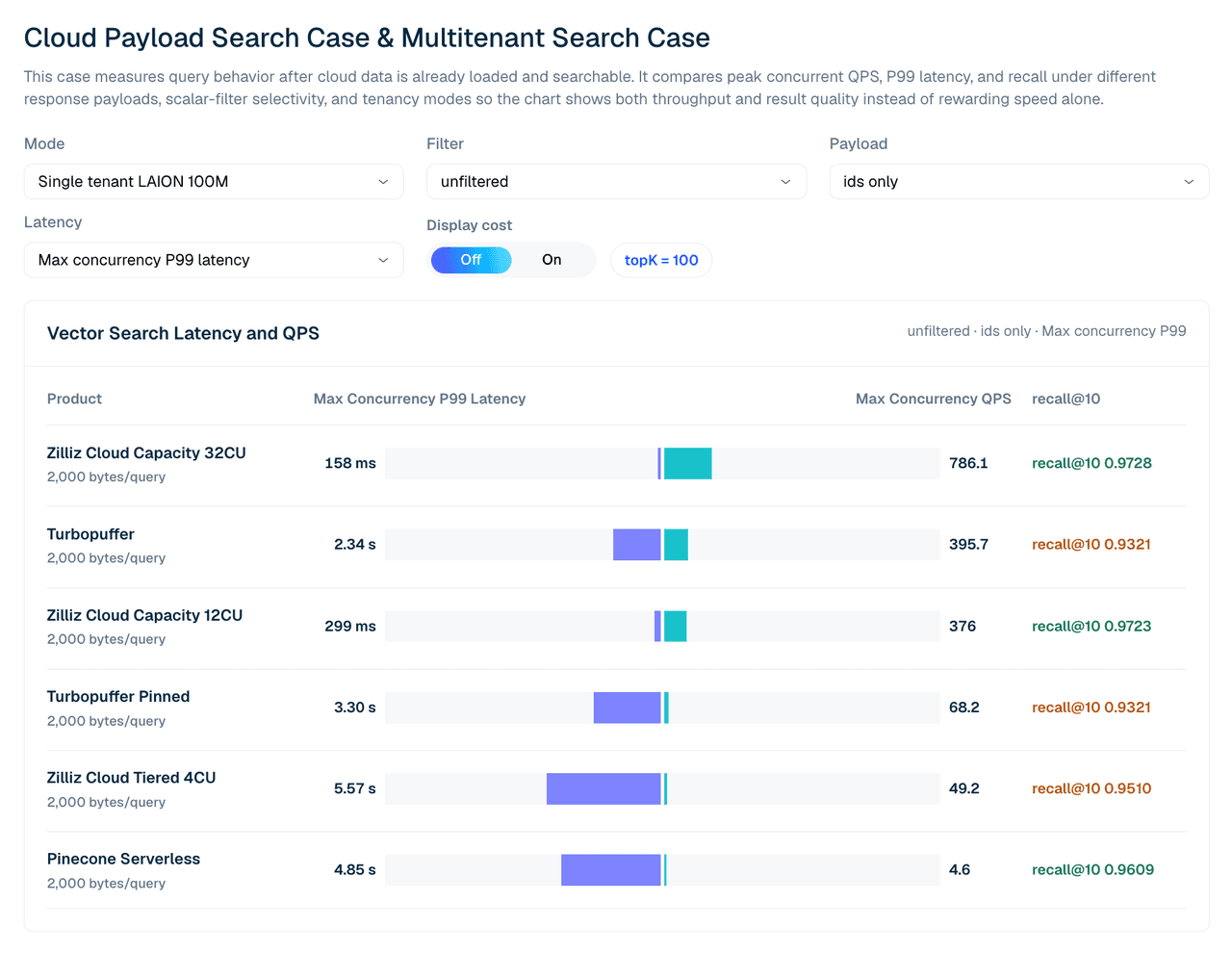
Figure 3. Single-tenant LAION 100M search with IDs-only responses. This view compares max concurrent QPS, P99 latency, and recall@10 across tested managed configurations.
The question is not only which product is fastest in one configuration. It is how performance changes when a team buys more capacity, changes payload shape, or needs a recall target. When the query returns raw vector payloads, throughput can change meaningfully.
| Product | IDs-only QPS | Vector payload QPS | Recall |
|---|---|---|---|
| Zilliz Cloud Tiered 4CU | 49.2 | 44.0 | 0.9510 |
| Zilliz Cloud Capacity 12CU | 376.0 | 229.4 | 0.9723 |
| Zilliz Cloud Capacity 32CU | 786.1 | 531.4 | 0.9728 |
| turbopuffer | 395.7 | 382.2 | 0.9321 |
| Pinecone Serverless | 4.6 | 4.5 | 0.9609 |
Table 3. Payload excerpt for broad unfiltered retrieval. Teams should benchmark the payload shape their application actually returns, not only IDs-only search.
Filtered Search: Where Selectivity Matters
Many production vector search workloads are permissioned or filtered. A support copilot may search only documents that the user is allowed to see. A recommendation system may filter by region, category, seller, or availability. An enterprise search app may apply tenant, access control, freshness, and document type constraints before ranking results.
These filters are not cosmetic. They change the execution path. At the 99.9% integer-filter plus vector-payload stress point, the product behavior changes sharply.
| Product | Max QPS | Recall | P99 latency |
|---|---|---|---|
| Zilliz Cloud Tiered 4CU | 955.7 | 0.9423 | 0.16 s |
| Zilliz Cloud Capacity 12CU | 933.0 | 0.9781 | 0.12 s |
| turbopuffer | 45.1 | 0.9436 | 7.03 s |
| Pinecone Serverless | 4.8 | —* | 3.30 s |
Table 4. Single-tenant selective filter stress point: 99.9% integer filter with vector payload. Recall for the Pinecone Serverless run at this stress point was not yet available at publication time; its QPS and latency are from the measured run.
This is one of the clearest examples of why cost-aware evaluation needs multiple workload shapes. A product that performs well on broad unfiltered retrieval may not be the best fit for selective filtered search. For permissioned search, access-control-heavy RAG, or workloads with high filter selectivity, the filtered rows may matter more than the unfiltered rows.
MultitenantSearchCase: Many Small Tenants Behave Differently
Single-tenant benchmarks do not capture every cloud workload.
Many AI applications are SaaS-shaped. A product may serve thousands of tenants, each with a smaller dataset. The operational challenge is not only vector search within a single large collection. It is routing, isolation, namespace management, and maintaining throughput across many small partitions.
The multitenant case uses the Cohere 10M dataset split across 1,000 tenants. The query shape uses topK 50 and compares IDs-only, vector payload, and filtered rows.
Two configuration notes shape how to read this table.
First, the Zilliz configurations here are intentionally small — Tiered 1CU and Capacity 2CU, just enough to hold the Cohere 10M dataset. The single-tenant case above already shows that Zilliz QPS scales with CU count; the question this case asks is cost-effectiveness at a configuration sized to the data, not peak throughput.
Second, the Pinecone column is a detached low-concurrency run (concurrency 4), not normalized against the higher-concurrency rows, so treat it as context rather than a direct comparison.
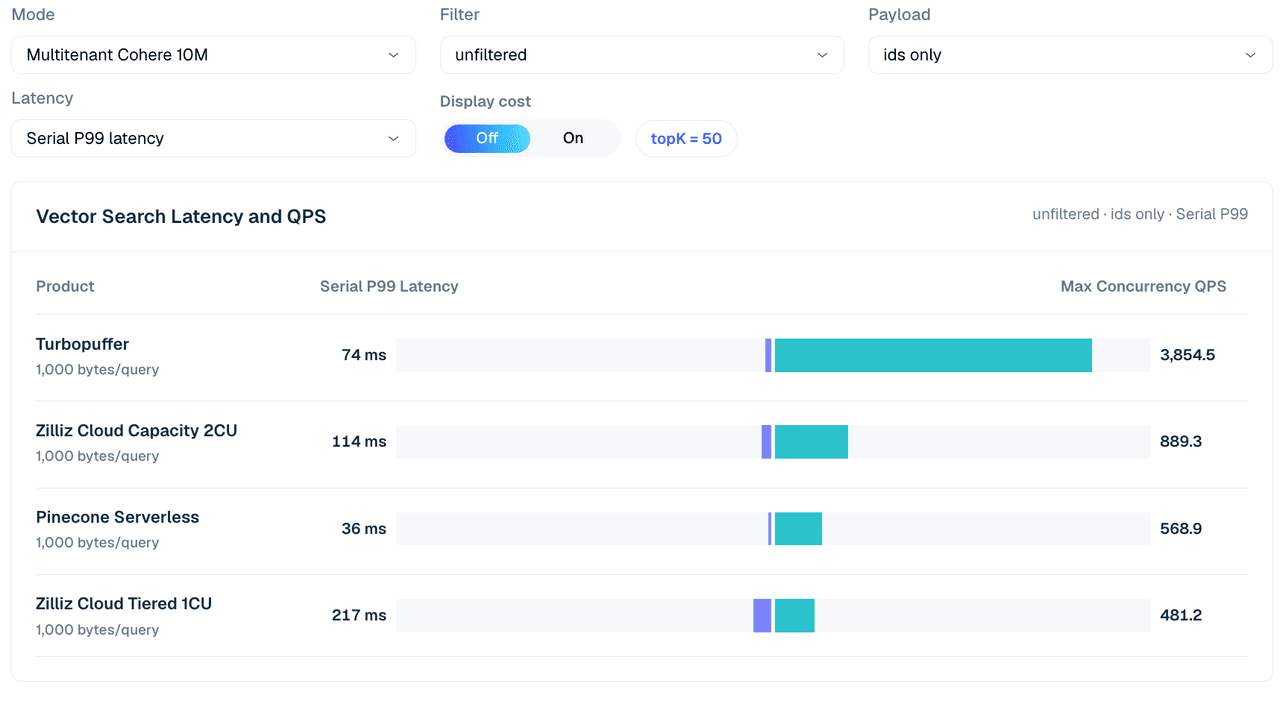
Figure 4. Multitenant Cohere 10M search across 1,000 tenants, unfiltered IDs-only, topK 50. The view compares serial P99 latency and max concurrent QPS across the tested configurations; the table below adds payload and filter variations.
| Case | Zilliz Tiered 1CU | Zilliz Capacity 2CU | turbopuffer | Pinecone (c4 run) |
|---|---|---|---|---|
| Unfiltered, IDs only | 481 | 889 | 3,855 | 569 |
| Unfiltered, vector | 34 | 371 | 1,775 | 542 |
| Integer filter 99.9%, vector | 625 | 1,307 | 3,835 | 526 |
| Scalar label 1%, vector | 152 | 588 | 1,767 | 600 |
| Scalar label 50%, vector | 29 | 317 | 1,760 | 562 |
Table 5. Multitenant search excerpt across 1,000 tenants, topK 50.
In this mode, Turbopuffer is strong across the board. It reaches 3,855 QPS on an unfiltered IDs-only search and 3,835 QPS on the selective integer-filter/vector row. Zilliz Cloud Capacity 2CU remains the stronger Zilliz profile in this excerpt, reaching 889 QPS on unfiltered IDs-only and 1,307 QPS on the 99.9% integer-filter/vector row.
The product read is again workload-shaped. Turbopuffer is a strong fit for many lightweight tenants and namespace-oriented throughput. Zilliz is stronger when workloads are filtered, permissioned, recall-sensitive, or heavier per-tenant, especially when teams can choose a Zilliz Capacity configuration that matches the serving target.
CloudColdLatencyCase: The First Query After Idle
Warm benchmark loops can hide cold behavior. For many production AI applications, especially agent memory, long-tail RAG, and low-frequency tenant workloads, the first query after idle matters. A system may look fast after warmup, but it adds seconds of latency when a cold collection, namespace, or cache path is accessed again.
CloudColdLatencyCase isolates that behavior. It measures the first query against a collection that has been idle for at least 24 hours — long enough for caches and serving paths to go as cold as they realistically get — and compares it with the first query on the warmed path from the same run.
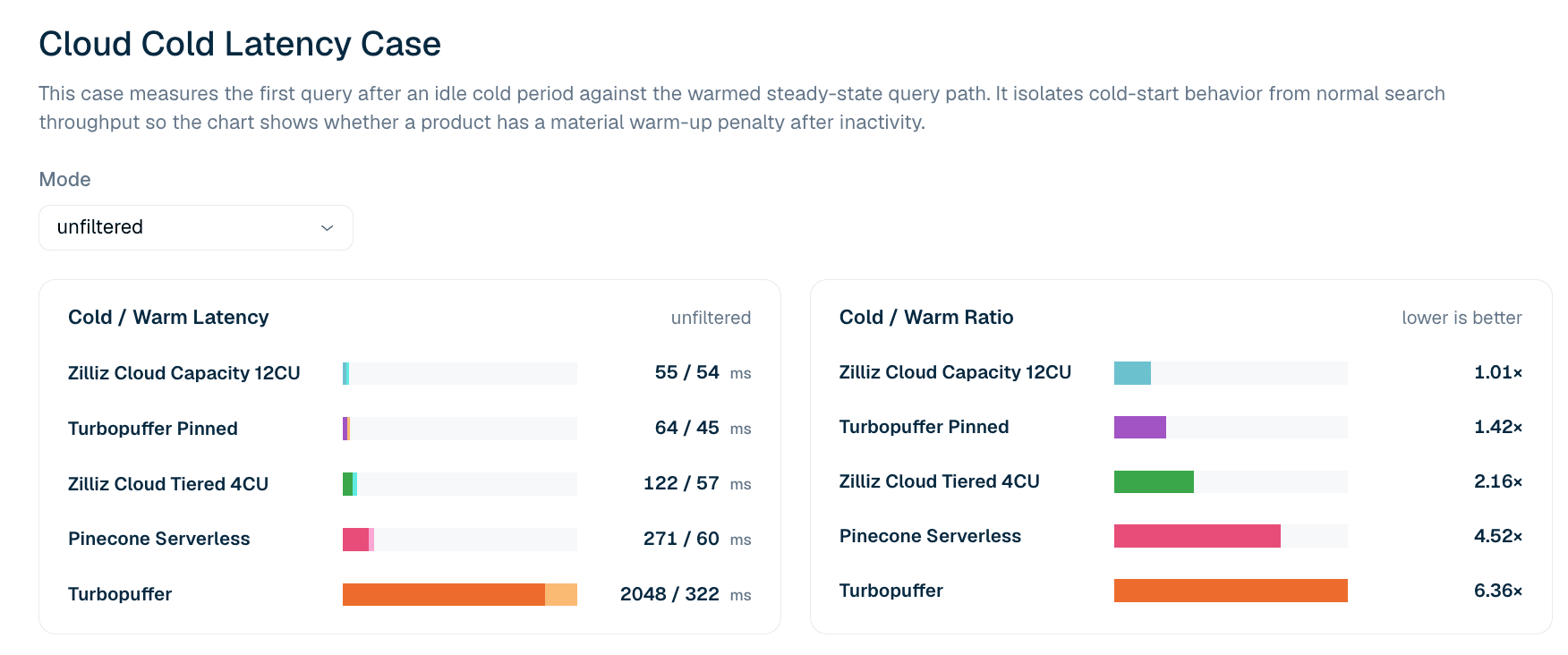
Figure 5. First-query latency after idle vs. the warmed query path for unfiltered LAION 100M search. The cold/warm ratio highlights whether a product has a material first-query penalty after idle.
| Product | First query after idle | First warm query | Cold/warm ratio |
|---|---|---|---|
| Zilliz Cloud Capacity 12CU | 55 ms | 54 ms | 1.01x |
| Turbopuffer pinned | 64 ms | 45 ms | 1.42x |
| Zilliz Cloud Tiered 4CU | 122 ms | 57 ms | 2.16x |
| Pinecone Serverless | 271 ms | 60 ms | 4.52x |
| turbopuffer | 2,048 ms | 322 ms | 6.36x |
Table 6. Cold and warm first-query latency excerpt for unfiltered LAION 100M. The case reports first-query latency rather than tail percentiles: cold/warm ratios at P99 tend to pick up network noise in later queries that does not reproduce reliably, so the leaderboard uses the stricter first-query definition.
In the current unfiltered cold-latency case, Zilliz Cloud Capacity 12CU shows the tightest cold-to-warm profile: 55 ms cold and 54 ms warm, or a 1.01x ratio. Turbopuffer pinned also has a strong profile at 64 ms cold and 45 ms warm. Unpinned Turbopuffer shows a larger cold penalty: 2,048 ms cold and 322 ms warm, or a 6.36x ratio.
Cold latency should always be read together with cost. Pinned replicas and provisioned capacity can reduce first-touch penalties, but they change the economic model. A product may exhibit excellent cold behavior because it retains more heat. That can be the right tradeoff for interactive applications, but it should not be separated from the cost of maintaining that path.
Cost Pareto Lines: Where Pricing Models Cross Over
A price sheet is not enough. A low unit price does not help if the product cannot reach the target QPS. A high-throughput configuration is not attractive if it costs more than another product that satisfies the same latency, recall, and payload requirements.
The Cost Pareto view combines measured benchmark boundaries with pricing models. For the LAION 100M query-only setting, each product line stops at the maximum QPS observed in the benchmark. The chart then estimates operating cost at target QPS levels and marks Pareto-optimal choices under those measured constraints.
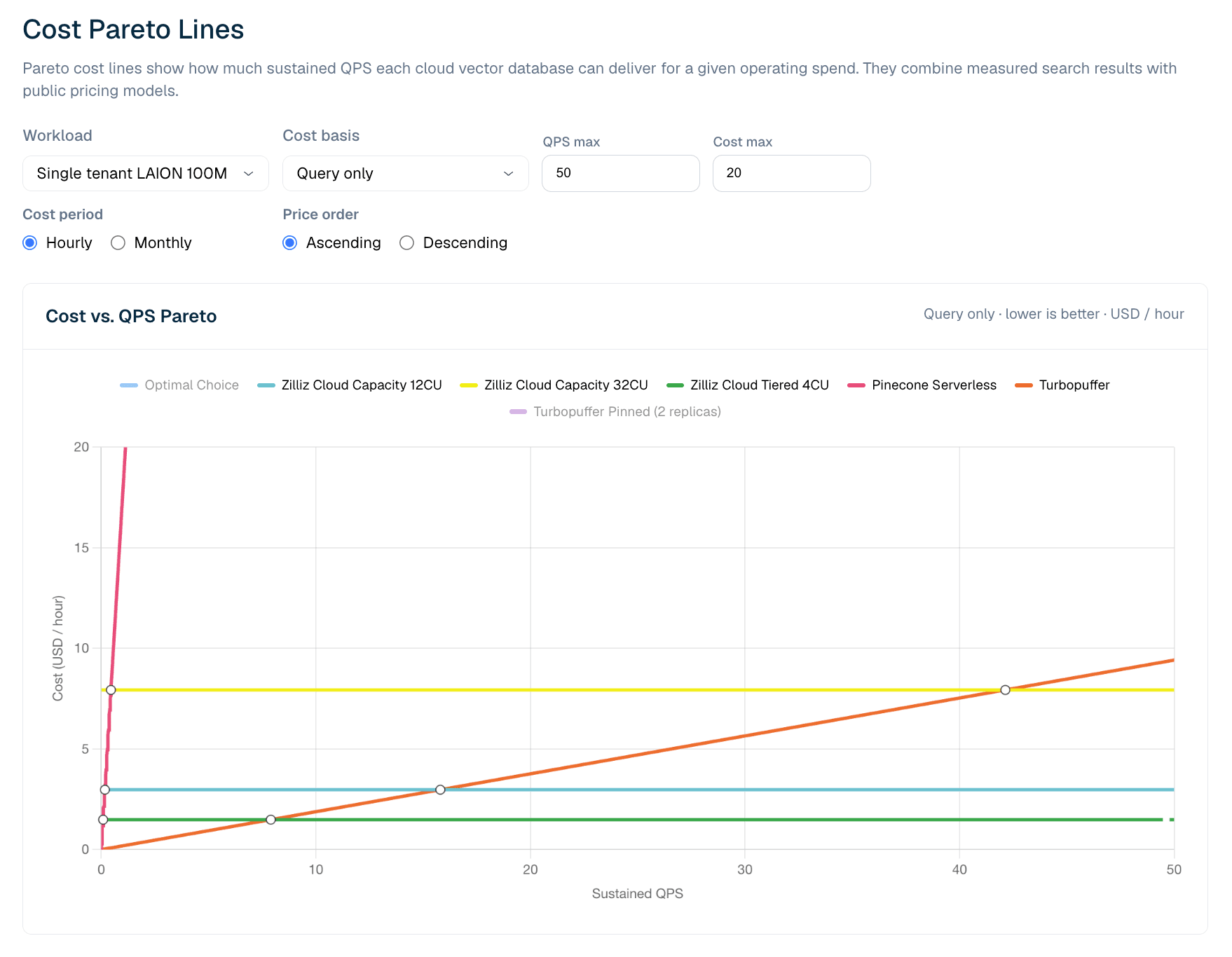
Figure 6. Cost vs. sustained QPS for LAION 100M query-only workloads. The Pareto view shows where serverless pricing is more efficient at low QPS and where provisioned Zilliz configurations become more cost-effective as utilization rises.
In the current LAION 100M query-only model, Turbopuffer has the advantage at very low sustained QPS. The measured crossover sits at roughly 8 QPS: below it, turbopuffer's usage-metered query pricing is the cheaper line; above it, Zilliz Cloud Tiered 4CU becomes cheaper, because its CU-hour serving cost is mostly flat once provisioned. As QPS rises, utilization improves and provisioned capacity becomes more cost-effective.
That does not mean serverless is worse. It means serverless and provisioned economics cross over. For low, spiky, or unpredictable workloads, usage-metered serverless can be the best fit. For sustained production traffic, a flat CU-hour model can become cheaper once utilization passes the crossover point. For teams that need stronger serving envelopes, cold behavior, or operational control, Zilliz Capacity may be the right profile even when Tiered is the lower-cost line.
Zilliz Cloud vs. Turbopuffer vs. Pinecone: Best Fit by Workload
| Workload shape | Strongest signal | Why |
|---|---|---|
| Very low sustained QPS | turbopuffer | Usage-metered serverless economics are attractive before the low-QPS crossover |
| Sustained QPS above the crossover (~8 QPS in this model) | Zilliz Cloud Tiered | Flat CU-hour economics improve as utilization rises |
| Fresh data or frequent refresh | Zilliz Cloud Capacity / Tiered | Insert-to-search and fully indexed readiness are strong in the LAION 100M insert case |
| Large full-load cost sensitivity | Zilliz Cloud Capacity / Tiered | Write-side cost is much lower in the tested LAION 100M bulk-load path |
| Broad unfiltered payload search | Turbopuffer and Zilliz Capacity 32CU | Turbopuffer is strong in broad retrieval; Zilliz scales with more capacity |
| Selective filters or permissioned search | Zilliz Cloud Capacity / Tiered | Zilliz shows much higher QPS and lower P99 latency in the 99.9% filter stress point |
| Many lightweight tenants | turbopuffer | Strongest raw QPS in the 1,000-tenant excerpt |
| Cold-start-sensitive interactive apps | Zilliz Cloud Capacity; Turbopuffer pinned | Both reduce first-query penalties, with different cost models |
| Low-ops serverless baseline | Pinecone Serverless | Mature serverless reference point, even when not the frontier in this workload |
How to Use These Benchmarking Results
VDBBench and its Cost Leaderboard are designed to make vector database evaluation more closely reflect how teams actually buy and operate managed cloud products. Peak QPS still matters, but it is no longer enough on its own. The more useful question is whether a product can meet the workload's requirements for latency, recall, freshness, payload, tenancy, and cost simultaneously.
A practical evaluation flow looks like this:
- Use the Performance Leaderboard to understand raw serving capability under controlled benchmark conditions.
- Use the Cost Leaderboard to understand cost-performance trade-offs across managed cloud products and workload shapes.
- Use VDBBench itself to reproduce the cases, test other products, or run the benchmark against production-like data and query distributions.
The current results should be read with several caveats.
- The products were benchmarked on May 10, 2026, and the cost model uses AWS us-west-2 pricing as of that date. Pricing can change by date and region.
- Configuration choices such as pinned modes, provisioned capacity, scaling controls, and serverless throttling can affect outcomes.
- Readiness states are not always exposed in the same way, so inserted, searchable, and fully indexed definitions need to be checked for each client.
- Finally, the workloads are specific by design. Cost Pareto results should always be read together with latency, recall, payload shape, and measured serving limits.
Benchmark Your Own Workloads
The Cost Leaderboard is a public snapshot of the current results, but the more important change is in VDBBench itself. It now lets teams evaluate performance and cost together against workload-specific constraints: freshness, payload size, tenant shape, cold behavior, and operational model.
A serverless product may be a good fit for low sustained QPS. Provisioned capacity may become more cost-effective once utilization rises. One system may lead broad retrieval, while another may perform better under selective filters, frequent refreshes, or cold-start-sensitive workloads.
The goal is not the best headline number. It is the best fit for your workload.
- View the current results: VDBBench Cost Leaderboard
- Reproduce these cases, or benchmark your own candidates: VectorDBBench on GitHub
- Questions or results to share? Open an issue on GitHub or join the conversation on Discord

Keep Reading

Stop Building AI Data Infra for the Wrong Stage
Learn how AI data infrastructure should evolve from prototype to enterprise scale, and when Vector Lakebase becomes the right architecture for AI apps.
Why AI Databases Don't Need SQL
Whether you like it or not, here's the truth: SQL is destined for decline in the era of AI.

Milvus WebUI: A Visual Management Tool for Your Vector Database
Explore Milvus WebUI to monitor, manage, and optimize your vector database with real-time insights, performance tracking, and system health monitoring.