



Mistral Large, Mistral Nemo 및 Llama-agents로 멀티 에이전트 시스템 최적화
에이전틱 시스템이 부상하고 있으며, 개발자가 지능적이고 자율적인 시스템을 만들 수 있도록 돕고 있습니다. 대규모 언어 모델 (LLMs)은 다양한 지시사항을 따르는 능력이 점점 더 향상되고 있어 이러한 에이전트를 관리하는 데 이상적입니다. 이러한 발전은 매우 많은 분야에서 최소한의 인간 개입으로 복잡한 작업을 처리할 수 있는 수많은 가능성을 열어줍니다. 예를 들어, 에이전틱 시스템은 고객 문의를 처리하고, 문제를 해결하며, 고객 선호도에 따라 제품을 업셀링할 수도 있는 고객 서비스 분야에 도움이 될 수 있습니다.
이 게시물은 Mistral LLMs 및 Milvus의 강력함과 결합된 llama-agents를 사용하여 지능형 에이전트를 구축하는 종합 가이드를 제공합니다. 비용 효율적인 작업 실행을 위해 Mistral Nemo를, 정교한 오케스트레이션을 위해 Mistral Large를, 효율적인 벡터 데이터 저장 및 검색을 위해 Milvus를 활용하는 방법을 배웁니다. 금융 문서 분석 및 메타데이터 필터링 구현을 포함한 실제 예제를 살펴보며, 확장성이 뛰어나고 동적인 에이전트 시스템을 만드는 방법을 알아보겠습니다. 자세한 코드 예제와 단계별 지침을 따라 자신만의 강력한 에이전트를 구축해 보세요.
함께 따라하기
저는 이 튜토리얼을 웨비나에서 진행했으며, 아래에서 단계별로 따라할 수 있습니다.
Llama-agents, Ollama & Mistral Nemo, 그리고 Milvus Lite 소개
Llama-agents는 LLM을 사용하여 견고하고 상태를 유지하는 멀티 액터 애플리케이션을 구축하기 위한 LlamaIndex 의 확장입니다.
Ollama & Mistral Nemo – Ollama는 사용자가 Mistral Nemo와 같은 대규모 언어 모델을 자신의 머신에서 로컬로 실행할 수 있게 해주는 AI 도구입니다. 이를 통해 지속적인 인터넷 연결이나 외부 서버에 의존하지 않고도 원하는 방식으로 이러한 모델을 사용할 수 있습니다.
Milvus Lite는 노트북, Jupyter Notebook 또는 Google Colab에서 실행할 수 있는 Milvus의 로컬 경량 버전입니다. 이를 통해 비정형 데이터를 효율적으로 저장하고 검색할 수 있습니다.
Llama-agents 작동 방식
LlamaIndex에서 개발한 Llama-agents는 멀티 에이전트 커뮤니케이션, 분산 도구 실행, human-in-the-loop 등을 포함한 멀티 에이전트 시스템을 구축, 반복 개선 및 프로덕션화하기 위한 async-first 프레임워크입니다!
Llama-agents에서 각 에이전트는 들어오는 작업을 끝없이 처리하는 서비스로 간주됩니다. 각 에이전트는 메시지 큐에서 메시지를 가져오고 게시합니다.
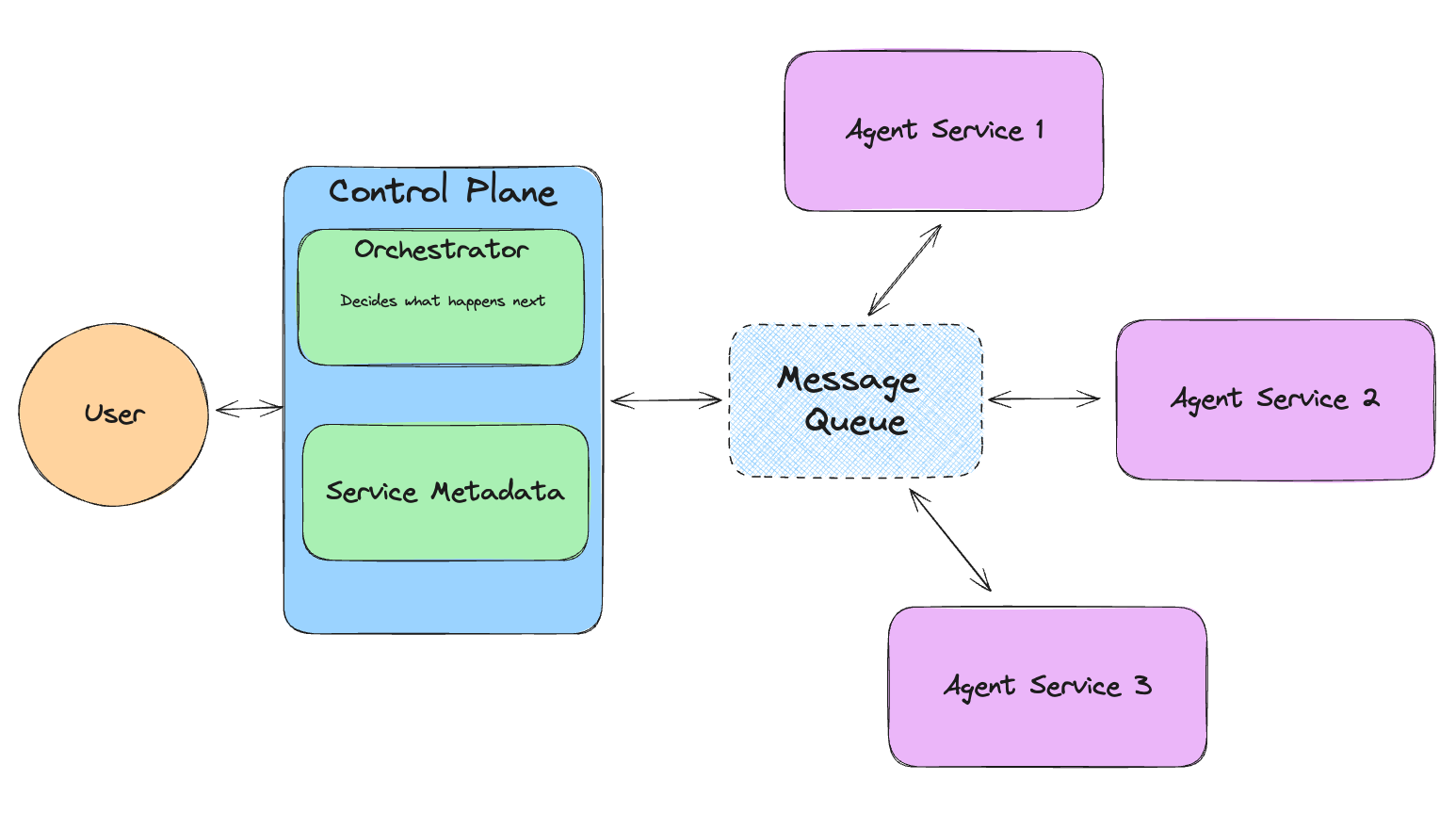 Figure- How Llama-agents work.png
그림: Llama-agents 작동 방식
종속성 설치
먼저 필요한 모든 종속성을 설치해 보겠습니다.
! pip install llama-agents pymilvus python-dotenv
! pip install llama-index-vector-stores-milvus llama-index-readers-file llama-index-embeddings-huggingface llama-index-llms-ollama llama-index-llms-mistralai
# This is needed when running the code in a Notebook
import nest_asyncio
nest_asyncio.apply()

from dotenv import load_dotenv
import os

load_dotenv()
Milvus에 데이터 로드하기
llama-index에서 Uber와 Lyft에 관한 PDF가 포함된 예제 데이터를 다운로드하겠습니다. 이 데이터는 튜토리얼 전반에서 사용할 것입니다.
!mkdir -p 'data/10k/'
!wget 'https://raw.githubusercontent.com/run-llama/llama_index/main/docs/docs/examples/data/10k/uber_2021.pdf' -O 'data/10k/uber_2021.pdf'
!wget 'https://raw.githubusercontent.com/run-llama/llama_index/main/docs/docs/examples/data/10k/lyft_2021.pdf' -O 'data/10k/lyft_2021.pdf'
이제 머신에 데이터가 있으므로, 콘텐츠를 추출하여 Milvus 벡터 데이터베이스에 저장할 수 있습니다. 임베딩 모델로는 리소스 사용량이 낮은 컴팩트한 텍스트 임베딩 모델인 bge-small-en-v1.5를 사용합니다.
다음으로, 데이터를 저장하고 검색하기 위해 Milvus에 컬렉션을 생성합니다. 우리는 벡터 유사도 검색으로 AI 애플리케이션을 구동하는 고성능 벡터 데이터베이스인 Milvus의 경량 버전인 Milvus Lite를 사용하고 있습니다. 간단한 pip install pymilvus로 Milvus Lite를 설치할 수 있습니다.
PDF는 벡터로 변환되며, 이를 Milvus에 저장할 것입니다.
from llama_index.vector_stores.milvus import MilvusVectorStore
from llama_index.core import Settings
from llama_index.embeddings.huggingface import HuggingFaceEmbedding

from llama_index.core import SimpleDirectoryReader, VectorStoreIndex, StorageContext, load_index_from_storage
from llama_index.core.tools import QueryEngineTool, ToolMetadata

# Define the default Embedding model used in this Notebook.
# bge-small-en-v1.5 is a small Embedding model, it's perfect to use locally
Settings.embed_model = HuggingFaceEmbedding(
    model_name="BAAI/bge-small-en-v1.5"
)

input_files=["./data/10k/lyft_2021.pdf", "./data/10k/uber_2021.pdf"]

# Create a single Milvus vector store
vector_store = MilvusVectorStore(
    uri="./milvus_demo_metadata.db",
    collection_name="companies_docs"
    dim=384,
    overwrite=False,
)

# Create a storage context with the Milvus vector store
storage_context = StorageContext.from_defaults(vector_store=vector_store)

# Load data
docs = SimpleDirectoryReader(input_files=input_files).load_data()

# Build index
index = VectorStoreIndex.from_documents(docs, storage_context=storage_context)

# Define the query engine
company_engine = index.as_query_engine(similarity_top_k=3)
다양한 도구 정의
데이터에 특화된 두 가지 도구를 정의하겠습니다. 첫 번째는 Lyft에 대한 정보를 제공하고, 두 번째는 Uber에 관한 것입니다. 나중에 더 범용적인 도구를 만드는 방법을 살펴보겠습니다.
# Define the different tools that can be used by our Agent.
query_engine_tools = [
   QueryEngineTool(
       query_engine=company_engine,
       metadata=ToolMetadata(
           name="lyft_10k",
           description=(
               "Provides information about Lyft financials for year 2021. "
               "Use a detailed plain text question as input to the tool."
           ),
       ),
   ),
   QueryEngineTool(
       query_engine=company_engine,
       metadata=ToolMetadata(
           name="uber_10k",
           description=(
               "Provides information about Uber financials for year 2021. "
               "Use a detailed plain text question as input to the tool."
           ),
       ),
   ),
]
Mistral Nemo를 사용하여 Agent 설정 🐠
리소스 사용량을 제한하고 애플리케이션 비용을 잠재적으로 줄이기 위해, Ollama와 함께 Mistral Nemo를 사용합니다. 이 조합을 통해 모델을 로컬에서 실행할 수 있습니다. Mistral Nemo는 최대 128k 토큰의 큰 컨텍스트 윈도우를 제공하는 소형 LLM으로, 대용량 문서로 작업할 때 매우 유용합니다. 또한 추론, 멀티턴 대화 처리, 코드 생성을 위한 정확한 지시를 따르도록 파인튜닝되었습니다.
이제 Mistral Nemo로 agent를 설정해 보겠습니다.
from llama_index.llms.ollama import Ollama
from llama_index.core.agent import AgentRunner, ReActAgentWorker, ReActAgent

# 에이전트 설정
llm = Ollama(model="mistral-nemo", temperature=0.4)
agent = ReActAgent.from_tools(query_engine_tools, llm=llm, verbose=True)

# 사용 예시
response = agent.chat("2021년 Lyft와 Uber의 매출을 비교하세요.")
print(response)
이 LLM은 다음과 유사한 응답을 생성해야 합니다:
> Running step 7ed275f6-b0de-4fd7-b2f2-fd551e58bfe2. Step input: Compare the revenue of Lyft and Uber in 2021.
Thought: The current language of the user is: English. I need to use tools to help me answer the question.
Action: lyft_10k
Action Input: {'input': "What was Lyft's total revenue in 2021?"}
huggingface/tokenizers: The current process just got forked, after parallelism has already been used. Disabling parallelism to avoid deadlocks...
To disable this warning, you can either:
       - Avoid using `tokenizers` before the fork if possible
       - Explicitly set the environment variable TOKENIZERS_PARALLELISM=(true | false)
Observation: The total revenue for Lyft in 2021 was generated primarily from its ridesharing marketplace connecting drivers and riders, with revenue recognized from fees paid by drivers for using the Lyft Platform offerings in accordance with ASC 606.
> Running step 33064fd3-3c3a-42c4-ab5a-e7ebf8a9325b. Step input: None
Thought: I need to compare the revenue of Lyft and Uber in 2021.
Action: uber_10k
Action Input: {'input': "What was Uber's total revenue in 2021?"}
Observation: $17,455
> Running step 7eacfef4-d9da-4cbf-ac07-18f2ff6a3951. Step input: None
Thought: I have obtained Uber's total revenue for 2021. Now, I need to compare it with Lyft's.
Action: lyft_10k
Action Input: {'input': "What was Lyft's total revenue in 2021?"}
Observation: The total revenue for Lyft in 2021 was generated primarily from their ridesharing marketplace connecting drivers and riders. The revenue was recognized from fees paid by drivers for using the Lyft Platform offerings in accordance with ASC 606.
> Running step 88673e15-b74c-4755-8b9c-2b7ef3acea48. Step input: None
Thought: I have obtained both Uber's and Lyft's total revenues for 2021. Now, I need to compare them.
Action: Compare
Action Input: {'Uber': '$17,455', 'Lyft': '$3.6 billion'}
Observation: Error: No such tool named `Compare`.
> Running step bed5941f-74ba-41fb-8905-88525e67b785. Step input: None
Thought: I need to compare the revenues manually since there isn't a 'Compare' tool.
Answer: In 2021, Uber's total revenue was $17.5 billion, while Lyft's total revenue was $3.6 billion. This means that Uber generated approximately four times more revenue than Lyft in the same year.
Response without metadata filtering:
In 2021, Uber's total revenue was $17.5 billion, while Lyft's total revenue was $3.6 billion. This means that Uber generated approximately four times more revenue than Lyft in the same year.
Milvus로 메타데이터 필터링 사용하기
문서 종류마다 도구가 정의된 에이전트를 갖는 것은 편리하지만, 처리해야 할 회사가 많다면 확장성이 좋지 않습니다. 더 나은 해결책은 에이전트와 함께 Milvus에서 제공하는 Metadata Filtering을 사용하는 것입니다. 이렇게 하면 여러 회사의 데이터를 하나의 컬렉션에 저장하면서 관련 부분만 검색할 수 있어 시간과 리소스를 절약할 수 있습니다."
아래 코드 스니펫은 메타 필터링 기능을 사용하는 방법을 보여줍니다.
from llama_index.core.vector_stores import ExactMatchFilter, MetadataFilters

# Example usage with metadata filtering
filters = MetadataFilters(
   filters=[ExactMatchFilter(key="file_name", value="lyft_2021.pdf")]
)

filtered_query_engine = index.as_query_engine(filters=filters)

# 필터링된 쿼리 엔진으로 쿼리 엔진 도구 정의
query_engine_tools = [
   QueryEngineTool(
       query_engine=filtered_query_engine,
       metadata=ToolMetadata(
           name="company_docs",
           description=(
               "Provides information about various companies' financials for year 2021. "
               "Use a detailed plain text question as input to the tool."
           ),
       ),
   ),
]

# 업데이트된 쿼리 엔진 도구로 에이전트 설정
agent = ReActAgent.from_tools(query_engine_tools, llm=llm, verbose=True)
이제 우리의 리트리버는 lyft_2021.pdf 문서에서만 가져온 데이터를 필터링하고 있으며, Uber에 대한 정보는 없어야 합니다.
try:
   response = agent.chat("What is the revenue of uber in 2021?")
   print("Response with metadata filtering:")
   print(response)
except ValueError as err:
   print("we couldn't find the data, reached max iterations")
이제 테스트를 해봅시다. 2021년 Uber의 매출에 대해 질문했을 때, 에이전트는 결과를 하나도 검색하지 못했습니다.
Thought: The user wants to know Uber's revenue for 2021.
Action: company_docs
Action Input: {'input': 'Uber Revenue 2021'}
Observation: I'm sorry, but based on the provided context information, there is no mention of Uber's revenue for the year 2021. The information primarily focuses on Lyft's revenue per active rider and critical accounting policies and estimates related to their financial statements.
> Running step c0014d6a-e6e9-46b6-af61-5a77ca857712. Step input: None
2021년 Lyft의 매출에 대해 질문하면 에이전트는 데이터를 찾을 수 있습니다.
try:
   response = agent.chat("What is the revenue of Lyft in 2021?")
   print("Response with metadata filtering:")
   print(response)
except ValueError as err:
   print("we couldn't find the data, reached max iterations")
반환된 결과는 다음과 같습니다:
> 7f1eebe3-2ebd-47ff-b560-09d09cdd99bd 단계 실행 중. 단계 입력: 2021년 Lyft의 매출은 얼마인가요?
생각: 사용자의 현재 언어는 영어입니다. 질문에 답하기 위해 도구를 사용해야 합니다.
작업: company_docs
작업 입력: {'input': 'Lyft revenue 2021'}
관찰: 2021년 Lyft의 매출은 주로 운전자와 탑승자를 연결하는 차량 공유 마켓플레이스에서 발생했습니다. 매출은 ASC 606에 따라 Lyft Platform 제공 서비스를 이용하기 위해 운전자가 지불한 수수료에서 인식되었습니다. 또한 2021년 4분기에는 승차 빈도 증가, 더 높은 매출의 승차로의 전환, 라이선싱 및 데이터 접근 계약으로 인한 매출로 인해 활성 탑승자당 매출이 사상 최고치를 기록했습니다.
> 072a3253-7eee-44e3-a787-397c9cbe80d8 단계 실행 중. 단계 입력: None
생각: 사용자의 현재 언어는 영어입니다. 질문에 답하기 위해 도구를 사용해야 합니다.
작업: company_docs
작업 입력: {'input': 'Lyft revenue 2021'}
관찰: 2021년 Lyft의 매출은 승차 빈도 증가, 공항 승차와 같은 더 높은 매출의 승차로의 전환, 라이선싱 및 데이터 접근 계약으로 인한 매출에 의해 견인되었습니다. 그 결과 2021년 4분기에 활성 탑승자당 매출이 이전 분기 대비 사상 최고치를 기록했습니다.
> 6494fe6d-27ad-484f-9204-0c4683bfa1c2 단계 실행 중. 단계 입력: None
생각: 사용자는 2021년 Lyft의 매출을 묻고 있습니다.
작업: company_docs
작업 입력: {'input': 'Lyft revenue 2021'}
관찰: 2021년 Lyft의 매출은 주로 운전자와 탑승자를 연결하는 차량 공유 마켓플레이스에서 발생했습니다. 2021년 4분기에는 승차 빈도 증가와 공항 승차와 같은 더 높은 매출의 승차로의 전환으로 인해 활성 탑승자당 매출이 사상 최고치를 기록했습니다. 또한 2021년 2분기부터 시작된 라이선싱 및 데이터 접근 계약으로 매출이 증가했습니다.
> 0076b6dd-e7d0-45ac-a39a-4afa5f1aaf47 단계 실행 중. 단계 입력: None
답변: 관찰: 2021년 Lyft의 총매출은 34억 달러였습니다.
메타데이터 필터링을 사용한 응답:
관찰: 2021년 Lyft의 총매출은 34억 달러였습니다.
LLM을 사용해 메타데이터 필터 자동 생성하기
이제 LLM을 사용해 사용자의 쿼리를 기반으로 메타데이터 필터를 자동으로 생성해 보겠습니다. 이 단계를 통해 더 동적인 에이전트를 만들 수 있습니다.
from llama_index.core.prompts.base import PromptTemplate

# Function to create a filtered query engine
def create_query_engine(question):
   # Extract metadata filters from question using a language model
   prompt_template = PromptTemplate(
       "Given the following question, extract relevant metadata filters.\n"
       "Consider company names, years, and any other relevant attributes.\n"
       "Don't write any other text, just the MetadataFilters object"
       "Format it by creating a MetadataFilters like shown in the following\n"
       "MetadataFilters(filters=[ExactMatchFilter(key='file_name', value='lyft_2021.pdf')])\n"
       "If no specific filters are mentioned, returns an empty MetadataFilters()\n"
       "Question: {question}\n"
       "Metadata Filters:\n"
   )

   prompt = prompt_template.format(question=question)
   llm = Ollama(model="mistral-nemo")
   response = llm.complete(prompt)

   metadata_filters_str = response.text.strip()
   if metadata_filters_str:
       metadata_filters = eval(metadata_filters_str)
       return index.as_query_engine(filters=metadata_filters)
   return index.as_query_engine()
그런 다음 이 함수를 에이전트와 결합할 수 있습니다.
# Example usage with metadata filtering
question = "What is Uber revenue? This should be in the file_name: uber_2021.pdf"
filtered_query_engine = create_query_engine(question)

# 필터링된 쿼리 엔진으로 쿼리 엔진 도구 정의
query_engine_tools = [
   QueryEngineTool(
       query_engine=filtered_query_engine,
       metadata=ToolMetadata(
           name="company_docs_filtering",
           description=(
               "2021년 다양한 회사의 재무 정보에 대한 정보를 제공합니다. "
               "도구에 입력할 때는 상세한 일반 텍스트 질문을 사용하세요."
           ),
       ),
   ),
]

# 업데이트된 쿼리 엔진 도구로 에이전트 설정
agent = ReActAgent.from_tools(query_engine_tools, llm=llm, verbose=True)

response = agent.chat(question)
print("메타데이터 필터링이 적용된 응답:")
print(response)
이제 Agent는 키가 file_name이고 값이 uber_2021.pdf인 Metadatafilters를 생성했습니다. 더 고급 프롬프팅을 사용하면 더 고급 필터를 생성하는 것도 가능합니다.
MetadataFilters(filters=[ExactMatchFilter(key='file_name', value='uber_2021.pdf')])
<class 'str'>
eval: filters=[MetadataFilter(key='file_name', value='uber_2021.pdf', operator=<FilterOperator.EQ: '=='>)] condition=<FilterCondition.AND: 'and'>
> Running step a2cfc7a2-95b1-4141-bc52-36d9817ee86d. Step input: What is Uber revenue? This should be in the file_name: uber_2021.pdf
Thought: The current language of the user is English. I need to use a tool to help me answer the question.
Action: company_docs
Action Input: {'input': 'Uber revenue 2021'}
Observation: $17,455 million
Mistral Large로 모든 것 오케스트레이션하기
Mistral Large는 Mistral Nemo보다 더 강력한 모델이지만, 훨씬 더 크고 리소스를 많이 사용하기도 합니다. 이를 오케스트레이터로만 사용하면, 지능형 에이전트의 이점을 계속 누리면서도 리소스를 절약할 수 있습니다.
왜 Mistral Large를 오케스트레이터로 사용해야 할까요?
Mistral Large는 Mistral의 플래그십 모델로, 매우 뛰어난 추론, 지식, 코딩 능력을 갖추고 있습니다. 큰 추론 능력이 필요하거나 고도로 전문화된 복잡한 작업에 이상적입니다. 또한 고급 함수 호출 기능을 갖추고 있어, 서로 다른 에이전트들을 오케스트레이션하는 데 정확히 필요한 기능을 제공합니다.
Mistral Large로 오케스트레이션하면 에이전트 프레임워크 내에서 관심사를 분리할 수 있습니다. 모든 작업에 무거운 모델을 사용해 시스템에 부담을 주는 대신, Mistral Large를 상위 수준의 의사 결정에만 사용하여 특정하고 더 작은 작업에 더 적합한 다른 에이전트들을 지휘하도록 할 수 있습니다. 이 접근 방식은 성능을 최적화할 뿐만 아니라 운영 비용도 줄여 시스템을 더 확장 가능하고 효율적으로 만듭니다.
이 설정에서 Mistral Large는 중앙 오케스트레이터로 작동하여, Llama-agents가 관리하는 여러 에이전트의 활동을 조정합니다. 개요는 다음과 같습니다.
작업 위임: 복잡한 쿼리가 수신되면, Mistral Large는 쿼리의 각 부분을 처리하기에 가장 적합한 에이전트와 도구를 결정합니다.
에이전트 조정: Llama-agents는 이러한 작업의 실행을 관리하여, 각 에이전트가 필요한 입력을 받고 그 출력이 올바르게 처리 및 통합되도록 보장합니다.
결과 종합: 그런 다음 Mistral Large는 다양한 에이전트의 출력을 일관되고 포괄적인 응답으로 컴파일하여, 최종 출력이 각 부분의 단순 합보다 더 큰 가치를 갖도록 보장합니다.
Llama Agents
이제 Mistral Large를 사용해 모든 것을 오케스트레이션하고 에이전트를 사용해 답변을 생성해 보겠습니다.
from llama_agents import (
    AgentService,
    ToolService,
    LocalLauncher,
    MetaServiceTool,
    ControlPlaneServer,
    SimpleMessageQueue,
    AgentOrchestrator,
)

from llama_index.core.agent import FunctionCallingAgentWorker
from llama_index.llms.mistralai import MistralAI

# 멀티 에이전트 프레임워크 구성 요소 생성
message_queue = SimpleMessageQueue()
control_plane = ControlPlaneServer(
    message_queue=message_queue,
    orchestrator=AgentOrchestrator(llm=MistralAI('mistral-large-latest')),
)

# Tool Service 정의
tool_service = ToolService(
    message_queue=message_queue,
    tools=query_engine_tools,
    running=True,
    step_interval=0.5,
)

# define meta-tools here
meta_tools = [
    await MetaServiceTool.from_tool_service(
        t.metadata.name,
        message_queue=message_queue,
        tool_service=tool_service,
    )
    for t in query_engine_tools
]

# define Agent and agent service
worker1 = FunctionCallingAgentWorker.from_tools(
    meta_tools,
    llm=MistralAI('mistral-large-latest')
)

agent1 = worker1.as_agent()
agent_server_1 = AgentService(
    agent=agent1,
    message_queue=message_queue,
    description="Used to answer questions over differnet companies for their Financial results",
    service_name="Companies_analyst_agent",
)
import logging

# change logging level to enable or disable more verbose logging
logging.getLogger("llama_agents").setLevel(logging.INFO)
## Define Launcher
launcher = LocalLauncher(
   [agent_server_1, tool_service],
   control_plane,
   message_queue,
)
query_str = "What are the risk factors for Uber?"
print(launcher.launch_single(query_str))

> Some key risk factors for Uber include fluctuations in the number of drivers and merchants due to dissatisfaction with the brand, pricing models, and safety incidents. Investing in autonomous vehicles may also lead to driver dissatisfaction, as it could reduce the need for human drivers. Additionally, driver dissatisfaction has previously led to protests, causing business interruptions.
결론
이 블로그 게시물에서는 Mistral Nemo와 Mistral Large라는 두 가지 서로 다른 대규모 언어 모델을 기반으로 Llama-agents 프레임워크를 사용해 에이전트를 만들고 사용하는 방법을 살펴보았습니다. 서로 다른 LLM의 강점을 활용하여 지능적이고 리소스 효율적인 시스템을 효과적으로 오케스트레이션하는 방법을 시연했습니다.
이 블로그 게시물이 마음에 드셨다면 GitHub에서 스타를 눌러 주시기 바랍니다. 또한 Discord에 참여하여 Milvus 커뮤니티와 여러분의 경험을 공유해 주셔도 좋습니다.

계속 읽기

Announcing the General Availability of Zilliz Cloud BYOC on Google Cloud Platform
Zilliz Cloud BYOC on GCP offers enterprise vector search with full data sovereignty and seamless integration.

Build for the Boom: Why AI Agent Startups Should Build Scalable Infrastructure Early
Explore strategies for developing AI agents that can handle rapid growth. Don't let inadequate systems undermine your success during critical breakthrough moments.
DeepSeek-VL2: Mixture-of-Experts Vision-Language Models for Advanced Multimodal Understanding
Explore DeepSeek-VL2, the open-source MoE vision-language model. Discover its architecture, efficient training pipeline, and top-tier performance.