


Llama 3, Mixtral 및 GPT-4o 실행하기
RAG의 G-Generation 부분을 실행하는 방법은 정말 다양합니다! 오늘은 이 분야에서 가장 주목받는 몇 가지 경쟁 모델을 실행하는 방법을 보여드리겠습니다: Meta의 Llama 3, Mistral의 Mixtral, 그리고 최근 OpenAI가 발표한 GPT-4o입니다.
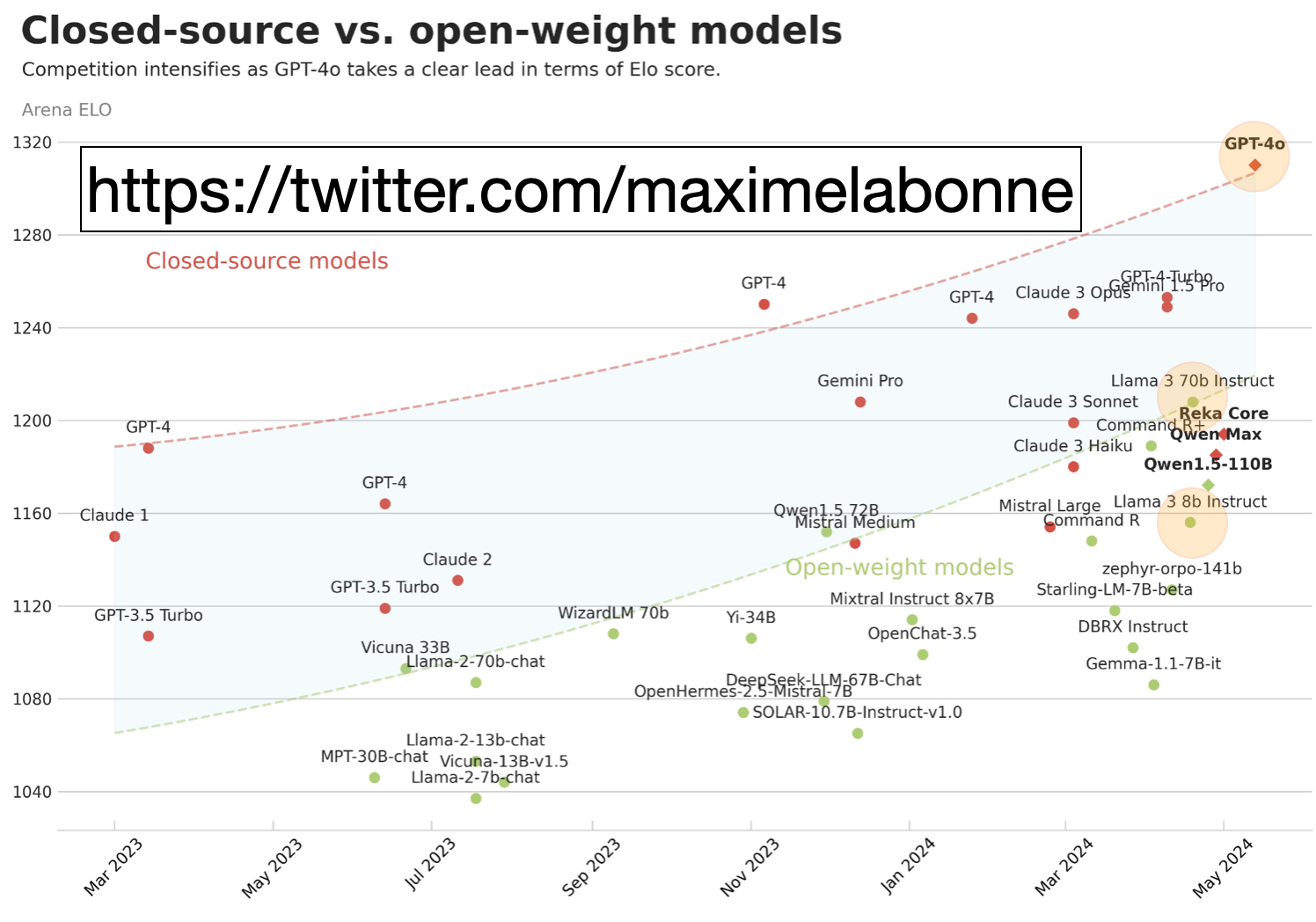
아래 LMSYS Leaderboard에서 볼 수 있듯이, 폐쇄형 소스 모델과 오픈소스 모델 사이의 격차(연한 파란색)는 이번 주 OpenAI의 새로운 발표로 인해 더 크게 벌어졌습니다.
 폐쇄형 소스 vs 오픈
이미지 출처: https://twitter.com/maximelabonne, https://chat.lmsys.org/?leaderboard 기반.
이 블로그의 개요:
오픈소스 Llama 3 또는 Mixtral을 실행하는 가장 빠른 방법
Ollama로 로컬에서 실행
Anyscale 엔드포인트
OctoAI 엔드포인트
Groq 엔드포인트
OpenAI의 최신 gpt-4o 실행
답변 평가: GPT-4o, Llama 3, Mixtral
시작해 봅시다!
Ollama를 사용해 로컬에서 Llama 3 실행하기
먼저, 답변을 생성하는 마지막 단계, 즉 RAG의 G 부분까지 일반적인 방식으로 RAG를 실행합니다. Python으로 RAG를 시작하는 튜토리얼, 이 튜토리얼을 포함해 많은 튜토리얼이 있습니다.
Ollama를 사용해 로컬에서 Llama 3를 실행하려면.
ollama를 설치하고 모델을 pull하기 위해 instructions를 따르세요.
해당 페이지에 따르면
ollama run llama3는 기본적으로 최신 "instruct" 모델을 pull하며, 이 모델은 채팅/대화 사용 사례에 맞게 fine-tuning되어 있고 컴퓨터에서 실행할 수 있습니다. 해당 명령을 실행하세요.Python의 경우,
pip install ollama.RAG Python 코드에서 Prompt와 Question을 정의하고, 로컬에 설치된 Llama 3 모델로 API 호출을 실행하세요.
제 경우에는 M2 16GB 노트북을 사용하므로 다운로드된 Ollama 모델은 Llama3-8B의 가장 높은 양자화 gguf-컴파일 버전입니다. 즉, 매우 작은 버전의 Llama 3가 이제 제 노트북에 설치된 것입니다!
# Separate all the context together by space, reverse order.
# See “Lost in the middle” arxiv.org paper.
contexts_combined = ' '.join(reversed(contexts))
source_combined = ' '.join(reversed(sources))

# Define a Prompt.
SYSTEM_PROMPT = f"""Given the provided Context, your task is to
understand the content and accurately answer the question based
on the information available in the context.
Provide a complete, clear, concise, relevant response in fewer
than 4 sentences and cite the unique Sources.
Answer: The answer to the question.
Sources: {source_combined}
Context: {contexts_combined}
"""

# Send the Question and Prompt to local! llama 3 chat.
import ollama
start_time = time.time()
response = ollama.chat(
   messages=[
       {"role": "system", "content": SYSTEM_PROMPT,},
       {"role": "user", "content": f"question: {SAMPLE_QUESTION}",}
   ],
   model='llama3',
   stream=False,
   options={"temperature": TEMPERATURE, "seed": RANDOM_SEED,
            "top_p": TOP_P,
           #  "max_tokens": MAX_TOKENS, # not recognized
            "frequency_penalty": FREQUENCY_PENALTY}
)

ollama_llama3_time = time.time() - start_time
pprint.pprint(response['message']['content'].replace('\n', ' '))
print(f"ollama_llama3_time: {format(ollama_llama3_time, '.2f')} seconds")
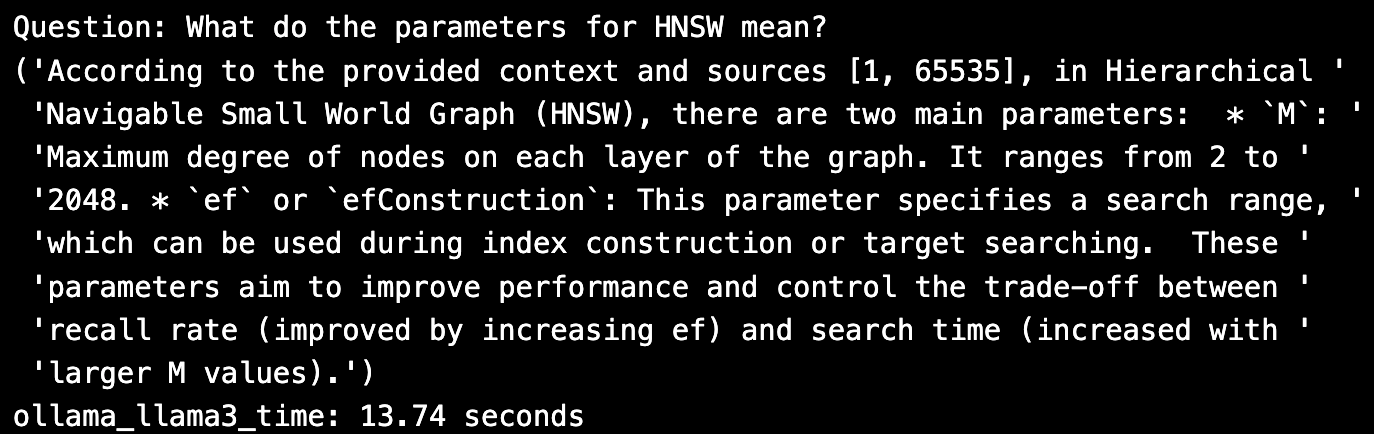
답변은 꽤 좋아 보입니다. 세 가지 매개변수가 보이지만, 인용 부분만 깨져 보입니다. 로컬 모델은 제 노트북에서 추론을 실행하는 데 13초가 걸렸지만, 비용은 무료였습니다.
Anyscale 엔드포인트에서 Llama 3 실행하기
Anyscale 엔드포인트에서 Llama 3 추론을 실행하려면:
Anyscale endpoints github 페이지의 지침에 따라 command line을 설치한 다음 plugin을 설치하세요.
Anysclae 엔드포인트 API 토큰을 받고 환경 변수를 업데이트하세요.
Python의 경우,
pip install openai.HuggingFace에서 다운로드한 Llama 3 모델에 대해 읽고 OpenAI API를 사용해 호출합니다. 저는 Anyscale playground의 기본 Llama 3를 사용했으며, 이는 70B-Instruct 모델이었습니다.
import openai

LLM_NAME = "meta-llama/Llama-3-70b-chat-hf"

anyscale_client = openai.OpenAI(
   base_url = "https://api.endpoints.anyscale.com/v1",
   api_key=os.environ.get("ANYSCALE_ENPOINT_KEY"),
)

start_time = time.time()
response = anyscale_client.chat.completions.create(
   messages=[
       {"role": "system", "content": SYSTEM_PROMPT,},
       {"role": "user", "content": f"question: {SAMPLE_QUESTION}",}
   ],
   model=LLM_NAME,
   temperature=TEMPERATURE,
   seed=RANDOM_SEED,
   frequency_penalty=FREQUENCY_PENALTY,
   top_p=TOP_P,
   max_tokens=MAX_TOKENS,
)
llama3_anyscale_endpoints_time = time.time() - start_time

# Print the response.
pprint.pprint(response.choices[0].message.content.replace('\n', ' '))
print(f"llama3_anyscale_endpoints_time: {format(llama3_anyscale_endpoints_time, '.2f')} seconds")
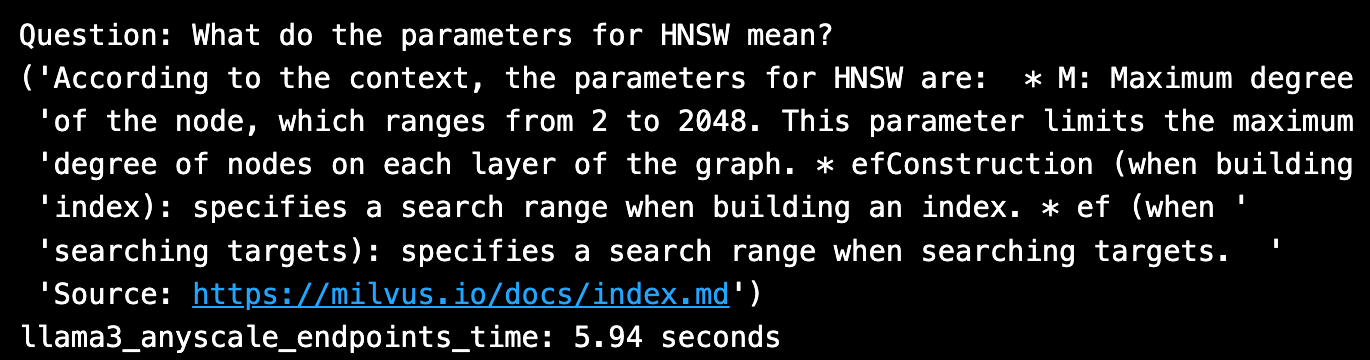
답변은 완벽한 인용까지 포함해 좋아 보입니다. HuggingFace Llama 3 70B를 Anyscale 엔드포인트에서 호출하는 데 약 6초가 걸렸습니다.
OctoAI 엔드포인트에서 Llama 3 실행하기
OctoAI 엔드포인트에서 Llama 3 추론을 실행하려면:
https://octoai.cloud/text로 이동해 Llama 3 8B 모델을 선택하고, 모델 링크를 클릭하면 샘플 코드를 볼 수 있습니다.
OctoAI 엔드포인트 API 토큰을 가져오고 환경 변수를 업데이트합니다.
Python의 경우
pip install octoai를 실행합니다.Meta에서 다운로드한 Llama 3 8B 모델에 대해 읽고 호출합니다.
from octoai.text_gen import ChatMessage
from octoai.client import OctoAI

LLM_NAME = "meta-llama-3-70b-instruct"

octoai_client = OctoAI(
   api_key=os.environ.get("OCTOAI_TOKEN"),
)

start_time = time.time()
response = octoai_client.text_gen.create_chat_completion(
   messages=[
       ChatMessage(
           content=SYSTEM_PROMPT,
           role="system"
       ),
       ChatMessage(
           content=SAMPLE_QUESTION,
           role="user"
       )
   ],
   model=LLM_NAME,
   temperature=TEMPERATURE,
   # seed=RANDOM_SEED, # not recognized
   frequency_penalty=FREQUENCY_PENALTY,
   top_p=TOP_P,
   max_tokens=MAX_TOKENS,
)
llama3_octai_endpoints_time = time.time() - start_time

# Print the response.
pprint.pprint(response.choices[0].message.content.replace('\n', ' '))
print(f"llama3_octai_endpoints_time: {format(llama3_octai_endpoints_time, '.2f')} seconds")
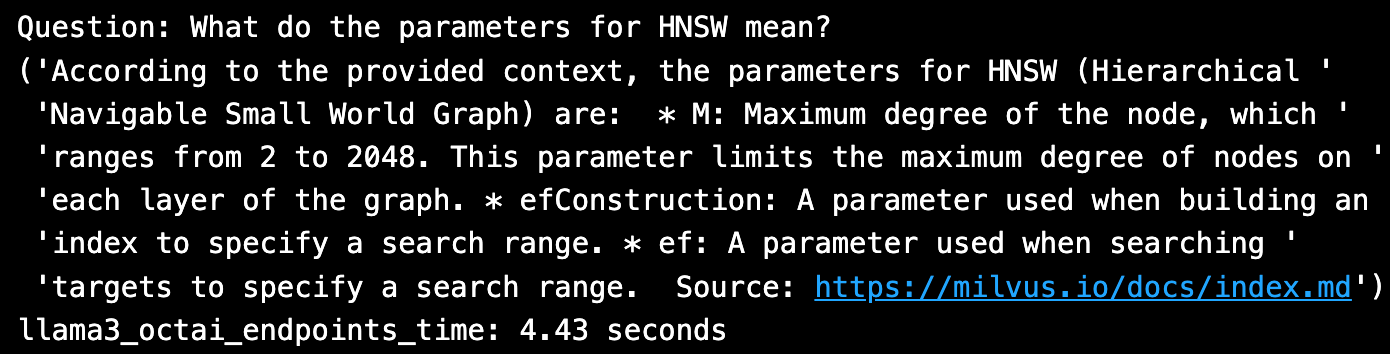
답변은 좋아 보이고 인용도 완벽합니다. Llama 3 70B를 OctoAI 엔드포인트에서 호출하는 데 약 4초 미만이 걸렸습니다.
Groq LPU 엔드포인트에서 Llama 3 실행하기
Groq 엔드포인트에서 Llama 3 추론을 실행하려면:
console.groq.com으로 이동해 지침을 따릅니다.
Groq 엔드포인트 API 토큰을 가져오고 환경 변수를 업데이트합니다.
Python의 경우
pip install groq를 실행합니다.HuggingFace에서 다운로드한 Llama 3 8B 모델에 대해 읽고 호출합니다.
from groq import Groq

LLM_NAME = "llama3-70b-8192"

groq_client = Groq(
   api_key=os.environ.get("GROQ_API_KEY"),
)

start_time = time.time()
response = groq_client.chat.completions.create(
   messages=[
       {"role": "system", "content": SYSTEM_PROMPT,},
       {"role": "user", "content": f"question: {SAMPLE_QUESTION}",}
   ],
   model=LLM_NAME,
   temperature=TEMPERATURE,
   seed=RANDOM_SEED,
   frequency_penalty=FREQUENCY_PENALTY,
   top_p=TOP_P,
   max_tokens=MAX_TOKENS,
)
llama3_groq_endpoints_time = time.time() - start_time

# 응답을 출력합니다.
pprint.pprint(response.choices[0].message.content.replace('\n', ' '))
print(f"llama3_groq_endpoints_time: {format(llama3_groq_endpoints_time, '.2f')} seconds")
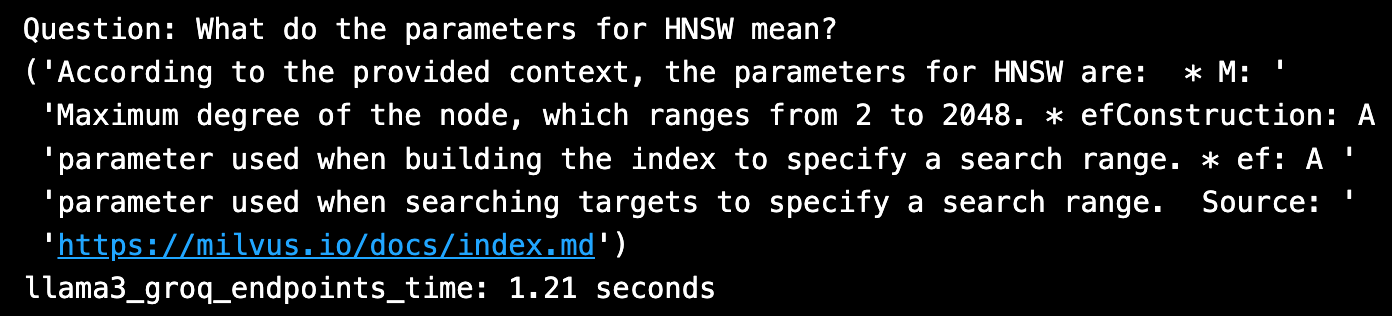
답변은 약간 더 간결해 보이고, 인용은 완벽합니다. Llama 3 20B는 Groq LPU 엔드포인트에서 호출하는 데 ~1초가 걸렸으며, 이는 지금까지 가장 빠른 추론입니다!
참고 - Mixtral을 실행하려면 동일한 단계를 모두 따르되, LLM_NAME을 Mixtral 모델에 대해 각 Endpoint Platform에서 사용하는 이름으로 변경하기만 하면 됩니다.
OpenAI에서 GPT-4o 실행하기
OpenAI에서 최신 GPT-4o 추론을 실행하려면:
OpenAI API 토큰을 받고 환경 변수를 업데이트합니다.
새 모델을 호출하는 방법에 대한 지침을 따릅니다.
Python의 경우,
pip install --upgrade openai --quiet.새로운 GPT-4o 모델에 대해 읽고 호출합니다.
import openai, pprint
from openai import OpenAI

LLM_NAME = "gpt-4o" # "gpt-3.5-turbo"

openai_client = OpenAI(
   # This is the default and can be omitted
   api_key=os.environ.get("OPENAI_API_KEY"),
)

start_time = time.time()
response = openai_client.chat.completions.create(
   messages=[
       {"role": "system", "content": SYSTEM_PROMPT,},
       {"role": "user", "content": f"question: {SAMPLE_QUESTION}",}
   ],
   model=LLM_NAME,
   temperature=TEMPERATURE,
   seed=RANDOM_SEED,
   frequency_penalty=FREQUENCY_PENALTY,
   top_p=TOP_P,
   max_tokens=MAX_TOKENS,
)
chatgpt_4o_turbo_time = time.time() - start_time

# Print the question and answer along with grounding sources and citations.
print(f"Question: {SAMPLE_QUESTION}")
for i, choice in enumerate(response.choices, 1):
   message = choice.message.content.replace('\n', '')
   pprint.pprint(f"Answer: {message}")
print(f"chatgpt_4o_turbo_time: {format(chatgpt_4o_turbo_time, '.5f')}")
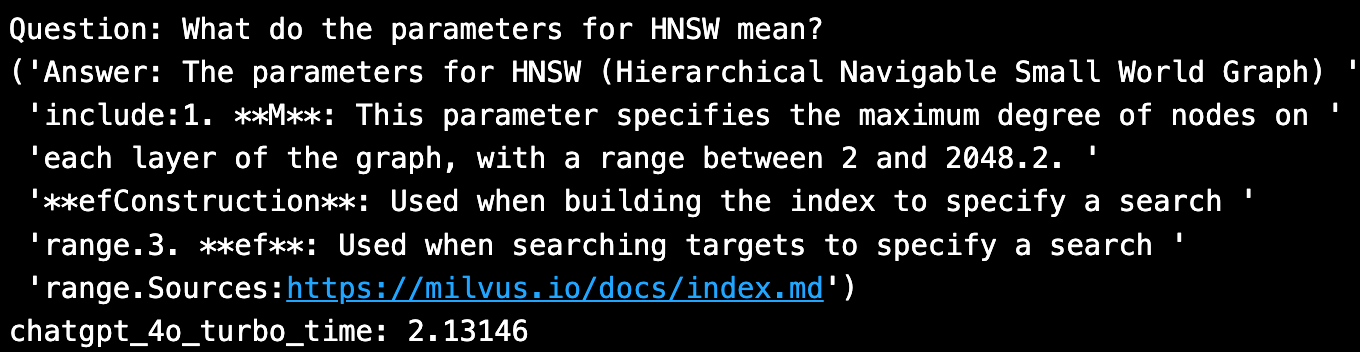
새 GPT-4o 모델은 좋아 보이며 grounding source 인용을 포함합니다. 추론을 실행하는 데 2초가 걸렸습니다.
Ragas를 사용한 빠른 답변 평가
저는 이 블로그에서 오픈 소스 Ragas를 사용하여 RAG 시스템을 평가하는 방법을 설명합니다. 아래에서는 하나의 Q&A만 사용합니다. 더 현실적인 평가는 ~20개의 질문을 사용할 것입니다.
import os, sys
import pandas as pd
import numpy as np
import ragas, datasets
from langchain_community.embeddings import HuggingFaceEmbeddings
from ragas.embeddings import LangchainEmbeddingsWrapper

from ragas.metrics import (
   # context_recall,
   # context_precision,
   # faithfulness,
   answer_relevancy,
   answer_similarity,
   answer_correctness
   )

# Read ground truth answers from file.
eval_df = pd.read_csv(file_path, header=0, skip_blank_lines=True)

# Possible LLM model choices to evaluate:
# openai gpt-4o = 'Custom_RAG_answer'
LLM_TO_EVALUATE = 'Custom_RAG_answer'
# LLM_TO_EVALUATE = 'llama3_ollama_answer'
# LLM_TO_EVALUATE = 'llama3_anyscale_answer'
# LLM_TO_EVALUATE = 'llama3_octoai_answer'
# LLM_TO_EVALUATE = 'llama3_groq_answer'
# LLM_TO_EVALUATE = 'mixtral_8x7b_anyscale_answer'

CONTEXT_TO_EVALUATE='Custom_RAG_context'
eval_metrics=[
    answer_relevancy,
    answer_similarity,
    answer_correctness,]
metrics = ['answer_relevancy', 'answer_similarity', 'answer_correctness']

# Change the default llm-as-critic, to save $.
LLM_NAME = "gpt-3.5-turbo"
ragas_llm = ragas.llms.llm_factory(model=LLM_NAME)

# Change the default embeddings to HuggingFace models.
EMB_NAME = "BAAI/bge-large-en-v1.5"
lc_embeddings = HuggingFaceEmbeddings(model_name=EMB_NAME)
ragas_emb = LangchainEmbeddingsWrapper(embeddings=lc_embeddings)

# Change each metric.
for metric in metrics:
   globals()[metric].llm = ragas_llm
   globals()[metric].embeddings = ragas_emb

# Execute the evaluation.
ragas_result, score = _eval_ragas.evaluate_ragas_model(
   eval_df, eval_metrics, LLM_TO_EVALUATE,
   CONTEXT_TO_EVALUATE, EVALUATE_WHAT)

# Display the results.
print(f"Using {eval_df.shape[0]} eval questions, Mean Score = {score}")
display(ragas_result.head())

아래는 결과를 요약한 표입니다.
| 모델 엔드포인트 | 답변 | 지연 시간(초) | 비용 | Ragas 답변 점수 |
Ollama Llama 3 | 제공된 컨텍스트와 출처 [1, 65535]에 따르면, Hierarchical Navigable Small World Graph (HNSW)에는 두 가지 주요 매개변수가 있습니다: * `M`: 그래프 각 계층에서 노드의 최대 차수입니다. 범위는 2에서 2048입니다. * `ef` 또는 `efConstruction`: 이 매개변수는 인덱스 구성 또는 대상 검색 중에 사용할 수 있는 검색 범위를 지정합니다. 이러한 매개변수는 성능을 개선하고 재현율(ef를 증가시키면 개선됨)과 검색 시간(M 값이 클수록 증가함) 간의 트레이드오프를 제어하는 것을 목표로 합니다. | 13.74 | 무료 | 0.76 |
Anyscale endpoints Llama 3 | `컨텍스트에 따르면 HNSW의 매개변수는 다음과 같습니다: * M: 노드의 최대 차수이며, 범위는 2에서 2048입니다. 이 매개변수는 그래프 각 계층에서 노드의 최대 차수를 제한합니다. * efConstruction (인덱스를 빌드할 때): 인덱스를 빌드할 때 검색 범위를 지정합니다. * ef (대상을 검색할 때): 대상을 검색할 때 검색 범위를 지정합니다. | |||
출처:[ https://milvus.io/docs/index.md](https://milvus.io/docs/index.md)'` | 5.94 | 무료 플레이그라운드 | 0.80 | |
Anyscale Mixtral | `HNSW의 매개변수 M은 노드의 최대 차수, 즉 그래프 구조에서 노드가 가질 수 있는 최대 연결 수를 의미합니다. 범위는 2에서 2048입니다. 또한 efConstruction과 ef는 각각 인덱스 빌드 및 대상 검색 중 검색 범위를 지정하는 데 사용되는 매개변수입니다. | |||
출처: 1.[ https://milvus.io/docs/index.md](https://milvus.io/docs/index.md) 2. [https://milvus.io/docs/index.md](https://milvus.io/docs/index.md)'` | 3.57 | 무료 플레이그라운드 | 0.79 | |
OctoAI Llama 3 | `제공된 컨텍스트에 따르면, HNSW (Hierarchical Navigable Small World Graph)의 매개변수는 다음과 같습니다: * M: 노드의 최대 차수이며, 범위는 2에서 2048입니다. 이 매개변수는 그래프 각 계층에서 노드의 최대 차수를 제한합니다. * efConstruction: 인덱스를 빌드할 때 검색 범위를 지정하는 데 사용되는 매개변수입니다. * ef: 대상을 검색할 때 검색 범위를 지정하는 데 사용되는 매개변수입니다. | |||
출처:[ https://milvus.io/docs/index.md](https://milvus.io/docs/index.md) ` | 4.43 | 백만 토큰당 $0.15 | 0.73 | |
Groq Llama 3 | `제공된 컨텍스트에 따르면 HNSW의 매개변수는 다음과 같습니다: * M: 노드의 최대 차수이며, 범위는 2에서 2048입니다. * efConstruction: 검색 범위를 지정하기 위해 인덱스를 빌드할 때 사용되는 매개변수입니다. * ef: 검색 범위를 지정하기 위해 대상을 검색할 때 사용되는 매개변수입니다. | |||
출처: [https://milvus.io/docs/index.md`](https://milvus.io/docs/index.md) | 1.21 | `무료 | ||
| 베타` | 0.79 | |||
Openai gpt-4o | HNSW의 매개변수는 다음과 같습니다:``- M: 노드의 최대 차수로, 그래프에서 각 노드가 가질 수 있는 연결을 제한합니다. 범위는 [2, 2048]입니다.``- efConstruction: 검색 범위를 지정하기 위해 인덱스 빌드 중 사용되는 매개변수입니다.``- ef: 검색 범위를 지정하기 위해 대상을 검색할 때 사용되는 매개변수입니다.``출처:https://milvus.io/docs/index.md | 2.13 | `입력 $5/M | |
| 출력 $15/M` | 0.803 |
출처: 저자의 코드 및 https://console.anyscale.com/v2/playground, https://console.groq.com/playground?model=llama3-70b-8192, https://octoai.cloud/text?selectedTags=Chat, https://openai.com/api/pricing/.
결론
오늘날 RAG의 G-Generation 부분을 위해 선택할 수 있는 모델과 추론 엔드포인트 옵션은 많습니다! 이 블로그에서 시도한 모든 엔드포인트는 고려해야 할 답변 품질(GPT-critic이 평가), 지연 시간, 비용이 각각 다릅니다.

계속 읽기
Zilliz Cloud On-Demand Compute: Pay Only for What You Use
The customer case behind Zilliz Cloud On-Demand: how a $10K vector search bill came down to under $500, and the engineering changes that made it possible.
How Zilliz Saw the Future of Vector Databases—and Built for Production
An inside look at how Zilliz built vector databases for real-world use, focusing on scalability, stability, and running them reliably at scale.
What Exactly Are AI Agents? Why OpenAI and LangChain Are Fighting Over Their Definition?
AI agents are software programs powered by AI that can perceive their environment, make decisions, and take actions to achieve a goal—often autonomously.